

_Last updated: October 4, 2026. Re-verified all 13 app entries and current pricing-visibility notes, aligned the FAQ with the exact questions contractors search (including the overall best electrician apps in 2026), and refreshed the recommended stacks for solo shops through 20-tech crews._
Quick answer: The best electrician apps split into two groups: a business-management app for CRM, estimates, scheduling, invoices, and follow-up, and field apps for calculations, code reference, photos, and accounting. For small electrical shops, the strongest stack of the best electrician apps starts with one workflow platform (like AceWatt) and adds specialized technical apps only where needed.
For takeoff-heavy work, our electrical estimating software comparison covers which tools actually cut bid time.
Finding the best electrician apps for 2026 means sorting through business-management platforms, field calculators, code-reference tools, and documentation apps. Most US electrical contractors run small shops, and the Census Bureau's small business data confirms the vast majority of construction-trade firms have fewer than 10 employees, so the best electrician apps are the ones a lean crew can actually use in the field, on a phone, between jobs. This guide compares the best electrician apps across every category so you can pick the right tool, or stack, for your shop.
The 13 Best Electrician Apps of 2026 at a Glance
| App | Category | Best for | Electrical-specific? | Mobile field use | Pricing visibility | Replaces what? | Still needs a companion app? |
|---|---|---|---|---|---|---|---|
| AceWatt | All-in-one CRM + job management | Small electrical contractors (1 to 20 techs) | Yes: built for electrical | Yes | Transparent on pricing | Disconnected estimates, scheduling, invoices, and follow-up | Code reference and calculator apps |
| Jobber | General home-service management | Broad home-service businesses | Partial: trade-agnostic | Yes | Public plans; verify current pricing | Generic CRM + scheduling | Electrical calculators and templates |
| Housecall Pro | Broad multi-trade platform | Multi-trade contractors | Partial: not electrical-specific | Yes | Public plans; verify current pricing | Generic FSM + invoicing | Electrical templates and calculators |
| ServiceTitan | Enterprise trade platform | Large contractors (20+ techs) | Yes: trade verticals supported | Yes | Quote-based; verify with vendor | Enterprise dispatch + reporting | Field calculator and code apps |
| FieldCamp | AI field-service positioning | Small service businesses | Partial | Yes | Public plans; verify current pricing | Generic field service | Electrical-specific workflow |
| FieldPulse | Field service platform | Small-to-mid trade contractors | Partial | Yes | Public plans; verify current pricing | Generic FSM | Electrical templates |
| Workiz | Field service for home services | Small-to-mid contractors | Partial | Yes | Public plans; verify current pricing | Scheduling + dispatch | Electrical calculator and code apps |
| BuildOps | Commercial trade platform | Mid-to-large commercial contractors | Yes: commercial trades | Yes | Quote-based; verify with vendor | Commercial dispatch + service contracts | Field calculator and code apps |
| QuickBooks Online | Accounting & invoicing | Bookkeeping-focused contractors | No | Yes | Public plans; verify current pricing | Accounting only | A CRM/job system |
| Ugly's Electrical References | Code reference | Field NEC table lookups | Yes: electrical-only | Yes | App store pricing | Carrying a printed code book | A CRM and calculator |
| Electrical Calc Elite | Electrical calculator | Load, conduit, voltage-drop calcs | Yes: electrical-only | Yes | App store pricing | Manual or spreadsheet calcs | A CRM and code reference |
| QuickBend | Conduit bending | Conduit layout in the field | Yes: electrical-only | Yes | App store pricing | Hand-drawn bend layouts | A CRM and code reference |
| CompanyCam | Photo documentation | Before/after job photos | No: multi-trade | Yes | Public plans; verify current pricing | Camera roll chaos | A CRM (or use built-in job-walk photos) |
> Competitor pricing, plan tiers, app-store availability, and feature lists change often. Verify directly with each vendor and the iOS or Android app store before making purchasing decisions. > > Disclosure: AceWatt is the product discussed in this guide. This article is published by AceWatt and reflects our opinion; it is not an independent review. > > Safety & compliance: Electrical work requires a licensed electrician. No app replaces professional judgment, local code compliance, or AHJ approval. Always verify calculations and code references against the NFPA 70 / NEC edition adopted in your jurisdiction and applicable local regulations.
How to use this table: every row is one of the best electrician apps compared in this guide. Match the "Best for" column to your crew size first, then check the "Still needs a companion app?" column to see what each tool leaves out.
Recommended Stack by Team Size
| Team size | Workflow platform | Calculator | Code reference | Photo / docs | Accounting |
|---|---|---|---|---|---|
| Solo electrician | AceWatt or a focused invoicing app | Electrical Calc Elite | Ugly's Electrical References | AceWatt AI job walk or CompanyCam | QuickBooks Online (or simpler) |
| 2 to 5 tech shop | AceWatt | Electrical Calc Elite | Ugly's | AceWatt AI job walk | QuickBooks Online |
| 6 to 20 tech shop | AceWatt or field service software for electricians | Electrical Calc Elite | Ugly's | AceWatt AI job walk + CompanyCam if needed | QuickBooks Online |
| 20+ tech shop | ServiceTitan, BuildOps, or AceWatt at the upper end of fit | Electrical Calc Elite | Ugly's | CompanyCam + integrated job-walk capture | QuickBooks Online or enterprise accounting |
Use this as a starting point. Verify fit with real workflow tests before committing to any platform. The detailed reviews below explain where each of these best electrician apps wins and where it falls short.
Best all-in-one electrician CRM and job management app
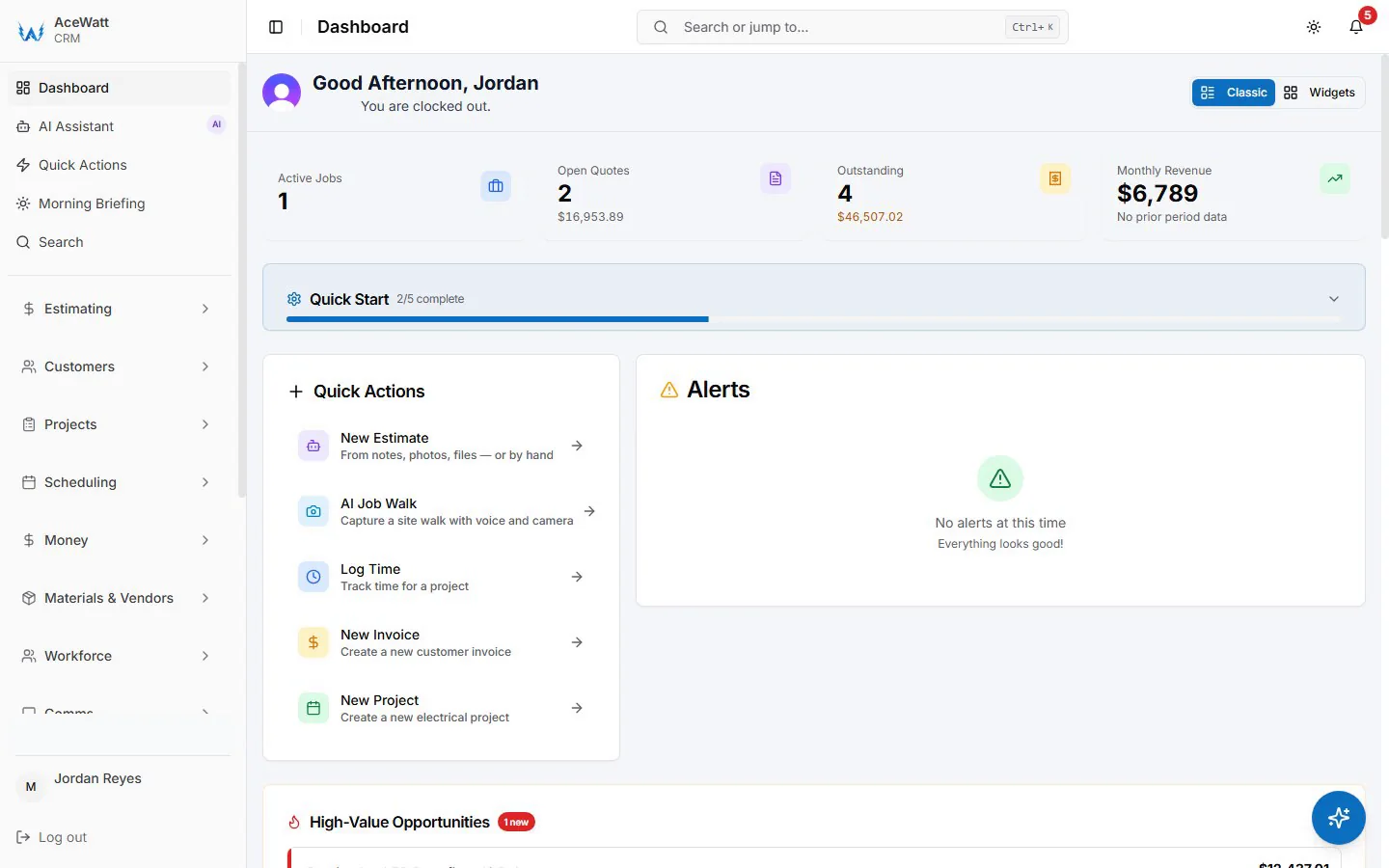
If you want one platform that covers leads, estimates, scheduling, job walks, invoicing, and follow-up, an all-in-one electrician CRM like AceWatt is the strongest fit for small to mid-size electrical contractors, and it is the category where the best electrician apps deliver the most value.
Best scheduling and dispatch app
For electricians who need crew scheduling, dispatch coordination, and customer reminders, AceWatt's job management tools provide scheduling built for electrical workflows.
Best invoice app
For billing-specific workflows, AceWatt's invoicing feature converts approved estimates into invoices without re-entering data. For a detailed comparison of standalone vs. CRM-connected billing tools, see our guides to electrician invoice software and the best electrician invoicing apps for 2026.
Best electrical calculator app
Pure calculation tools like Electrical Calc Elite handle load calculations, conduit sizing, and voltage drops, tasks that business-management platforms do not cover, which is why the strongest stacks pair the two kinds of best electrician apps together.
Best electrical reference app
Code-reference apps like Ugly's give you on-the-go access to NEC tables, formulas, and conversion charts, and they are the most-used technical entries among the best electrician apps after the business platform itself.
Best photo and job documentation app
Photo-documentation apps like CompanyCam capture time-stamped, GPS-tagged before-and-after images, which makes them a common companion pick alongside the best electrician apps for business management. AceWatt's built-in AI job walk also captures photos and notes as part of the job-documentation workflow.
How We Chose the Best Electrician Apps for This List
We evaluated every tool on criteria that matter to electrical contractors specifically, not just general home-service businesses. That filter is what separates the best electrician apps from generic software rankings: each pick has to earn its place in a real field workflow.
Electrical-specific usefulness
Does this app solve problems unique to electrical work, like estimate-to-invoice accuracy for panel upgrades, service-call tracking, job-walk documentation, and materials/labor breakdowns? The best electrician apps answer yes; general home-service tools usually answer partially.
Field usability on mobile
Electricians work on job sites, not desks. Every entry among the best electrician apps must work well on a phone in the field, one-handed, in bad light, with gloves coming on and off.
Estimating, scheduling, invoicing, and job-history fit
We prioritized apps that connect the full workflow, from the first customer call through the estimate, schedule, job notes, invoice, and follow-up.
Small-contractor fit vs enterprise fit
Most US electrical contractors have fewer than 10 technicians. We flagged which tools fit small teams and which are built for larger operations.
Standalone value and workflow integration
Some apps are best used alone. Others are strongest when they replace a stack of disconnected tools. We called out where each product fits.
1. AceWatt: Best AI CRM and Job Management App for Electrical Contractors
Best for small electrical contractors who want one lead-to-paid workflow
AceWatt is built specifically for electrical contractors. It connects the entire workflow, from the first lead and job walk through the estimate, schedule, invoice, and follow-up, in one platform designed for electricians, not general home-service companies. That end-to-end coverage is why it tops our list of the best electrician apps for small shops.

Key capabilities:
- AI-powered job walks: Walk a site, capture notes, photos, and scope, then review AI-assisted summaries and scope drafts before finalizing your estimate. Learn more at AI Job Walk.
- AI-assisted estimating: Generate estimate drafts from job-walk data for your review, then send approved estimates to customers. See Automated Estimating.
- Scheduling and job management: Assign work, track progress, and keep customer history in one place. Explore Job Management.
- Invoicing: Convert approved estimates into invoices and track payment status. Visit Invoicing.
- Customer history and follow-up: Every customer interaction (calls, estimates, jobs, invoices) lives in one record so nothing falls through the cracks.
Where AceWatt beats point apps
Point apps do one thing well, and several of them belong on any list of the best electrician apps. AceWatt replaces the messy combination of spreadsheets, texts, generic calendars, and separate invoice tools that most small electrical contractors cobble together. When your estimate, schedule, invoice, and customer history are all in one system, you stop losing information between tools.

Where AceWatt is not a replacement for code calculators
AceWatt is a business-management platform, not a code-reference or electrical calculator. For load calculations, conduit sizing, and NEC lookups, pair AceWatt with a dedicated calculator or reference app. If you need a quick web check before selecting a paid app, AceWatt also publishes free wire size, voltage drop, conduit fill, and box fill calculators for common field planning checks. See all free electrical contractor tools.
2. Jobber: Best General Home-Service Business App
Jobber strengths
Jobber is a well-established platform for home-service businesses. It handles scheduling, invoicing, client communication, and basic CRM functions across many trades, and it earns its spot among the best electrician apps mainly for shops that also serve HVAC, plumbing, or other trades.
- Scheduling and dispatch tools
- Invoicing and payment collection
- Client communication features
- Broad third-party integrations
Limitations for electrical-specific workflows
Jobber is trade-agnostic. It does not include electrician-specific features like AI job walks, electrical estimate templates tailored to panel upgrades and service calls, or automated scope documentation from site visits.
3. Housecall Pro: Best Broad Trade Platform
Housecall Pro strengths
Housecall Pro serves multiple trades with scheduling, invoicing, dispatch, and customer management, and it lands on best electrician apps lists as the broad multi-trade option rather than an electrical specialist.
- Multi-trade scheduling and dispatch
- Invoicing and payment features
- Customer communication tools
- Mobile-friendly interface
Limitations for electrical specialists
Housecall Pro is not built specifically for electrical contractors. It lacks electrical-specific estimate templates, job-walk documentation workflows, and AI-assisted scope capture.
4. ServiceTitan: Best Enterprise Electrical Contractor Platform
ServiceTitan strengths
ServiceTitan is the dominant platform for large trade businesses.
- Comprehensive dispatch and scheduling
- Advanced reporting and analytics
- Marketing and call-booking tools
- Payroll and inventory management
Best-fit company size
ServiceTitan is designed for companies with 20+ technicians, and for that size of electrical operation it is the most capable of the best electrician apps we compared. Small electrical contractors (1 to 10 techs) may find it more platform than they need.
5. FieldCamp: Best AI Field-Service Positioning
FieldCamp strengths
FieldCamp markets itself as an AI-powered field-service platform.
- AI-assisted scheduling and dispatch recommendations
- Field-service management
- Credit-based pricing model
Best-fit use case
Among the AI-first entries on 2026 best electrician apps shortlists, FieldCamp is worth watching for small service businesses that want AI features without enterprise pricing. However, it is not electrical-specific.
6. FieldPulse: Field Service for Small-to-Mid Trade Shops
FieldPulse positions itself as a field service management platform for small-to-mid contractors. It covers scheduling, estimates, invoicing, customer records, and basic dispatch across multiple trades.
It is not electrical-specific, so contractors should verify how well electrical templates, estimate fields, and panel/EV/charger scope language fit out of the box. Verify current pricing and plan tiers directly on the vendor page. See AceWatt's FieldPulse alternative comparison for a side-by-side angle.
7. Workiz: Field Service for Home Services
Workiz markets to home-service businesses including electricians. It supports scheduling, dispatch, customer reminders, and invoicing.
Like other trade-agnostic platforms, Workiz does not include electrical-specific estimate templates or AI job-walk capture. Verify pricing tiers, electrician-specific features, and any add-on fees directly on the vendor page before buying.
8. BuildOps: Commercial Trade Platform
BuildOps targets mid-to-large commercial trade contractors with dispatch, service agreements, project management, and reporting. It is a stronger fit for commercial electrical operations than for solo or small residential shops.
Pricing is typically quote-based. Verify directly with the vendor. AceWatt also publishes a BuildOps alternative comparison for contractors weighing the fit.
9. QuickBooks Online: Best Accounting App for Electricians
Why accounting apps still matter
Every electrical contractor needs solid accounting. QuickBooks Online handles bookkeeping, tax preparation, profit-and-loss reporting, and basic invoicing.
When to pair with an electrician CRM
QuickBooks Online is an accounting tool, not a CRM or field-management platform. Most electrical contractors benefit from running a field CRM (like AceWatt) alongside QuickBooks Online. AceWatt keeps your field operations organized for a clean bookkeeping handoff, so estimates, invoices, and job records stay connected. If you are weighing that exact combination, our accounting software guide for small electrical contractors breaks down what QuickBooks covers, where the gaps are, and what the connected setup costs.
10. Ugly's Electrical References: Best Code Reference App
Ugly's is the go-to pocket reference for electricians, and no best electrician apps list is complete without a code-reference pick. The app version puts NEC tables, Ohm's law formulas, conduit fill charts, motor full-load amps, and conversion tables on your phone. Always verify code references against your local AHJ requirements and the NEC edition adopted in your jurisdiction.
- NEC reference tables (edition may vary; confirm locally)
- Conduit fill and box-fill calculations
- Ohm's law and power formulas
- Motor data and transformer data
Every electrician should have this regardless of which CRM or business platform they use.
11. Electrical Calc Elite: Best Electrical Calculator App
Among the best electrician apps for pure field math, Electrical Calc Elite is the standard calculator pick. It handles load calculations, conductor sizing, conduit sizing, voltage drop, motor calculations, and panel schedules.
- Load calculations based on NEC tables (verify against your local AHJ and adopted edition)
- Voltage-drop calculations
- Conduit and wire sizing
- Motor full-load-amp references
Pair it with your CRM for broad field-calculation support.
12. QuickBend: Best Conduit Bending App
QuickBend covers the conduit-bending niche that generalist best electrician apps skip. It calculates bend offsets, saddle bends, and multi-bend layouts.
- Offset bend calculator
- Saddle bend layouts
- Multi-bend configurations
- Visual bend diagrams
13. CompanyCam: Best Photo Documentation App
CompanyCam rounds out the documentation side of the best electrician apps. It captures time-stamped, GPS-tagged photos organized by project and customer.
- Time-stamped photos
- GPS-tagged locations
- Project-based organization
- Drawing and annotation tools
Electrical contractors who use AceWatt's AI job walk get photo documentation built into the workflow.
All-in-One Electrician Apps vs Point Apps
When one platform wins among the best electrician apps
If you are tired of juggling spreadsheets, text messages, a paper calendar, a separate invoice tool, and sticky notes for follow-up, an all-in-one platform like AceWatt eliminates the gaps. For most small contractors, that is why an all-in-one ranks first among the best electrician apps we compared, and why the comparison table flags a companion-app column at every row.
When a calculator/reference point app still wins
No all-in-one platform replaces electrical calculators or code-reference tools, and the honest answer for most shops is a stack: the business side handled by one of the all-in-one best electrician apps, plus 1 to 2 technical field apps.
Recommended stack for a 1 to 10 person electrical contractor
For a lean shop, the best electrician apps stack like this:
- CRM, estimates, scheduling, invoices, follow-up: AceWatt
- Job management and dispatch: electrician job management software
- Field service overlay if needed: field service software for electricians
- Code reference: Ugly's Electrical References
- Electrical calculator: Electrical Calc Elite
- Photo documentation (if not using AceWatt job walks): CompanyCam
- Accounting / bookkeeping: QuickBooks Online
For deeper context, see electrical contractor software, the AI CRM for contractors overview, electrical contractor scheduling software, how to price electrical work, electrician job management software (blog), best field service software for electricians 2026, and the electrician software comparison page.
What to Look For in the Best Electrician Apps
The best electrician apps share a few traits regardless of category. Use this checklist when you evaluate any tool for your electrical contracting business, whether it is a business-management platform or a field calculator.
Mobile-first job notes
Electricians document work on site, not at a desk. Your app should let you capture notes, photos, and scope from your phone in real time.
Estimate-to-invoice workflow
The fastest way to get paid is to turn an approved estimate into an invoice without re-entering data.
Scheduling and reminders
A calendar that shows who is where, what job is next, and when follow-up is due keeps crews on track and customers informed.
Customer history
When a customer calls back six months later, your app should show every estimate, job, invoice, and note from that customer.
Voice notes and photo documentation
On a loud job site, typing is slow. Voice notes and photo capture speed up documentation. See how AceWatt's AI job walk turns site documentation into estimates.
Reporting and follow-up
The best apps remind you to follow up on unsent estimates, unpaid invoices, and overdue jobs. Follow-up automation is one of the clearest separators between the best electrician apps and generic to-do tools.
FAQ
What is the best app for electricians?
The best app for electricians depends on what you need. For an all-in-one platform that handles leads, estimates, scheduling, invoicing, and follow-up, AceWatt is built specifically for electrical contractors and ranks at the top of our list of the best electrician apps for 2026, ahead of broader home-service tools. For calculations, use Electrical Calc Elite. For code reference, use Ugly's.
What apps do electrical contractors use most?
Most electrical contractors combine a business-management app (for estimates, scheduling, and invoices) with field apps for calculations, code reference, and accounting. Among the best electrician apps we tested, the most-used combo is an all-in-one CRM plus one calculator and one code-reference tool, with an accounting app running alongside.
What are the best electrician apps in 2026 overall?
The best electrician apps in 2026 pair one all-in-one workflow platform with one or two technical field apps. A typical stack: an electrical-specific CRM like AceWatt for estimates, scheduling, and invoicing, a calculator app for load and voltage-drop math, a code-reference app for NEC tables, and an accounting tool running alongside.
Is there an all-in-one electrician app?
Yes. AceWatt is an all-in-one CRM and job-management platform built specifically for electrical contractors. It covers leads, AI job walks, estimates, scheduling, invoicing, customer history, and follow-up in one system. It does not replace code calculators or reference tools.
What is the best free electrician app?
Free electrician apps tend to be limited to calculators or basic invoicing. None of the best electrician apps in the business-management category are permanently free; most offer trials. For free field tools, several conduit-bending calculators are available at no cost on iOS and Android app stores.
Do electrician apps replace estimating software?
No. Among the best electrician apps, calculators and reference tools do not replace estimating software. However, all-in-one platforms like AceWatt include estimating as part of the workflow. See Automated Estimating.
Sources and Verification Notes
- Vendor pages referenced: AceWatt, Jobber, Housecall Pro, ServiceTitan, FieldCamp, FieldPulse, Workiz, BuildOps, QuickBooks Online, CompanyCam. Verify current pricing, plans, integrations, and electrical-specific features directly on the vendor site before buying.
- App-store listings for Ugly's Electrical References, Electrical Calc Elite, QuickBend, and CompanyCam should be checked for current price, version compatibility, and platform support (iOS/Android).
- NFPA / NEC reference page: NFPA 70: National Electrical Code. Always defer to the NEC edition adopted by your jurisdiction and your local AHJ.
- US Census Bureau Statistics of U.S. Businesses: source for the small-firm-size context referenced in the introduction.
- AceWatt internal context: pricing, CRM for electricians, electrical contractor software, electrician job management software, field service software for electricians.
This article is an AceWatt editorial comparison and not an independent product review. Pricing, plans, and feature lists change frequently, so re-verify before purchase.
Related Reading
- See all CRM features for electrical contractors in one platform.
- The all-in-one electrical contractor app: scheduling through dispatch
- offline capture for daily service work
- Best Electrical Contractor Software (2026): FSM Compared for Small Crews
- Best Electrician App for Daily Service Work in 2026: 7 Field-Tested Apps for Work Orders, Estimates & Invoicing
- Mobile-First Dispatch & Invoicing: 5 Apps That Let Electricians Bill from the Job Site in 2026
- AceWatt vs FieldPulse comparison — how the two platforms compare for electricians.
- More head-to-head comparisons → electrician software comparison hub
- All head-to-head pages → AceWatt alternatives for electricians