Job management

Electrician job management software for cleaner handoffs

AceWatt helps electrical contractors keep each job's customer, quote, field, follow-up, and invoice context together from first call to payment.

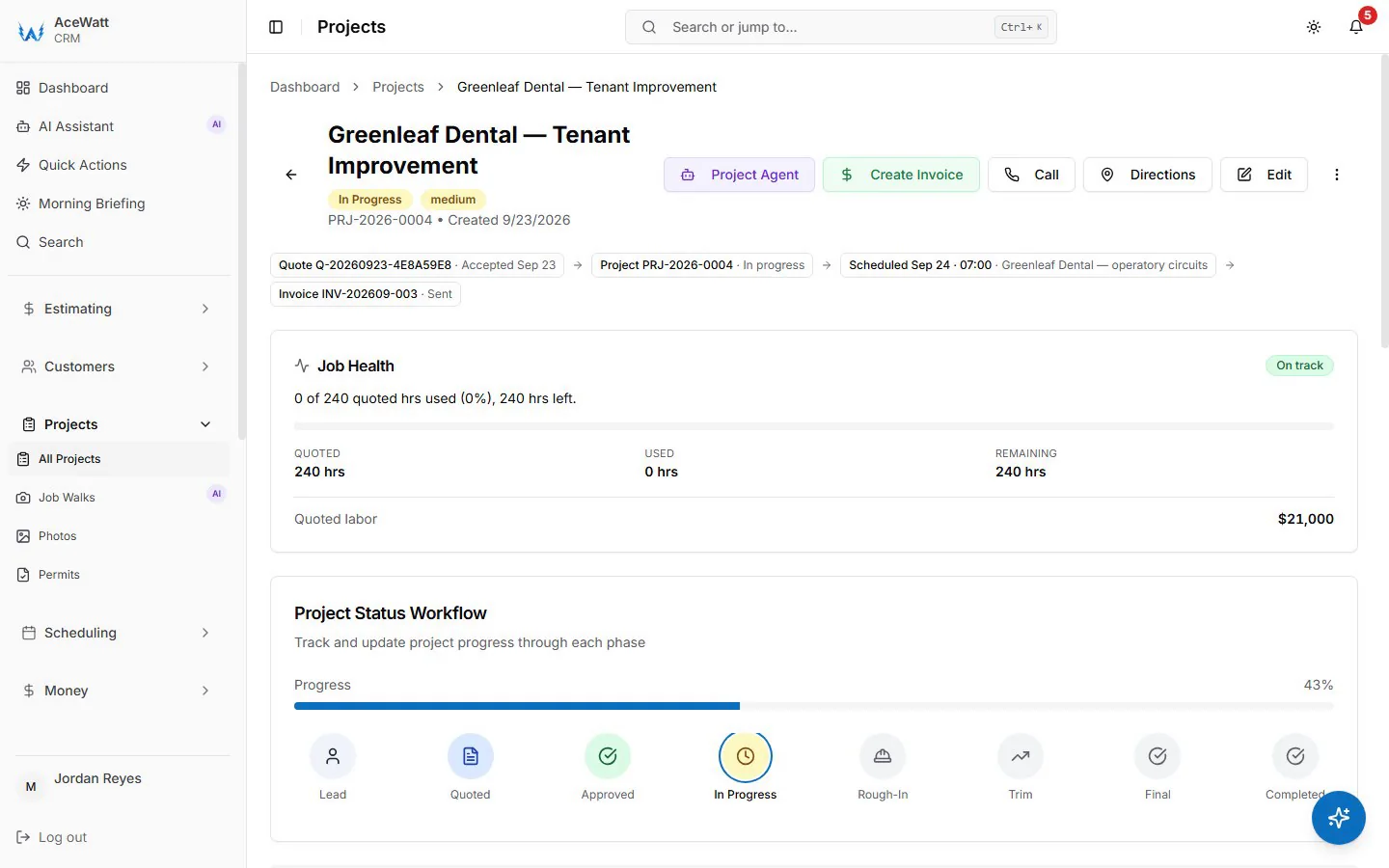
AceWatt CRM dashboard
AceWatt CRM dashboard showing electrical contractor jobs, customers, and revenue workflow
One electrical-first workspace for jobs, customers, quotes, invoices, and follow-up.

What this helps fix

  • Lead and job status
  • Estimate and follow-up workflow
  • Customer history
  • Invoice context
  • Job status from lead to paid
  • Field notes and photos attached to the job

What is electrician job management software?

Electrician job management software is a platform that tracks every electrical job from lead capture through estimate, scheduling, field documentation, invoicing, and final payment. Unlike a generic calendar or spreadsheet, job management software for electricians keeps the customer record, quote context, job notes, schedule, and invoice connected on a single job record so the office, the field, and the estimator all see the same source of truth. The best electrician job management software is built around how electrical contractors actually work — not how a generic sales team tracks opportunities.

Track job status

Know whether work is new, quoted, pending follow-up, accepted, scheduled, invoiced, or closed. Electrician job management software makes job status visible at a glance so nothing falls through the cracks between the estimate and the invoice.

Preserve job history

Keep customer and site context attached so repeat work starts with knowledge, not memory. When a customer calls back six months later, the prior job notes, photos, materials, and invoice context should be one click away.

Connect office and field

Reduce handoff gaps between electricians, estimators, office staff, and owners. Electrician job management software gives every role visibility into the same job record instead of relying on text messages, whiteboards, and notebooks.

Automate follow-up

Keep pending estimates and unpaid invoices visible so the office can chase revenue before another contractor wins the job. Follow-up is where most electrical shops lose money without realizing it.

Feature checklist

What to look for in electrician job management software

The best electrician job management software should handle the full electrical job lifecycle, not just scheduling or invoicing in isolation. These are the features that matter most for electrical contractors.

  • Lead and customer tracking

    Every call, form fill, referral, and repeat customer should be tracked on a single customer record with job history, contact details, and site context.

  • Estimate and quote workflow

    Move from job walk or customer call to a reviewed estimate without rebuilding the scope from scratch each time. Electrical-specific estimating beats generic line-item quotes.

  • Scheduling and dispatch context

    Assign technicians, avoid double-booking, and keep crew assignments visible alongside job status, customer notes, and materials needed.

  • Field documentation

    Capture photos, notes, voice memos, materials used, and site conditions attached directly to the job record so the office sees what the field saw.

  • Invoicing connected to job context

    When the invoice carries the approved scope, materials, and labor from the job record, billing is faster and fewer disputes arise.

  • Follow-up automation

    Pending estimates, unpaid invoices, and warranty callbacks should surface automatically so revenue does not slip through the cracks.

Who benefits most from electrician job management software?

Electrician job management software helps electrical contractors who are losing time to manual handoffs, forgotten follow-ups, scattered job notes, and invoices that do not match the work. If any of these sound familiar, job management software can help.

Workflow

How electricians manage jobs with AceWatt

Four steps that move an electrical job from lead to invoice on one customer record. Each step is visible on the page so the office, the field, and the estimator see the same source of truth.

  1. Step 1

    Capture the lead and estimate context

    Start the job record with customer details, estimate context, and job status so the office and field team see the same source of truth instead of texts and notebooks.

  2. Step 2

    Track status across the job

    Use the CRM workflow to keep the job moving from estimate to scheduled work with visible ownership and status at each step.

  3. Step 3

    Preserve field and customer history

    Keep notes, follow-up context, and job history attached to the record so callbacks, repeat service, and warranty work do not start from scratch.

  4. Step 4

    Close the loop with invoice and follow-up

    Move completed work into invoicing and follow-up so the team can see revenue status, customer history, and next action in one place.

Comparison

Electrician job management software comparison

The right job management software for electricians depends on shop size, billing complexity, and whether the tool understands electrical workflows. This comparison focuses on practical fit, not feature count.

CapabilityAceWattGeneric CRMSpreadsheet / paper
Built for electrical contractorsYes — trade-awareNo — generic salesManual
Job status trackingLead to paid on one recordLimited to deal stagesManual updates
Estimate-to-invoice contextConnectedSeparate toolsRe-entered manually
Field documentationPhotos, notes, voice on job recordNot includedPhotos in texts
Follow-up automationPending quotes surface automaticallyManual remindersForgotten
Pricing transparencyPublic from $49/moVariesFree but costs time

Pricing and features change. Confirm current details with each vendor before buying.

Internal links

Related electrical contractor workflows

These crawlable links keep every Phase 1 SEO page within two clicks of the homepage.

FAQ

Common questions

What is electrician job management software?

Electrician job management software is a platform that organizes the full electrical job lifecycle — from lead capture and estimate through scheduling, field documentation, invoicing, and follow-up — on a single connected job record. It replaces the scattered mix of spreadsheets, text messages, whiteboards, and notebooks that most electrical contractors rely on.

How does AceWatt support job management for electricians?

AceWatt puts electrical job context inside a CRM workflow with AI-assisted notes, follow-up support, scheduling, invoicing, and customer history. The job record stays connected from first call to final payment, so the office, the field, and the estimator see the same source of truth.

What is the difference between job management software and field-service software for electricians?

Job management software focuses on the job record — status, context, documentation, follow-up, and invoice handoff. Field-service software emphasizes scheduling, dispatch, and routing. Most electrical contractors need both, which is why AceWatt combines CRM job management with scheduling and dispatch context in one platform.

Can electrician job management software help with follow-up?

Yes. One of the biggest revenue leaks in an electrical shop is estimates that go cold because nobody followed up. Job management software keeps pending quotes visible and can automate reminders so the office chases revenue before a competitor wins the job.

How much does electrician job management software cost?

AceWatt plans start at $49 per month for the Starter plan. Pricing depends on the number of users and which AI workflows, scheduling features, and integrations are included. Confirm current pricing and feature availability on the AceWatt pricing page before starting a trial.

Does AceWatt replace QuickBooks for electricians?

No. AceWatt is the job management and CRM layer that captures quotes, job notes, invoices, and payments. QuickBooks handles the formal accounting. AceWatt Growth and Scale plans include QuickBooks Online sync so cleaner operational data flows into the books without manual re-entry.

Ready to connect electrical work from lead to invoice?

Start with AceWatt Starter at $49/month, then grow into AI workflows and team visibility when the shop needs them.

View AceWatt pricing