
Capture field scope once
Keep customer needs, site observations, photos, and scope notes attached to the opportunity before estimate work begins. Electrical estimating software eliminates the step of rebuilding scope from memory or scattered texts.
Electrical estimating software
AceWatt helps electrical contractors keep lead details, job-walk notes, scope context, estimate follow-up, and final review in one CRM workflow without claiming automatic pricing or code approval.
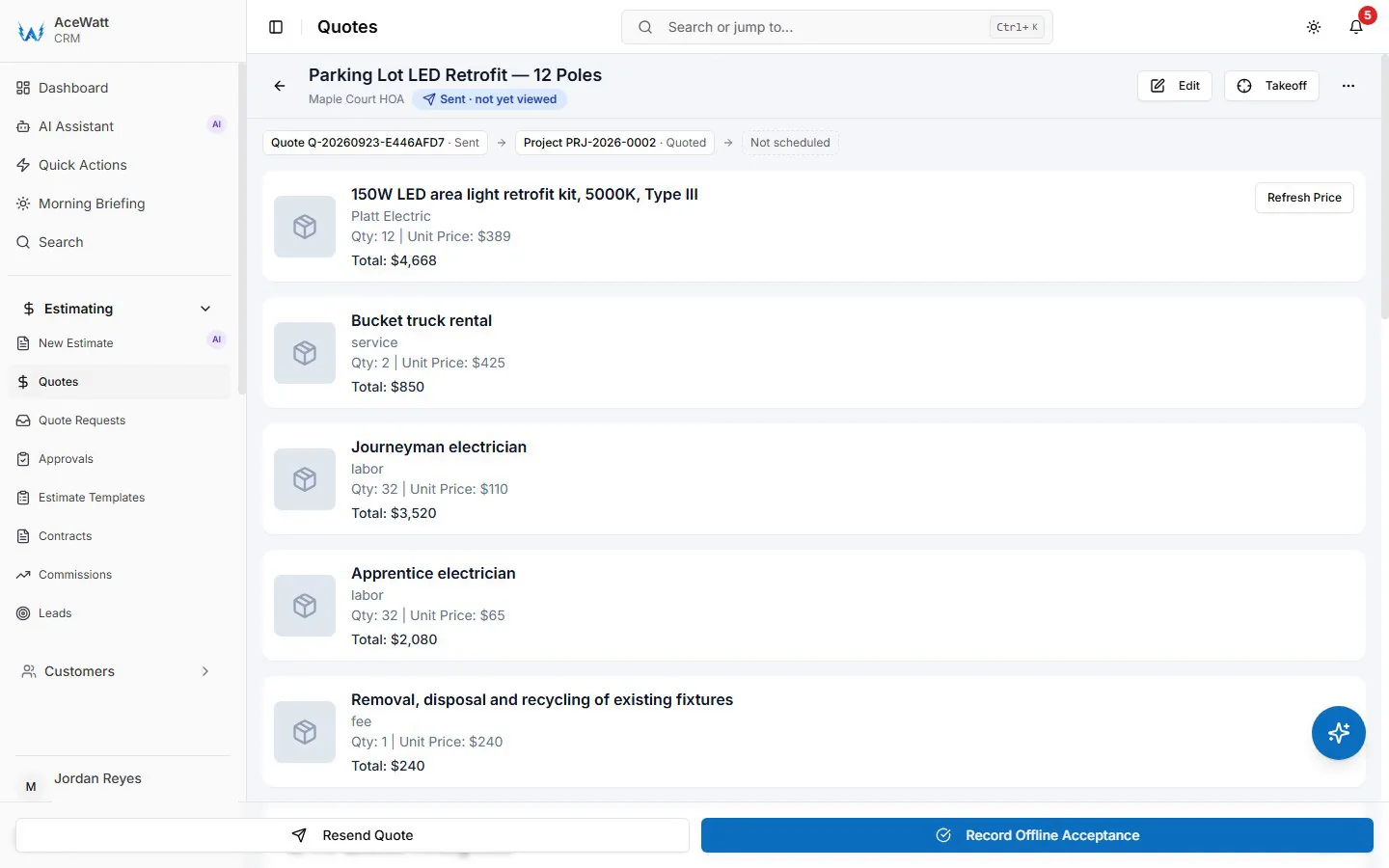
Screens from a demo company with sample data.
Electrical estimating software helps contractors turn job-walk notes, customer requests, site observations, and scope details into a reviewed estimate. Unlike a generic quote template, electrical estimating software keeps the scope context, materials notes, labor assumptions, and follow-up status connected to the job record. The best electrical estimating software for electrical contractors supports the estimate workflow without replacing the licensed electrician's judgment on pricing, code compliance, and safety.
Keep customer needs, site observations, photos, and scope notes attached to the opportunity before estimate work begins. Electrical estimating software eliminates the step of rebuilding scope from memory or scattered texts.
Use AI-assisted summaries and reusable scope language to draft cleaner estimate context for contractor review. The estimator reviews, edits, and approves before the quote goes out.
Track sent quotes, their status, and next actions so estimate opportunities do not disappear after the job walk. Electrical estimating software keeps pending estimates visible until they are won or lost.
Final pricing, code interpretation, and safety decisions stay with the licensed electrician. AceWatt supports the estimate workflow; it does not approve scope or set prices without contractor review.
Feature checklist
The best electrical estimating software should connect the estimate to the full job lifecycle — job walk, quote, follow-up, invoice — rather than producing a disconnected PDF. These are the features that matter most.
Photos, voice notes, site observations, and scope details captured during the job walk should feed directly into the estimate without re-entering data.
AI can summarize job-walk notes into draft scope language, but the estimator reviews and edits before the quote is sent. No automatic pricing or code decisions.
Templates for common electrical scopes — panel upgrades, EV charger installs, service changes, lighting retrofits, troubleshooting — speed up estimating without forcing generic line items.
Sent estimates should be tracked with follow-up due dates and status so the office chases pending quotes before a competitor wins the job.
When the estimate is approved, the scope and materials should flow into the job and invoice without manual re-entry. Electrical estimating software that stops at the PDF creates downstream billing work.
Final pricing, code compliance, and safety assumptions must be reviewed by a licensed electrician before the estimate is sent. The software supports the workflow but does not replace professional judgment.
Electrical estimating software helps contractors who spend too many evenings rebuilding quotes from scattered notes, who lose track of pending estimates, or whose invoices do not match the original scope. If any of these sound familiar, electrical estimating software can help.
Workflow
Four contractor-reviewed steps that keep captured scope, quote context, follow-up, and final review visible before a customer estimate is sent.
Store customer needs, site notes, photos, and field observations on the opportunity so the estimate starts from one shared record.
Use AI-assisted summaries and saved scope language to prepare estimate context the contractor reviews before pricing or sending.
Track sent quotes, their status, and next actions so estimate opportunities stay visible after the job walk.
Have the contractor review final pricing, code interpretation, safety concerns, and customer-facing scope before the estimate leaves the shop.
Comparison
The right electrical estimating software depends on whether you estimate from job walks (service work) or from drawings (commercial plan-and-spec). This comparison focuses on practical workflow fit.
| Capability | AceWatt | Takeoff tools | Spreadsheet / paper |
|---|---|---|---|
| Built for electrical contractors | Yes — trade-aware | Some — plan-focused | Generic |
| Job-walk to estimate | Notes and photos feed the quote | Not supported | Manual re-entry |
| AI-assisted scope drafting | Yes — contractor-reviewed | No | No |
| Follow-up visibility | Pending quotes stay visible on the job record | Not included | Forgotten |
| Estimate-to-invoice handoff | Connected on one job record | Separate tool | Manual |
| Pricing transparency | Public from $49/mo | Quote-based | Free but costs time |
Pricing and features change. Confirm current details with each vendor before buying.
Keep exploring
Pages on the work that connects to this one.
FAQ
Electrical estimating software organizes customer details, job scope, materials notes, quote context, and follow-up so contractors can prepare and review estimates from one workflow. Unlike a generic quote template, it keeps the estimate connected to the job record from job walk through follow-up and invoice.
No. AceWatt supports estimate workflow and quote context with AI-assisted scope drafting. Final pricing, code interpretation, and safety decisions stay with the licensed electrician. AceWatt helps organize and draft; the contractor reviews and approves.
Yes. Job-walk notes, observations, photos, and scope summaries stay attached to the job record so the estimator has clearer context before preparing a quote. This eliminates rebuilding the scope from memory or scattered texts.
No. AceWatt is a CRM workflow aid. Contractors still review code requirements, site conditions, safety, and customer-facing scope before sending an estimate. The software supports the workflow; it does not make code or safety decisions.
Takeoff software (Countfire, PlanSwift, Bluebeam) measures plans and counts fixtures for commercial plan-and-spec work. Electrical estimating software like AceWatt focuses on the field-to-quote workflow for service and small-project contractors who estimate from job walks and customer calls. Many shops use both — takeoff for plan-based bids, CRM estimating for service work.
AceWatt plans that include AI-assisted estimating start at $49 per month. Pricing depends on the plan and which AI workflows are included. Confirm current pricing and feature availability on the AceWatt pricing page before starting a trial.
Start with AceWatt Starter at $49/month, then grow into AI workflows and team visibility when the shop needs them.