
Buyer's guide for 2026
Electrical Contractor Software: Best Tools for Electrical Businesses in 2026
Compare electrical contractor software — the category of electrical business software that handles estimating, scheduling, CRM, invoicing, job tracking, and AI workflows. This guide explains what the category covers, how it connects to electrical accounting software and field operations, the features that move revenue for electrical shops, the leading tools and how they differ, and where AceWatt fits — built for electrical contractors first.
- 14-day free trial
- Plans from $49/month
- 30-day money-back guarantee
Local software guides
Electrical contractor software by state
Find state-specific electrical contractor software guidance with local licensing, NEC adoption, salary, and workflow context.
What is electrical contractor software?
Electrical contractor software is the category of business tools that electrical shops use to run the work that actually pays the bills: leads, estimates, follow-up, scheduling, mobile job notes, invoicing, payments, and reporting. The category overlaps with CRM, field service management, estimating, and accounting handoff. Some platforms cover the full workflow. Others specialize in one slice and integrate with others.
Shoppers often search using broader or narrower terms for this same category. Electrical business software is the umbrella term for the all-in-one platform that runs an electrical shop — CRM, scheduling, job tracking, invoicing, and reporting together. Electrical accounting software is the narrower slice focused on invoicing, job-cost tracking, accounts receivable, and the handoff to QuickBooks or Xero for general ledger and tax. Most electrical contractor software platforms cover both needs to different depths; the sections below call out where each boundary sits.
For electrical contractors, the difference between a generic platform and a trade-specific tool shows up in the data model. Electrical jobs need a quote tied to a customer and a property, materials and labor against an electrical pricebook, photos and notes from a job walk, change orders during the work, and an invoice that ties back to the same record. A generic CRM can be configured to do this, but it does not understand electrical work out of the box.
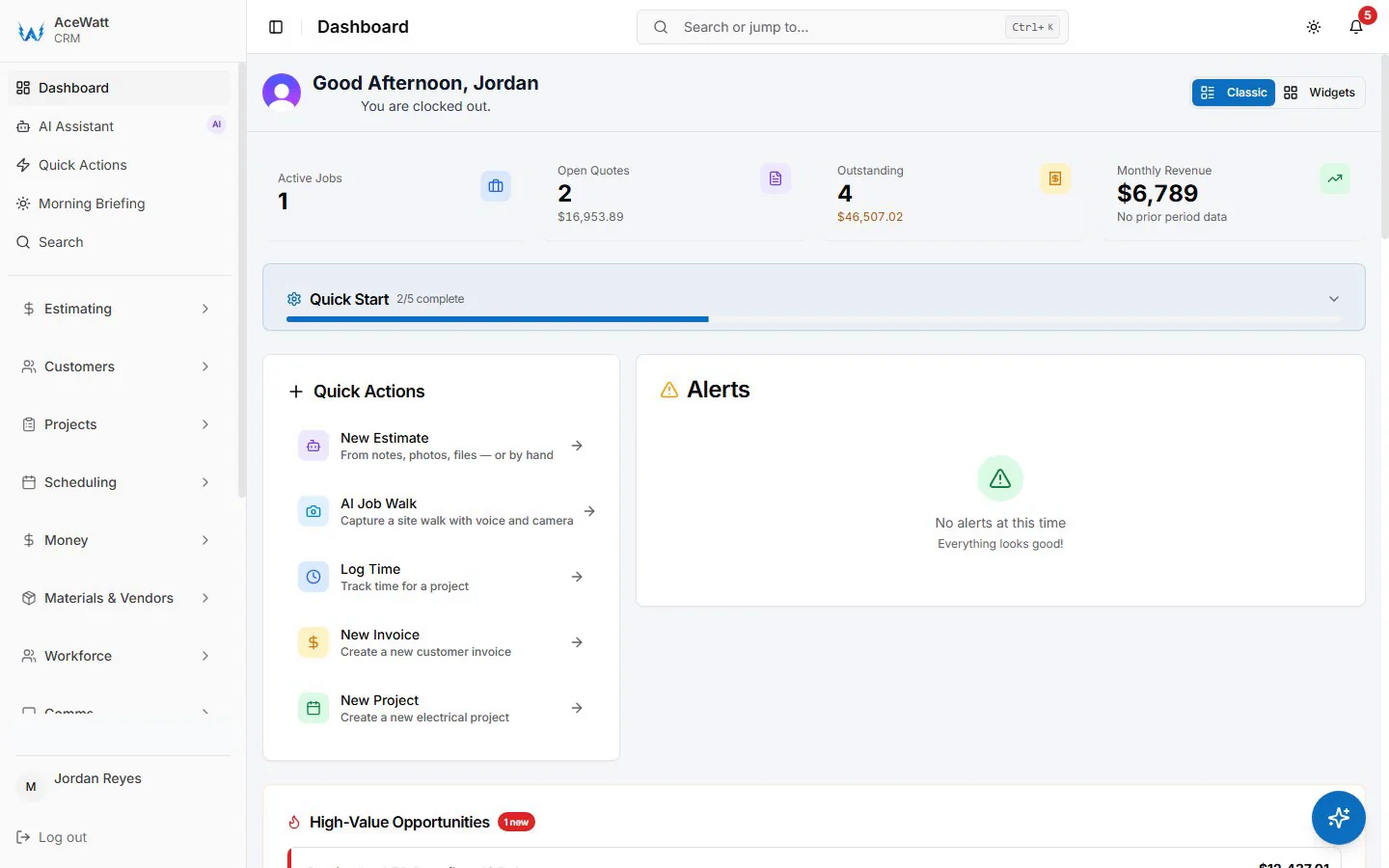
AceWatt is positioned in this category as an AI-powered CRM purpose-built for electrical contractors. The page below covers how the category fits together, the features that matter most, the leading tools, pricing context, and how to choose by company size and workflow.
Quick comparison
AceWatt vs generic field service software vs trade-specific competitors
Five capability checkpoints that tend to decide the buying decision for electrical shops. Where capability depends on the vendor or plan, we say so.
| Capability | AceWatt | Generic FSM platforms | Trade-specific competitors |
|---|---|---|---|
| Built around electrical jobs | Yes — trade-first data model | Generic across home-service trades; electrical setup varies | Depends on which trade the product centers on |
| AI estimate drafting from photos or notes | Yes | Varies by vendor and plan | Varies by vendor and plan |
| Quote-to-invoice without re-keying | Yes | Often requires add-ons or configuration | Varies by vendor and plan |
| Starting price published on the site | $49/month | Varies by vendor and plan | Often quote-based |
| Setup model | Self-serve trial signup | Self-serve, but configuration is generic | Often vendor-led implementation |
“Trade-specific competitors” covers vendors that target a single home-service trade or a defined trade cluster. Capability and pricing change — confirm current details with each vendor before deciding.
Who needs electrical contractor software?
- Solo electricians running quotes, scheduling, and invoices out of email and a phone, where pending quotes get lost and follow-up is never on time.
- Residential service crews (2–10 techs) with whiteboard dispatch, scattered job notes, and invoices that lag behind completed work.
- Commercial and project-based contractors juggling multi-phase scope, change orders, progress billing, and field photos that need to live with the job.
- Service departments inside larger contractors running repeat work, callbacks, and warranty follow-ups that fall through if the customer record is not the source of truth.
- Owners switching off spreadsheets who can already see that the next stage of growth requires connected workflow rather than another tab in a sheet.
Feature checklist
Features electrical contractors should prioritize
Eight pillars that separate a tool that earns its monthly cost from a tool that becomes another tab nobody opens.
Lead capture and follow-up
Centralizes inbound calls, web inquiries, and referrals against a single customer record. Makes pending quotes and each lead's next follow-up date visible so revenue does not rot in someone's inbox.
Electrical estimating and quote builder
Reusable templates, an electrical pricebook for materials and labor, and AI-drafted line items from job descriptions or job-walk photos. Quotes are sent for online acceptance and converted into a job and invoice without re-keying.
Job walk documentation
Captures site photos, voice notes, and scope details from the field on mobile, attached to the customer and job record automatically. Replaces the day-after rebuild from memory and text threads.
Scheduling and dispatch
Drag-and-drop calendar with crew assignments, mobile views for the field, and accepted-quote context flowing into the schedule. Removes the morning-whiteboard meeting.
Work orders and job notes
Job records that hold scope, materials, change orders, photos, and time entries. Office and field share one source of truth instead of stitching context together from messages.
Invoicing, payments, and accounting handoff
Convert accepted quotes into deposit, progress, or final invoices. Collect card payments through Stripe (ACH if you enable it) and reconcile against the job. Time and payroll hours export as a CSV file for your bookkeeper.
Customer history and repeat service
Every quote, invoice, message, and job photo lives on the customer record so repeat service, callbacks, and warranty work start with knowledge instead of memory.
Reporting and owner dashboards
Close rate on quotes, revenue by job type, AR aging, and technician productivity — without exporting to a spreadsheet at month-end.
Workflow
How electrical contractors manage work from lead to invoice with AceWatt
AceWatt helps electrical contractors capture leads, build estimates, document job walks, schedule crews, track job notes, and hand off invoices inside one workflow.
- Step 1
Capture the lead and follow up
Start with the inbound call, web inquiry, or referral on one customer record, then keep the next follow-up visible before the quote goes cold.
- Step 2
Build the electrical estimate and quote
Use the captured scope, electrical estimating context, quote builder, and contractor-reviewed line items to prepare a customer-ready estimate.
- Step 3
Document the job walk
Attach job-walk photos, voice notes, site observations, and scope details to the same record so the office is not rebuilding the visit from memory.
- Step 4
Schedule and dispatch the crew
Move accepted work into scheduling with the customer, quote, and field context available to the office and crew.
- Step 5
Track work orders and job notes
Keep work order details, job notes, change context, materials, and field updates attached to the active job record.
- Step 6
Send the invoice and close the loop
Carry approved quote and job context into invoice handoff, payment follow-up, accounting review, and the customer history for future work.
Quick comparison
Leading electrical contractor software options
A short read on where each tool tends to win, what its pricing model looks like, and where it fits in the buyer journey. Pricing varies by plan, seat count, and add-ons — confirm with each vendor before deciding.
| Tool | Best for | Pricing model | Notes |
|---|---|---|---|
| AceWatt | Electrical-first AI CRM for solo and small-to-growing electrical shops | Starter $49 / Growth $99 / Scale $199 / Custom | Built around electrical jobs. AI drafts estimates and job-walk summaries; contractor approves before sending. |
| Broad field-service platforms | Shops that need one system across several home-service trades | Verify current vendor pricing before buying | Can be a strong fit when multi-trade dispatch is the priority. Electrical-specific setup depth varies by vendor and plan. |
| Enterprise trade platforms | Larger contractors that need deep implementation, permissions, and reporting | Often quote-based; verify scope and onboarding costs directly | Good for complex organizations, but evaluate implementation effort, seat structure, and whether electrical workflows are native or configured. |
| Estimating-only tools | Teams that only need takeoff, assemblies, or quote math | Varies by vendor and module | Useful when estimating is the bottleneck, but customer history, scheduling, follow-up, and invoicing may still live elsewhere. |
| Spreadsheets and forms | Very early shops proving a workflow before buying software | Low software cost; high manual time cost | Flexible at first, but customer records, follow-up, approvals, photos, and invoices drift apart as volume grows. |
Vendor capabilities and pricing change. Confirm current plan inclusions, seat counts, payment processing terms, and add-on costs directly with each vendor before deciding.
Capability comparison
AceWatt vs generic CRM, enterprise field service, and spreadsheets
Where the differences actually show up. Where capability depends on the vendor or the plan, we say so.
| Capability | AceWatt | Generic CRM | Enterprise field service | Spreadsheets / whiteboard |
|---|---|---|---|---|
| Built around electrical jobs (quote → job → invoice) | Yes — purpose-built for electrical contractors | Usually requires customization | Varies by vendor/tier | No — manual rebuild every job |
| AI estimate drafting from photos or descriptions | Yes | May require add-ons/configuration | Varies by vendor/tier | No |
| Quote-to-invoice flow without re-keying | Yes | Usually requires add-ons | Varies by vendor/tier | No |
| Mobile job notes and photos tied to customer record | Yes | Varies; often needs setup | Varies by vendor/tier | No |
| Stripe payments built in | Yes | Varies; often an add-on | Varies by vendor/tier | No |
| Starting price visible on the website | $49/month | Varies by vendor | Varies by vendor/tier | Low tool cost, manual time cost |
| Setup effort | Self-serve trial signup | Self-serve, but generic | Can require implementation | Low to start, high to maintain |
“Varies by vendor/tier” means capability depends on which product is configured and what is included in the selected plan.
Real workflows
What electrical contractor software looks like on a live job
Five common electrical jobs and how a connected CRM workflow handles each from job walk to paid invoice.
Panel upgrade
Job walk captures existing panel photos and amperage notes. AI drafts the estimate with materials and labor against the pricebook. Office reviews, sends, and tracks acceptance. Schedule the crew, log mobile job notes, generate the deposit invoice and final invoice from the same record.
EV charger install
Voice notes from the site visit cover panel capacity, run length, and customer preferences. AI summary becomes the scope language for the quote. Stripe deposit collection happens before the install date is locked on the schedule.
Service call
Inbound call attaches to the customer record. Tech sees prior service history on mobile before arrival. Job notes, photos, and time entries land on the same record. Invoice goes out same-day with the issue summary attached.
Emergency repair
Dispatch the closest available crew from the calendar. Field captures voice notes and photos for documentation. Office sees the repair flow into the invoice queue without re-keying scope from a phone log.
Remodel rough-in
Multi-stage scope captured during the job walk. Quote covers rough-in and trim with phased line items. Schedule reflects each phase, mobile job notes capture daily progress, and milestone (percentage-of-completion) invoices go out as each phase is billed.
How much does electrical contractor software cost?
Pricing falls into two broad models. Tiered subscription pricing is published on the vendor's website and scales by feature tier and seat count. Quote-based pricing requires a sales conversation and an implementation proposal — typical for enterprise platforms aimed at larger trade businesses.
Hidden costs to ask about before signing: onboarding and migration fees, payment processing rates, per-seat add-ons, integration costs to your accounting system, and AI usage caps. AceWatt publishes plans and AI credit allowances directly on its pricing page so the total is transparent up front.
AceWatt pricing
Plans, pricing, and AI credits
Promo AI credit allowances run through November 19, 2026. Post-promo allowances are listed below so there are no surprises.
| Plan | Price | Best for | Promo AI credits / mo (until 2026-11-19) | Post-promo AI credits / mo |
|---|---|---|---|---|
| Starter | $49/mo | Solo electricians and small shops | 5,000 / mo | 1,900 / mo |
| Growth | $99/mo | Growing teams (up to 5 users) | 10,000 / mo | 4,000 / mo |
| Scale | $199/mo | Established shops, unlimited users | 25,000 / mo | 10,000 / mo |
| Custom | Contact | Larger contractor teams with specific needs | Custom | Custom |
How to choose
How to choose the right electrical contractor software
Match the tool to the workflow you actually run today, not the workflow you might run in three years.
If you are a solo electrician
Look for software that gets you from a phone call to a sent quote without spreadsheet copy-paste. AceWatt Starter at $49/month covers the core CRM, AI quote builder, and basic scheduling for one user.
If you run a 2–10 tech residential service crew
Prioritize follow-up visibility, scheduling, mobile job notes, and invoicing in one tool. AceWatt Growth at $99/month adds AI copilot, voice, schedule optimizer, AI job walks, and a customer portal for growing teams.
If you are a commercial or project-based contractor
Job costing depth matters. AceWatt Scale at $199/month supports unlimited users, route optimization, and a dedicated support contact. Larger commercial teams may also evaluate enterprise platforms with quote-based pricing — match scope to the workflow you actually need.
If you are switching from spreadsheets
Move customer list, active quotes, and active jobs first. Run the next two weeks of new work fully inside the CRM before worrying about historical archives. AceWatt's customer CSV import gets the customer list in quickly.
If you are switching from ServiceTitan, Jobber, or Housecall Pro
Confirm your data export rights, pricebook structure, and invoice history needs before cancelling. Bring customers (CSV import) and active jobs into AceWatt first, and keep an export of your old system for history.
Electrical contractor software implementation checklist
- Import customers, then add active jobs: Import your customer list from a CSV file, then add open quotes and in-progress jobs from your current tool or spreadsheet. Historical archives can wait.
- Set lead and job pipeline stages: Mirror the stages your team already uses verbally: new lead, walked, quoted, follow-up, scheduled, in progress, invoiced, paid.
- Build estimate templates: Capture the 5–10 most common electrical jobs (panel upgrade, EV charger, service call, remodel rough-in, emergency repair) as reusable templates with line items and labor rates.
- Set scheduling rules: Decide how the calendar reflects accepted work — by crew, by service area, or by job type. Get the office and field looking at the same view.
- Train office and field teams: Run one focused session for each role. Office on quotes, follow-up, and invoicing. Field on mobile job notes, photos, and time entries.
- Review the first 30 days of metrics: Look at quote-to-acceptance rate, time from job-walk to sent quote, follow-up cadence, and AR aging. Adjust templates and stages from real data.
The first 30 days matter more than the next 30. A focused rollout that gets active jobs into the workflow beats a perfect data import that slows down billing.
Why AceWatt is built for electrical contractors
- AI job walks turn voice notes and photos into quote-ready summaries. The contractor reviews and approves before anything is sent.
- Electrical-first CRM, not generic contractor software. Customer records, job history, and pricebook content are shaped around how electrical shops earn money.
- Quote, schedule, invoice, follow up in one connected workflow instead of four disconnected tools the office has to keep in sync.
- Transparent plans for small and growing electrical shops. Starter $49/mo, Growth $99/mo, Scale $199/mo, and Custom for larger contractor teams.
- 14-day free trial on Starter, Growth, and Scale. No permanent free tier; checkout runs through Stripe.
Keep exploring AceWatt for electrical contractors
Deep-dive pages and field guides for the workflows above.
Electrical contractor CRM
The CRM-focused page on AceWatt for electrical contractors.
CRM for electricians
How AceWatt's CRM is shaped around electrical jobs.
Field service software for electricians
Field-service-adjacent CRM workflow for electrical shops.
Electrician job management software
Job-by-job context from lead to invoice.
Electrician invoice software
Invoice workflow tied to the quote and job.
AI job walks
Photo and voice job-walk capture with AI summaries.
Electrical estimating software
Estimating workflow that keeps scope capture, quote drafting, and contractor review connected.
Contractor scheduling software
Scheduling workflow with crew assignments, job status, and field context.
Electrical estimating software guide
Migration plan from spreadsheets to estimating software.
AI for electrical contractors
How electrical contractors are using AI in 2026.
Pricing and plans
Starter $49, Growth $99, Scale $199, Custom.
Free electrical contractor tools
NEC calculators and field templates for electrical planning and office handoff.
Voltage drop calculator
Check run length and voltage-drop percentage before choosing conductors.
Wire size calculator
Plan conductor size using ampacity and voltage-drop context before quoting materials.
Best CRM for electricians 2026
Buyer guide for electrician CRM workflows, fit, and trade-specific software choices.
Electrician software comparison (2026)
Six-tool side-by-side comparison of electrician software for 2026.
All electrician software comparisons
Head-to-head software comparisons built for electrical contractors.
Electrical contractor software for small business
Software picks and workflows for small electrical shops.
Managing an electrical contracting business
Operations guide for running an electrical contracting company.
CRM vs spreadsheets for electricians
When to move from spreadsheets to a CRM system.
FAQ
Electrical contractor software, answered
The questions electrical contractors ask before choosing their software stack.
What is the best electrical business software?
The best electrical business software is the platform that keeps leads, estimates, scheduling, mobile job notes, invoicing, and reporting connected in one record per customer and per job — instead of spread across spreadsheets and separate single-purpose tools. AceWatt is built as an all-in-one electrical business software platform for electrical contractors, with AI-assisted estimating and job walks built around the electrical workflow.
Does electrical contractor software include electrical accounting software?
Most modern electrical contractor software covers the operational side of electrical accounting software — invoicing, job-cost tracking, accounts receivable, and the customer-facing payment flow. The handoff to general ledger, payroll, and tax is usually done through an integration with QuickBooks or Xero rather than built in. If your priority is pure accounting depth, look for platforms that publish a live accounting integration; if your priority is the revenue workflow (quote to invoice to cash), electrical business software with built-in invoicing is usually the better fit.
What is electrical contractor software?
Electrical contractor software is the category of business tools that electrical shops use to run customer relationships, estimates, scheduling, mobile job notes, invoicing, payments, and reporting in one place. It can show up as a CRM, a field service management platform, an estimating tool, or an all-in-one platform. AceWatt sits in this category as an AI-powered CRM purpose-built for electrical contractors.
What is the difference between electrical contractor CRM and field service software?
An electrical contractor CRM keeps the customer, quote, follow-up, and job-history relationship at the center. Field service management software typically centers on dispatch, route, technician utilization, and back-office automation. Many platforms blur the line. AceWatt is built CRM-first so the lead, quote, and follow-up workflow stays connected to scheduling and invoicing instead of being a side feature.
What software do electrical contractors use for estimating?
Electrical contractors use a mix of tools: spreadsheets, estimating-only platforms, all-in-one trade platforms, and AI-assisted CRMs. The right choice depends on whether estimating context needs to live near the customer record, the job, the schedule, and the invoice, or whether it can stay in a separate tool. AceWatt drafts estimate line items from job-walk notes and pricebook content so the office reviews and sends instead of typing from a blank page.
Is electrical contractor software worth it for small shops?
Small shops generally see the biggest wins where revenue stalls: quotes that take days to send, follow-up that is forgotten, and invoices that go out late. A focused tool that connects those steps tends to outperform spreadsheets and email threads even at a one-electrician shop. AceWatt's Starter plan is designed for solo electricians and small shops that want this connected workflow without enterprise complexity.
Can electrical contractor software replace spreadsheets?
Yes, for the day-to-day workflow. Spreadsheets are a low-friction starting point, but they do not connect customer history, quote status, scheduling, mobile job notes, and invoicing. Once those gaps cost real revenue or mistakes, a purpose-built tool earns its monthly cost. Some shops still keep a spreadsheet for one-off analysis, but the operational system of record moves into the CRM.
How much does electrical contractor software cost?
Pricing varies widely. Some platforms publish tiered subscription pricing, while others use quote-based pricing with implementation fees. AceWatt publishes plans on its pricing page: Starter at $49/month, Growth at $99/month, Scale at $199/month, and Custom for larger contractor teams. Always check seat counts, payment processing terms, and add-on costs before comparing platforms.
Does AceWatt offer a free trial?
Yes. Starter, Growth, and Scale start with a 14-day free trial. You choose a plan at Stripe checkout when you sign up, and the first 14 days are free. AceWatt does not offer a permanent free tier.
How is AceWatt different from generic CRM or field service tools?
AceWatt is positioned around electrical contractor workflows from the ground up: electrical-specific job records, AI estimate drafting from job-walk notes, a quotes list that shows which quotes are still open, scheduling tied to the accepted quote, and invoicing tied to the same job. Generic CRM and broad field-service tools cover similar ground for many trades, but require more configuration to feel native to electrical work.
What features should I prioritize when choosing electrical contractor software?
Prioritize the features tied to revenue: lead capture, estimate workflow, follow-up visibility, scheduling, mobile job notes, invoicing, and reporting. Then add the features tied to your specific risk: AI assistance if quote speed is the bottleneck, payment processing if collections lag, or job-walk capture if scope details are getting lost between site and office.
Can I switch from ServiceTitan, Jobber, or Housecall Pro to AceWatt?
Yes. AceWatt imports your customer list from a CSV file, with a step that maps your columns to AceWatt fields, and material price lists can be imported from a CSV on the Materials page. Jobs and invoices do not import today, so plan to re-create active jobs and keep an export of your old system for history. Getting active jobs and pipeline into the CRM workflow first keeps revenue from stalling during the transition.
One Electrical Contractor Software. Every Job. From $49/mo.
Replace the patchwork of estimating tools, schedulers, billing apps, and spreadsheets with one platform built for electrical contractors.