
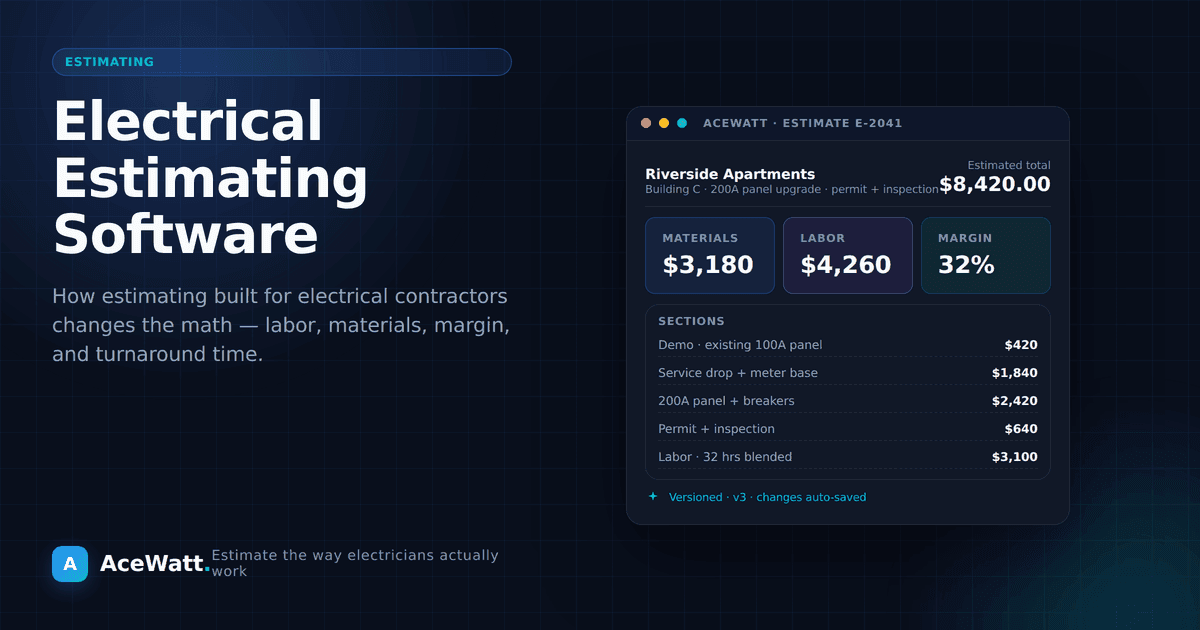
Direct answer: Electrical estimating software helps electrical contractors turn job walks, plans, and voice notes into draft quotes faster and more consistently than spreadsheets. It typically combines digital takeoff, an electrical pricebook, NEC-related checklist prompts, and AI-assisted note capture. The best fit depends on your shop size: solo electricians and small crews lean toward mobile-first all-in-one tools (AceWatt, HousecallPro, Joist), 5 to 20 truck shops want estimating connected to CRM and dispatch (AceWatt, ServiceTitan), and large commercial bidders still pair heavy takeoff (PlanSwift, McCormick) with a separate CRM. None of it replaces a licensed electrician. Every AI-generated draft must be reviewed against your local code and AHJ before it goes to a customer.
You just spent three hours building an estimate for a 200-amp panel upgrade. You pulled material prices from a supplier catalog that's two months old. You guessed on labor hours because the last panel job threw you a curveball. You submitted the quote and crossed your fingers.
Two days later, the homeowner went with another electrician: one who quoted the job in 20 minutes, on-site, from their phone.
That's not a competitor who works faster. That's a competitor who uses estimating software.
If you're still building electrical estimates in spreadsheets, or worse, on legal pads, you're leaving money on the table and losing jobs to contractors who've moved on. In this guide, we'll break down exactly what electrical estimating software does, why it matters more than ever in 2026, and how to choose the right tool for your business.
If you handle this on a phone in the field, see our guide to the best estimating software with integrated digital takeoff first — it covers the workflow end to end. If you are comparing full tool lists for 2026, our plan-takeoff estimating software comparison ranks the dedicated options side by side.
What Is Electrical Estimating Software?
Electrical estimating software is a digital tool designed to help electrical contractors create accurate, professional estimates, bids, and quotes. Unlike generic estimating platforms built for general contractors, electrical estimating tools are built for the specific workflows of electrical work: NEC code references, electrical material pricing, load calculations, permit tracking, and circuit-level takeoffs.
Here's what that means in practice: instead of manually counting outlets on a blueprint, looking up Romex prices in a catalog, and typing everything into Excel, you upload a plan set, use digital takeoff and AI-assisted review to organize quantities, apply your saved material and labor assumptions, and generate a formatted quote faster.
The best tools in 2026 go even further. AI-powered platforms can pair job-site photos with voice notes, summarize scope, and support material takeoff work from walkthrough context. Some let you talk through the job in plain English and turn that into a draft estimate for review. We'll get to those.
Why Electricians Still Lose Money on Estimates
Industry coverage from Electrical Contractor Magazine and member resources from the National Electrical Contractors Association (NECA) consistently call out estimating accuracy as one of the biggest swings on contractor margin. Independent shop owners regularly cite losing meaningful single-digit percentages of potential revenue to forgotten line items, stale pricing, and labor-hour miscalculations. The exact percentage depends on your job mix and discipline, but the direction is consistent. Estimating is where margin quietly disappears.
On a $50,000 commercial job, even a low-single-digit miss can represent thousands of dollars you leave behind, and not because you underpriced the work. You forgot a line item, used stale material pricing, or miscalculated labor hours.
The most common estimating mistakes electricians make:
- Using outdated pricebooks. Copper prices swing 15 to 20% in a quarter. If your material list is from January, your March bids are already wrong.
- Forgetting overhead in unit costs. Your hourly rate isn't just wages. It's insurance, vehicle costs, tool depreciation, phone, office software, and the coffee you buy at every job site. Most electricians account for labor and materials but forget the "hidden 30%."
- Racing through estimates. When you're busy, you estimate fast. Fast estimates miss things. A forgotten GFCI here, an uncounted circuit there, and suddenly you're eating $500 on a job you thought was profitable.
- No historical data. If you can't compare your estimate to what the job actually cost, you can't get better. Spreadsheets don't track actuals. Paper notes get lost.
The spreadsheet trap is real. Excel is flexible, but it's also where accurate estimates go to die. One wrong cell reference, one formula that didn't copy down, and your $12,000 bid should have been $14,500. Every contractor who's switched from spreadsheets to dedicated estimating software says the same thing: "I didn't realize how much I was losing."
7 Must-Have Features in Electrical Estimating Software
Not all estimating tools are created equal. If you're evaluating options, here are the seven features that separate professional-grade electrical estimating software from basic calculators:
1. Digital Takeoff from Blueprints
Upload a PDF plan set and electronically count circuits, measure conduit runs, and review electrical symbols. No more printing plans and highlighting with three different markers. Digital takeoff can reduce the manual work behind many estimates.
2. Electrical Pricebook Integration
Your estimating tool should make it easy to maintain electrical-specific material pricing, not force you into a generic construction catalog that includes lumber and drywall. Whether pricing comes from imports, integrations, or a maintained pricebook, it should be simple to keep common items current.
3. NEC Code References Built In
Electrical work is governed by the National Electrical Code (NFPA 70). Your estimating software should help you keep code-related checklist items visible for wire sizing, box fill, grounding, and GFCI placement. This supports estimator review, but final compliance still depends on licensed trade judgment and local authority requirements.
4. Template Library for Common Job Types
Residential service calls, commercial tenant improvements, new construction, industrial motor circuits: each job type has a different estimating rhythm. Good software offers pre-built templates with default material lists and labor units you can customize to your actual production rates.
5. AI-Powered Material Recognition
The biggest leap in estimating technology for 2026. Upload photos from a panel, room, or blueprint and pair them with voice notes so AI can summarize conditions, suggest materials, and support takeoff review. Tools like AceWatt's AI Job Walk bring that context into the estimate workflow today.
6. One-Click Quote Generation
An estimate is internal. A quote goes to the customer. Your software should turn an approved estimate into a professional, branded quote in one click, with your company logo, payment terms, scope of work, and customer signature line. No copy-pasting into Word. For shops that want to present tiered good-better-best pricing, electrical proposal software can structure your estimates into option cards that close more deals. And if you need a simple starting format, our free electrician estimate template covers the seven sections every quote needs.
7. Mobile Field Estimating
Electricians don't estimate from desks. You're standing in a customer's basement or walking a construction site. Your estimating tool needs to work as well on your phone as it does on a laptop, with full functionality, not a watered-down mobile view.
How AI Is Changing Electrical Estimating
If there's one shift that defines estimating in 2026, it's artificial intelligence. And we're not talking about ChatGPT writing your emails. We're talking about AI that actually does electrical work:
AI photo-backed job walks. Snap photos during a job walk and dictate what you see. AI keeps the photos tied to your scope notes, summarizes conditions, suggests likely materials, and gives you a structured starting point for takeoff review.
Voice-powered estimating. Walk through a job site with your phone. Say what you see: "We need to add four recessed cans on this circuit, run 12/2 from the panel through the attic, and install a 20-amp dedicated circuit for the microwave." The software turns that description into draft estimate lines, applies your configured labor rates and pricebook assumptions, and gives you a quote to review.
NEC-aware review support. Estimating software should help surface code-related checklist items and prompt estimator review. Final compliance still depends on licensed trade judgment and local authority requirements.
AceWatt is built specifically for electrical contractors. It combines AI Job Walk for photo-backed, dictated field notes, AI Estimating that drafts quotes for review from that job walk, and electrical pricebook support for your saved materials and labor assumptions. You can walk a job, describe what you see, and turn that context into a professional quote draft for review. Start AceWatt's 14-day AI estimating trial signup →
Electrical Estimating Software Comparison (2026)
Here's how the top options stack up:
| Feature | AceWatt | PlanSwift | McCormick | ServiceTitan | HousecallPro | Joist |
|---|---|---|---|---|---|---|
| Price | $49 to 199/mo | One-time ($1,500+) | Quote-based | $200 to 500+/mo | $59 to 199/mo | Free to $50/mo |
| Electrical-Specific | ✅ Yes | ❌ Generic | ✅ Yes | ❌ Generic FSM | ❌ Generic FSM | ❌ Generic |
| AI Features | ✅ Voice + photo-backed job walks | ❌ None | ❌ None | ⚠️ Basic (Atlas AI) | ⚠️ Basic | ❌ None |
| Mobile Estimating | ✅ Mobile-ready | ❌ Desktop | ❌ Desktop | ✅ Mobile | ✅ Mobile | ✅ Mobile |
| Material Pricing | ✅ Pricebook support | ❌ Manual | ⚠️ Periodic | ⚠️ Add-on | ❌ Manual | ❌ Manual |
| CRM Integration | ✅ Built-in | ❌ Separate | ❌ Separate | ✅ Built-in | ✅ Built-in | ❌ None |
| Best For | 1 to 20 truck ops | Large commercial | Large contractors | 10+ truck ops | Multi-trade | Solo electricians |
Quick take:
- AceWatt wins for electrical contractors who want AI-powered estimating that's built for their trade specifically.
- PlanSwift (now part of Trimble) is the legacy choice for blueprint takeoff, powerful but feels like software from 2015.
- McCormick Systems is deeply electrical but has a steep learning curve and a desktop-only interface.
- ServiceTitan is the 800-pound gorilla: comprehensive but expensive, and often overkill for shops under 10 trucks.
- Joist is great if you're a solo electrician on a tight budget and just need basic mobile estimating.
How to Choose the Right Estimating Software
Your choice depends on where you are in your business:
Solo electrician (just you, maybe one helper): You need mobile-first, simple, fast. Joist for budget. AceWatt Starter ($49/mo) if you want AI + CRM + estimating in one place.
Small crew (2 to 5 electricians): You need team features: shared pricebooks, scheduling integration, job costing. AceWatt Growth or HousecallPro.
Growing operation (5 to 20 trucks): You need estimating that connects to scheduling, dispatch, CRM, invoicing, and reporting. ServiceTitan or AceWatt Growth/Scale.
Large commercial/industrial: You need heavy-duty takeoff with assembly building and multi-phase project support. McCormick or PlanSwift for estimating, paired with a separate CRM.
Ask yourself these questions:
- Do I estimate mostly from the field or the office?
- How many estimates do I produce per week?
- Do I need this tool to handle CRM, scheduling, and invoicing too?
- What's my budget per month for software?
- How important is AI/automation to my workflow?
If the answers are "field," "5+," "yes," "under $200," and "very," you're the ideal candidate for an all-in-one AI platform like AceWatt. For shops that need estimating tied to customer history, scheduling, and invoice follow-up, AceWatt also works as CRM software for electrical contractors instead of a standalone estimating calculator.
How to Transition from Spreadsheets to Estimating Software
Switching from Excel (or paper) to estimating software feels daunting. It shouldn't be. Here's a practical migration path:
Week 1: Import your data. Most platforms let you import material lists and pricing via CSV. Bring in your top 100 materials and your actual labor rates. Don't try to import everything. Start with what you use most.
Week 2: Build your first 5 estimates in the new tool. Run them in parallel with your old method. Compare the results. You'll immediately spot where the software catches things you missed.
Week 3: Customize templates. Set up templates for your most common job types: residential service calls, panel upgrades, EV charger installs, lighting circuits. These templates become your estimating engine.
Week 4: Go all-in. Stop using spreadsheets. Force yourself to use the software for every estimate. By the end of week four, you'll be faster than you were with Excel.
Pro tip: AceWatt offers migration assistance and csv import for existing material lists and pricebooks. You don't have to start from scratch.
Electrical Estimating Software Pricing Guide
Here's what to expect when budgeting:
| Tier | Price Range | What You Get |
|---|---|---|
| Free | $0 | Basic estimating, limited materials. Good for testing. |
| Entry | $30 to 80/mo | Mobile estimating, templates, basic pricebook. |
| Professional | $80 to 200/mo | AI features, CRM, scheduling, pricebook support, reporting. |
| Enterprise | $200 to 500+/mo | Multi-user, advanced takeoff, project management, custom integrations. |
A simple ROI model: If estimating software saves meaningful time on each estimate, multiply those hours by your weekly estimate volume and your internal billing rate. That gives you a planning estimate for recovered time.
Then factor in accuracy. Better templates, pricebook discipline, and review workflows can reduce forgotten line items and material waste, but the dollar impact depends on your job mix and volume.
The point is not a guaranteed multiplier. The safer test is whether saved admin time, faster quote turnaround, and fewer missed items are worth the subscription cost for your actual estimate volume. Run the numbers with your own estimates before choosing a tool.
Selection Checklist Before You Buy
Use this checklist before you put a card down. It saves more headaches than any feature list:
- [ ] Is this tool built for electrical contractors, or is it a generic construction estimator?
- [ ] Does my electrical pricebook stay editable and locked to my shop, not the vendor's catalog?
- [ ] Does every AI-generated estimate pass through a human review step before it reaches a customer?
- [ ] Can the same record flow into scheduling, invoicing, and the customer record without re-typing?
- [ ] Are there templates for the job types I actually quote: service, panel, EV, light commercial?
- [ ] Can my field team use it on a phone from a crawl space, not just on a desktop?
- [ ] Is pricing public on the vendor's site? Can I download my data if I leave?
- [ ] How does the tool draw the line at NEC/AHJ judgment? Is it explicit?
If any box stays unchecked, dig further before committing. The right tool feels obvious within a two-week trial.
Related Tools and Guides
For deeper category context and free tools you can use today:
- Bid calculator, wire size calculator, voltage drop calculator, and estimate template: see all free electrical contractor tools for quotes and field checks
- Electrical contractor estimating software: broader buyer's guide
- How to estimate electrical work: methodology, not just tools
- Best AI estimating software for electrical contractors: AI feature deep-dive
- Electrical contractor pricing guide: pricing strategy beyond software
- Electrical contractor price book guide: build a consistent price book your estimates pull from
- AI tools for electricians: full category map across the trade
For pricing, see AceWatt pricing and confirm current numbers on the page itself.
FAQs
What is electrical estimating software in plain English?
Software that helps electrical contractors build quotes faster and more consistently, usually with digital takeoff, an electrical pricebook, NEC-related checklist prompts, templates for common job types, and increasingly AI-assisted note capture. It does not replace a licensed electrician; it speeds up the paperwork around the work.
Is AI estimating safe for electrical contractors?
It is safe when AI is treated as a draft assistant, not a final answer. Use AI to convert job-walk notes into a structured estimate, then review every line against your code, your pricebook, and your local AHJ before sending. Avoid any tool that auto-sends quotes to customers without a human review step.
How much does electrical estimating software cost in 2026?
It varies, and pricing changes; verify directly with vendors. Common ranges in the market: free or low-cost mobile estimators ($0 to $50/month), professional all-in-one tools with AI ($80 to $200/month, AceWatt sits here), and enterprise field-service platforms ($200 to $500+/month). Heavy commercial takeoff tools like PlanSwift use one-time licensing closer to $1,500+.
Can electrical estimating software handle NEC code requirements?
Good tools surface code-related checklist prompts (wire sizing, GFCI placement, box fill, grounding) but final code interpretation belongs to a licensed electrician and the local authority having jurisdiction (AHJ). Treat any "AI-driven NEC compliance" claim as marketing. Code is a human judgment.
What's the difference between estimating software and a CRM?
Estimating software focuses on the quote: takeoff, pricebook, labor hours, output format. A CRM tracks the customer, job, follow-up, and payment status across the lifecycle. The strongest 2026 tools combine both, so the same record carries from estimate to job to invoice. AceWatt is built that way; see CRM for electricians for the broader view.
Where should a solo electrician start?
If you are billing under $250K and quoting from spreadsheets, start with a mobile-first tool that pairs estimating with a basic CRM and follow-up. The fastest wins come from consistent templates, an editable pricebook, and a real follow-up cadence, not from chasing the most advanced AI feature.
The Bottom Line
Electrical estimating software isn't optional anymore. Your competitors are using it. Your customers expect fast, professional quotes. And the math on accuracy alone makes the case.
The shift to AI-powered estimating in 2026 is a major opportunity for electrical contractors. Voice estimating, photo-backed job walks, and AI-assisted takeoff support can save time and make your estimating process more consistent.
If you're ready to stop estimating in spreadsheets and start moving faster, start AceWatt's 14-day AI estimating trial signup. Landing-page trial signup does not require a card; choosing a paid plan later uses Stripe. Or book a 15-minute demo to see AI-powered electrical estimating in action.
Last updated: 2026-05-26.