
_Last updated: October 2026._
The best accounting software for small electrical contractors is the combination most shops already half-own: QuickBooks Online for the ledger, plus an electrical-specific job management layer that feeds it clean job-costed data. Small shops (1 to 5 person crews) rarely need a full construction-accounting suite; they need job costing, progress billing, change-order tracking, and invoice follow-up that a generic bookkeeping setup cannot capture. This guide to electrical accounting software compares the realistic options for 2026 and shows where AceWatt fits as the electrical CRM that connects the field workflow to the books.
Quick answer: Accounting software for small electrical contractors should track job costs per project, handle progress billing and retainage, manage change orders, and sync to QuickBooks. Most small electrical shops do not need to replace QuickBooks, they need an electrical-native CRM feeding it. Compare job costing, invoicing, and QuickBooks sync across electrical accounting software options before buying.
Which Accounting Software Fits a Small Electrical Shop: Comparison
Not every small electrical contractor needs the same tool. The right accounting software for small electrical contractors depends on crew size, commercial vs. residential mix, and whether you already run QuickBooks. Use this electrical accounting software comparison table to shortlist before you demo anything. If you run commercial work, weight the progress billing and retainage rows heavily; they are where generic tools break first:
| Category | Best fit | Core accounting strength | Watch out for | Typical cost model |
|---|---|---|---|---|
| QuickBooks Online (alone) | Solo electrician, simple service calls | General ledger, invoices, bank feeds, CPA-ready reports | No job costing depth for electrical scopes; manual field data entry | Monthly SaaS; check current QuickBooks pricing |
| QuickBooks + AceWatt CRM | 1 to 5 person residential/commercial shops | The invoice list and payroll hours come out as QuickBooks-ready exports (Growth and Scale plans) | You still keep QuickBooks; your bookkeeper works from the exports, so this is not a native two-way sync (full sync in development) | AceWatt from $49/mo plus your QuickBooks plan |
| Construction accounting suites | Multi-crew commercial contractors | Full construction ledger, union payroll, certified reports | Heavy setup and cost for a small shop; overkill below ~5 crews | Higher monthly tiers plus onboarding |
| Spreadsheet + accountant | Very small or new shops | Cheapest possible ledger | No field-to-books connection; hours of re-entry; job profitability always late | Accountant fees only |
The pattern worth noticing: the best accounting software for small electrical contractors is usually a combination, not a single product. The books live in one place; the job reality (estimates, material lists, crew hours, change orders) lives in another. The failure mode small shops hit is manually re-typing field data into the accounting tool. Most electrical accounting software decisions come down to how much of the field side you want connected.
Why Generic Bookkeeping Falls Short for Electrical Work
Standard small-business bookkeeping assumes simple transactions: sell, invoice, get paid. Electrical contracting does not work that way, and this is why accounting software for small electrical contractors has become its own category. Electrical accounting software earns its keep in four places:
- Multi-phase projects. A commercial tenant build-out bills in stages. Your ledger needs to show what was billed, what is retained, and what is still open, per job, not just per customer. That is exactly what a progress billing schedule tracks, and why it shows up in nearly every feature list below.
- Retainage. Commercial projects routinely hold back a percentage of payment until final inspection and sign-off. The held funds must be tracked automatically, not reconstructed at year-end.
- Change orders. Electrical scopes shift mid-project when unknown junction boxes or faulty wiring surface behind walls. Each change needs a documented approval trail tied to the invoice that eventually bills it.
- Code and compliance documentation. Permits, NEC compliance records, and master-electrician sign-offs are part of the financial record on commercial work. The National Electrical Code (NEC) from NFPA is updated on a three-year cycle, and audit-ready shops keep compliance documentation linked to the job that produced it.
- Material price swings. Copper wire and conduit prices move. A job quoted at one material cost can be unprofitable at another by the time it is built, which is why real-time job costing matters more in electrical than in most trades.
If your current setup cannot track the deposited materials for a 200-amp panel upgrade separately from general inventory, you cannot see whether that job was actually profitable until it is too late to fix it. That blind spot is what accounting software for small electrical contractors is built to remove.
Must-Have Features in Accounting Software for Small Electrical Contractors
When you evaluate accounting software for small electrical contractors, score each option against the workflows that actually decide whether a small electrical shop makes money:

- Per-job cost tracking. Labor burden, vehicle overhead, and material costs allocated to the specific job, down to the spool of MC cable. This is the difference between "we had a good year" and "that EV charger install made $1,100."
- Progress billing and retainage. Automatic tracking of staged payments and held-back percentages on commercial jobs.
- Change order management. Documented scope changes with approval status, tied to the original quote and the final invoice.
- QuickBooks Online sync. Most electrical contractors already run QuickBooks with their accountant. Ripping it out to accommodate field operations creates disruption and CPA friction. Look for electrical accounting software that pushes clean data into QuickBooks instead of replacing it.
- Field-to-invoice speed. The delay between finishing a job and invoicing it is the silent cash killer. The office should not wait for paper tickets to re-type.
- Licensing and compliance tracking. Audit trails for permits, NEC documentation, and master-electrician sign-offs linked to the corresponding job and invoice.
A licensed electrician or qualified reviewer should still verify compliance-sensitive documentation, pricing commitments, and site conditions before invoices go out, software organizes the record; it does not replace the licensed judgment behind it.
How AceWatt Fits: The Electrical CRM Layer That Feeds Your Books
AceWatt is not a replacement for QuickBooks, and it is honest to say so. It is the electrical-native job management and CRM layer that captures what happens in the field and hands clean, job-costed data to the accounting side. For small electrical contractors evaluating electrical accounting software, that division of labor matters:
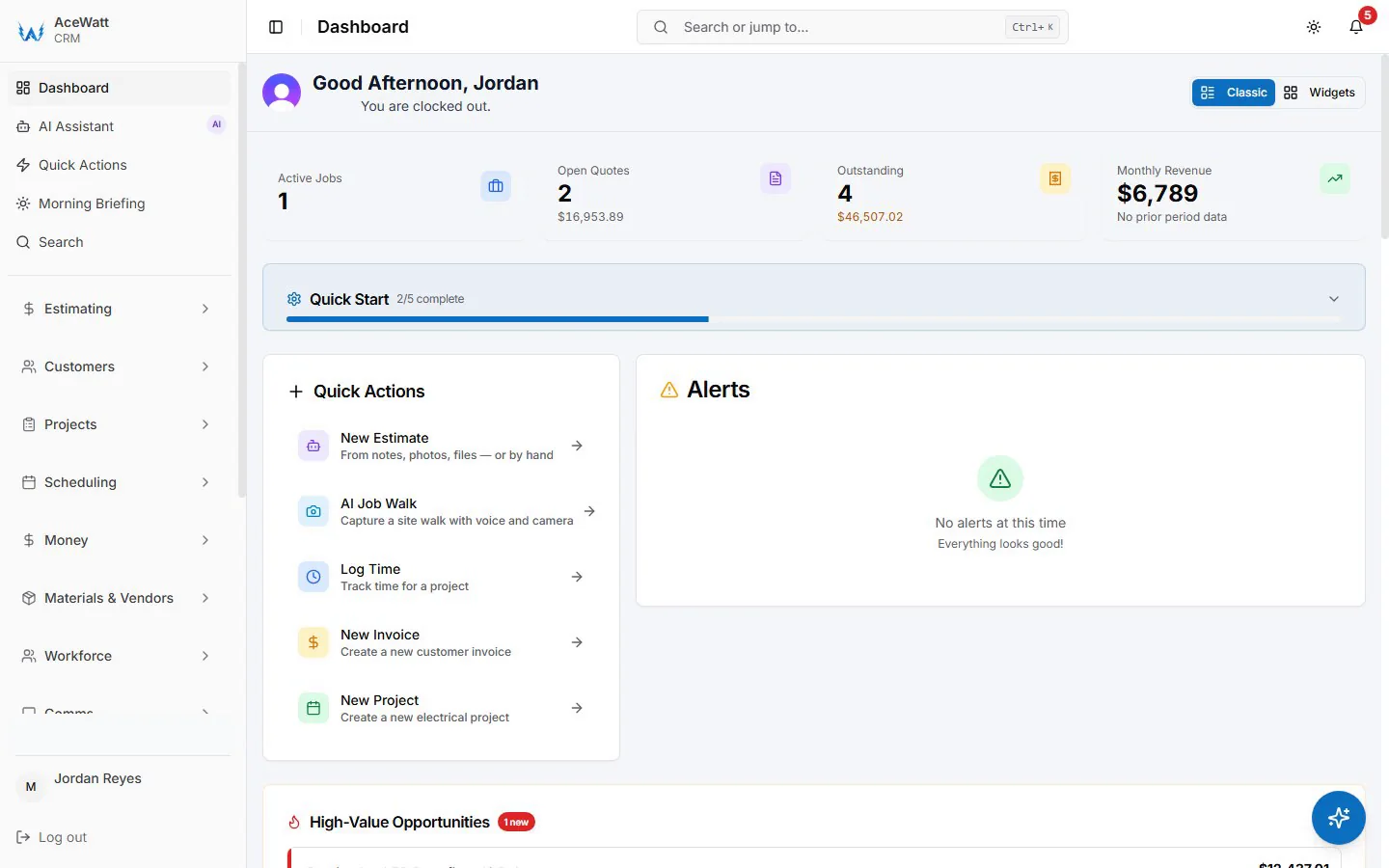
- Estimate-to-invoice continuity. Automated estimating turns job walks and scope notes into quote drafts a contractor reviews and prices. Approved quotes convert to jobs, and completed jobs convert to invoices without re-typing scope into the accounting tool.
- Job costing from real field data. Voice documentation and AI job walks capture crew notes, materials, and site conditions while details are fresh. The AI drafts structured summaries for contractor review, the licensed electrician confirms scope, pricing, and compliance before anything is billed.
- QuickBooks-ready exports (Growth and Scale plans). Your invoice list comes out of AceWatt as a spreadsheet and tracked payroll hours as a QuickBooks-format CSV for your bookkeeper; it is not a native two-way sync. Starter plan users can still run quotes and invoices in AceWatt and hand off to their books manually, see plans and pricing.
- Follow-up that protects cash flow. Invoice status sits next to the job and customer history, so the office can see which completed work still needs money movement instead of digging through two systems.
For shops that want the deeper accounting picture, see our guides on QuickBooks integration for electrical contractors and job costing vs. general-ledger accounting.
What It Costs: AceWatt Plans Plus QuickBooks
Budgeting an electrical accounting software stack is straightforward because AceWatt publishes transparent pricing:
| AceWatt plan | Monthly price | Users | QuickBooks export | Best for |
|---|---|---|---|---|
| Starter | $49/mo | 1 | Manual handoff | Solo electrician getting organized |
| Growth | $99/mo | Up to 5 | Included | Small shops that want field-to-books flow |
| Scale | $199/mo | Unlimited | Included | Established contractors with back-office complexity |
All plans include a 14-day trial, and every plan covers the core job workflow: CRM, quotes, invoices, scheduling, and the AI quote builder. Add your current QuickBooks Online subscription for the ledger side. Before purchasing any tool, confirm the QuickBooks handoff covers the transaction types you actually use, and verify payment-processing availability for your account, since card and ACH collection depends on payment processing being enabled.
Implementation: Moving a Small Shop Without Breaking the Books
Adopting accounting software for small electrical contractors goes wrong when shops try to migrate everything at once. The sequence that works for electrical accounting software rollouts:
- Clean your chart of accounts first. QuickBooks categories (Copper Wire, Conduit, Labor: Apprentice, Permits) should reflect how you actually buy and bill.
- Load pricing databases. Standard price lists, supplier catalogs, and labor-rate matrices go into the estimating layer so quotes start from real numbers.
- Migrate active jobs only. Open estimates, current schedules, and outstanding invoices. Leave five-year-old history in the archive where it belongs.
- Pilot on one service type. Run residential service calls or straightforward panel upgrades through the new workflow before you trust it with multi-phase commercial builds and their progress billing schedules.
- Reconcile weekly at first. For the first month, compare what came out of the field layer against what your bookkeeper entered in QuickBooks. Small mapping issues are cheap to fix early and expensive to find at tax time.
That reconciliation habit doubles as your audit trail: the IRS business section sets the federal record-keeping baseline your records need to meet, and clean job-level exports make assembling them a filter instead of a shoebox hunt.
Frequently Asked Questions
What is the best accounting software for small electrical contractors?
For most 1 to 5 person shops, the best electrical accounting software setup is QuickBooks Online for the ledger plus an electrical-specific CRM like AceWatt that runs the field side and hands your bookkeeper an invoice list and payroll hours. Full construction-accounting suites usually make sense only for larger multi-crew commercial contractors.
Does AceWatt replace QuickBooks?
No. AceWatt is the job management and CRM layer that captures quotes, job notes, invoices, and payments. QuickBooks handles the formal accounting. AceWatt Growth and Scale plans include QuickBooks-ready exports: your invoice list as a spreadsheet and your payroll hours as a QuickBooks-format CSV for your bookkeeper. There is no native, real-time, bidirectional sync today. In an accounting software for small electrical contractors stack, AceWatt covers the field side while QuickBooks keeps the books.
How much does electrical accounting software cost for a small electrical shop?
A connected setup typically runs your QuickBooks Online subscription plus AceWatt at $49 to $199/month depending on team size and whether you want the QuickBooks-ready exports (Growth and Scale plans). Construction accounting suites cost more and add onboarding fees, usually overkill below roughly five crews. For framing the wider small-business picture around your books, the SBA business guide is a solid free starting point. The one exception is heavy commercial work: if most of your revenue bills through progress billing schedules with retainage, a construction suite earns its fees.
Can AI do bookkeeping for an electrical contractor?
No, and be skeptical of tools that claim it can. AI in AceWatt drafts estimate context, summarizes job walks and voice notes, and answers quick questions about your recent business activity. A licensed electrician or qualified bookkeeper still verifies scope, pricing, compliance-sensitive statements, and the actual books. AI reduces re-typing; it does not replace licensed or professional judgment.
Is job costing or general ledger more important for electrical contractors?
Both, for different questions. Job costing answers "did this project make money?", the ledger answers "did the business?" Small shops that only keep a general ledger usually cannot say which service line (residential service, EV chargers, commercial build-outs) actually carries the business. This job-costing explainer covers the split in depth.
Do I need accounting software if I am a solo electrician?
Yes, but lightweight. A solo electrician typically needs invoicing, basic job costing, and tax-ready records, QuickBooks Online plus a tool like AceWatt Starter ($49/mo, 1 user) covers quotes, invoices, scheduling, and the AI quote builder with a 14-day trial. Spreadsheets work until the re-entry time costs more than the software.
The Bottom Line for Small Shops
Accounting software for small electrical contractors is a solved problem when you stop looking for one tool that does everything. Keep QuickBooks for the books your accountant already knows. Put an electrical-native layer in the field that captures the job as it actually happens (scope, hours, materials, change orders) and hands it to the ledger clean. Then look at profitability per job while you can still affect it, not at year-end when you cannot. That combination of a trusted ledger plus an electrical-native field layer is what good electrical accounting software looks like for a small shop in 2026. Commercial shops should confirm their progress billing schedule and retainage tracking live in the connected setup before the first multi-phase job runs through it.
AceWatt starts at $49/month with a 14-day trial and no permanent free tier, compare plans or read how electrical contractor invoicing works end to end in the connected workflow.
Related Reading
- Overview of every electrical contractor software feature AceWatt ships.