
From quote to invoice
Accepted job context should move toward invoicing without duplicate data entry.
Invoice app
An electrician invoice app should keep billing close to the estimate and job context. AceWatt turns completed electrical work into sent invoices so contractors do not lose revenue detail between tools.
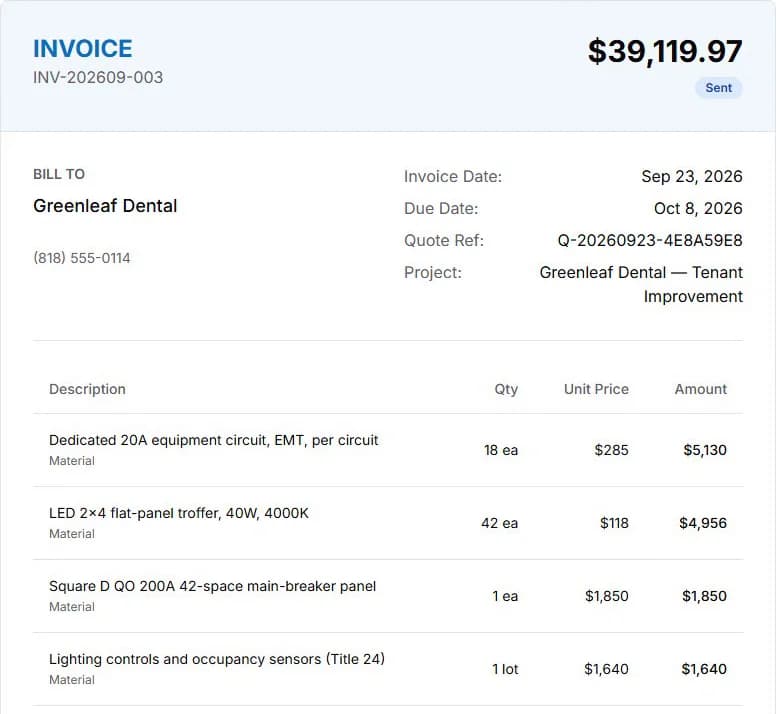
Screens from a demo company with sample data.
Accepted job context should move toward invoicing without duplicate data entry.
Invoices make more sense when they sit near previous estimates, job notes, and site context.
Owners need to see work that is complete, billed, pending, or stuck.
Workflow
Four steps from completed electrical work to a sent invoice with payment follow-up attached to the customer record.
Start from the customer record so the invoice stays connected to the estimate, job notes, and completed work that created the revenue.
Use the quote-to-invoice flow so completed electrical work turns into billable line items without rebuilding the invoice from scratch.
Check customer history, attachments, and job notes before sending so the invoice matches the real work performed.
Send the invoice from the same workflow and keep payment follow-up attached to the CRM record so nothing gets lost after the work is done.
Keep exploring
Pages on the work that connects to this one.
FAQ
The best electrician invoice app connects billing directly to the job that earned it — pulling accepted estimates, labor hours, materials, and change orders into a clean invoice without re-entering data. AceWatt keeps that context attached to the customer record so follow-up and payment tracking stay visible.
AceWatt offers an electrical invoice app as part of its CRM workflow. You can turn a completed job into an invoice, attach it to the customer record, and track payment status without switching tools. See AceWatt pricing for current plans.
Yes. AceWatt's electrician invoice app is mobile-friendly, so you can create and send invoices from the job site, attach photos or notes, and keep payment follow-up tied to the customer record.
AceWatt focuses on CRM and job-to-invoice workflow context. Accounting-specific workflows may still live in dedicated finance tools.
Invoices connect to the customer relationship, estimate, job notes, and follow-up that created the revenue.
Start with AceWatt Starter at $49/month, then grow into AI workflows and team visibility when the shop needs them.