

Best Work Order Apps for Electricians in 2026: Seven Platforms Compared
Quick answer: The best electrician app for daily service work in 2026 is one that captures the work order on site (diagnosis, code references, materials, labor) and turns it into a paid invoice without evening data entry. AceWatt does this for electrical contractors with AI voice job walks and automated invoice follow-up; Jobber, Housecall Pro, FieldPulse, FieldEdge, Simpro, and ServiceTitan each fit a different shop size.
An electrical work order is not a generic task. It is a record of diagnosis, code compliance, materials, labor, and money, and all five elements have to survive the trip from the customer's driveway back to the office. This guide compares seven work order apps for electricians in 2026, covering what each platform does well, where each falls short, and how to match the tool to the size and type of your shop, so you can pick the best electrician app for daily service work rather than the loudest demo. Electrical field service management has matured enough that there is no reason to run service calls off paper tickets and text threads in 2026, and there is equally no reason to pay enterprise prices for features a three-person shop will never open.
Why Electricians Need a Dedicated Electrician App in 2026
Consider a routine residential service call. A homeowner reports that half the receptacles in the garage are dead. The technician finds a tripped GFCI protecting the downstream loads, resets it, confirms with a receptacle tester, and documents the repair under the garage GFCI requirement in NEC 210.8. Or the call goes the other way: an open neutral traced to a junction box buried behind drywall, a violation of NEC 314.29 accessibility rules that requires cutting in an accessible box, splicing, and drywall repair before the invoice can even be scoped. Replace a receptacle in most jurisdictions and NEC 406.4(D) applies, which may pull GFCI or AFCI protection into the scope whether or not the customer asked for it.
Either way, the work order carries photos, test results, parts, labor hours, and a customer signature. When that record lives on a paper ticket, a text thread, or a shared spreadsheet, pieces of it disappear. The best electrician apps treat the work order as the system of record instead: every photo, part, and hour lands on the ticket the moment it happens. Disappearing data is disappearing revenue: the $18 GFCI receptacle that never made the invoice, the estimate that sat in a truck door for nine days, the payment collected three weeks after the job closed.
Generic task trackers make this worse, not better. They are built for office workflows with no concept of dispatch windows, material markups, permit numbers, or inspection dates. The 2026 economics tighten the screws further. Copper and THHN pricing moves often enough that material costs recalled from memory are wrong by the time the invoice goes out, customers expect text-to-pay and same-day quotes, and the 2026 NEC is now working through state adoption, which means your jurisdiction's effective code cycle varies by job. A solo electrician spending four hours a week rekeying data into QuickBooks is surrendering $300 to $600 of billable time at typical rates of $75 to $150 an hour. Electrician work order software exists to close exactly those gaps, and AI-powered platforms now collapse estimate turnaround from days to minutes by capturing job details on site. The National Electrical Contractors Association has long documented that project documentation and change-order discipline are where electrical contractors leak margin, and the NFPA's NEC adoption tracker shows how differently code cycles roll out state by state. Both land directly on the work order, which is why a generic app is not enough.
What Makes the Best Electrician App Actually Work for Service Calls
Any field service platform can hold a customer name and a calendar slot. The best electrician app for daily service work has to handle the parts of the job that happen after arrival. Judge every option against this checklist:
- Job walk documentation. Photos, voice notes, and annotations attached directly to the work order while the scope is fresh, not reconstructed at 9 p.m.
- Material tracking on the ticket. Parts pulled from the van get logged against the job at the moment of use, with markup applied, so nothing goes unbilled.
- Real-time dispatching. A dispatcher or solo operator can see crew availability, push an emergency no-power call to the closest tech, and update the customer without phone tag.
- Same-day invoicing. The invoice generates from the completed work order, with time, materials, and photos already attached, before the tech leaves the property.
- QuickBooks sync. Job costs, invoices, and payments flow to the books without double data entry at the end of the week.
- Recurring service agreements. Generator maintenance, panel inspections, and lighting retrofit contracts need automatic scheduling and renewal triggers.
- Offline behavior. Basements, crawlspaces, and mechanical rooms kill signal. The app has to capture data offline and sync later.
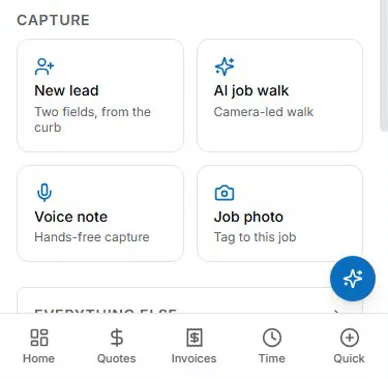
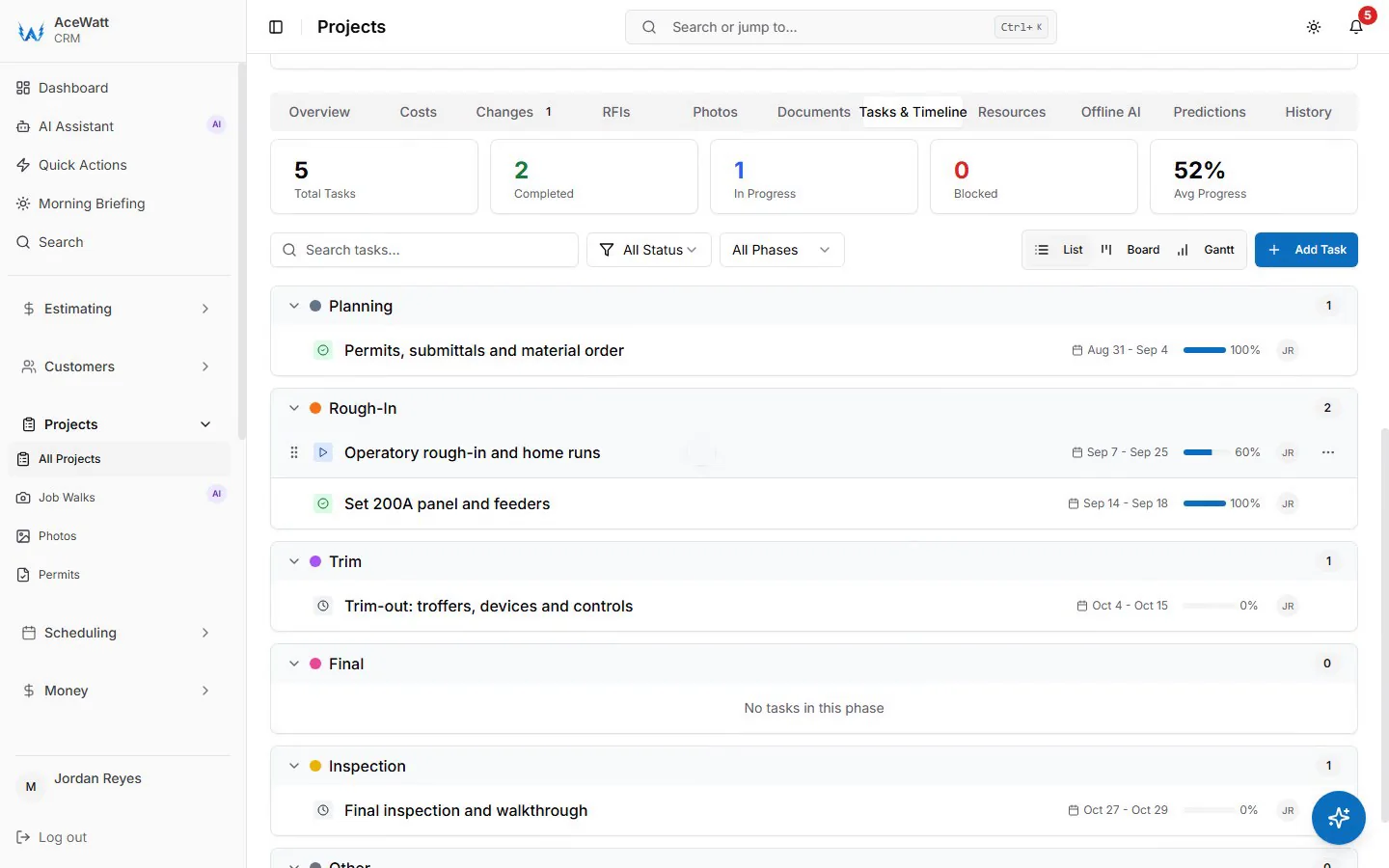
AceWatt: AI-Powered Work Order Management Built for Electrical Contractors
AceWatt was built specifically for electrical contractors, and the difference shows in how work orders move from first call to paid invoice.
The platform starts with an electrical contractor CRM that tracks every customer, service location, and job history, so a repeat caller's panel brand, past repairs, and open estimates surface before the phone call ends. That history matters on the second visit: if you replaced a failed 15-amp breaker feeding the master bedroom last year and the customer calls about the same circuit tripping again, the prior diagnosis, photos, and warranty status are on screen, not in a filing cabinet.
AI estimating is where AceWatt separates itself from template-based quoting. Instead of typing line items in the driveway, the tech walks the job and speaks the findings. AI voice documentation converts that narration into structured work order notes: the tech says "200-amp Murray panel, two double-tapped breakers on the AC condenser circuit, no working clearance in front of the panel, and the label is illegible," and the platform produces clean, organized documentation with photos pinned to each finding. The same job walk feeds the estimate, pulling materials and labor into priced line items, so the customer gets a professional quote before the tech leaves the property. That is the core promise of modern electrical estimating software: scope captured once, at the source, with no evening data entry.
Automated follow-up is built into the invoice lifecycle rather than bolted on. When the customer accepts a quote, AceWatt emails the invoice with a pay link automatically: a deposit invoice if the quote asks for one (the balance invoice follows once it is paid), otherwise the full invoice with the quote's line items. Once an invoice is overdue, the platform sends automatic email reminders at 1, 7, 14 and 30 days late without anyone at the shop lifting a phone.
On the operations side, crew scheduling and dispatching gives the office a drag-and-drop dispatch board with skill-based suggestions, so generator and EV charger installs land on the right people, and the live dispatch map (while the app is open) shows where the crew is when an emergency no-power call comes in. Job tracking moves every work order through statuses from scheduled to dispatched, on site, completed, and invoiced, so nothing stalls between the truck and the books. Invoicing and payment tracking email the invoice automatically when a quote is accepted, let the office build any other invoice from the completed work order with a button, with time, materials, and photos attached, then take card payment online through an emailed pay link (ACH if your Stripe account has it enabled), including deposits on larger scopes and partial payment tracking on multi-day commercial jobs. QuickBooks-ready exports give your bookkeeper the invoice list as a spreadsheet and payroll hours as a QuickBooks-format CSV; there is no native, real-time, bidirectional sync today, and full sync is in development.
For shops evaluating total cost of ownership, the relevant math is not the subscription alone. It is the subscription minus the recovered billable hours, the unbilled materials, and the overdue invoices that automated email reminders chase. AceWatt is designed so that calculation comes out positive for a solo operator and a ten-truck shop alike.
Jobber: Solid Scheduling for Solo Electricians
Jobber is a generalist electrical scheduling app and field service platform that has earned its popularity with solo operators and very small shops. As an electrician app for a one-person operation it is easy to recommend: quoting, scheduling, invoicing, and a client portal are all clean, and the mobile app is genuinely easy to learn in an afternoon. Published plans start around $40 a month on annual billing for a single user, with higher tiers in the $120 to $200 range adding features like QuickBooks sync and API access. For a one-van operation that mainly needs to stop losing quotes, Jobber is a reasonable choice.
The limitations come from the generalist design. There is no electrical-specific estimating logic, no AI voice capture on the job walk, and material pricing relies on your own templates rather than a trade-aware estimate engine. Shops doing panel upgrades, EV chargers, and load calculations tend to outgrow template quoting within a year or two.
Housecall Pro: Strong Invoicing for Residential Service Work
Housecall Pro is another strong generalist, best known for fast, consumer-friendly billing. As an electrician invoice app it performs well: text-to-pay, technician GPS tracking, recurring service plans, and automated review requests all work out of the box, and the customer-facing experience is polished. Published pricing starts near $49 a month for a single user on annual billing, with mid tiers around $99 to $149.
The trade-off is depth. Commercial work orders with phased billing, retention, and long material lists are not Housecall Pro's strength, and the estimating tools follow the same template model as most generalists. Residential-focused shops doing service calls, ceiling fan installs, and lighting repairs get the most value. Contractors running commercial jobs usually want more job costing underneath the invoice.
ServiceTitan: Enterprise Work Orders for Large Electrical Shops
ServiceTitan is the largest name in electrical job management software, and it behaves like it. The platform covers CSRs, dispatch, flat-rate pricebooks, reporting, payroll, and sales pipelines in depth, and large multi-location electrical contractors run their entire operation on it. For a shop with dedicated office staff, a call center, and 20-plus technicians, that depth has real value.
It is not built for small shops. Pricing is quote-based and commonly reported in the $250 to $500 per technician per month range on annual contracts, with implementation measured in months and training budgets to match. A five-person shop does not need a call-center platform, and paying per technician for features nobody opens is the fastest way to make software a net loss. ServiceTitan also assumes an office structure; a solo electrician will find the workflow heavy.
FieldEdge: Dispatching and Follow-Up for Growing Teams
FieldEdge grew out of the ESC product line and remains a capable electrical dispatch software option for residential-focused shops moving from 3 to 15 technicians. The dispatch board is the center of the product, with drag-and-drop assignments and real-time technician tracking, and the built-in pricebook supports flat-rate selling. Text-based customer communication and follow-up tools are solid for shops that sell service agreements.
Pricing is quote-based, typically landing around $100 to $200 per user per month. The caveats are familiar for generalist platforms: estimating is pricebook-driven rather than AI-assisted, documentation relies on manual entry rather than voice capture, and shops with heavy commercial work find the job costing thinner than they need.
FieldPulse: A Flexible Middle Option for Small Teams
FieldPulse is a US-based electrical job management software option aimed at two to ten user teams. It covers scheduling, quoting, invoicing, customer management, and technician tracking with a modern interface, and it adds an AI assistant for routine administrative work. Published plans start in the $50 to $60 per month range for a single user and scale with seat count, which keeps it accessible for shops that have outgrown Jobber's lower tiers.
It is still a generalist at heart. There is no electrical-specific estimate engine, no voice-driven job walk documentation, and reporting is lighter than ServiceTitan. It fits best as a stepping stone for growing residential shops.
Simpro: Estimating and Job Costing for Commercial Electrical Work
Simpro sits closest to the commercial end of the market. Its estimating module supports large pricebooks, takeoff-style builds, and detailed job costing, which matters when you are billing a tenant improvement with hundreds of line items and a 60-day payment cycle. Electrical contractors doing commercial installs, solar, and industrial maintenance are its core user base. Pricing is quote-based and typically starts above $100 per user per month, with implementation that rewards shops with office staff to own the setup.
For small residential shops, Simpro is more platform than the work requires. Solo electricians will find the workflow slow relative to the volume of tickets they run.
How to Choose the Best Electrician App for Your Shop
Match the platform to the shop, not the demo. Here is how the seven platforms in this guide compare side by side:
| Platform | Best For | AI Capability | Estimating Model | Shop Size | Published Pricing |
|---|---|---|---|---|---|
| AceWatt | Electrical contractors who want on-site capture to become a paid invoice | AI voice job walks, AI estimating, automated invoice follow-up | AI-assisted from the job walk | Solo to 10+ trucks | See acewatt.com pricing |
| Jobber | Solo operators stopping quote leakage | None for estimating | Template quotes | 1–3 users | From ~$40/mo |
| Housecall Pro | Residential service and text-to-pay billing | None for estimating | Template quotes | 1–5 users | From ~$49/mo |
| ServiceTitan | Large multi-location contractors | Add-on modules | Flat-rate pricebook | 20+ techs | ~$250–500/tech/mo, quote-based |
| FieldEdge | Residential dispatch and service agreements | None | Flat-rate pricebook | 3–15 techs | ~$100–200/user/mo, quote-based |
| FieldPulse | Small teams outgrowing starter plans | Basic admin assistant | Template quotes | 2–10 users | From ~$50–60/mo |
| Simpro | Commercial estimating and job costing | None | Pricebook + takeoff | Commercial shops | $100+/user/mo, quote-based |
Pricing reflects each vendor's published plans as of October 2026; quote-based platforms vary by contract. Use this decision path:
- Solo electrician. You need quoting, invoicing, payment collection, and QuickBooks sync with zero administrative overhead. AI estimating and automated follow-up matter most because there is no office to chase quotes, and the best electrician app for a one-van shop does the chasing for you. A generalist starter plan works; an electrical-specific platform works better.
- Two to eight technicians. Dispatching, crew availability, and job status visibility become the priority. Strong work order tracking for electricians means every status change from scheduled to invoiced is visible without calling the tech. Evaluate the dispatch board and the follow-up engine before anything else.
- Commercial and multi-crew operations. Job costing, phased billing, and estimating depth lead the list. This is where ServiceTitan and Simpro earn their price.
Regardless of size, ask these questions in every demo of an electrician app. Does the invoice generate from the completed work order with materials and photos attached, or does someone rebuild it at the office? Does QuickBooks sync push item-level detail or just journal entries? Does the app work in a basement with no signal and sync later? Can it store permit numbers, inspection dates, and the AHJ's adopted code cycle on the job record? Who owns your data and what does export cost if you leave?
The 2026 market has removed the last excuse for paper work orders. The question is no longer whether to use electrical field service management software, or even whether electricians need an app at all. It is whether the best electrician app for your shop understands what happens after the tech knocks on the door. For electricians, that difference decides whether the app saves time or just relocates it.
Frequently Asked Questions
What is the best app for electricians?
For electrical contractors, the best electrician app is one built for the trade rather than a generic field service tool: it should capture the job walk on site (photos, voice notes, code references), turn that capture into a priced estimate before the tech leaves, generate the invoice from the completed work order, and chase payment automatically. AceWatt is built exactly that way for electrical contractors; generalists like Jobber and Housecall Pro are solid fallbacks for solo shops that mainly need scheduling and text-to-pay.
Can an electrician app replace paper work orders completely?
Yes for day-to-day service work. Photos, customer signatures, test results, material lists, and labor hours live on the digital work order, and the invoice generates from it directly. Some jurisdictions still want printed permits or signed paper documents for specific inspections, so keep a small paper trail for anything your authority having jurisdiction requires in physical form.
How much does an electrician app cost?
Published pricing in October 2026 runs from about $40 a month for a solo-user generalist plan (Jobber) to $250–$500 per technician per month for enterprise platforms like ServiceTitan. Most small electrical shops land between $40 and $150 a month. AceWatt's plans are listed on the pricing page.
Do electrician apps work without cell signal?
The best ones degrade gracefully. Basements, crawlspaces, and mechanical rooms kill signal regularly, so the app must capture data offline on the device and sync when signal returns. Ask for a live demo of offline behavior in a dead zone. This is one of the most common failure points for field service apps, and "verify offline capture during a demo" is fair advice for any platform you evaluate.
Related Reading
- For a pricing-and-features breakdown of field apps, see the best mobile app for electricians working in the field.