
Electrical invoicing software turns finished jobs into collected revenue: it converts approved estimates into invoices without re-typing, captures T&M hours and materials from the field, handles deposits, progress billing, and retainage, takes card and ACH payments, and works with QuickBooks so nothing is entered twice. AceWatt, built specifically for electrical contractors, connects estimating, job tracking, T&M capture, payment tracking, and automated follow-up in one workflow and hands your bookkeeper QuickBooks-ready exports, so invoices go out the day work ends.
Electrical Invoicing Software: How Electrical Contractors Get Paid Faster in 2026
Most electricians did not get into the trade to do paperwork at 9 p.m. in the truck. Yet that is exactly what happens when invoicing lives on notepads, spreadsheets, and paper tickets. The work gets done well, the customer is happy, and the invoice goes out three days late, or a week, or never quite captures the materials picked up on the way to the site.
In 2026, that workflow is not just inefficient. It is expensive. Copper wire pricing has swung by double-digit percentages within single quarters, customers expect to pay by card or ACH on the spot, and commercial general contractors still hold retainage and stretch payment terms toward 60 or 90 days. Electrical invoicing software closes the gap between finished work and collected revenue, and shops that adopt it are usually paid faster than the ones still building invoices at the kitchen table. For a side-by-side look at the options, see our best electrical contractor invoicing software guide for 2026.
The Real Cost of Slow, Manual Invoicing for Electrical Shops

Slow invoicing is not an administrative annoyance. It is a cash flow leak with a measurable price tag.
Start with labor. A journeyman electrician billing $85 per hour who loses two unbilled hours a week because time was never logged from the field is giving up $170 a week, or roughly $8,800 per year per tech. On time-and-material jobs, those hours are only billable if they are captured. Once the truck leaves the site and the day turns over, the accuracy of a reconstructed timesheet drops fast.
Then there is the delay cost. A shop billing $25,000 a month that sends invoices out ten days late has added ten days to every payment cycle. At 30-day terms, that is 40 days of receivables floating while the supply house still expects its account paid and the business credit card carries a balance at 20 percent or more APR. The job was profitable on paper. The timing turned it into an interest-free loan to the customer.
Finally, there are disputes. An invoice that arrives days after the job, with no photos, no documented job walk, and no record of the change order conversation, invites questions. Every question adds another week before a check clears.
What Electrical Invoicing Software Should Actually Do
Plenty of generic tools can put a logo on a PDF. Electrical work has requirements those templates were never built to handle, and the right software should cover all of them:
- Convert approved estimates into invoices without re-typing line items.
- Track change orders as separate, signable documents that flow into the final bill.
- Support time-and-material billing with saved labor rates, including overtime and after-hours rates, and automatic material markups.
- Handle deposits, progress billing against a schedule of values, and retainage, which on commercial projects is commonly 10 percent held until closeout.
- Capture materials at the point of purchase, with receipt photos logged against the job.
- Accept card payments (processing typically runs near 3 percent) and lower-cost ACH the same day, with payment status visible at a glance.
- Sync with QuickBooks so nothing is entered twice.
If a tool cannot do those things, it is a PDF generator, not electrical contractor software. Our electrical contractor invoicing software overview walks through each requirement in more depth.
How AceWatt Connects Invoicing to Estimates, Job Tracking, and Payments
AceWatt was built specifically for electrical contractors, and invoicing is not a standalone module bolted onto the side. It sits at the end of a connected workflow that starts before the job does.
The process begins with the job walk. AI Voice and Job Walk Documentation lets you record observations hands-free while you walk the site, and the system turns that audio into structured notes attached to the job record. AI Estimating then builds the quote from real assemblies and pricing instead of guesswork. When the customer approves, the estimate becomes a scheduled job. Crew Scheduling and Dispatching puts the right tech on it, and Job Tracking captures labor hours, materials, and photos as the work happens.
When the work is complete, the billing is usually done already: the accepted quote was invoiced with its line items and emailed automatically at acceptance (the deposit invoice first, if you take one, and the balance once it is paid), and change orders approved along the way sit on the job record, so nothing is re-typed. Invoicing and Payment Tracking shows whether the bill has been paid or is overdue, and Automated Follow-Up sends email reminders at 1, 7, 14 and 30 days late. Because everything lives in one system, billable work does not fall through the cracks, and neither does the change order a busy tech forgot to mention.
Time-and-Material Billing Made Simple for Electricians
Time-and-material work is where most invoicing leakage happens, because it depends entirely on accurate field capture. AceWatt treats T&M as a first-class billing method, not an afterthought.
Techs clock in and out from their phones against the job, and labor carries one hourly rate per job title (there are no automatic after-hours or emergency rates). Materials are logged at cost against the job as they are bought, and markup is set on the quote. If your shop runs a 25 or 30 percent material markup, set it on the quote so it carries into the invoice created from it, instead of depending on someone remembering at the desk on Friday afternoon.
The documentation also protects you. When a panel upgrade turns into a service riser replacement, the voice notes from the job walk and the photos logged during the job become the evidence behind the change order. Customers rarely argue with an invoice that shows a timestamped record of what was found and what was done, and T&M disputes shrink accordingly.
QuickBooks-Ready Exports: What Your Bookkeeper Gets Today
Double entry is where margins quietly die. An invoice typed into field software and then typed again into QuickBooks takes twice the time and creates twice the opportunity for error, and job costs that do not line up with the books make every tax season and every loan application harder than it needs to be.
AceWatt's QuickBooks handoff today is QuickBooks-ready exports, not a native, real-time, bidirectional sync; full sync is in development. What exports today is your invoice list as a spreadsheet and your payroll hours as a QuickBooks-format CSV. Revenue, materials, and labor stay against the right job in AceWatt, so job costing stays honest across multiple concurrent projects, and your accountant gets a clean invoice list instead of a shoebox of mismatched invoices.
For shops running several commercial projects at once, this is not a convenience feature. It is the difference between knowing your real margin on a job and discovering months later that change orders never made it onto the invoice. To compare accounting options for your shop, read our 2026 accounting software showdown for electrical contractors.
Automated Follow-Up That Gets Invoices Paid Faster
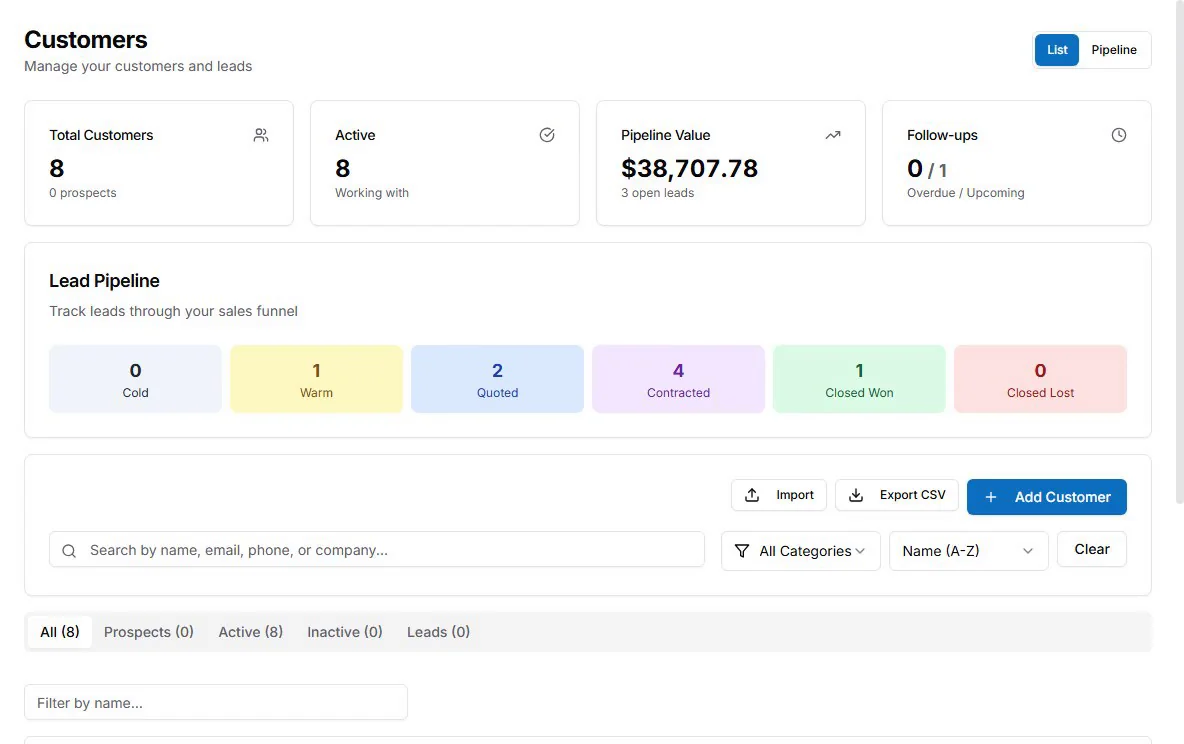
The most awkward part of running an electrical business is calling a customer you did good work for to ask about a bill. Automated Follow-Up removes that conversation from your plate.
AceWatt sends automatic email reminders on overdue invoices at 1, 7, 14 and 30 days late. Contractors who move from manual collections to an automated cadence commonly see payment cycles shorten, because the reminder goes out on schedule every time, whether you are on a ladder or asleep.
The result is cash flow that no longer depends on your memory or your willingness to make an uncomfortable call.
Choosing the Right Electrical Invoicing Software for Your Crew Size
The right fit depends on how you work:
- Solo electricians need a fast electrical invoice app more than a full back office. Priority features: estimate-to-invoice conversion, receipt capture, and online payment when payment processing is enabled. If invoicing a service call from your phone takes more than five minutes, keep looking.
- Shops with two to ten techs need dispatch and job data tied to billing. Every scheduled job should become a tracked job, and every tracked job should end in an invoice. Look for crew scheduling and dispatching that feeds job tracking, which feeds the invoice.
- Growing commercial shops need progress billing, retainage tracking, change order management, and honest QuickBooks job costing. Verify the software can bill against a schedule of values and hold retainage correctly, because retrofitting that later is painful.
Ask any vendor one question: when a tech finishes a job at 3 p.m., what has to happen before the invoice goes out? With AceWatt, the answer is almost nothing, because the data is already there. For a wider look at tools by crew size, see our roundup of the best electrical contractor billing software for 2026.
FAQ
What is electrical invoicing software?
Electrical invoicing software is a tool built for electrical contractors that turns finished jobs into invoices: it converts approved estimates into bills, captures T&M hours and material markups from the field, handles deposits, progress billing, and retainage, and takes card and ACH payments. AceWatt connects invoicing to estimating, scheduling, job tracking, and automated follow-up, with QuickBooks-ready exports for your bookkeeper, so invoices go out the same day work ends.
How does electrical invoicing software help contractors get paid faster?
It removes the delay between finishing work and sending the bill, which shortens every payment cycle. Automated follow-up reminders go out on schedule without awkward phone calls, and online card and ACH payments let customers pay the same day. Shops moving from manual invoicing to an automated cadence commonly see payment cycles shorten.
Can electrical invoicing software handle time-and-material billing?
Yes. In AceWatt, techs clock in and out from their phones against the job, labor carries one hourly rate per job title, and materials are logged at cost, with markup set on the quote. Voice notes and photos from the job also back up change orders, which reduces T&M disputes.
Does AceWatt's electrical invoicing software sync with QuickBooks?
AceWatt produces QuickBooks-ready exports: your invoice list as a spreadsheet and your payroll hours as a QuickBooks-format CSV for your bookkeeper. Revenue, materials, and labor stay tied to the right job in AceWatt, so job costing stays accurate there. It is an export handoff rather than a native real-time bidirectional sync.
What should solo electricians and small shops look for in invoicing software?
Solo electricians should prioritize estimate-to-invoice conversion, receipt capture, and online payment, and should be able to invoice a service call from a phone in under five minutes. Shops with two to ten techs need scheduling and job tracking that feed directly into billing, so every tracked job ends in an invoice. Growing commercial shops should verify progress billing against a schedule of values and retainage tracking. More detail is in our 2026 state of electrical contractor software trends.
Related Reading
- See all CRM features for electrical contractors in one platform.
- Electrical contractor invoicing software: the fuller category guide, from deposit handling to collections.
- Electrical contractor billing software for progress invoicing and AIA: how phase billing, retainage, and G702/G703 applications work.
- How electrical contractors automate time-and-material billing: stopping T&M leakage at the source.
- See pricing for what is included on each plan.
The Bottom Line
Every day between finished work and a paid invoice is a day you are financing your customers. In 2026, electrical invoicing software is how contractors stop giving away that float: approved estimates become invoices automatically, T&M is captured in the field, QuickBooks stays accurate without double entry, and automated follow-up keeps payments moving without a single awkward phone call.