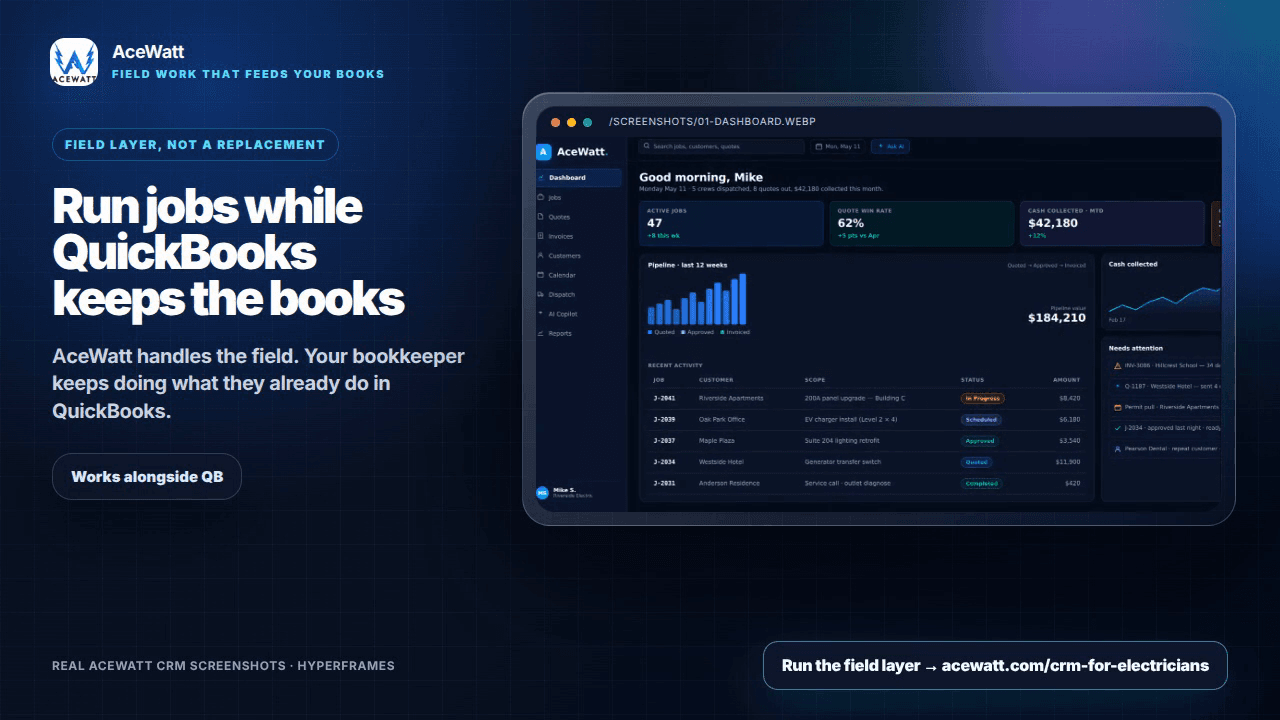
Most electrical contractors already run their books on QuickBooks; it's the default for small and mid-size trades. The pain shows up when you add field software for scheduling, estimating, and invoicing: suddenly you're typing the same customer, the same job, and the same invoice in two places. A proper electrical contractor QuickBooks integration removes that double entry so a job sold in the field flows cleanly into the accounting your bookkeeper already trusts. This 2026 guide compares the main field platforms that connect to QuickBooks, explains what "integration" actually covers, and shows how AceWatt fits in honestly, including where it works alongside QuickBooks rather than replacing your accounting software.
Quick answer: why QuickBooks integration matters for electrical contractors
QuickBooks is excellent at general ledger, payroll, and tax-ready financials, but it was never designed for the field side of an electrical business: dispatching techs, building load-based estimates, tracking permits, or generating a clean invoice the moment a panel upgrade is signed off. That gap is why contractors bolt on a field/CRM layer. The catch is simple: if that layer doesn't talk to QuickBooks, every customer record and invoice gets entered twice, reconciliation gets messy, and job-cost data lives in a different world than your P&L.
In short, QuickBooks integration matters because it keeps one source of truth. You sell and schedule in your field software, your bookkeeper closes the books in QuickBooks, and the numbers tie out without re-keying. For electrical contractors, where every job has materials, labor, permits, and sometimes change orders, clean handoff between the field system and accounting is what protects margin. If you're still deciding which accounting system pairs with your field software, our broader accounting software for electrical contractors guide covers that decision. Whether you use a purpose-built CRM for electricians or a broader trades platform, the integration quality determines whether your stack saves time or just creates a second inbox.
What QuickBooks does well for electrical contractors (and where it stops)
QuickBooks Online (and QuickBooks Desktop, still common in the trades) is a strong accounting foundation. Here's what it handles well for an electrical shop:
- General ledger and chart of accounts: income, COGS, overhead, and balance-sheet items organized the way your CPA wants them.
- Invoicing and payment acceptance, especially with QuickBooks Payments for card and ACH.
- Payroll and workers' comp tracking, important for licensed electricians.
- Sales tax, bank reconciliation, and financial reporting: P&L by class, balance sheet, and 1099 prep for subs.
Where QuickBooks stops, and where contractors start looking for integration, is the field and customer-facing workflow:
- Estimating that reflects material takeoffs, labor hours, and electrical-specific pricing catalogs.
- Scheduling and dispatch with truck rolls, on-call rotation, and route logic.
- Mobile documentation: photos of panels, load calculations, and permit-ready records.
- CRM: tracking leads, quotes, and follow-ups that turn a one-off call into a maintenance contract.
- Real-time job costing tied to committed material purchases and time cards from the field.
That list is exactly what a field platform (or an AI-powered CRM for contractors) is built to do. The goal of integration is not to replace QuickBooks; it's to make sure the field side feeds the accounting side cleanly.
What "QuickBooks integration" actually means
"QuickBooks integration" is a loose marketing term, and contractors get burned when they assume it means more than it does. Here's a practical breakdown of the four levels you'll see in 2026:
- Two-way sync. The gold standard. A customer, invoice, or payment created in the field platform appears in QuickBooks, and vice versa. Premium platforms advertise this, but it's complex; duplicates and mapping conflicts are common without careful setup.
- One-way push. The field software sends invoices, customers, or payments to QuickBooks, but nothing flows back. This covers 80% of what contractors need and is far less error-prone.
- One-way pull. QuickBooks customers or items are pulled into the field software so estimates use the right service items and tax rates.
- Export-based / works alongside. The field platform generates invoices, customer records, and job-cost reports that your bookkeeper imports or re-enters into QuickBooks (CSV, PDF, or manual). There's no live connection. It's slower and requires human reconciliation, but it's transparent, inexpensive, and works fine for smaller shops or contractors who want their bookkeeper to own every transaction.
> Important honesty note: AceWatt falls into the fourth category in 2026. AceWatt does not have a native, built-in, real-time QuickBooks sync. It produces invoices, customer records, estimates, and job-cost data that your bookkeeper uses to inform QuickBooks entries; the data flows through export and reconciliation by a person, not an automatic connection. If a live two-way QB sync is a hard requirement for your shop today, AceWatt isn't the right primary tool for that specific need (and we'll say so plainly). For contractors fine with a bookkeeper-owned workflow, AceWatt's field and AI features sit cleanly alongside QuickBooks.
The 2026 electrical contractor QuickBooks integration comparison
The table below summarizes how the main platforms used by electrical contractors stack up on the dimensions that matter for QB integration. Pricing is shown as rough ranges in USD per month and changes often, so check vendor sites for current pricing, and note that most quote per user and tier.
| Software | Sync Type | QB Online | Job Costing | AI Features | Electrical-Specific | Price Range |
|---|---|---|---|---|---|---|
| ServiceTitan | Two-way sync | Yes (built-in) | Strong (budget vs. actual) | Limited (some automation) | Good (trade-flavored) | Premium ($$$), often $300+/mo, check vendor |
| Housecall Pro | Two-way sync (QBO) | Yes | Basic-to-moderate | Limited | General trades | Mid ($$), often $49 to 200+/mo, check vendor |
| FieldPulse | Two-way sync (QBO) | Yes | Moderate | Limited | Moderate | Mid ($$), check vendor |
| Jobber | Two-way sync (QBO) | Yes | Basic | Limited | General trades | Mid ($$), often $69 to 300+/mo, check vendor |
| AceWatt | Export-based (works alongside QB) | No live sync (bookkeeper-led) | Reports/exports only | Strong (AI estimating, docs, CRM) | Purpose-built for electricians | Check /pricing |
A few honest takeaways from this comparison:
- If a native two-way QBO sync is non-negotiable, ServiceTitan, Housecall Pro, FieldPulse, and Jobber generally offer it, usually on mid-to-premium tiers and at higher price points than a leaner tool.
- Those platforms are broader trades tools, not electrical-specific, and their AI capabilities are relatively limited in 2026.
- AceWatt is the inverse profile: purpose-built for electrical contractors with strong AI estimating, documentation, and CRM, and priced to be accessible, but its QuickBooks relationship is export-based and bookkeeper-led, not a live connection.
The right choice depends on which side of that tradeoff your shop cares about most.
What most QuickBooks integrations get wrong for electrical contractors
Even platforms with genuine two-way sync often leave electrical contractors frustrated. The recurring gaps:
1. Mapping electrical service items correctly. Generic trades tools use service-item lists built for plumbers and HVAC. Electrical contractors need items tied to load calculations, NEC references, permit categories, and material catalogs. When the QB integration maps a "Service call" but not the breakdown of a panel upgrade, your job costing and COGS get blurred.
2. W-2 vs. subcontractor labor in job cost. Electrical work often mixes W-2 electricians with 1099 helpers or subs. Integrations that sync labor flat, or not at all, leave you without true margin-per-job visibility. See our write-up on electrical job costing software.
3. Material purchases and committed costs. A real job has material bought from supply houses (often on house accounts), returns, and credits. If the integration only syncs the final invoice, you lose committed-cost tracking essential for margin discipline.
4. Change orders and multi-phase projects. Commercial jobs accumulate change orders. Integrations that treat every sync as a single invoice make it hard to reconcile phased billing against progress payments in QuickBooks.
5. Duplicate customer records. Two-way sync without strict de-duplication rules creates ghost customers: the same property twice, once from the field app and once from QuickBooks.
6. Over-promising on "set it and forget it." Marketing implies you connect once and it runs. In practice, integrations need periodic review, mapping fixes, and reconciliation.
The honest framing: integration reduces double entry, it doesn't eliminate bookkeeping judgment. Your bookkeeper or CPA still owns the chart of accounts, tax treatment, and reconciliation, and you want them to. Keep that boundary; it protects you at audit and tax time.
How AceWatt works alongside QuickBooks
Let's be direct about what AceWatt does and doesn't do with QuickBooks, because we'd rather you know before you sign up.
On the field and CRM side, AceWatt provides:
- CRM built for electricians: leads, customers, property history, service agreements, and follow-ups. (/crm-for-electricians)
- AI estimating: generate estimates from job scope, load info, and materials. (electrical estimating software)
- Invoicing: create and send professional invoices tied to jobs, ready for your bookkeeper. (electrician invoice software)
- Scheduling and dispatch: assign techs, track job status, keep the field coordinated.
- AI documentation: panel photos, notes, and completed-work records that support invoicing and permits.
- Reports and job-cost exports: data your bookkeeper can use to reconcile material, labor, and margin per job in QuickBooks.
What AceWatt does NOT do:
- No native, live, two-way QuickBooks sync.
- No automatic push of invoices into QuickBooks Online or Desktop.
- No real-time QB connection or OAuth-style linkage.
How the two work together in practice:
The realistic workflow is that AceWatt owns the field (what got sold, what got installed, what's owed) and produces clean invoices, customer records, and job-cost reports. Your bookkeeper takes those outputs and enters or imports them into QuickBooks, reconciles against bank and supply-house feeds, and owns the financials. For a solo electrician or small shop with a part-time bookkeeper, this is usually a few extra minutes per job. For larger shops with high invoice volume and complex job costing, a true two-way QBO sync on a premium platform may be worth the cost, and AceWatt wouldn't be the right fit for that need today.
For the full feature set, browse AceWatt features and pricing. For broader context, our guide on how to manage an electrical contracting business walks through the workflows this fits into.
How to choose: by shop size and workflow
There's no universally "best" tool, only the best fit for your shop's size, complexity, and how much bookkeeping automation you need.
Solo electrician or contractor (1 to 2 trucks): You likely do your own books or hand a shoebox to a bookkeeper quarterly. A full two-way QBO sync is overkill. An export-based workflow (AceWatt for CRM, estimating, invoicing, and documentation, with your bookkeeper handling QuickBooks) is usually the leanest path. See our best CRM for electrical contractors rundown.
Small shop (3 to 8 techs): The inflection point. Invoice volume rises, and double entry starts to hurt. Two paths: (a) a mid-tier field platform with QBO two-way sync (Housecall Pro, FieldPulse, Jobber) if accounting automation is your priority, or (b) AceWatt alongside QuickBooks if your priority is electrical-specific CRM, AI estimating, and documentation, and your bookkeeper can absorb reconciliation. The right call depends on whether your bottleneck is bookkeeping hours or field/estimating speed.
Mid-market electrical contractor (10+ techs, commercial work): Job costing, change orders, and multi-phase billing dominate. Premium platforms with dependable two-way sync and strong job costing (ServiceTitan is the common reference) usually earn their price. AceWatt's export-based model is unlikely to scale to this volume without significant bookkeeping overhead, and we won't pretend otherwise.
A practical decision rule:
- Need live QBO two-way sync as a hard requirement? Shortlist ServiceTitan, Housecall Pro, FieldPulse, Jobber.
- Need electrical-specific AI CRM, estimating, and documentation, okay with a bookkeeper-led QB workflow? Evaluate AceWatt.
- Unsure? Start with the side that hurts most, bookkeeping time or field/estimating speed, and fix that first.
Setup and migration checklist
Whatever platform you choose, a clean setup saves months of cleanup. Use this checklist for an electrical shop moving field software alongside QuickBooks:
- Clean your QuickBooks first. Reconcile accounts, close out stale customers, confirm your chart of accounts and service-item list are current. A messy QB file poisons any integration.
- Standardize your service items. Map electrical service types (residential service, panel upgrade, commercial T&M, maintenance agreement) to QB items so invoices import cleanly.
- Decide on a de-duplication rule. Agree where the "master" customer record lives, usually QuickBooks for financials, field platform for job history.
- Set job-costing categories. Define labor (W-2 vs. sub), material, permit, and overhead buckets the same way in both systems.
- Run both in parallel for 30 days. Compare invoices and job-cost numbers and reconcile discrepancies before full cutover.
- Brief your bookkeeper or CPA. Whoever owns QuickBooks should understand the new workflow, the export cadence, and where their judgment is still required, especially with an export-based tool like AceWatt.
- Document the export cadence. Set a fixed rhythm (e.g., weekly invoice export, monthly job-cost report) so nothing drifts.
- Review mapping monthly at first. Check the first few months for miscategorized items, duplicates, and orphan customers.
This applies to AceWatt too: steps 1, 5, 6, and 7 matter most for keeping the two systems honest with each other.
FAQ
Does AceWatt integrate directly with QuickBooks?
No. As of 2026, AceWatt has no native, live QuickBooks connection, two-way sync, or automatic invoice push. AceWatt works alongside QuickBooks: it produces invoices, customer records, estimates, and job-cost reports that your bookkeeper enters or imports into QuickBooks and reconciles. If you need a real-time QBO sync, a dedicated trades platform is the better fit.
Do I need two-way QuickBooks sync, or is export-based enough?
It depends on volume and bookkeeping capacity. Solo and small shops often find export-based perfectly adequate; the bookkeeper owns every transaction, which is how most CPAs prefer it. Higher-volume shops, or those with complex multi-phase commercial jobs, usually benefit from two-way sync to cut reconciliation time. Evaluate your monthly invoice count and available bookkeeper time.
Can I use QuickBooks Payroll alongside a field CRM?
Yes. Payroll is a QuickBooks strength, independent of your field/CRM tool. Your field software tracks time and job assignments; your bookkeeper translates that into payroll. Keeping payroll and workers' comp in QuickBooks is a sensible setup regardless of which field platform you choose.
What's the cheapest way to avoid double data entry?
The lowest-cost option is usually an export-based CRM like AceWatt paired with a disciplined bookkeeper: one tool plus a little manual workflow. The next step up is a mid-tier platform with QBO sync, which costs more per month but cuts re-keying. The "cheapest" choice depends on whether you're optimizing for software spend or admin hours.
Will an AI CRM replace my bookkeeper?
No, and it shouldn't. AI CRM tools (AceWatt included) help with estimating, documentation, lead follow-up, and faster invoicing, but they don't replace professional accounting judgment for tax treatment, chart-of-accounts decisions, reconciliation, or audit support. Treat AI as a productivity layer on the field side, not a substitute for licensed financial expertise.
If your priority is a native QuickBooks sync, the premium trades platforms above are worth a look. If you want an electrical-specific, AI-powered CRM that works alongside QuickBooks, and you're comfortable with a bookkeeper-owned accounting workflow, try AceWatt free and see how its estimating, invoicing, scheduling, and documentation fit your shop. No credit card to start.
Related reading: Electrical Dispatch Software That Syncs With QuickBooks & Sage: 2026 Field Test.
Related reading: How to Sync Electrical Dispatch Software with QuickBooks: Field-to-Finance Workflow Guide.
Related reading: How to Sync Field Time Entries with QuickBooks for Electrical Contractors: Eliminate Double-Entry in 2026.
Related Reading
- How to Sync Your Electrical Estimating Software with Accounting Tools in 2026
- See how AceWatt vs FieldPulse handle QuickBooks sync → FieldPulse alternative
- How Electrical Contractors Cut 15+ Admin Hours/Week with Job Costing