

_Last updated: October 21, 2026. Re-verified the comparison table, QuickBooks sync scope, and pricing-visibility notes. No dollar figure here is a live quote; vendor pricing changes often, so confirm directly with each vendor._
Why Electrical Contractors Need Specialized Billing Software in 2026
Quick answer: Electrical billing software for contractors handles T&M service tickets, fixed-price commercial progress billing, and recurring maintenance agreements in one system, with mobile invoicing, change-order capture, and QuickBooks sync back to your accounting ledger. The best fit depends on crew size and whether your work is residential service, commercial bids, or both. For a feature-by-feature comparison of invoicing workflows, see our full guide to electrical billing software.
Electrical contracting runs on thin margins and tighter schedules. Between managing time-and-materials service calls, fixed-price commercial bids, and recurring maintenance agreements, the administrative burden of billing can consume 10 to 15 hours a week for a solo electrician, and it scales for multi-crew shops. Generic invoicing tools don't understand arc-fault circuit requirements, change-order workflows on a 480V panel swap, or the reality that a technician needs to generate an invoice from a ladder before leaving a customer's driveway.
The right electrical billing software solves this by embedding trade-specific logic directly into the billing engine. It handles progress billing on multi-phase commercial jobs, tracks retainage per contract terms (many commercial shops follow the AIA G702/G703 pay-application format), manages service agreement renewals with escalation clauses, and hands every transaction to QuickBooks Online so nothing is entered twice. The result: faster payments, fewer disputes, and field crews who spend less time on paperwork. For a full picture of the accounting side, see our guide to accounting software for electrical contractors, which covers job costing and chart-of-accounts mapping in more depth.
Key Features to Look for in the Best Electrical Contractor Billing Software
Any electrical billing software you shortlist should cover four capability areas before anything else matters. Here is what to check in each.
Multi-Model Billing Support
Electrical shops rarely operate on a single billing model. A residential service division runs T&M with trip charges and hourly rates; a commercial division bids fixed-price with progress payments; a maintenance division bills recurring monthly or quarterly agreements. The software must support all three simultaneously, without forcing workarounds like creating separate "companies" in QuickBooks.
Look for:
- T&M billing with configurable labor rates (journeyman, apprentice, foreman), material markup tables, and trip charge logic
- Progress billing tied to schedule of values, with automatic retainage calculation (typically 5 to 10%) and lien waiver generation
- Recurring agreements with auto-renewal, escalation clauses, and proration for mid-cycle starts
For shops that live mostly on service calls, the mobile T&M billing workflow explains how field capture should flow straight into the invoice.
Mobile-First Field Invoicing
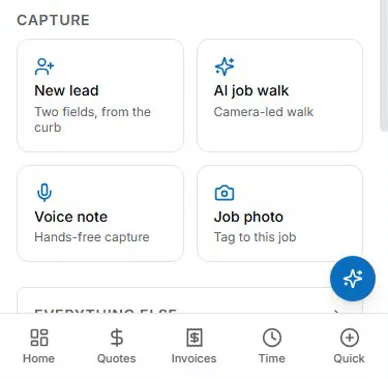
An electrician finishing a 200A panel upgrade at 4:30 PM on a Friday needs to send the invoice before pulling out of the driveway. Mobile invoicing is the difference between net-15 and net-45 payment terms. The app must work offline (job sites have dead zones), capture signatures, attach photos of completed work and permit sign-offs, and sync when connectivity returns. That is the baseline test for any electrical billing software you demo: invoice from the driveway, not the office. If mobile invoicing speed is your top priority, compare it against the options in our electrician invoicing app review before committing.
Change Order Management
Electrical scopes evolve. A "simple" EV charger install becomes a sub-panel upgrade, trenching, and utility coordination. Without structured change order workflows, shops leave 3 to 8% of project revenue on the table. The software should:
- Generate change orders from the mobile app with line-item pricing
- Require customer approval (digital signature) before work proceeds
- Automatically update the schedule of values and progress billing
- Track pending vs. approved changes for cash flow forecasting
Every approved change should flow straight into your electrical billing software’s schedule of values, so progress billing stays current without re-entry.
Job Costing Integration
Billing doesn't exist in a vacuum. Every invoice should feed job costing reports that compare estimated vs. actual labor hours, material costs, and subcontractor expenses by phase (rough-in, trim, finish, testing). This feedback loop is how estimators improve accuracy on the next bid. When you compare electrical billing software options, ask to see this loop live in a demo. Deeper job-cost coverage lives in our roundup of the best accounting software with job costing for electrical contractors.
Comparison of 7 Top Electrical Contractor Billing Software Tools for 2026
This comparison of billing software for electrical contractors is organized by shop type. Pricing, features, and AI capabilities change often; verify current vendor documentation, plan limits, and export options before choosing.
| Tool | Best For | T&M Billing | Progress Billing | Recurring Agreements | QuickBooks Online Sync | Mobile App | Starting Price (per user/mo) |
|---|---|---|---|---|---|---|---|
| ServiceTitan | Large shops (10+ trucks) | ✅ Advanced | ✅ AIA-style | ✅ Full suite | ✅ 2-way, real-time | ✅ iOS/Android | $398 + $50/truck |
| Housecall Pro | Residential service shops | ✅ Basic | ❌ Limited | ✅ Basic | ✅ 2-way | ✅ iOS/Android | $65 |
| Jobber | Small service shops (1 to 5) | ✅ Basic | ❌ No | ✅ Basic | ✅ 1-way (push) | ✅ iOS/Android | $49 |
| FieldEdge | HVAC/Electrical hybrid | ✅ Good | ✅ Basic | ✅ Good | ✅ 2-way | ✅ iOS/Android | $199 |
| Knowify | Commercial subcontractors | ✅ Good | ✅ AIA G702/703 | ❌ Limited | ✅ 2-way | ✅ iOS/Android | $186 |
| Simpro | Large commercial/industrial | ✅ Advanced | ✅ Full AIA | ✅ Advanced | ✅ 2-way | ✅ iOS/Android | Custom quote |
| Electric Ease | Electrical-specific, mid-market | ✅ Trade-specific | ✅ Trade-specific | ✅ Trade-specific | ✅ 2-way | ✅ iOS/Android | $149 |
Key differentiators among electrical contractor billing software tools:
- ServiceTitan and Simpro offer the deepest electrical-specific price books but require implementation budgets that can reach five figures. Verify current implementation costs directly with each vendor before budgeting.
- Knowify targets AIA progress billing and union payroll integration, which matters for prevailing-wage commercial work.
- Electric Ease was built for electrical contractors; its price book includes NEMA ratings, conduit fill calculations, and voltage-drop-aware material lists.
- Housecall Pro and Jobber lack progress billing, making them a weak fit for commercial GC work.
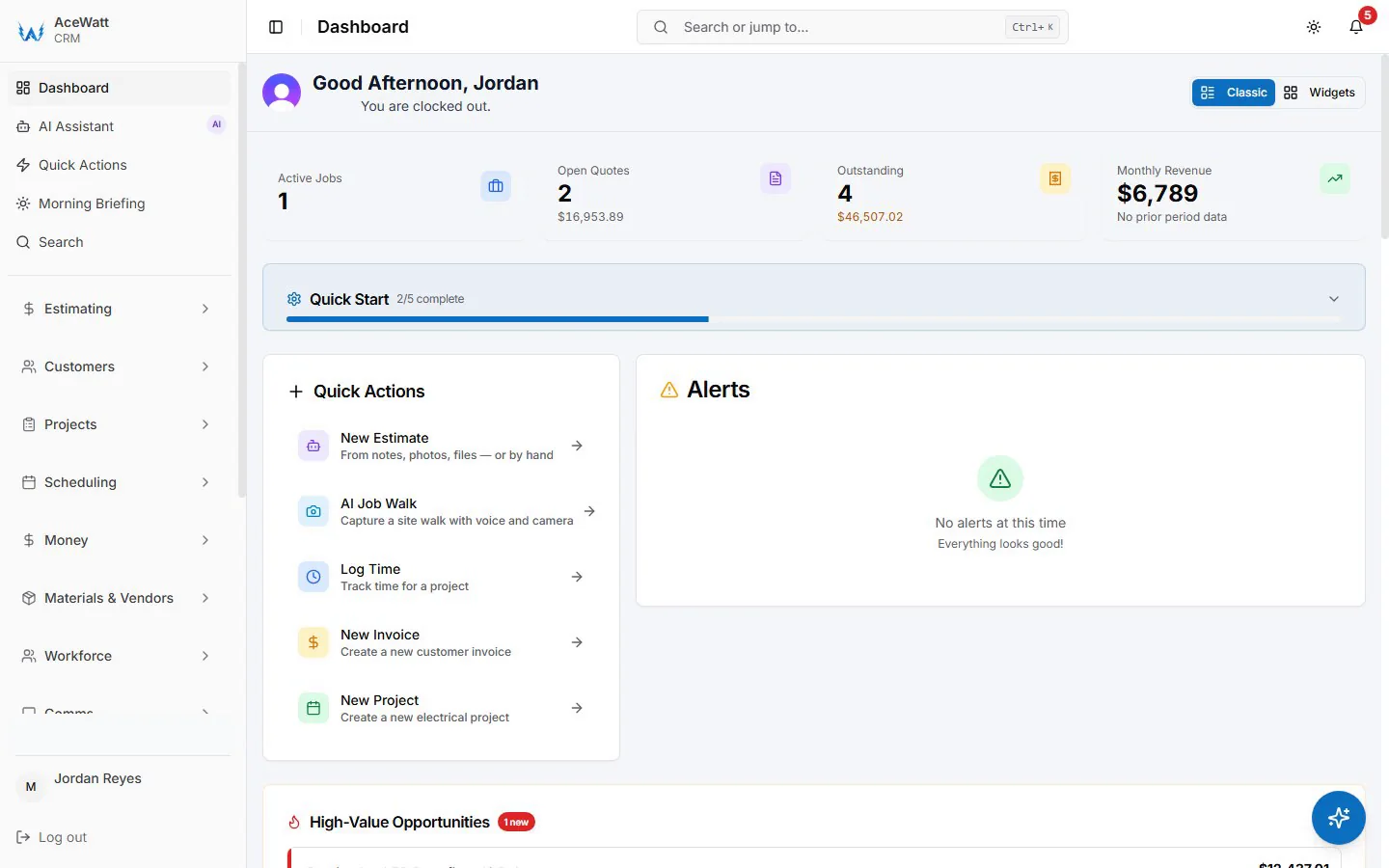
Where AceWatt fits: AceWatt is a mobile-first CRM and billing workflow for electrical contractors. Jobs move from AI job walk to quote to invoicing without re-entry, and follow-up on unpaid invoices is automated instead of manual. It is built for residential and light-commercial shops that bill T&M and fixed-price work and want billing tied to the job record rather than a separate accounting stack. For shops comparing electrical billing software on workflow fit rather than accounting depth, that job-record alignment is the thing to test in a demo. Its QuickBooks handoff today is QuickBooks-ready exports (an invoice-list spreadsheet and a QuickBooks-format payroll-hours CSV), not a native, real-time, bidirectional sync. Confirm the QuickBooks export scope with your accountant before purchasing any tool, since integration depth varies by plan and vendor.
This is a buying framework, not a universal ranking. Bring your actual jobs into each demo and test the workflow from field capture to reviewed invoice to follow-up. The National Electrical Contractors Association (NECA) publishes guidance on billing standards and labor units that contractors should reference alongside any software tool. The best electrical billing software for your shop is the row your actual jobs fit, not the longest feature list.
How AI-Powered CRM and Estimating Simplify Electrical Billing Workflows
The billing cycle starts before the first invoice: it starts at the estimate. AI-assisted estimating analyzes your historical job data (actual labor hours by phase, material waste factors, subcontractor performance) to generate quotes that reflect reality, not optimism, and it keeps that history inside your electrical billing software instead of a disconnected spreadsheet.
Example: Your last three 400A service upgrades averaged 32 labor hours, not the 24 your estimator templates assume. The AI flags this, adjusts the labor forecast, and recalculates the bid price to maintain your target margin. On an $18,000 job, that 8-hour correction at $95/hr fully burdened protects $760 of margin, if the underlying job history is clean, which is exactly what disciplined billing data provides.
AI-assisted CRM extends this to the sales pipeline:
- Lead scoring prioritizes commercial plan-and-spec bids over low-intent residential inquiries
- Automated proposal generation pulls approved estimate line items into branded, e-signable proposals with payment schedules
- Win/loss analysis identifies which estimators, job types, or competitors correlate with margin erosion
When the job is won, the estimate flows directly into job costing inside your electrical billing software, with no re-entry. Labor budgets, material POs, and subcontractor commitments are pre-populated. Field crews see phase budgets on their mobile app; project managers get variance alerts at 80% budget consumption. By the time the first progress bill is generated, the data is already validated. To see how the estimating side works end to end, read our walkthrough of AI estimating software for electrical contractors.
The Critical Role of QuickBooks Sync in Electrical Billing Software
QuickBooks Online dominates electrical contractor accounting. But a one-way "push" sync (invoice → QBO) creates more problems than it solves. For growing shops, true 2-way sync across the tools that offer it matters. Not every tool offers it, and the ones that don't (including AceWatt today) rely on exports instead; ask each vendor to demo the exact handoff before you buy. The question to put to every demo is simple: how does your electrical billing software talk to our ledger?
What 2-way sync actually delivers on the platforms that support it:
- Chart of accounts mapping: Revenue accounts (Service Labor, Commercial Labor, Material Sales, Equipment Rental) map automatically, with no manual journal entries
- Customer/vendor sync: New customers created in the field app appear in QBO instantly; vendor bills from suppliers (Graybar, CED, Elliott Electric) pull into job costing
- Payment reconciliation: Customer payments recorded in QBO (credit card, ACH, check) mark invoices paid in the field system, eliminating the "did we get paid?" phone calls
- Payroll integration: Labor hours approved in the field system push to QBO Payroll or Gusto with job cost codes attached, enabling true burdened labor costing
Real-world impact: A 12-truck shop spending 20 hours/week on manual QBO reconciliation could recover roughly 1,000 admin hours/year. At $35/hr burdened admin cost, that is meaningful annual savings; verify the math against your own bookkeeping data before buying.
Automated Follow-Up and Payment Tracking: Reducing Days Sales Outstanding
Electrical billing software earns its keep after the invoice goes out. Contractors carry disproportionate receivables risk. Commercial GCs pay net-60 to net-90; residential customers forget; maintenance agreements auto-renew but cards expire. Manual follow-up is inconsistent, and expensive.
Automated follow-up sequences change the math:
| Timeline | Action | Channel |
|---|---|---|
| Day 0 | Invoice sent with "Pay Now" link (card/ACH) | Email + SMS |
| Day 3 | Friendly reminder: "Invoice #1234 due in 7 days" | SMS |
| Day 10 | Past due notice with payment link | |
| Day 17 | Firm reminder + late fee notice (per contract terms) | Email + SMS |
| Day 30 | Final notice + collections escalation path | Certified mail + Email |
Typical pattern: Shops implementing automated sequences commonly report DSO improvements in the 30 to 40% range. On $2M annual revenue, reducing DSO by 20 days frees roughly $110,000 in working capital. Treat these as directional benchmarks, not guarantees; your terms, customer mix, and collection discipline drive the actual result.
Payment tracking dashboards show aging by customer, job, and invoice type. Project managers see which commercial GCs are chronic late payers and can adjust future bid pricing or payment terms accordingly. Integration with credit card processing (3.5% typical) and ACH (0.8% + $0.25) gives customers easy payment options, and gives you faster settlement. The U.S. Small Business Administration publishes cash-flow management guidance that pairs well with any receivables automation.
Cost vs. Value: What Electrical Contractors Should Expect to Pay
Electrical billing software pricing models vary, but the total cost of ownership includes more than the subscription:
| Cost Component | Range | Notes |
|---|---|---|
| Base subscription | $49 to $398/user/mo | Per-user vs. per-truck pricing matters for scaling |
| Implementation/onboarding | $0 to $50,000 | ServiceTitan/Simpro require certified implementation; others self-serve |
| Payment processing | 2.9% + $0.30 (cards) / 0.8% + $0.25 (ACH) | Negotiable at volume; some platforms bundle |
| Integrations | $0 to $200/mo | QuickBooks sync often included; API access may cost extra |
| Training/support | $0 to $500/mo | Phone support tiers vary; dedicated CSM at enterprise level |
Value calculation framework: any billing software for electrical contractors has to clear these four numbers:
- Admin hours saved × burdened hourly rate = direct labor savings
- DSO reduction × (annual revenue / 365) × cost of capital = working capital value
- Revenue capture from change orders, reduced underbilling, faster invoicing = top-line growth
- Margin improvement from estimating feedback loop = incremental net margin lift
A 5-person shop paying $300/mo for a mid-tier platform typically reaches break-even within the first quarter on admin savings alone, when the math is run on their own numbers. The margin and cash flow improvements are the upside.
Conclusion: Choosing the Right Electrical Billing Software for Your Shop
Choosing electrical billing software isn't about the most features. The right electrical billing software matches your business model, crew size, and growth trajectory.
Solo electricians and 2 to 3 truck shops: Prioritize mobile-first electrical billing software with T&M simplicity and low-friction QuickBooks sync. Housecall Pro or Jobber suffice if you're 100% residential service. Add Electric Ease if you're moving into light commercial.
Growing shops (4 to 10 trucks) with mixed residential/commercial: Need progress billing, change order workflows, and estimating feedback. FieldEdge, Knowify, or Electric Ease hit the sweet spot, implementable in weeks, not months.
Large commercial/industrial contractors (10+ trucks, prevailing wage, union): Require AIA billing, certified payroll, deep job costing, and ERP-grade integration. ServiceTitan or Simpro justify their cost through scale.
Universal non-negotiables for every tier:
- A QuickBooks path that matches how your bookkeeper actually works (native 2-way sync on the platforms that offer it, or a clean line-level export you reconcile on a schedule)
- Mobile offline invoicing with signatures
- Automated follow-up sequences
- Change order capture from the field
- Job costing that feeds estimating
Evaluate with a pilot: run one crew on the platform for 30 days. Measure invoice-to-payment time, admin hours, and change order capture rate. The data will make the decision obvious. When you're ready to compare pricing tiers across tools, see our electrical contractor software pricing overview.
The short version: the right electrical billing software for your shop is the one your crew will actually use in the field and your bookkeeper can reconcile without phone calls. Everything else is negotiation.
Frequently Asked Questions
What is the best electrical contractor billing software?
The best electrical billing software for your shop depends on your work mix. Residential service shops usually do well with mobile-first tools like Housecall Pro or Jobber; commercial subcontractors need AIA progress billing and certified payroll support from tools like Knowify or Simpro; growing mixed shops should evaluate FieldEdge, Electric Ease, or AceWatt against their actual job data in a 30-day pilot.
How much does electrical contractor billing software cost per month?
Electrical contractor billing software pricing falls into three broad bands. Entry plans for small service shops start around $49 to $65 per user per month. Mid-market electrical-specific tools run $149 to $199 per user per month. Enterprise platforms like ServiceTitan start near $398 plus per-truck fees and can carry five-figure implementation costs. Always verify current pricing with each vendor before budgeting.
Can electricians invoice from a mobile app?
Yes. Most modern electrical billing software for electricians includes iOS and Android apps that build the invoice on site, capture the customer's signature, attach photos, and send it before the tech leaves the driveway. Offline capture with later sync matters when job sites have poor signal.
Does electrical billing software replace QuickBooks for electrical contractors?
Usually no. Most electrical shops keep QuickBooks Online as the general ledger and use electrical billing software for field capture, invoicing, progress billing, and job costing. On tools that support it, that connection is a two-way sync; on others it's a scheduled export. Either way, the exceptions are enterprise ERP-grade platforms that include the full accounting stack.
What is AIA progress billing and do I need it?
AIA progress billing is the standardized pay-application format (G702/G703) used on many commercial jobs: you bill completed phases of the schedule of values, retainage is held back per contract, and lien waivers accompany each application. If you subcontract for commercial GCs, you generally need it; if you only do residential service work, you don't.
How does electrical billing software reduce days sales outstanding?
Automated follow-up sequences send reminders on a fixed schedule (day 3, day 10, day 17, day 30) with payment links, so no invoice waits on someone remembering to call. Payment tracking dashboards surface aging by customer and job so chronic late payers are visible before the next bid, not after. That follow-up automation is the core DSO lever in billing software for electrical contractors.
How is electrical billing software different from generic invoicing tools?
Electrical billing software understands trade-specific workflows that generic tools don't: T&M tickets with labor-rate tiers and material markup, progress billing against a schedule of values with retainage, change-order capture from the field, and job costing that feeds your next estimate. Generic invoicing apps stop at "send a bill." For shops doing residential T&M work only, that can be enough, which is exactly what the best electrician apps roundup covers. For mixed residential-commercial work, the trade-specific features are where the money is.
Your billing system should be a profit center, not a cost center. Choose accordingly.
Related Reading
- See all CRM features for electrical contractors in one platform.
- electrical contractor billing software for progress invoicing and AIA
- automating AIA progress billing
- turning service calls into maintenance contracts
- turning service calls into recurring revenue
- Jobber vs. AceWatt for Electrical Contractors (2026)
- 7 Best Electrical Contractor Invoice Software (2026 Picks)
- Electrician Invoice Apps in 2026: The Complete Guide
- which app electricians should pick in 2026
- Best electrical contractor billing software tools: billing-side pricing context for the same tools