

Meta description: Compare the best electrical quote apps for 2026. Estimate jobs, send quotes, collect approvals, and invoice faster with electrician-friendly tools.
Best Electrical Quote App for 2026: Estimates & Invoicing
An electrical quote app lets electricians build assembly-based estimates, send quotes customers can e-sign by link, collect deposits, and turn accepted quotes into invoices without re-typing line items. For US contractors in 2026, the strongest option covers the full quote-to-cash cycle: estimate, approval, invoice, payment, and job costing. Trade-specific platforms handle labor hours, material markup, and code-driven scopes that generic invoice makers ignore.
If you are shopping for an electrical quote app in 2026, you are not looking for a PDF generator. You want to quote a panel upgrade from the driveway before you leave the site, get a signature and a deposit before you order a 200A service package, and have the invoice drafted when the job wraps. That is the bar this comparison uses.
Comparison: the best quote apps for electricians in 2026

| App | Best for | Quote-to-invoice workflow | Offline mode | Pricing model | Integrations |
|---|---|---|---|---|---|
| AceWatt | Solo electricians to multi-crew electrical shops | Accepted quote auto-creates a draft invoice with line items copied over | Field notes, clock-ins, leads, and expenses queue offline | $49/month Starter, $99/month Growth, $199/month Scale | QuickBooks-ready exports, Stripe payments |
| ServiceTitan | Large residential and commercial contractors | Strong, but heavy setup and long onboarding | Limited | Quote-based, typically $100+ per technician per month with annual contracts | Broad marketplace |
| Housecall Pro | Small residential service businesses | Good, but templates are trade-agnostic | Partial | Per-user monthly tiers | Payments, some accounting |
| Jobber | Home service shops doing multiple trades | Quote converts to invoice, but no electrical assemblies | Partial | Per-user monthly tiers | QuickBooks, payments |
| McCormick Systems | Commercial estimators doing takeoffs | Excellent estimates, weak invoicing handoff | No | Seat licenses, often $1,000+ per year | Limited accounting |
| Invoice Simple / Wave | Side-work and one-off jobs | Invoice-first; estimating is a blank form | No | Free to low monthly | Payment processors only |
The pattern holds across categories. ServiceTitan and Jobber get you a nice workflow, but you assemble electrical line items by hand because their templates were built for plumbing and HVAC. McCormick produces a strong estimate, then you retype it into your invoicing tool. Generic invoice makers collect money but know nothing about labor units, material markup, or assemblies.
Must-have features in an electrical quote app
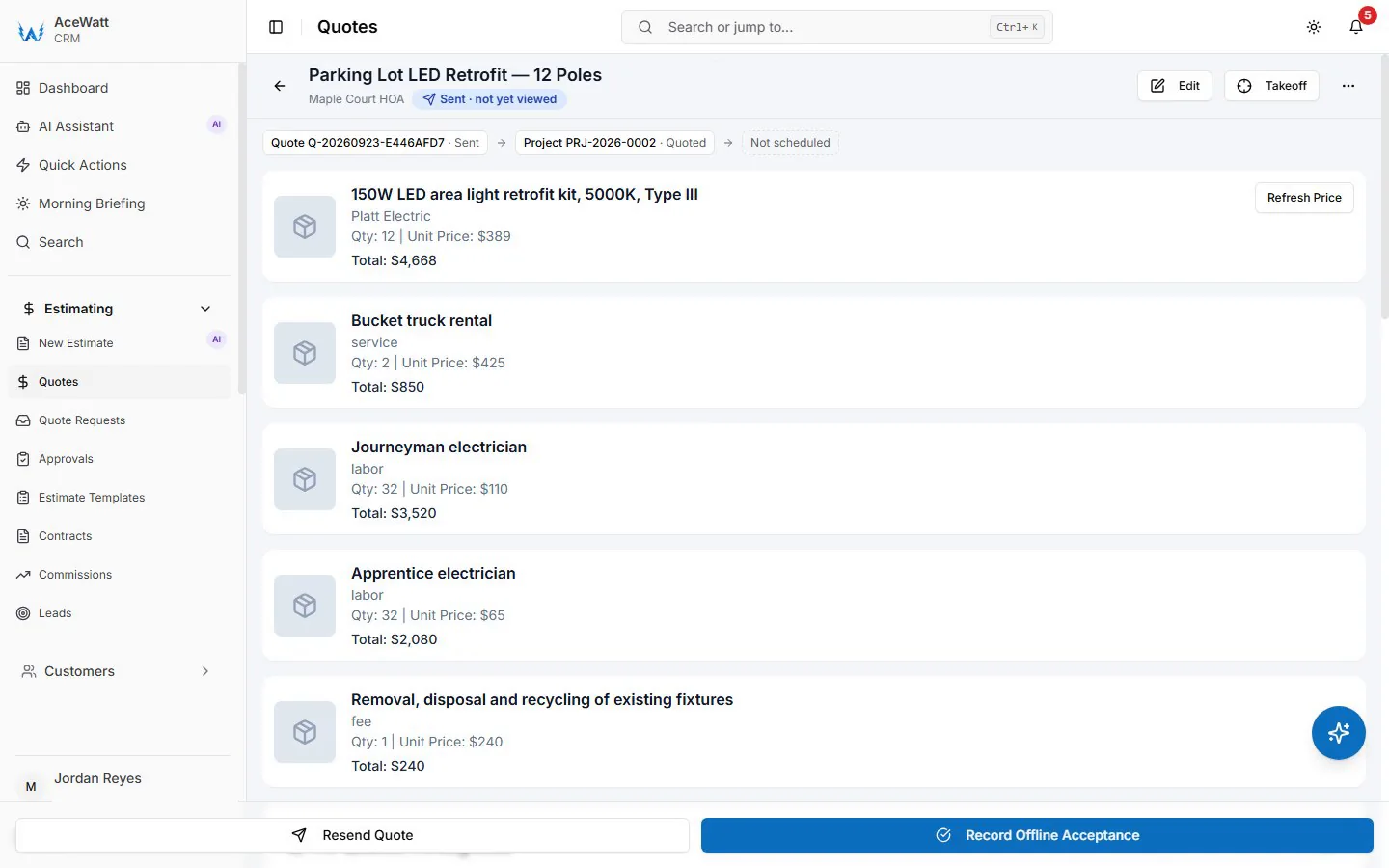
Quote builder with labor units and assemblies
A serious electrical estimating tool builds quotes from assemblies, not blank lines. A "200A panel replacement" assembly should carry its own labor hours and material list so you are not re-deriving a 6-hour job from scratch every time. Test any candidate app by building one assembly and reusing it on a second quote. If you cannot save labor hours against a template and pull it forward, you are paying for a word processor with a logo.
For a deeper walkthrough of the approach, our guide on how to estimate electrical work breaks down labor units, overhead recovery, and markup math.
Cost libraries with material markup
Material prices move. Copper and aluminum conductor pricing has swung enough since 2024 that quoting from last year's spreadsheet loses money. Your app should store material at cost and apply a markup percentage at quote time, so a 35% markup on an $865 material list becomes $1,168 of sell price without a calculator. Update supplier pricing on a set schedule, monthly at minimum, and spot-check your five most-quoted assemblies before every big bid. For shops buying at scale, our electrical distributor software guide for 2026 covers the purchasing side.
E-signature and deposit requests
A quote is not a job until it is signed and funded. Look for customer e-signature by link and the ability to email a deposit invoice with a pay link the moment the customer accepts. In AceWatt, customers e-sign quotes and contracts from an emailed link, and acceptance can trigger a deposit invoice payable online by card.
Change orders and photos
Residential and light commercial work changes mid-job. A written, priced change order protects both sides: the customer knows what the attic rewiring adds, and you have documentation when the invoice runs past the original number. Keep change order approvals inside your company before the crew proceeds, and photograph conditions before you start. A picture of the existing Zinsco panel before replacement is your best defense in a dispute, and the NEC requires work in existing buildings to be assessed for safe installation, which you can verify against the NFPA's free NEC access.
Offline site notes
Job sites have dead zones: basements, mechanical rooms, new construction shells with no service yet. The app should queue field data when signal drops and sync it when service returns. AceWatt queues clock in and out, new leads, field notes, expenses, and project notes without a connection.
The quote-to-cash workflow
The whole point of an electrical quote app is closing the loop from estimate to money in the bank:
- Estimate. Build the quote from assemblies against your current pricebook. AceWatt's AI estimating drafts a quote for review from a job walk, photos, a typed description, or an uploaded PDF plan set.
- Approval. Customer e-signs from an emailed link. No printing, no scanning, no "I'll mail it back Monday."
- Invoice. When the customer accepts, AceWatt creates a draft invoice with the quote's line items copied over. Nothing is re-typed.
- Payment. Customers pay online by card, with ACH available when the contractor's Stripe account has it enabled. AceWatt emails automatic reminders for overdue invoices at 1, 7, 14, and 30 days past due.
- Job costing. Track logged hours and material against the quoted amount. Techs clock in and out from their phones, and AceWatt records whether they were at the job site, so the hours you pay match the hours you sold.
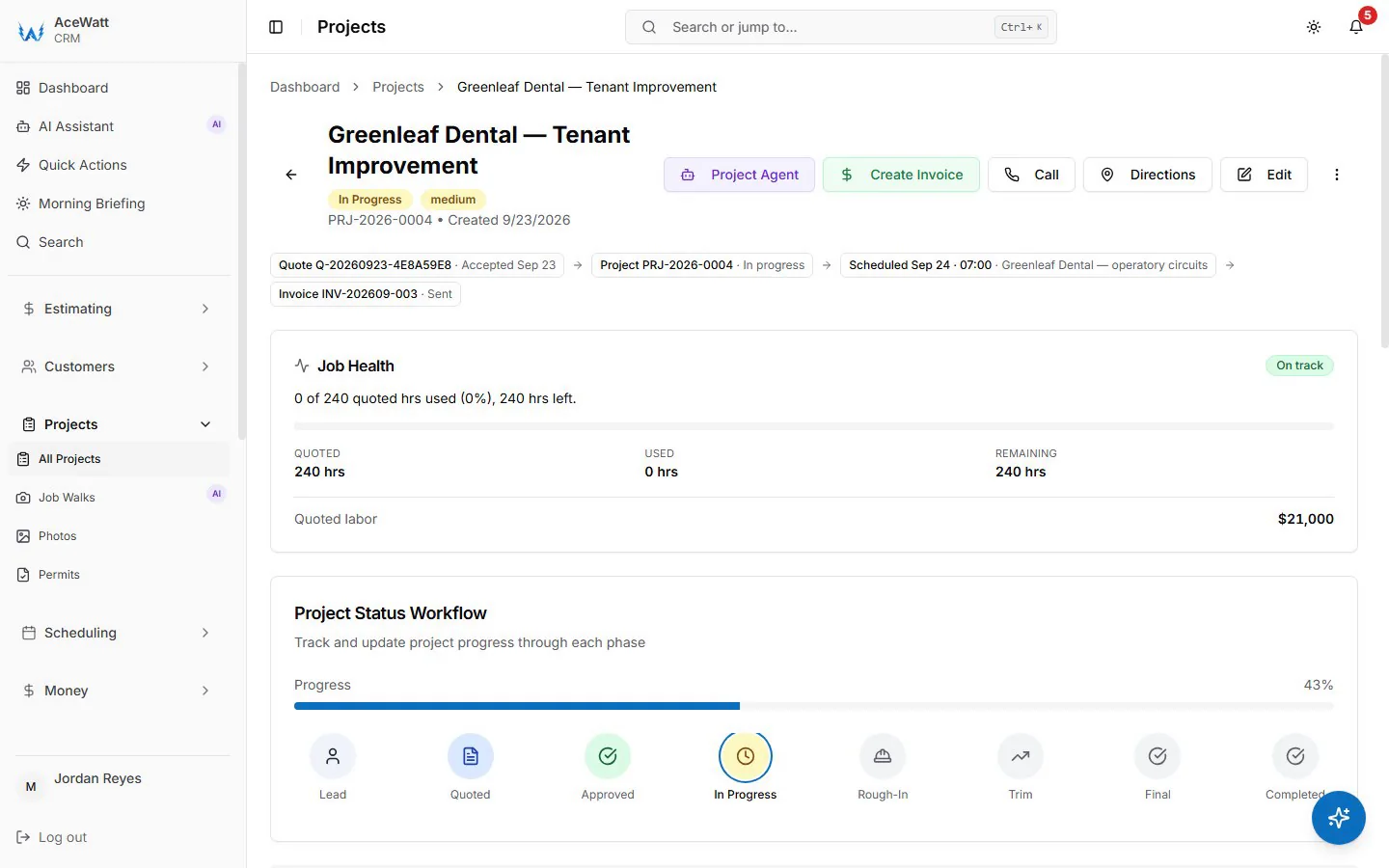
On the money side, our guide to electrical contractor invoicing software covers invoice structure, payment terms, and follow-up timing in more depth.
Three real quotes, built in an app
200A panel upgrade: $4,800
A common residential upgrade, and a job where quoting speed wins the work. Line items from an assembly:
| Item | Material cost | Labor |
|---|---|---|
| 200A main breaker panel, 40-space | $385 | 6.0 hrs |
| Feeder wire 4/0 AL SER, 15 ft | $140 | included |
| Ground rod and bonding hardware | $65 | 0.5 hrs |
| Permits and inspection | $180 | 0.5 hrs |
| Misc. breakers and connectors | $95 | included |
Material subtotal: $865. With a 35% material markup: $1,168. Labor at $95/hr for 7 hours: $665. Add overhead, disposal of the old panel, and a service call buffer, and the sell price lands at $4,800. The customer e-signs on the porch, a 20% deposit invoice ($960) goes out with a pay link before the truck leaves, and acceptance converts the quote to an invoice automatically. Cash flow improves because you fund material with the deposit instead of your credit line, and approvals that used to take a week of "let me talk it over" happen the same day.
Permit note: a service upgrade requires a permit and inspection in virtually every US jurisdiction, and the work must meet the current National Electrical Code, which you can access free online through the NFPA.
EV charger install: Level 2 home charging
A 48A wall unit on a 60A circuit: 6/3 NM-B or THHN in EMT, a 60A double-pole breaker, and a load calculation if the service is marginal. The US Department of Energy's Alternative Fuels Data Center documents Level 2 residential charging requirements, and NEC Article 625 governs the installation. Quote it as an assembly with a load-calc line item, and require e-signature before scheduling, because the scope changes if the panel needs a feeder upgrade. Add the load calculation to the quote itself: it shows the homeowner the work behind the number and justifies the price against the guy quoting from a flyer.
Troubleshooting call: time and materials
No formal quote, but the app still matters. Log the diagnostic hour, the replaced dimmer or receptacle at cost, and invoice from the truck before you drive away. Time-and-materials calls are where margin leaks: if the diagnostic hour goes unbilled twice a week at $95/hr, that is nearly $10,000 a year given away. Invoice on site and the check clears before the ledger closes on the job.
Choosing by shop size
Solo electricians should weigh the quote-to-invoice handoff most heavily, because every re-typed line item comes out of evenings. Growing shops with two to five techs should prioritize dispatch and job costing alongside quoting, since margin problems at that size come from unbilled hours, not bad estimates. Larger operations need role-based access and per-user pricing that does not punish headcount. AceWatt's tiers map to that curve: Starter at $49/month for 1 user, Growth at $99/month for up to 5, and Scale at $199/month with unlimited users, each starting with a 14-day trial. If you are also comparing estimate presentation formats, our electrical proposal software guide covers good-better-best options, and the 2026 electrical contractor invoicing software guide reviews invoicing tools side by side.
FAQ
What is the best app to give electrical quotes?
The best app is built for electrical work specifically: assembly-based estimating, material markup on quotes, e-signature by link, and automatic quote-to-invoice conversion. AceWatt covers these with AI estimating that drafts quotes for review from job walks, photos, descriptions, or PDF plan sets using your own pricebook. ServiceTitan is strong for large shops but priced per technician with long contracts; AceWatt starts at $49/month for solo electricians.
Can I create an electrical estimate from my phone?
Yes. AceWatt's AI Job Walk lets you walk a site with your phone, dictating notes and snapping photos, and generates a report with material suggestions. The quote itself is then built and reviewed in the app against your pricebook and assembly templates.
What should an electrical quote include?
Line items for materials and labor with hours, your material markup applied, permit and inspection costs where required, payment terms including the deposit percentage, an expiration date, and space for the customer's e-signature. For panel upgrades and EV work, include the code basis of the scope, such as NEC Article 625 for EV charging equipment. The NEC is available free online through NFPA.
How do electricians turn quotes into invoices?
In AceWatt, acceptance does the work. When a customer accepts a quote, a draft invoice is created with the quote's line items copied over, so nothing is re-typed. A deposit invoice can be emailed with a pay link at the same time, and overdue invoices get automatic email reminders at 1, 7, 14, and 30 days past due.
Is there a free electrical quote app?
Free apps like Wave and Invoice Simple exist, but they are generic invoice makers with no labor units, assemblies, or markup logic. AceWatt has no permanent free tier, but offers a 14-day trial plus a 30-day money-back guarantee on your first subscription payment, so you can run real jobs through the workflow before committing.
Next step
Run your next three quotes through AceWatt during the 14-day trial: one panel upgrade, one EV charger, one service call. Compare the time from site walk to signed, deposited quote against your current process. Start the free trial or book a demo to see the quote-to-invoice workflow on your own job types first.
{
 "@context": "https://schema.org",
 "@type": "FAQPage",
 "mainEntity": [
 {
 "@type": "Question",
 "name": "What is the best app to give electrical quotes?",
 "acceptedAnswer": {
 "@type": "Answer",
 "text": "The best app is built for electrical work specifically: assembly-based estimating, material markup on quotes, e-signature by link, and automatic quote-to-invoice conversion. AceWatt covers these with AI estimating that drafts quotes for review from job walks, photos, descriptions, or PDF plan sets using your own pricebook."
 }
 },
 {
 "@type": "Question",
 "name": "Can I create an electrical estimate from my phone?",
 "acceptedAnswer": {
 "@type": "Answer",
 "text": "Yes. AceWatt's AI Job Walk lets you walk a site with your phone, dictating notes and snapping photos, and generates a report with material suggestions. The quote itself is then built and reviewed in the app against your pricebook and assembly templates."
 }
 },
 {
 "@type": "Question",
 "name": "What should an electrical quote include?",
 "acceptedAnswer": {
 "@type": "Answer",
 "text": "Line items for materials and labor with hours, your material markup applied, permit and inspection costs where required, payment terms including the deposit percentage, an expiration date, and space for the customer's e-signature. For panel upgrades and EV work, include the code basis of the scope, such as NEC Article 625 for EV charging equipment."
 }
 },
 {
 "@type": "Question",
 "name": "How do electricians turn quotes into invoices?",
 "acceptedAnswer": {
 "@type": "Answer",
 "text": "In AceWatt, when a customer accepts a quote, a draft invoice is created with the quote's line items copied over, so nothing is re-typed. A deposit invoice can be emailed with a pay link at the same time, and overdue invoices get automatic email reminders at 1, 7, 14, and 30 days past due."
 }
 },
 {
 "@type": "Question",
 "name": "Is there a free electrical quote app?",
 "acceptedAnswer": {
 "@type": "Answer",
 "text": "Free apps exist but are generic invoice makers with no labor units, assemblies, or markup logic. AceWatt has no permanent free tier, but offers a 14-day trial plus a 30-day money-back guarantee on your first subscription payment."
 }
 }
 ]
}
Related Reading
- Electrician invoicing app comparison: what to check before you commit to an invoicing tool.
- Best apps for small electrical crews in 2026: the full field guide for 1-10 tech shops.
- Electrical estimating software: how dedicated estimating tools stack up.