

How to Create an Electrical Contractor Invoice With Materials Markup and Permit Fees
An electrical contractor invoice with materials markup and permit fees should itemize labor, material cost, applied markup, and permit charges as separate lines so the customer sees exactly what they are paying for. Build the markup into the approved quote before work starts, decide whether permit fees are pass-through or billable with markup, then convert the accepted quote into an invoice. AceWatt handles this flow end to end, from AI-drafted estimates to deposit invoices and overdue-invoice tracking.
1. The 2026 Billing Rule for Electrical Materials Markup and Permit Fees
The single most common billing mistake electricians make is invoicing for materials at raw cost after the job is done, with no markup agreed to in advance. That practice quietly eats your margin. A service call that uses $180 in materials from the supply house, billed at $180, means you financed the customer's job, handled the pickup, absorbed the risk of returns and defects, and earned nothing for it.
Material markup is not padding. It covers procurement time, truck stock carrying costs, supplier price volatility, warranty exposure, and the simple fact that tying up your cash in someone else's project deserves a return. Typical residential and light-commercial electrical contractors apply material markup somewhere in the range of 20 to 50 percent over cost, with many shooting for a total "effective" materials margin of 25 to 35 percent once supplier discounts and job-lot pricing are factored in. The right number for your shop depends on your overhead structure, which is worth calculating deliberately rather than copying from a forum.
Permit fees are the second half of the rule. Most jurisdictions require permits for panel upgrades, service changes, new circuits beyond like-for-like replacement, and most commercial work. The fees themselves are set by your city or county building department and vary widely: a residential rewire permit in one jurisdiction might run $150 while a comparable permit elsewhere runs $600 or more. Whatever the amount, the fee has to appear on paper somewhere, because a customer who receives a surprise $400 permit line on a final invoice after never discussing it will dispute it.
The 2026 rule, then, is simple: every dollar of material cost, markup, and permit spend that the customer will owe gets written into the quote, line by line, before the job is scheduled. If you want to go deeper on pricing strategy, see our comparison of time and materials versus fixed price billing.
2. Build the Quote With Labor, Material Cost, Markup, and Permit Lines
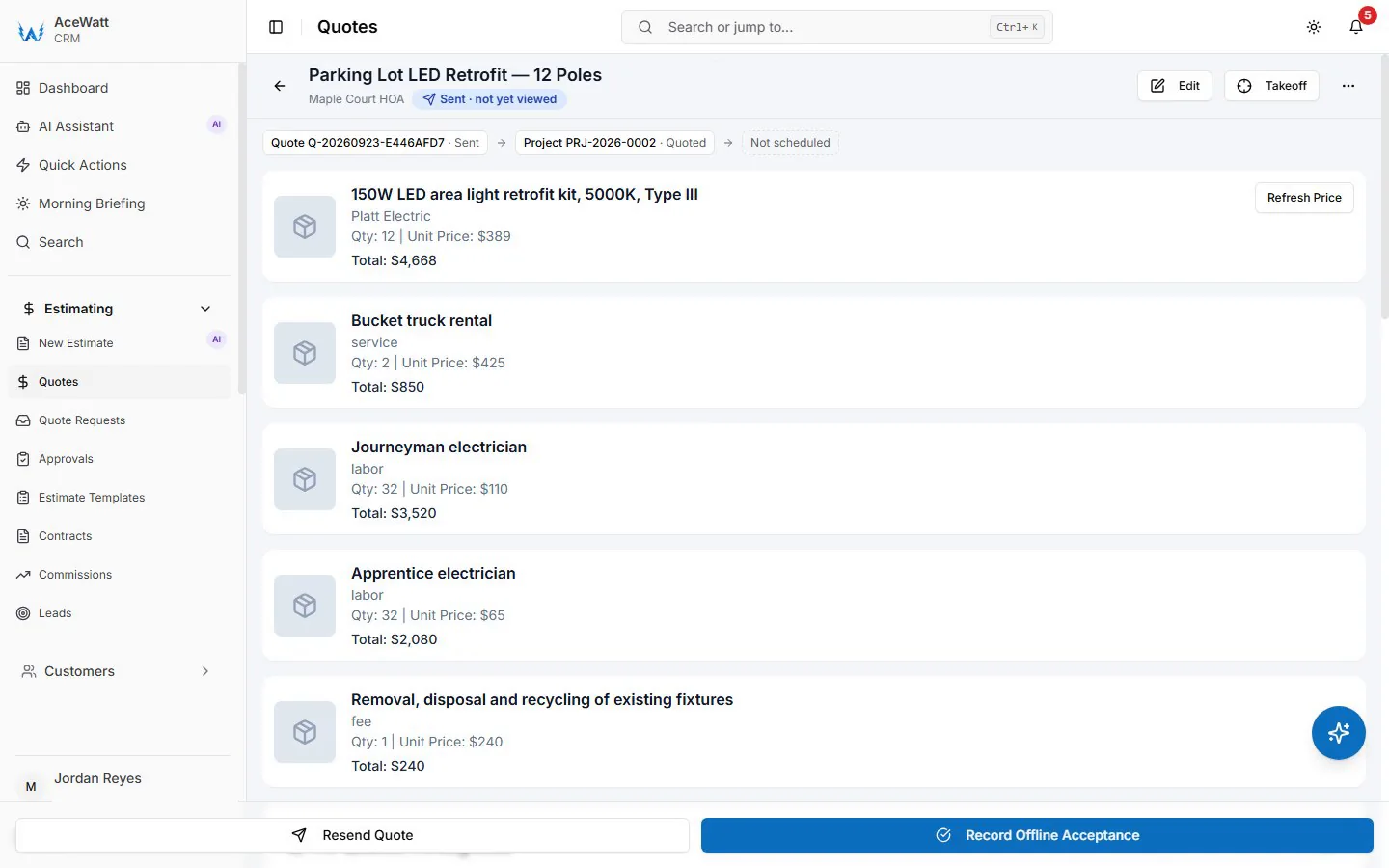
A clean electrical quote has four kinds of lines, and mixing them is what creates invoicing disputes later.
Labor lines. Price labor by the hour using one hourly rate per job title, or fold labor into assembly pricing. AceWatt uses a single hourly rate per job title, so a master electrician and an apprentice carry distinct rates and your quote reflects who will actually be on site.
Material cost lines. Log materials at your actual cost from your supplier, whether that is a 200A meter-main combo, 12/2 NM-B by the 250-foot roll, AFCI breakers, or device plates. Logging at cost keeps your internal numbers honest and makes margin visible on every job. Our guide on building an electrical contractor price book covers how to structure assemblies so common installs price themselves.
Markup lines. In AceWatt, markup applies on quotes, not invoices. That is actually the correct place for it. The customer approves the marked-up price once, and the invoice that follows carries the same numbers. This is why building markup into the quote line items before approval matters so much: it is your only clean opportunity to set the price the customer agrees to.
Permit lines. Give permits their own line, never buried inside a lump-sum labor line. Label it clearly, for example "Electrical permit, City of X, per municipal fee schedule."
AceWatt's AI estimating drafts the quote for your review from a job walk, photos, a typed description, or an uploaded PDF plan set, using your company's pricebook and assembly templates. On a 3,000-square-foot new construction takeoff, that means the system proposes fixture counts, homerun counts, and panel gear from the plans, applies your stored material costs and markup, and hands you an editable draft instead of a blank page. You review, adjust, and send. If you are comparing tools, our 2026 survey of electrical contractor software trends shows what shops are actually adopting and paying for.
3. How to Decide Whether Permit Fees Are Pass-Through or Billable With Markup
Permit fees can be billed three ways, and you should pick one policy and apply it consistently.
Pass-through at cost. You pay the permit, then bill the exact amount with zero markup. This is the goodwill option. It is common on residential jobs where the fee is small and the relationship matters more than the margin. Show the actual receipt amount if the customer asks.
Billable cost plus markup. You bill the permit fee with the same markup as materials, treating it as procurement: you drove to the building department, filed the application, and scheduled the inspection. A $250 permit at 25 percent markup bills at $312.50. This is defensible on commercial and T&M work where every hour of administrative time has a cost. Note that some jurisdictions and general contractor contracts prohibit markup on permits; on public work and many commercial GC agreements, pass-through at cost is contractually required, so read the contract before you mark anything up.
Folded into the fixed price. On fixed-price residential jobs, many contractors simply include the permit in the job total without a separate line. This keeps the quote clean, but you should still note "permit included" so the customer knows inspections are covered.
Two compliance points worth knowing. First, only a licensed electrical contractor or someone authorized by the permitting jurisdiction can typically pull an electrical permit; homeowners can pull owner-occupant permits in many states, but that creates liability questions when you perform the work. Second, permit fee schedules are public. The ICC (International Code Council) family of codes, adopted by most US states and municipalities, drives the inspection requirements behind these fees, and you can verify code adoption and permitting rules through your state's electrical board or the ICC and your local building department, for example through resources like the NFPA 70 National Electrical Code that most permit inspections are enforced against.
Whichever policy you choose, put it in the quote as its own line item in AceWatt so the customer approved it before day one.
4. Turn an Accepted Electrical Quote Into an Invoice Without Retyping

The old workflow goes like this: write the estimate in one tool, retype it into an invoice template, retype the materials, recalculate tax, and hope nothing got lost between documents. Every retyped line is a chance to underbill.
AceWatt removes that step. When a customer accepts a quote, AceWatt creates a draft invoice with the quote's line items copied over. Labor hours, marked-up materials, and the permit line all carry across exactly as approved. You review the draft, adjust for any approved changes, and send it.
Acceptance itself is also clean. Customers can e-sign quotes and contracts by link from the AceWatt customer portal, so you have a record of approval tied to the exact pricing the customer saw. Internal change orders are approved inside the company, so if the panel upgrade turns into a service relocate mid-job, you document and approve the change on your side before it hits paper.
For shops still comparing options, our rundown of the 7 best electrical contractor invoice software tools for 2026 covers the field, including where most generic invoicing apps fall short on trade-specific line items.
5. Use Deposit and Milestone Billing for Larger Electrical Jobs
A $900 service call can be invoiced on completion. A $22,000 whole-house rewire or a $60,000 tenant improvement should not be, because you will be financing two months of material and labor out of pocket.
Two mechanisms cover this.
Deposits. When a customer accepts a quote, AceWatt can create a deposit invoice and email it with a pay link. Customers pay online by card, and by ACH bank payment when the contractor's Stripe account has it enabled. A 30 to 50 percent deposit on large residential jobs is standard practice and covers your first material order. Card processing fees are the tradeoff for same-week cash; ACH fees are lower, which is why many contractors list ACH as the preferred option on larger jobs.
Milestone billing. AceWatt supports invoicing a project by percentage of completion. A common structure on a residential rewire: 40 percent deposit, 30 percent at rough-in inspection, 30 percent at final. On commercial TI work, monthly billing by percentage complete keeps cash flowing across a multi-month schedule. Note that AceWatt's milestone billing is percentage-based; it does not do retainage tracking or AIA G702/G703 pay applications, so GC projects requiring formal pay apps need those prepared alongside.
6. Track Overdue Electrical Invoices and Aging in 2026
Sending the invoice is half the job. The other half is getting paid, and aging receivables are where small electrical shops quietly bleed.
AceWatt tracks the full pipeline from quote to job to invoice to paid, and marks unpaid invoices as overdue automatically. The invoice aging report buckets receivables at 0 to 30, 31 to 60, 61 to 90, 91 to 120, and 120+ days. If your aging report shows $14,000 sitting in the 60-plus buckets, that is next week's payroll problem, visible before it becomes one.
AceWatt also emails automatic reminders for overdue invoices at 1, 7, 14, and 30 days past due. Reminders are email only, not SMS, but the cadence is usually enough: most residential customers pay after the first or second reminder because they simply forgot, and a consistent automated sequence means no invoice goes silent because you were on a ladder all week.
A practical policy worth adopting in 2026: no new job is scheduled for a customer with an invoice older than 60 days. The aging report makes that rule enforceable because the data is in front of you.
7. Keep Accounting Records With QuickBooks-Ready Exports
Your bookkeeper needs clean numbers at month end. AceWatt provides QuickBooks-ready exports: an invoice-list spreadsheet and a payroll-hours CSV in QuickBooks layout. Techs clock in and out from their phones, and AceWatt records the location and flags whether the tech was at the job site, so the payroll-hours export reflects verified time rather than remembered time.
Full QuickBooks sync is in development. Today, the export workflow is: pull the invoice list, pull the payroll CSV, hand both to your bookkeeper or import them into QuickBooks. For shops evaluating the broader toolchain, our guide to electrical contractor accounting software with job costing explains how job-level cost tracking should connect to your general ledger, and the payroll and labor cost guide breaks down what fully burdened labor really costs per hour.
Plan-wise, this workflow runs on any AceWatt tier. Starter at $49/month covers one user with core CRM, the AI quote builder, and scheduling. Growth at $99/month for up to 5 users adds AI Job Walk, the AI document scanner, commission tracking, and the customer portal. Scale at $199/month supports unlimited users. Every plan carries the 30-day money-back guarantee on the first subscription payment, and the 14-day trial lets you run a real invoice through the system first.
FAQ
How much should I mark up materials on an electrical invoice?
Most residential and light-commercial electrical contractors apply 20 to 50 percent markup on material cost, targeting an effective materials margin of roughly 25 to 35 percent. The correct number for your shop depends on your overhead, so calculate it from your own numbers. In AceWatt, markup applies at the quote stage, so the marked-up price is what the customer approves and what appears on the invoice.
Should permit fees be billed at cost or with markup?
On residential work, either is acceptable if the customer approved it in the quote. On commercial and public projects, many GC contracts and jurisdictions require permits to be passed through at cost with no markup, so check the contract first. Whatever you choose, list the permit as its own line item before the job starts.
Can customers pay my electrical invoices online?
Yes. When a customer accepts a quote in AceWatt, the system can create and email a deposit invoice with a pay link. Customers pay by card online, and ACH bank payment works when the contractor's Stripe account has it enabled.
How does AceWatt handle invoicing on long projects?
AceWatt supports milestone billing by percentage of completion, so a rewire or tenant improvement can be billed at deposit, rough-in, and final stages rather than in one lump sum. It does not handle retainage or AIA G702/G703 pay applications, so formal GC pay apps need to be prepared separately.
Does AceWatt sync with QuickBooks?
Not yet. AceWatt offers QuickBooks-ready exports today: an invoice-list spreadsheet and a payroll-hours CSV in QuickBooks layout. A full QuickBooks sync is in development.
Start a 14-day AceWatt trial and build your next quote with labor, material markup, and permit lines already in place. The customer approves the price once, and the invoice follows automatically.