
_Last updated: October 2, 2026. Added in-body screenshots of the mobile capture, AI job walk, and quote-approval workflows this guide recommends, sharpened the best-field-service-app comparison notes, and re-verified pricing-visibility caveats._
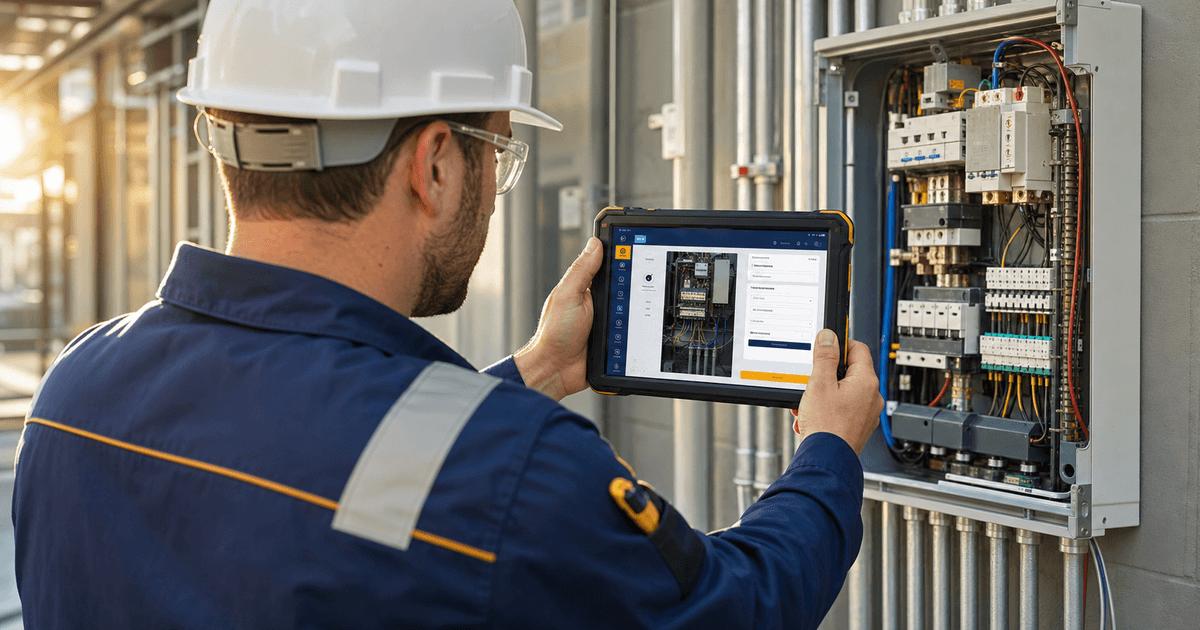
A field service mobile app for electricians is the software your technicians use on site to capture job notes, photos, voice documentation, approvals, and invoices, and to push that context back to the office before it gets lost in the truck-to-office gap. The best field service app for electricians keeps every field detail attached to the customer and job record so the office can quote, schedule, invoice, and follow up without phone-tagging the crew.
The core problem it solves is the handoff. Electrical work creates job notes, photos, voice notes, parts lists, panel details, safety concerns, scope changes, approvals, estimates, invoices, and customer messages. A useful electrician mobile app does not simply show a calendar. It protects field context from the truck-to-office gap.
Quick answer: the best field service app for electricians captures job history, photos, voice documentation, technician updates, customer approvals, estimates, invoices, and dispatch changes in one usable workflow. The deciding factor is whether field details stay attached to the customer and job record so the office can quote, schedule, invoice, and communicate with confidence.
A field service mobile app for electricians should help technicians document the site, dispatchers see status, estimators understand scope, and customers receive clear updates. Software can organize information, but it should not replace licensed review of safety, code-sensitive scope, or final pricing. Electrical installations in the United States are governed by NFPA 70 (National Electrical Code), and permit, inspection, and AHJ requirements vary by jurisdiction.
What Is a Field Service Mobile App for Electricians?
A field service app for electricians lets electrical technicians and office staff manage job information from the field: schedules, dispatch notes, customer details, job history, site photos, voice notes, estimates, approvals, invoices, and follow-up messages.
The category overlaps with an electrician job app, electrical contractor app, CRM, dispatch tool, and field service app for technicians. The difference is focus. A generic work-order app may tell a tech where to go next. A strong mobile app for electrical contractors also preserves quoteable, billable details: panel labels, breaker issues, fixture counts, access limits, customer requests, safety observations, parts used, and work completed.
For electricians, mobile usability matters because documentation happens in imperfect conditions: garages, crawlspaces, service rooms, parking lots, retail stores, and multi-family properties. The field service app for electricians must make it easy to record the note, attach the photo, and update the job before memory fades.
What Electricians Need From a Mobile Field App
The right field service app for electricians should support the full job cycle, not just the calendar. Use this checklist when comparing tools.
Job history and customer context
Technicians need more than an address. Prior service calls, open quotes, access notes, previous invoices, warranty context, and property history can change how the tech approaches the visit. A field service app for electricians should keep that history connected to the job record.
Photos, notes, and voice documentation
Photo documentation is essential for panel conditions, existing wiring, damaged equipment, labels, attic access, fixture locations, and change-order context. Typed notes help, but voice documentation lets a tech talk through what they see and organize details later. AceWatt's voice documentation page explains how this preserves field context without forcing long phone typing.
Estimates, approvals, invoices, and payments
A field service mobile app for electricians should help move from documented scope to reviewed estimate, customer approval, completed work, and invoice. The app should capture parts, labor notes, optional scope, and customer questions. If a vendor offers payment features, verify current processing terms, fees, supported methods, and settlement details.
Dispatch, schedule updates, and customer communication
The office needs to know when a technician is on the way, on site, delayed, completed, or waiting on approval. Customers need clear appointment windows and status updates. The field service mobile app for electricians should reduce calls that begin with “where is the tech?” and “what happened on that job?”
Offline access, reporting, and management visibility
Electrical work does not always happen with perfect signal. Ask vendors what works without connectivity, how data syncs, and what happens if two people edit the same job. Also look for reporting that shows job volume, quote status, invoice status, technician activity, and follow-up gaps. Field documentation patterns used by trade contractors are also discussed in NECA's workforce and field-operations resources, which can help frame what a mobile workflow should capture before the crew leaves the site.
Best Field Service Mobile Apps for Electricians: Quick Comparison
There is no single best field service app for electricians for every company. ServiceTitan, Jobber, ClockShark, FieldEdge, and AceWatt serve different buying needs. Verify current features, packages, and pricing directly with each vendor before purchasing.
| App | Electrical-vertical | AI job walk/voice notes | Offline | Estimating+Invoicing | Pricing tier |
|---|---|---|---|---|---|
| AceWatt | Electrical-first CRM for electricians and electrical contractors | AI job walk plus voice documentation; human review still required | Web-based mobile workflow from a phone browser; verify connectivity needs | Estimates/quotes and invoicing in the CRM workflow | Starter/Growth/Scale plans; see current pricing |
| ServiceTitan | Powerful multi-trade platform with strong home-service/electrical use | Automation and AI vary by package; verify job-walk and voice-note details | Mobile behavior varies; verify offline support | Full field-service estimating and invoicing for larger teams | Enterprise-priced or quote-based; verify current terms |
| Jobber | Solid general field service platform for small service businesses | Not primarily positioned as an electrical AI job-walk tool; verify AI details | Mobile app available; verify offline behavior | Estimates and invoices are core workflows | SMB field-service pricing; verify current packages |
| ClockShark | Strong time tracking and workforce management for trades | Not primarily an estimating-first electrical AI job-walk platform; verify notes | Mobile time tracking is a strength; verify offline details | More time/workforce focused; verify estimating and invoicing | Time-tracking/workforce tier; verify packages |
| FieldEdge | Established field-service software used by home-service contractors | Mobile notes and field workflows may be available; verify AI specifics | Mobile field workflows available; verify offline behavior | Established estimating, dispatch, and invoicing workflows | Mid-market/quote-based packages; verify terms |
The table is intentionally honest. A field service app for electricians should be judged by fit, not by a vendor claiming it wins every row. ServiceTitan can be powerful but enterprise-priced. Jobber is solid general field service. ClockShark is strong for time tracking. FieldEdge is established. AceWatt's angle is electrical-first CRM execution with AI job walk and voice documentation built around preserving field context.
Mobile Job Notes and Photo Documentation
The most expensive mobile-data problem is usually invisible: the technician knows what happened, but the business record does not. A field service app for electricians should make job notes and photo documentation fast enough that technicians actually use them.
Good photo documentation gives the estimator site visibility, shows the office what was completed, supports change-order conversations, helps future technicians, gives customers clearer explanations, and reduces confusion about what was requested, approved, or completed.
For electrical contractors, photos should not sit in a phone gallery alone. They should attach to the customer, job, quote, or invoice record. The field service mobile app for electricians should also preserve captions such as “existing 100A panel,” “water damage near disconnect,” or “customer requested two additional can lights.” Those details can change scope and pricing.
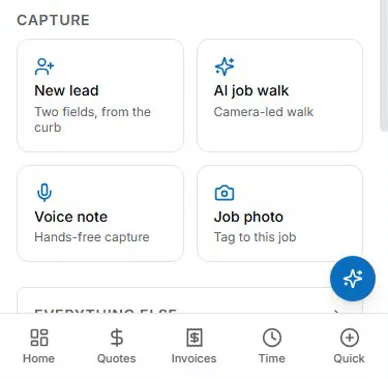
A practical mobile workflow lets the tech open the job, add photos, dictate notes, and mark next steps. If your current process is “text the office and hope someone copies it later,” the handoff is already leaking data. In AceWatt, that mobile workflow looks like this: the technician opens the capture screen on their phone, and new lead, AI job walk, voice note, and job photo actions are one tap away.
Voice Documentation and AI Job Walks
Voice is often the fastest way for an electrician to capture field context. A technician can describe panel condition, parts, customer concerns, and open questions without stopping to type. The value of a field service app for electricians increases when that voice becomes structured job context.
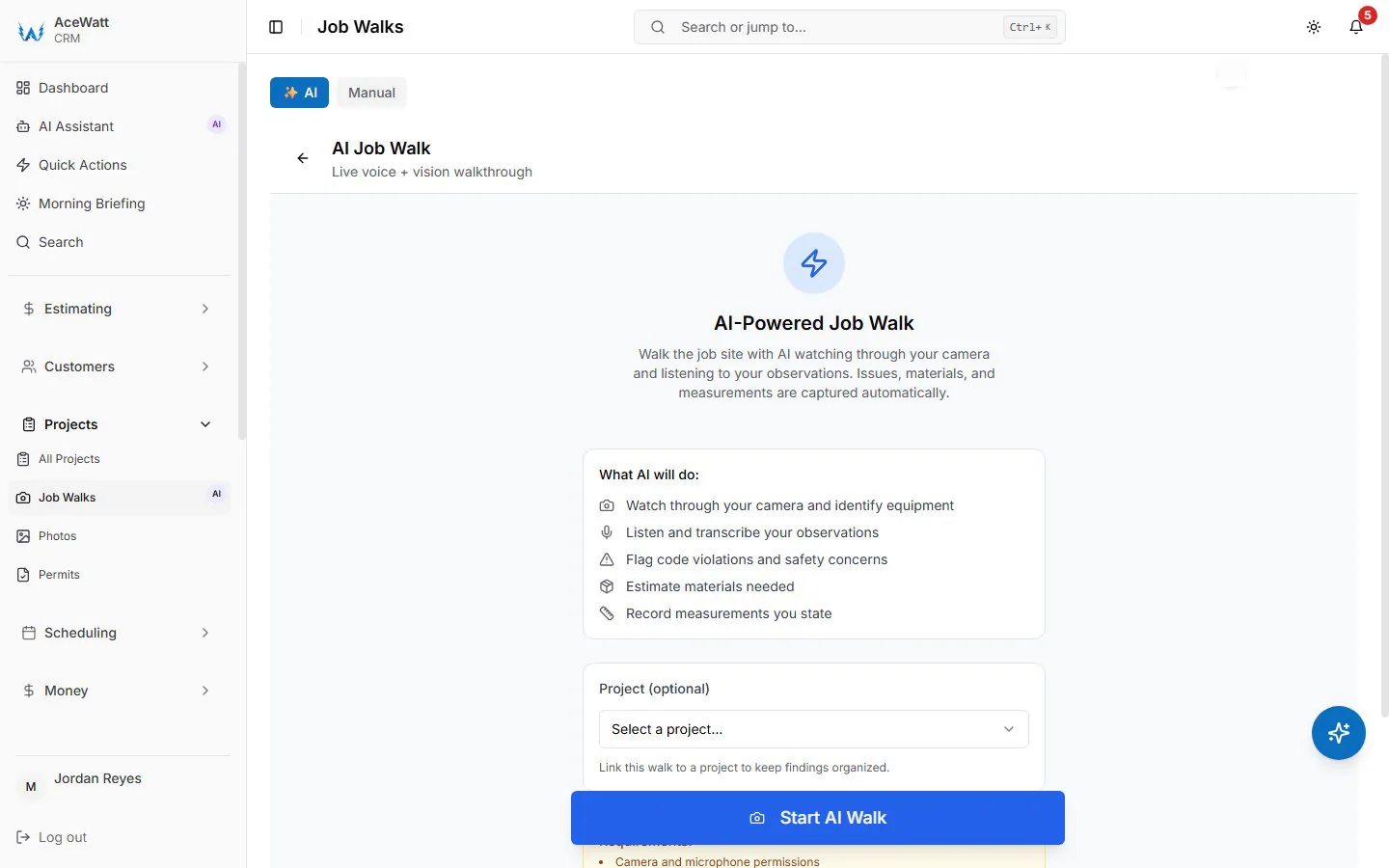
An AI job walk can turn voice notes, typed notes, and photos into a summary: customer goal, site observations, likely materials, safety issues to review, scope assumptions, and next steps. It helps estimating and office handoff, but a qualified person still reviews code-sensitive scope, load calculations, safety concerns, permit assumptions, exclusions, and final pricing.
AceWatt is designed around this problem. The job walk app for electricians workflow captures what happened on site, while AceWatt's AI job walk and voice documentation organize the record. For a field service mobile app for electricians, this is the difference between “the tech remembers” and “the company knows.”
Voice also helps adoption. If a tech can record a clean summary quickly, the office gets better information and the technician spends less time typing.
Estimates, Approvals, and Invoices From the Field
A field service app for electricians should shorten the distance between documented scope and a reviewed customer estimate. Troubleshooting can reveal an added repair, lighting work can grow into extra fixtures, and a panel or EV charger job can need a revised scope. The mobile workflow should capture the detail before the quote is drafted or revised.
The safest workflow is assisted, not automatic. Software can gather notes, photos, customer requests, and parts context, then help draft an estimate. The contractor still reviews labor, materials, exclusions, taxes, permits, inspections, warranty language, approvals, and final price.
Customer approvals should be easy to track. A field service mobile app for electricians should show what was approved, when it was approved, and whether the scope changed. The invoice should connect back to completed work and approved scope rather than a vague memory.
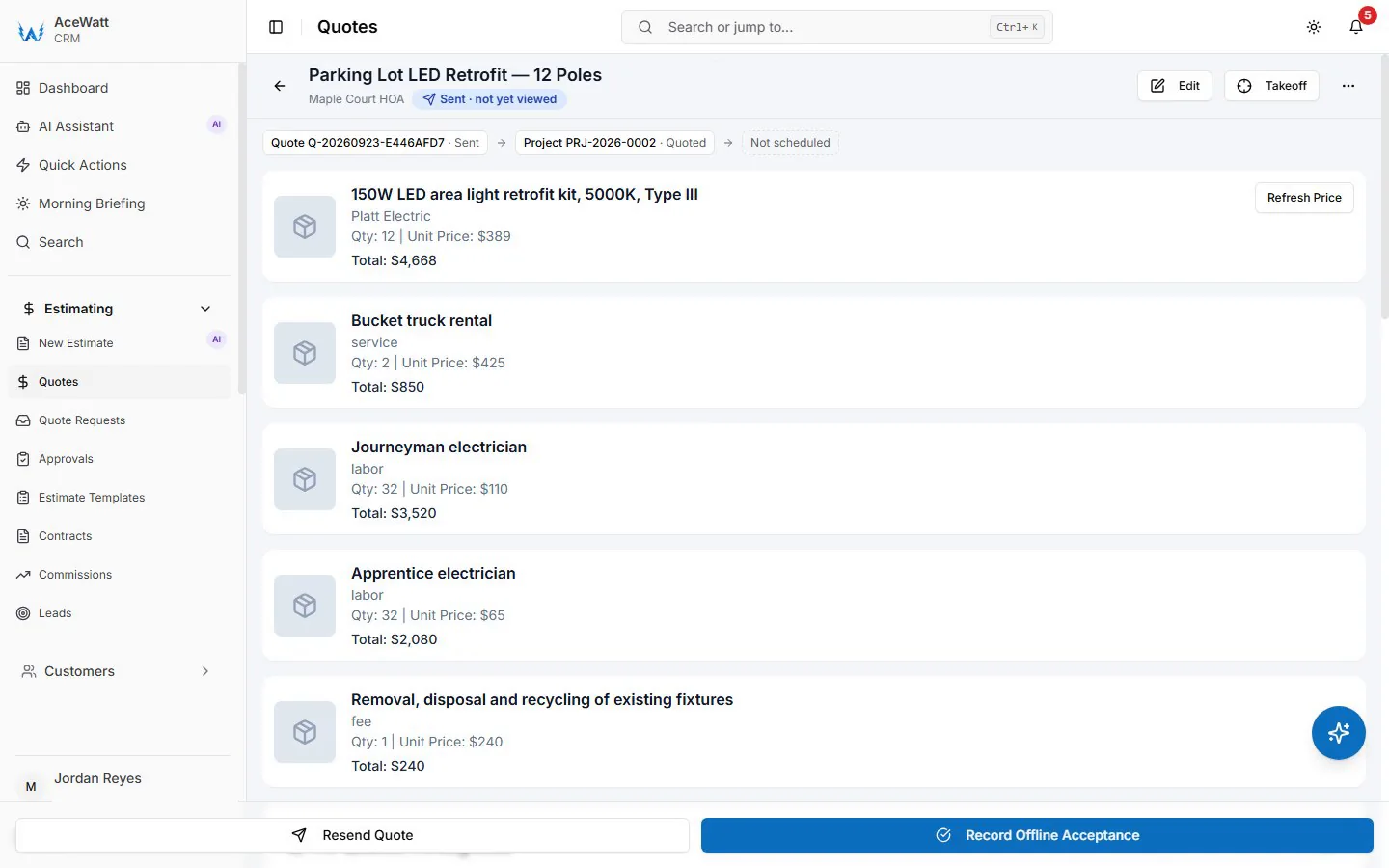
This is where mobile documentation and CRM matter together. An electrician mobile app that captures notes but does not connect to quotes and invoices still leaves the office rebuilding the story. A connected CRM for electricians keeps customer, job, estimate, communication, and invoice context together. In AceWatt, the field detail flows into a quote the contractor reviews line by line before it goes to the customer.
Technician Schedules and Dispatch Updates
Dispatch is more than assigning a time slot. A dispatcher needs availability, required skills, location, urgency, customer expectations, parts, and access constraints. A field service mobile app for electricians should make that context visible before the tech rolls.
For technicians, the schedule should answer: where am I going, who is the contact, what was promised, what has been quoted, and what should I update before leaving? For the office, it should show job status without constant phone calls.
Look for simple status updates: assigned, confirmed, on the way, on site, waiting for approval, completed, needs follow-up, ready to invoice. Labels matter less than consistency. If every technician uses different shorthand, dispatch will struggle to see the truth.
A field service mobile app for electricians also helps with same-day changes. Emergency calls, late parts, longer troubleshooting, and no-shows happen. Mobile updates put schedule changes and job context in one place.
Offline Access and Job-Site Reliability
Offline access is a major buying question for any field service app for electricians, but vendors use the term differently. Some tools let users view records offline, some store drafts and sync later, and some require connectivity for most workflows. The U.S. Bureau of Labor Statistics occupational outlook for electricians notes that electrical work routinely happens across diverse sites, commercial, residential, industrial, and maintenance, where connectivity assumptions do not always hold.
Ask direct questions: Can technicians view today's jobs without signal, add photos, record voice notes, or create estimates offline? What happens when connectivity returns? How are sync conflicts handled? Are offline features included in the plan you are buying?
For AceWatt specifically, use honest language: AceWatt supports a web-based mobile workflow accessible from a phone browser, but this article is not claiming a native offline mode or native app-store listing. If offline operation is critical for your service area, confirm the exact workflow during your demo.
Even with offline features, reliability depends on process. Technicians should open the job before entering a low-signal area, capture notes immediately, and sync before the office depends on the data. A field service mobile app for electricians is as strong as the workflow around it.
Customer Communication From Mobile
Customers do not want to chase your office for basic updates. They want to know who is coming, when the technician will arrive, what was found, what needs approval, and how to pay. A field service mobile app for electricians should support those updates without custom writing every time.
Mobile communication can include confirmations, on-the-way messages, delay notices, estimate links, approvals, completion summaries, invoice notifications, and follow-up reminders. The message should reflect the job record, not a generic promise.
Electrical contractors should be careful with safety and compliance language. Customer messages can explain documented findings and next steps, but code-sensitive statements, repair recommendations, and final pricing should be reviewed by qualified people.
AceWatt's communication hub, customer portal, job notes, estimates, invoices, scheduling, and dispatch workflows keep communication tied to the job. For broader AI context, see AceWatt's guide to AI field service software for electricians.
How to Choose the Right Mobile App by Crew Size
The best field service app for electricians depends on how many people share context. A solo electrician, a two-truck shop, and a 15-person electrical contractor do not need the same buying process.
Solo electrician
A solo electrician needs speed and simplicity. The mobile app should capture customer details, job notes, photos, estimates, invoices, and follow-up without office overhead. Avoid buying an enterprise system just because it has every feature. Choose a field service app for electricians you can keep current between jobs.
Priority features: mobile notes, photos, quote drafts, invoice workflow, customer communication, and clean customer history. Offline needs depend on your service area.
Two to five technicians
At two to five technicians, the problem shifts from personal organization to handoff consistency. The office needs to know what each tech saw, what each customer approved, and which jobs need quoting or invoicing. A mobile app for electrical contractors should standardize statuses, notes, photos, approvals, and dispatch updates.
Priority features: scheduling/dispatch, shared job history, technician notes, voice documentation, estimates, approvals, invoices, customer communication, and basic reports. This is often where AI job walks turn field notes into office-ready summaries.
Six to twenty technicians
At six to twenty technicians, the field service app for electricians becomes a management system. Dispatchers need visibility, owners need reports, estimators need consistent scope, and technicians need quick workflows.
Priority features: role-based workflows, dispatch visibility, consistent documentation, quote and invoice handoff, customer portal, reports, and implementation support. Compare onboarding, data migration, integrations, and contract terms before choosing.
How AceWatt Helps Electricians Capture Field Context
AceWatt's angle is simple: the best field service app for electricians prevents field-to-office data loss. AceWatt is an electrical-first CRM with AI job walk, voice documentation, AI copilot, estimates/quotes, invoicing, scheduling/dispatch, customer portal, communication hub, job notes/photos, and reports. The workflow is built around keeping the customer, job, quote, invoice, and communication record connected.
That matters on real electrical jobs. A panel-upgrade lead may start as a call, become a job walk, generate photos and voice notes, require estimate review, need approval, move into scheduling, and finish as an invoice. If each step lives in a separate app, the office reconstructs the truth. A field service mobile app for electricians should reduce that work.
AceWatt's AI job walk and voice documentation help turn messy field input into organized context. The AI copilot can assist with summaries and workflow support, while the contractor controls scope, pricing, safety review, and customer-facing decisions. Estimates/quotes, invoicing, scheduling/dispatch, customer portal, communication hub, job notes/photos, and reports keep the workflow moving without replacing professional judgment.
AceWatt is also honest about mobile delivery. The product supports a web-based mobile workflow accessible from a phone browser. This article does not claim native offline mode, native iOS/Android app-store availability, payment-processing guarantees, or accounting sync beyond what you verify for your plan. For current packages, review AceWatt pricing and ask to see the job-walk-to-invoice workflow in a demo.
Frequently Asked Questions
What is the best field service app for electricians?
The best field service app for electricians is the one that fits your crew size, service mix, budget, and documentation needs. If your biggest problem is time tracking, a workforce tool may be enough; our electrician time tracking app comparison covers the dedicated clock-in options. If your biggest problem is enterprise dispatch, a larger field-service suite may fit. If your biggest problem is lost field context, choose a field service app for electricians that captures photos, voice notes, job history, estimates, approvals, invoices, dispatch updates, and customer communication.
What should an electrical contractor mobile app include?
An electrical contractor mobile app should include customer history, job notes, site photos, voice documentation, technician schedules, dispatch updates, estimates, approvals, invoices, customer messages, reporting, and clear permissions. It should make it easy for technicians to update the job before they leave. The field service mobile app for electricians should support licensed review for scope, safety, code-sensitive issues, and final pricing.
Can electricians create estimates from a mobile app?
Yes, many tools let electricians create or start estimates from a mobile workflow. The safer process is to capture photos, notes, parts, labor context, customer requests, and scope details in the field, then have a qualified person review the estimate. A field service mobile app for electricians can make estimating faster, but it should not automatically decide price, code requirements, exclusions, or safety recommendations.
Do field service mobile apps work offline?
Some field service mobile apps offer offline viewing, offline data capture, or sync-later workflows, but offline support varies by vendor, device, plan, and feature. Verify exactly what works without signal before buying. For AceWatt, use a precise expectation: it supports a web-based mobile workflow accessible from a phone browser, but you should confirm connectivity needs during a demo if offline access is critical.
How does a mobile app improve job documentation?
A mobile app improves job documentation by capturing information closest to the moment it happens: photos, voice notes, typed notes, approvals, parts used, work completed, and next steps. A field service mobile app for electricians keeps that context attached to the customer and job record so the office can quote, invoice, schedule follow-up, and communicate without rebuilding the story.
Ready to see AceWatt capture field context from job walk to invoice? Start with AceWatt pricing and trial options or book a demo to compare your truck-to-office handoff against an electrical-first workflow.
Related Reading
- Browse the full AceWatt feature set: AI job walk, estimating, invoicing, scheduling.
- offline capture for daily electrical service work
- Best Electrician App for Daily Service Work in 2026: 7 Field-Tested Apps for Work Orders, Estimates & Invoicing
- Mobile-First CRM for Field Electricians: Offline Mode, Job Photos & QuickBooks Handoff
- See the Housecall Pro alternative page for electrical teams → Housecall Pro alternative
- Jobber vs. AceWatt for Electrical Contractors (2026)
- ServiceTitan vs. AceWatt: an honest 2026 comparison for electrical contractors
- All head-to-head pages → AceWatt alternatives for electricians