

Mobile CRM for Electricians: Offline Access, Job Photos, and QuickBooks Sync in the 2026 Field Guide
Electrical work happens in the places office software was never built for: poured concrete basements, steel-framed mechanical rooms, unfinished commercial shells, and rural service calls forty minutes past the last cell tower. A mobile CRM for electricians with offline capability keeps the business running in all of them. This guide covers what offline mode actually needs to do, how photo and voice documentation protect margin, and how field activity should flow straight into QuickBooks without a night of data entry.
1. Why Mobile-First CRM Is Now the Backbone of Electrical Field Operations in 2026
Desktop-first CRMs assumed someone would sit down at a desk at 7 p.m. and reconstruct the day. In practice, that reconstruction is where electricians lose money. A service tech billing between $75 and $150 per hour who spends 30 minutes a day on paperwork the app should have captured on site is giving up roughly $12,000 a year in recoverable time, per tech.
Mobile-first means the app is designed around the sequence of an electrical job: arrive, review the customer's history and equipment at the door, document the work, record hours and materials, invoice, and leave. Everything else, estimating, dispatching, follow-up, and accounting sync, hangs off that field sequence.
By 2026, mobile field service management software for electricians has also absorbed capabilities that used to live in separate tools. AI estimating, voice documentation of job walks, automated follow-up, and QuickBooks handoff now sit inside the same mobile workflow. The result is one record per job, created where the work happens.
2. Offline Mode: Keeping Job Data Flowing When Job Sites Have No Signal
Signal dies exactly where electrical work concentrates. Commercial electrical rooms sit behind concrete block and steel stud walls. Residential service calls drop to one bar the moment you walk into a basement or crawlspace. New construction often has no permanent power and no WiFi until late in the project. Rural service territories have dead zones between towers that no carrier fixes.
A mobile hotspot at $30 to $60 per month helps with a weak signal, but it cannot create a signal where there is no tower. Offline mode closes that gap. Done properly, it works like this:
- The app keeps a local copy of the data the tech needs that day: the schedule, customer records, job history, estimates, and material price lists.
- Everything captured in the field (notes, labor hours, materials, photos, signatures) writes to the device's local database, not to a spinner waiting on a server.
- When signal returns, background sync pushes everything up automatically, in order, without the tech tapping anything.
What separates real offline mode from a marketing bullet is simple to test. Before buying any tool, take it into a basement and try to open an estimate, take a photo, log two hours of labor, add a 20A breaker to the materials list, and capture a customer signature. Then ask the vendor what happens when two users edit the same job while offline. Vendors with a real answer describe conflict handling. Vendors without one change the subject.
3. Job Photos and Walk Documentation: Turning Field Evidence into Faster Approvals and Fewer Disputes
Photos tied to the job record are the cheapest insurance an electrical contractor can buy. Four categories cover most risk:
- Existing conditions: the scratched panel door, the water staining below the meter base, the drywall damage already present before you open a wall.
- Nameplates and equipment data: the panel brand, bus rating, and open breaker slots on a 200A service, which is exactly what you need to price an EV charger circuit or a subpanel addition.
- Progress photos: rough-in before insulation, grounding electrode conductor connections, conduit runs before they get buried in finish work.
- Completion photos: labeled panel directories, mounted equipment, code-required working clearances maintained per NEC 110.26.
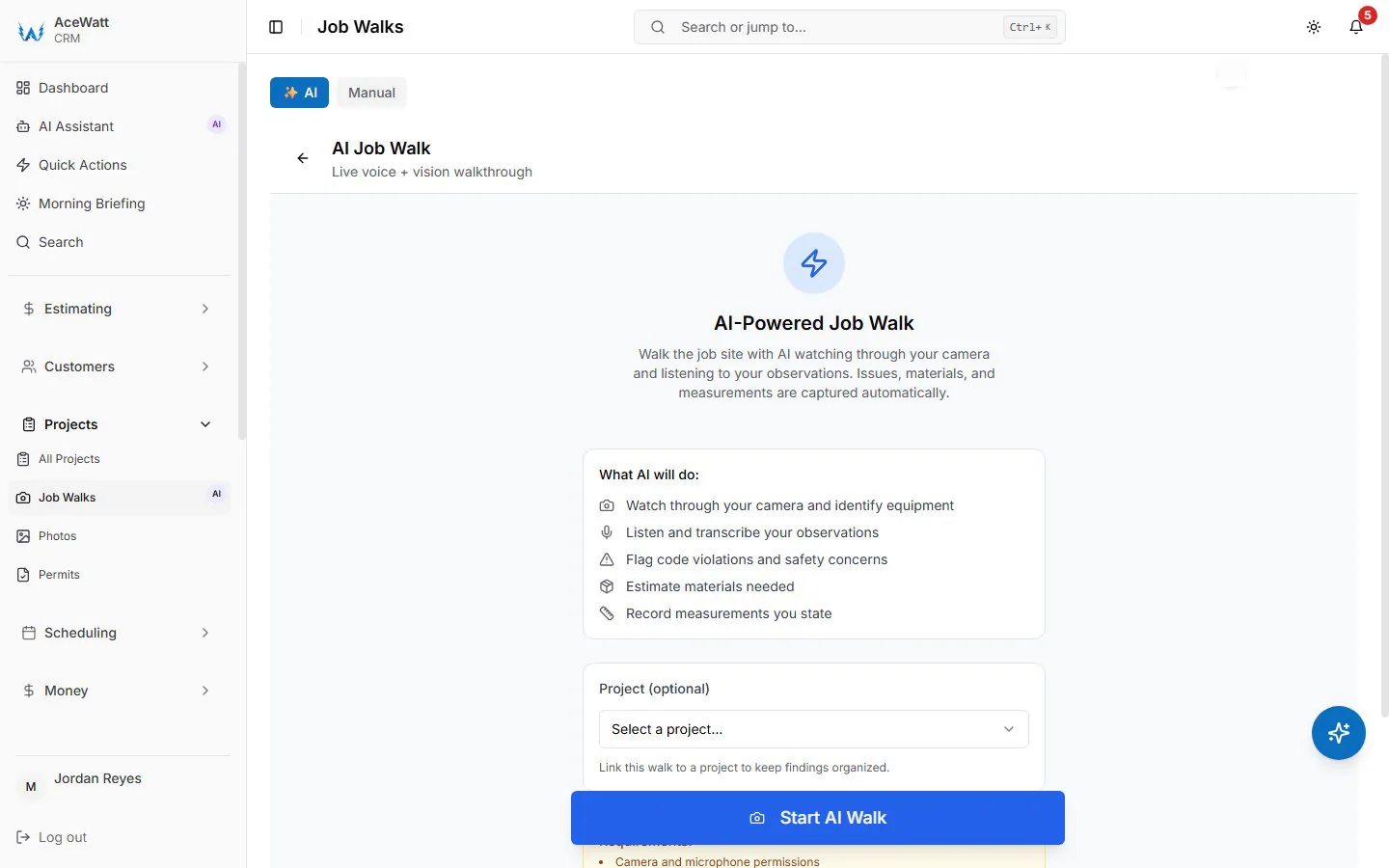
AI voice documentation turns the walk itself into the record. The tech narrates while walking the site, and the AI transcribes and structures the narration into job notes, flagging materials and tasks. A five-minute voice walk replaces ten minutes of thumb typing on a ladder, and the transcript is time-stamped and attached to the job.
The financial impact shows up in two places. First, disputes shrink: when a homeowner claims you cracked the meter base, the pre-work photo ends the conversation. Second, change orders close faster. A change order quote for knob and tube wiring discovered in a 1920s house, with photos attached, gets approved the same day. The same change order described in a text message gets debated for a week while your crew sits unassigned.
4. QuickBooks Handoff: Closing the Loop Between Field Work and Electrical Accounting
Most US electrical contractors under 50 employees run on QuickBooks Online, and the classic failure mode is running the field on paper and the books on QuickBooks, then reconciling the two at month end. An invoice-list export and a payroll-hours CSV cut some of that reconciliation work.
Done right, the handoff covers the objects that actually matter to electrical accounting:
- Customers and job records
- Service items and materials, including your marked-up pricing
- Invoices created in the field
- Payments, including on-site card payments
- Time activity for labor hours
- Classes or locations, if you track residential versus commercial job costing
Time and material billing is where the payoff is largest. T&M jobs live or die on captured detail. When labor hours and materials are logged on the device during the job, the office builds the invoice from the job record with a button instead of from paper (materials logged at cost; markup is set on the quote), and the invoice lands on the invoice-list export for your bookkeeper's QuickBooks entry. Nothing gets re-typed from paper by office staff, and nothing gets forgotten because the paper went through the washer in the truck.
Payment tracking closes the loop. The tech can see at the job that an invoice is open, collect payment before leaving, and the owner can see from anywhere which invoices are outstanding without asking anyone.

5. How Mobile CRM Connects Estimating, Dispatching, and Job Tracking for Electrical Teams
The value of a mobile CRM is not any single feature. It is that the job moves through one connected pipeline:
- AI Estimating: the walk notes, photos, and equipment data feed the estimate. Electrical estimating software that starts from documented site conditions produces quotes grounded in what the job actually requires, with your labor rates and material pricing applied consistently.
- Automated Follow-Up: invoices that go overdue get automatic email reminders at 1, 7, 14 and 30 days late, so collections do not depend on the owner remembering to chase them.
- Crew Scheduling and Dispatching: the office dispatches the nearest tech with the right skills, whether that is a residential service call or a tech qualified for generator or high-voltage work. Techs see schedule changes as push updates, not phone tag.
- Job Tracking: every job carries a live status from scheduled to dispatched to on site to completed to invoiced to paid, so nobody calls the office to ask where a job stands.
- Invoicing and Payment Tracking: invoicing happens at the job, and payment collection starts there too.
6. Solo Electricians vs Growing Shops: Scaling Mobile CRM Without Adding Admin Overhead
Solo electricians use mobile CRM to delete the second shift. Scheduling, estimates, invoices, and follow-ups live in one app, so quoting from the truck replaces an hour at the kitchen table. Automated follow-up does the work of a part-time office person reminding customers about overdue invoices.
Growing shops use the same platform to coordinate. The dispatcher works from a live board instead of whiteboards and text messages. Office staff and field crews share one job record, so the person answering the phone knows the job status without radioing a foreman. Customers get status updates automatically.
The scaling math matters. A shop adding two techs without job management software for electricians typically needs part-time office help at $18 to $25 per hour, which runs roughly $19,000 to $26,000 a year at 20 hours a week. With dispatching, job tracking, and invoicing automated on one platform, the same coordinator handles more volume, and growth stops requiring a proportional admin hire.
7. Key Features to Evaluate in a Mobile CRM for Electrical Contractors in 2026
Evaluate against your actual workday, not a demo over WiFi:
- True offline mode with automatic background sync, tested in a real basement
- Offline photo and signature capture, not just offline viewing
- AI voice and job walk documentation that produces structured job notes
- AI estimating driven from your own price list and labor rates
- QuickBooks-ready exports (for AceWatt today, an invoice-list spreadsheet and a payroll-hours CSV; native sync in development — confirm scope before purchasing)
- Electrical-specific material catalogs: wire by the foot, breakers, devices, panelboards
- Dispatching with skill and location awareness
- On-site invoicing and integrated payment processing
- Minimal required fields and glove-friendly touch targets
- Per-user logins, permissions, and an audit trail on every job record
Also ask about photo storage limits, data export, and what happens to your data if you cancel.
8. Implementation Checklist: Getting Field Electricians to Actually Use the Mobile CRM
Adoption is won or lost in the first month. Follow this sequence:
- Clean QuickBooks first. Tidy the item list and customer list so exported records map correctly from day one.
- Load your material catalog and labor rates before launch. A tech who cannot find 12/2 NM-B in the app will go back to paper.
- Roll out in phases. Start with dispatch and job tracking, add estimating in week two, then set up the QuickBooks export once field data is flowing cleanly.
- Limit required fields to essentials: status, hours, materials, photos. Every extra field is a reason to skip closeout.
- Train on live jobs. Run the first week as a ride-along on real service calls, not a conference room walkthrough.
- Set a photo standard: existing conditions, nameplate, and completion photo on every panel swap or device install.
- Name a field champion, ideally your most respected tech rather than the newest hire.
- Review adoption weekly for 30 days: jobs closed on device, invoices created same day, sync failures resolved.
- Tie closeout to cash. When techs see that completing the job on the app produces same-day payment, usage stops being a request and becomes a habit.
The Bottom Line
Offline capability keeps data flowing where electricians actually work. Photo and voice documentation create records that win disputes and speed approvals. QuickBooks-ready exports hand your bookkeeper the invoice list and payroll hours. Evaluate every tool against the basement test, roll out in phases, and hold the standard that a job is not done until it is documented and invoiced from the field.