

Best Electrical Contractor Software for 2026: 10 Tools Compared
The average electrical shop runs on a stack of disconnected tools: a spreadsheet for estimating, a phone for scheduling, a paper ticket book, and QuickBooks at the end of the month. That works at two trucks. It stops working at four.
The best electrical contractor software has to handle the work electricians actually do: bidding from takeoffs with real labor units, tracking jobs that sit for weeks waiting on gear and inspections, billing time and material on service work and progress billing on construction, and rescheduling a crew the moment a no-power call comes in. Most field service platforms were built for plumbers and HVAC techs, and the differences show up in exactly those places.
Full disclosure: we build one of the platforms compared below. Our system is an all-in-one electrical contractor platform covering AI estimating, automated follow-up, crew scheduling and dispatch, job tracking, invoicing and payment tracking, AI voice and job-walk documentation, and QuickBooks-ready exports (full sync in development). This guide covers the whole market, including where competitors beat us. Choose for your shop, not for our benefit.
1. What Electrical Contractor Software Actually Needs to Do in 2026
Electrical field service management software has to match how electrical work flows, from first call to final payment. Walk through any week in a real shop and the requirements write themselves:
- Estimating from real electrical data. Bids come from takeoffs, assemblies, labor units, and material pricing. An EV charger bid under NEC 625.41 means a branch circuit sized at 125% of the continuous load: a 48-amp charger on a 60-amp circuit, #6 copper THHN on many runs. A panel upgrade means a load calculation under NEC 220.83 for an existing dwelling and conductor sizing off Table 310.12, where a 100-amp service calls for #4 copper or #2 aluminum. The software needs to carry that math.
- Lead capture and follow-up. Missed calls, web forms, and voicemails need a response system, because the first contractor to call back with a number usually frames the negotiation.
- Scheduling and dispatch. Crew availability, skill pairing, arrival windows, and emergency jumps.
- Job tracking with electrical-specific statuses. Waiting on gear, waiting on inspection, failed inspection pending correction, change order pending signature. A job sitting three weeks on a panelboard lead time is normal, and the system needs to show why.
- Invoicing and payment tracking. T&M tickets signed on site, deposits before material orders, change orders, progress billing with a schedule of values and retainage, and an aging report that shows who owes what.
- Documentation. Voice notes from the job walk, before and after photos, permit numbers, inspection results.
- Accounting sync. Everything above has to land in QuickBooks without re-keying.
Any platform that cannot cover that list will push part of your operation back into notebooks.
2. Why Generic Field Service Tools Fall Short for Electricians
Most job management software for electricians on the market was designed for HVAC and plumbing companies first. Electricians came second. That shows up in four places:
- Voltage drop and load calculations. A 210-foot branch circuit run fails the 3% voltage drop recommendation in the informational note to NEC 210.19(A) when the software cannot model run length at all. Flat-rate pricebook tools built around "replace the capacitor" have no field for conductor length, and bid quality suffers.
- Gear lead times. Panelboards, switchgear, and transformers can carry lead times from several weeks to several months depending on the market. A dispatch board built around same-day service calls has no status for "waiting on gear with a promised ship date of March 14," so the office cannot answer the customer's only question: when.
- Retainage and progress billing. Commercial electrical work bills monthly on a schedule of values with 5 to 10% retainage held until substantial completion, and draws released against lien waivers. Residential service tools offer a paid-or-unpaid toggle, and that is the entire billing model.
- Permits and inspections. Electrical work lives by the AHJ calendar. Permits carry numbers, fees, and inspection windows, and failed inspections carry a re-inspection fee from your jurisdiction's published schedule plus a second truck roll. Software without permit fields pushes all of it back into the estimator's notebook and the county web portal.
The usual result is three disconnected systems: an electrical estimating program, a generic field service app, and QuickBooks, with data re-keyed between each one and discrepancies surfacing at tax season.
3. 10 Best Electrical Contractor Software Tools Compared for 2026
Pricing below reflects vendor-published rates where posted and license structure where pricing is quote-only. Vendors change plans often, so confirm current numbers on a demo before signing anything.
| Tool | Best For | Estimating | Dispatch and Scheduling | Invoicing and QuickBooks | Pricing |
|---|---|---|---|---|---|
| Our platform | Electrical shops that bid and run work in one system | AI quote drafts for review, assemblies, labor units | Yes, with gear lead-time statuses | T&M, milestone billing, QuickBooks-ready exports | Tiered by shop size |
| ServiceTitan | Large residential service operations | Limited, flat-rate pricebook focus | Excellent | Strong, QBO or full accounting | Quote only |
| simPRO | Commercial project management | Yes, assemblies and labor | Yes, multi-week projects | Progress billing, retainage | Quote only, per user |
| Jobber | Solo to small residential | No, quote templates | Day-of dispatch | Residential invoicing, QBO sync | Roughly $40 to $200 per month |
| Housecall Pro | Solo residential service | No | Day-of dispatch | Residential invoicing, QBO sync | Roughly $49 to $349 per month |
| Service Fusion | Flat-rate residential | No | Yes | Good, QuickBooks Desktop and Online | Flat pricing around $325 per month |
| Workiz | Small shops with heavy call volume | No | Yes | Good, QBO sync | Low hundreds per month |
| FieldPulse | Small teams wanting customization | No | Yes | Good | Roughly $50 to $100 per user per month |
| Trimble Accubid | Dedicated estimating departments | Best-in-class takeoff and labor | No, estimating only | Exports to accounting | Quote only, seats |
| McCormick Systems | Prevailing wage and public work | Yes | No | Certified payroll tie-ins | Quote only |
Two patterns stand out. First, the market splits between all-in-one platforms built for HVAC and plumbing that treat electrical as a category, and electrical estimating programs that stop at the bid. Second, estimating capability is the dividing line between the tiers: every tool below the top three rows invoices, but only four of the ten can price a panel upgrade from a plan set.
4. Best Software for Electrical Estimating and AI Takeoffs
Electrical estimating software is where the money is won or lost, because labor is 40 to 60% of most electrical bids and a 10% miss on labor units erases the margin on the job.
Traditional estimating platforms handle this with assemblies: a duplex receptacle assembly carries the device, a single-gang box, 12-2 MC cable per foot of run, a plate, and a labor unit pulled from references like the NECA Manual of Labor Units. Trimble Accubid is the standard for large commercial packages, and McCormick Systems dominates public work, where Davis-Bacon projects require WH-347 certified payroll and fringe benefits built directly into labor rates.
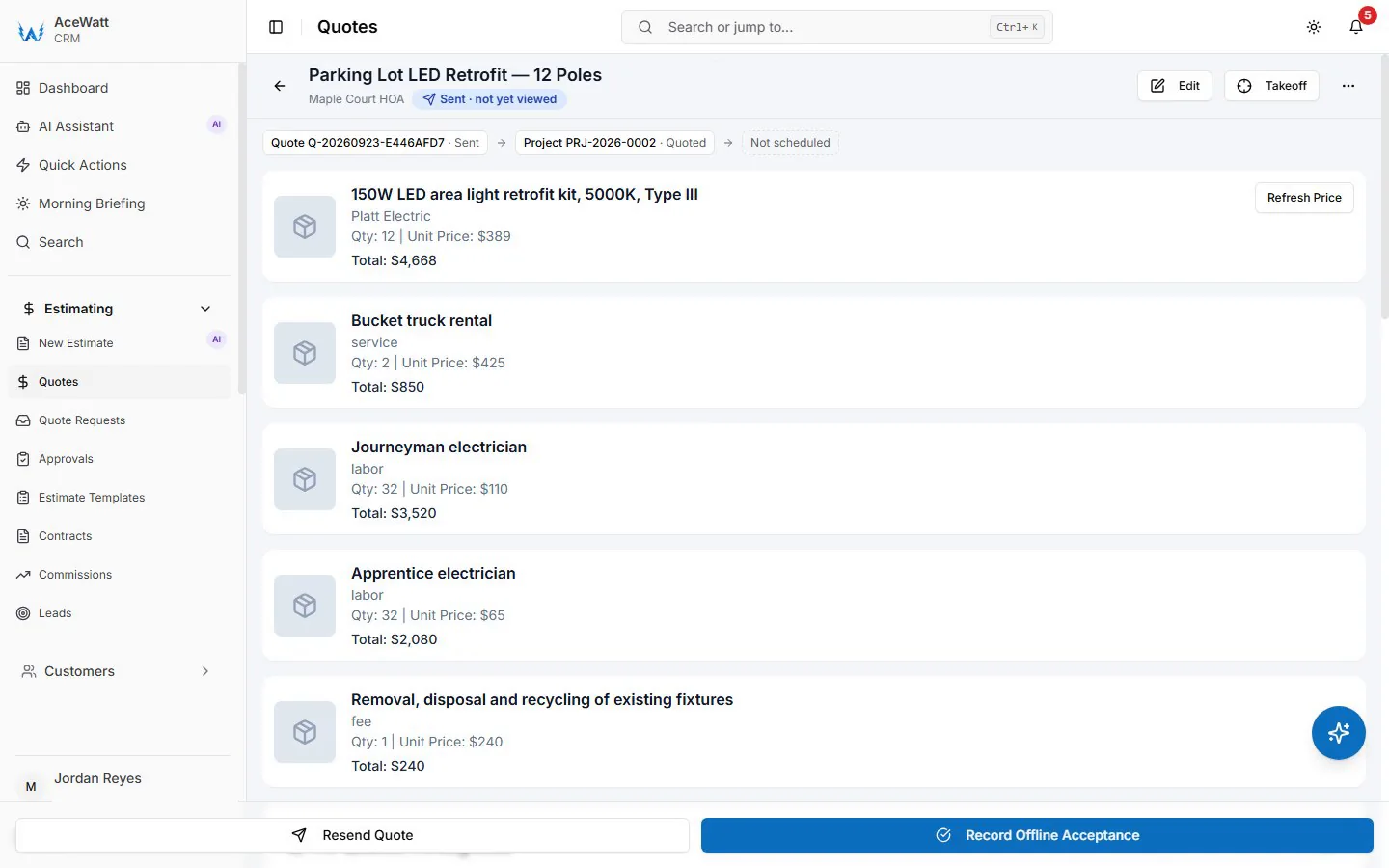
AI electrical estimating software changes the first step. Counting 340 receptacles, 96 lighting fixtures, and 61 switches across a 40-unit apartment plan set takes an estimator most of a day. Our platform's AI Estimating takes the plan PDF and drafts a quote for your review from your pricebook and assembly templates; the device counts stay with the estimator, checked against the drawings. Material pricing then applies current costs rather than the numbers from last quarter's spreadsheet, which mattered a great deal during the copper and gear price swings of the last several years.
Load calculations and service sizing stay with the licensed person bidding the job. The software's job is speed on the first draft, and on turning a finished estimate into a proposal the same day instead of the same week. Accubid and McCormick remain the right answers for a dedicated estimating department; the limitation of both is scope. They estimate. They do not schedule crews, chase payment, or sync to QuickBooks, so commercial estimators still need a second and third system behind them.
5. Best CRM and Automated Follow-Up Tools for Electrical Contractors
Every shop has a folder of quotes that were never answered: the panel upgrade bid emailed three weeks ago, the EV circuit request from a web form, the tenant improvement that went quiet after the walk-through. A 2024 BrightLocal-style survey figure does not matter here; your own call log does. Pull the last twenty quotes you sent and count how many got a second touch. For most shops it is under half.
Choosing the best CRM for electrical contractors comes down to three capabilities:
- Missed-call capture. A tech under a panel cannot answer the phone. Text-back within a minute plus automatic logging into the electrical contractor CRM means the lead exists in the system before the truck is packed up.
- Quote follow-up sequences. When a quote goes out, the system should run a cadence automatically: a text the next day, an email on day three, a final nudge on day seven, then a close-out message. Our platform does not run quote sequences (its automatic reminders are email reminders on overdue invoices at 1, 7, 14 and 30 days late); Jobber's campaign feature runs them for residential quotes.
- Loss reason tracking. Every dead quote gets a reason: price, timing, went with GC's electrician, never responded. That log is the only honest picture of why revenue leaks.
ServiceTitan covers all three thoroughly once implemented. Jobber and Workiz do it well at small-shop prices. Housecall Pro handles follow-up but caps out on commercial workflows. Review the loss reasons monthly: if nine of twelve panel upgrades are logged lost to price, adjust the estimate template, because the follow-up cadence was never the problem.
6. Best Scheduling, Dispatch, and Job Tracking Software for Electrical Crews
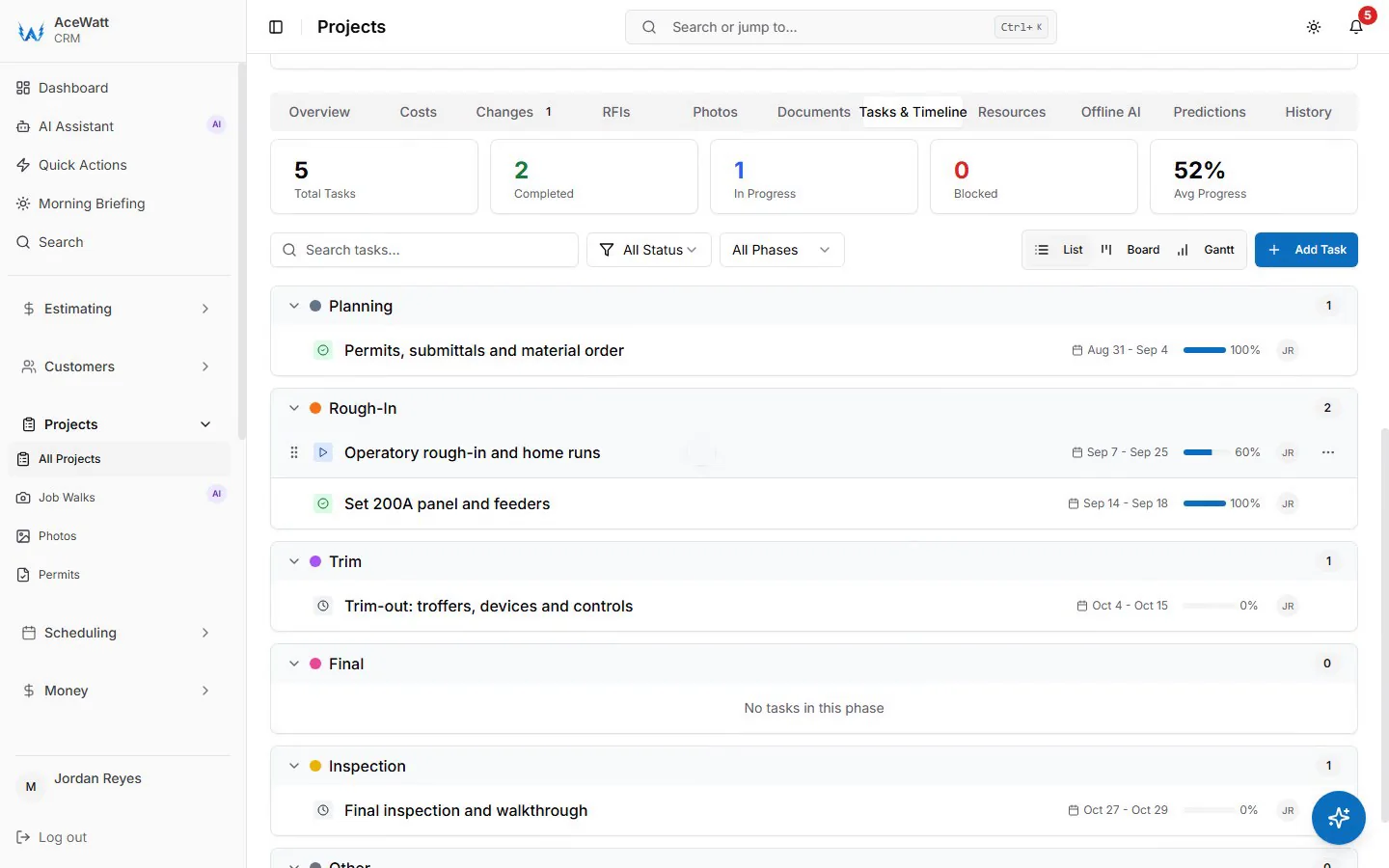
An electrical contractor scheduling platform lives or dies on statuses. A dispatch board with only "scheduled" and "done" cannot represent an electrical job's real life, which includes waiting on the panelboard, waiting on the inspector, and the change order still waiting on approval. Our platform carries those statuses on the board with the promised ship date and inspection window attached, so the office answers "when" without calling the foreman mid-pull.
What else matters:
- Skill pairing. The board needs to know a journeyman from an apprentice, because apprentices cannot work unsupervised under most state licensing rules and a service swap on 400-amp gear is a two-person job under nearly every safety program. Dispatch on skill first, then proximity.
- Emergency jumps. When a no-power call comes in, the office needs to see which crew can be pulled with the least damage: which jobs are interruptible service work and which are rough-in holding a framing inspection slot.
- Field-to-office visibility. Techs close out from the app: timestamps, photos, materials used, and a voice note that our platform transcribes and files against the job record automatically.
- Permit and inspection tracking. Permit number, fee, inspection date, and result sit on the job, so a failed inspection generates a correction task instead of living on the inspector's sticker.
Among competitors, simPRO's project scheduling handles multi-week commercial jobs with dependencies and is the strongest pure scheduling engine in this group. ServiceTitan's dispatch map is built for dense residential routes, which fits a service shop more than a contractor running two-week projects. Jobber and Housecall Pro cover simple day-of dispatch well and stop there.
For a shop running both service and construction, here is the test: ask any vendor to show a job in the "waiting on gear" state. If the demo shows only booked and done, keep looking.
7. Best Invoicing, Payment Tracking, and QuickBooks Sync Software for Electricians
An electrician invoice app has to bill the way electrical work is sold. Service work is time and material: the tech clocks in and out on the ticket, labor bills from the timestamps at your posted rate, materials bill from the price list with your markup, and the customer signs on the screen before the truck leaves. Construction work bills differently: a deposit up front, typically 25 to 50% before gear gets ordered, progress billing monthly on a schedule of values, retainage held at 5 to 10%, and final release after substantial completion, often against lien waivers, conditional before payment and unconditional after.
Most residential tools handle the first model and cannot spell the second. When you evaluate, test these five things:
- Progress billing. Can the system produce an application for payment in the AIA G702/G703 format your GC expects, with prior applications, current work completed, stored materials, and retainage calculated line by line? simPRO does. Our platform does not; it offers milestone (percentage-of-completion) billing instead. The residential-first tools generally do not.
- Deposit accounting. A deposit should post to a liability account in QuickBooks until the work is performed, not straight to income. Deposits booked as income give you an overstated quarter and a CPA bill in April.
- Change orders. The change order needs a signature before the work happens and needs to flow into the next application for payment automatically.
- Payment tracking. An aging report (current, 30, 60, 90) with retainage receivable tracked as its own line, because retainage held by a GC is your money sitting in someone else's account for months.
- Sync quality. Two-way sync of customers, invoices, payments, and credits, with payments landing in undeposited funds so they reconcile cleanly against the bank feed. One-way export tools create a second set of records someone still has to clean up.
Card rates matter too. Most platforms process at roughly 2.6 to 3.5% plus a small fixed fee depending on whether the card is tapped on site or keyed in from an emailed invoice. On a $14,000 panelboard change order, the difference between card-present and keyed-in pricing is real money, so compare processing rates alongside subscription costs.
For most shops, QuickBooks is already the accounting system, so electrical accounting software is really a question of handoff quality. Our QuickBooks handoff today is QuickBooks-ready exports: your invoice list as a spreadsheet and your payroll hours as a QuickBooks-format CSV for your bookkeeper, not a native two-way sync. simPRO's QuickBooks integration is solid for commercial shops. Jobber and Housecall Pro sync cleanly but only carry the residential billing model. If your shop runs any commercial work, an invoice app without retainage fields will cost you more in January reconciliations than it saves in subscription fees.
8. How to Choose the Right Electrical Contractor Software for Your Shop Size
Solo electricians. Your bottleneck is the phone and the invoice, because you are the estimator, the dispatcher, and the tech. A missed call at 10 a.m. while you are under a panel is a lost job by 6 p.m. Priorities: missed-call text-back, mobile invoicing with card capture on site, and a simple customer database. Housecall Pro and Jobber fit here at published pricing under $200 a month for a single user, and Workiz is worth a look if phone traffic is drowning you. Our entry tier covers quotes, invoices with online card payment, and a customer database, plus real estimating, which matters once you bid panel upgrades and EV circuits instead of only service calls.
Small residential service shops (2 to 6 trucks). You need dispatch, follow-up, and an electrician job management software your office manager will actually use. Jobber and Workiz are the easiest adoptions, usually running one to two weeks to get live. FieldPulse adds customization if you have someone to configure it. The dividing line is bid size: once you quote panel upgrades and subpanel feeds rather than only service calls, the flat-rate pricebook tools start to leak, and a platform with assemblies and labor units can pay for itself on the first bid you do not underprice.
Growing commercial and mixed contractors (7 trucks and up). Estimating is the center of the business and job costing is how you learn whether you made money. Your realistic options: simPRO for commercial project management, ServiceTitan if you are a large residential service operation with call-booker staff, Trimble Accubid paired with separate field and accounting systems if you have a dedicated estimating department, McCormick if you bid Davis-Bacon work and need certified payroll and fringe built into labor rates, or our platform if you want estimating, dispatch, milestone (percentage-of-completion) billing, and QuickBooks-ready exports in one system.
Implementation reality check: plan on three to six months for a ServiceTitan rollout, including implementation fees. simPRO configuration runs one to three months. Our platform, Jobber, and Housecall Pro are typically live in two to four weeks. Budget implementation like a job, because migrating customers, price lists, and open jobs is real labor.
9. Final Verdict: The Best Electrical Contractor Software Stack for 2026
No single tool wins every category, but the categories sort cleanly:
- Best all-in-one for electrical shops that bid and run work: our platform, the row in this comparison that connects AI Estimating quote drafts through dispatch, T&M and milestone billing, and QuickBooks-ready exports in one system.
- Best for solo and very small residential shops: Housecall Pro for simplicity, Jobber for follow-up campaigns.
- Best AI phone layer: Workiz.
- Best for large residential service operations: ServiceTitan, if you have the volume to justify the implementation.
- Best commercial project management: simPRO.
- Best pure estimating: Trimble Accubid for large commercial packages, McCormick for prevailing wage work.
- Best budget flat-rate option: Service Fusion.
The pattern across the market in 2026: estimating is separating the winners. A platform that counts devices from a plan set, prices them at current material costs, and hands the job to dispatch in the same system closes the two biggest leaks in an electrical business, the underpriced bid and the unbid lead.
Before you sign with any vendor, run the same test: bring your last three estimates and your open job list to every demo. Make each vendor build one bid and one invoice in front of you, using your numbers and your current gear lead times. Demos that run only on the vendor's sample data hide the gaps; your panel upgrade quote exposes them in the first ten minutes.