

CRM Scheduling for Electrical Contractors: How Small Businesses Stop Losing Jobs to Slow Follow-Up in 2026
A homeowner requests a quote for a 200-amp panel upgrade. You walk the job Thursday and promise a number by Monday. A service call runs long, the supply house shorts your wire order, and the estimate sits in the truck until Wednesday night. By then the homeowner has three competing prices and has signed with the contractor who emailed a line-item proposal Sunday evening.
Solo electricians and two-truck shops don't lose work because they can't bend pipe or terminate a 4/0 aluminum feeder. They lose it because follow-up on panel upgrades, EV charger installs, troubleshooting calls, and tenant fit-outs happens manually or not at all. In 2026, the shops winning repeat service work are the ones that automated the administrative drag so field hours stay billable.
Why Small Electrical Contractors Lose Jobs to Slow Follow-Up
Most homeowners collect three to five bids on any job over $1,000, and the first detailed proposal frames every conversation after it. If your estimate lands four days after the walk-through while a competitor's arrived the same evening, you are negotiating from behind before anyone reads your scope.
The leak compounds. Send ten estimates in a month, follow up on four, and six buying decisions happen without you. On a residential panel upgrade that runs $2,500 to $4,500 plus permit and a new 4/0 aluminum service entrance conductor, that silence has a real dollar figure. This is a process problem, not a skill problem, and the tooling now exists to fix it at shop-of-any-size prices.
What a CRM + Scheduling Combo Actually Does for Electricians
Most electrical contractor CRM software treats scheduling as a shared calendar view. That is not enough. CRM scheduling for electrical contractors has to solve small business reality: leads arrive by web form, text, and voicemail, usually while you are on a ladder.
Pair an AI-powered CRM with crew scheduling and dispatching and the flow changes. A homeowner submits an EV charger request on your website at 8:40 PM. The CRM creates the contact, tags the job type, and drops a site-walk task into your next open slot. The GC's text about a tenant fit-out is logged the same way, attached to the property record with two years of history behind it.
For a solo electrician, a CRM set up this way replaces sticky notes and unanswered voicemails. For a three-truck shop, it ends the morning scramble of assigning tickets over group text. That is small electrical business automation in its most useful form: fewer admin hours, more billable ones.
Follow-Up: Convert Panel Upgrades, EV Charger Installs, and Service Calls
The revenue leak is never the first contact. It is the third, fourth, and fifth touch that never happens.
Follow-up for electricians works when the touches are trade-specific and code-aware. On a panel upgrade, day two is a short explainer on the NEC 220.83 load calculation that determines whether the existing 150-amp service truly needs the 200-amp upgrade you quoted. Day four is a summary of a similar swap nearby, including the permit window and the utility's disconnect and reconnect fees. Day seven is a call offering install slots for the following week.
EV charger follow-ups cover NEC 625.54 GFCI protection for receptacle-connected charging, the load management options under NEC 625.42 that can avoid a service upgrade entirely, and the utility rebate deadline that forces a decision date. Troubleshooting follow-ups reference AFCI replacement requirements per NEC 210.12. Automated Follow-Up handles overdue invoices (email reminders at 1, 7, 14 and 30 days late), not open estimates, so these touches stay with you.
Crew Scheduling and Dispatching Without Adding Office Overhead
A three-truck shop typically breaks down around 15 to 20 active jobs, when the owner starts spending two hours every morning assigning work, chasing materials, and texting ETAs. Hiring a dispatcher costs $45,000 to $60,000 a year loaded. Crew dispatch software built for electrical work solves the problem for a fraction of that.
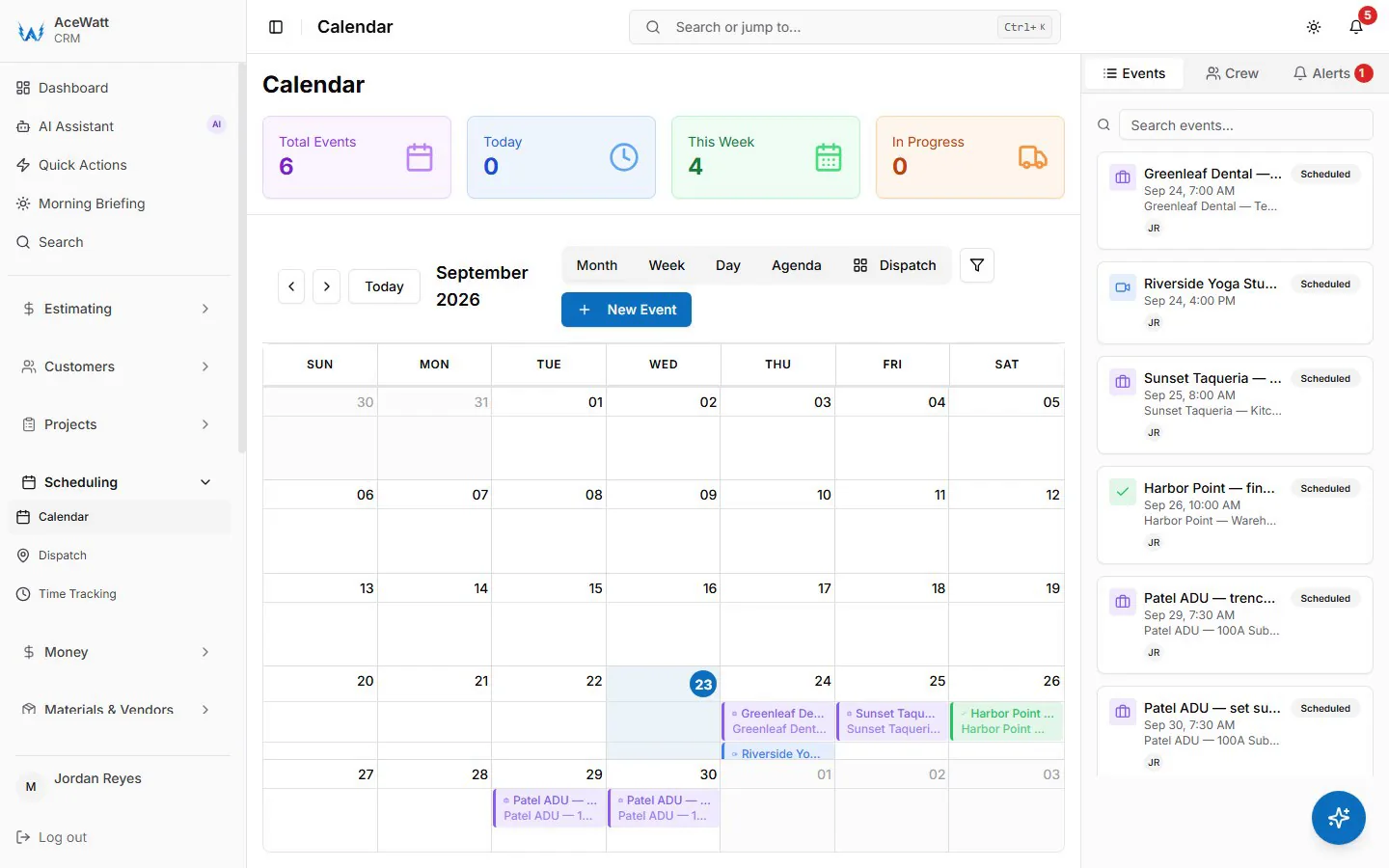
In 2026, a serious electrician scheduling app reads the job, not just the calendar. On the drag-and-drop dispatch board, skill-based suggestions point a commercial trim-out to a tech whose skills fit, and you send the residential rewire to the two-person crew carrying fish tape and dust barriers. When the clinic service call runs long against the afternoon panel upgrade, the live dispatch map (while the app is open) shows where everyone is, so you can reassign the job and call the customer with a new ETA. Solo operators get the same view of the day, so the Friday generator startup never gets double-booked.
Job Tracking From First Call to Final Walk-Through
Most job tracking software for electricians stops at two statuses: scheduled and complete. Electrical work does not operate that way. It moves through rough-in, inspection, trim-out, and final test, each with its own materials, labor, and sign-offs.
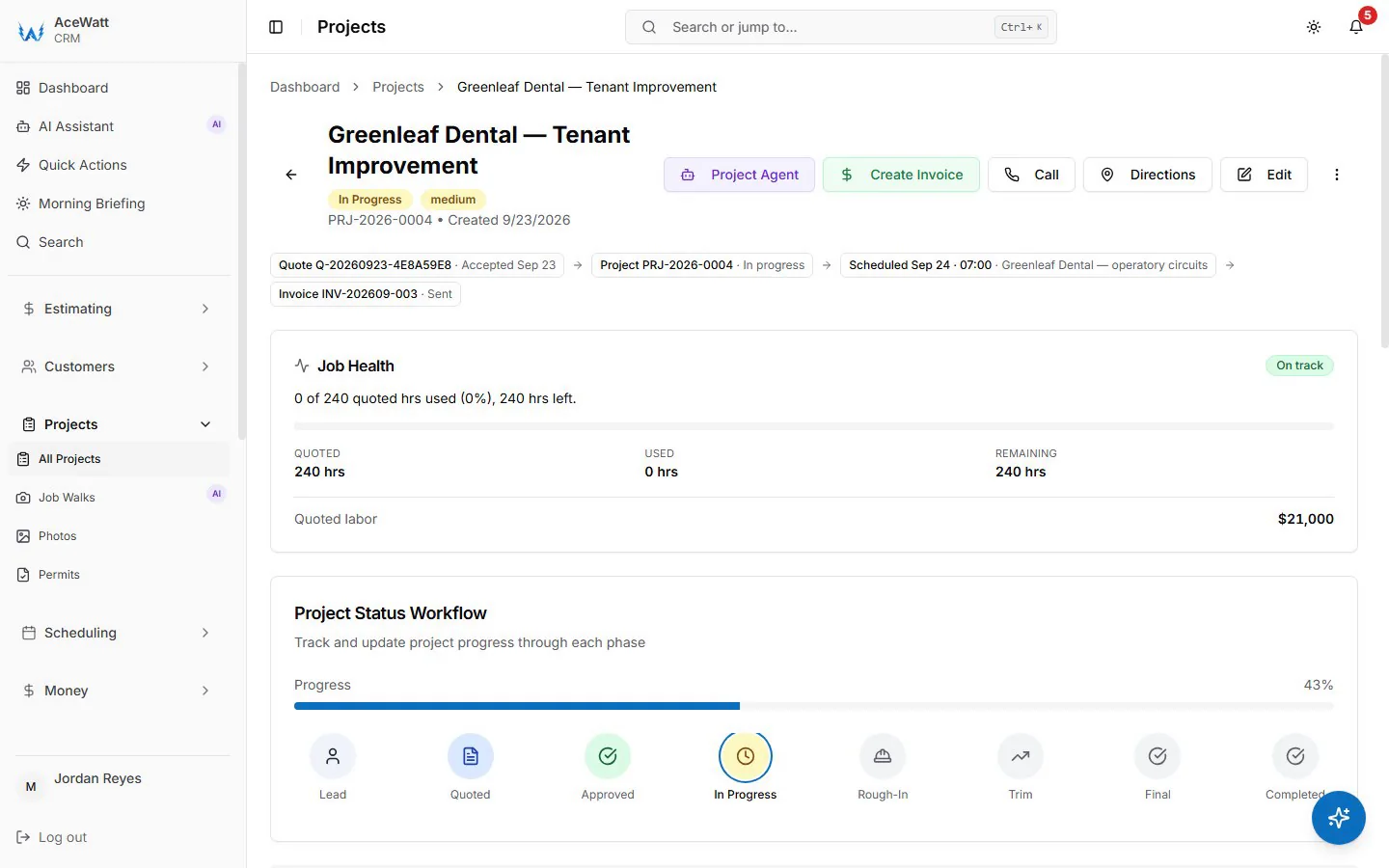
Tie the scheduled appointment to the work order and you can see which circuits, fixtures, and devices are complete and which are pending across every active project. On a 40-unit apartment fit-out, filter by building, floor, unit, and system: lighting, power, fire alarm, data. The field tech marks Unit 3B rough-in complete from a phone, inspection photos are already uploaded, and the project manager sees status in real time. On T&M work, the work order captures symptom, diagnosis, repair, parts, and timestamps, so when a property manager asks what happened at 1400 Main Street, you send documentation instead of deciphering a handwritten ticket.
Invoicing, Payment Tracking, and QuickBooks-Ready Exports for Solo Electricians and Growing Shops
Double entry kills margins. You write the invoice in the field, retype it into QuickBooks at 9 PM, forget the retainage line, and spend Sunday fixing the reconciliation.
With invoicing, payment tracking, and a QuickBooks handoff built for electrical contractors, the work order flows into the invoice with labor hours, material lines, and approved change orders attached. Tap send from the job site, the customer pays online by card (or ACH, if your Stripe account has it enabled), the payment posts against the job automatically, and the job status updates to paid or partial.
For solo electricians, that cuts the re-keying hours behind a $400 to $800 a month part-time bookkeeper. For growing shops, the office manager spends Friday reconciling instead of Monday entering data. The QuickBooks handoff today is QuickBooks-ready exports: the invoice list as a spreadsheet and payroll hours as a QuickBooks-format CSV for your bookkeeper. There is no native, real-time, bidirectional sync today; full sync is in development.
AI Voice and Job Walk Documentation: Close the Loop on Every Estimate
Scope is won or lost on the site walk. You are standing in a mechanical room with a GC discussing phasing, metering, and temporary power. Two days later you have forgotten the utility requires a CT cabinet on the line side, and the estimate goes out without it.
AI Voice and Job Walk Documentation captures scope during the visit. Dictate into the mobile app: 4,000-amp service, 277/480V, utility CT cabinet required line side, temp power from the existing 800A panel in Room 112. The AI transcribes, structures, and tags the notes by equipment, voltage, location, and special conditions, then attaches photos with GPS and timestamps.
Then AI estimating does the part that used to eat your weekends. It pulls the structured notes and job site photos, cross-references your material pricing and labor units, and returns a line-item estimate for the commercial trim-out, residential rewire, or generator hookup in minutes instead of days. A whole-house rewire that used to consume a Saturday at the kitchen table prices out before you leave the driveway. The CT cabinet, the temp power feeder, and the phasing verification labor all appear because the voice note captured them, not because you remembered them at 10 PM.
AI estimating for electricians also protects margin. Unit-based takeoffs do not forget box connectors, the #10 THHN for the water heater circuit, or the second supply house trip that a tired 9 PM estimate always misses. When a customer questions a bid that is $3,200 above a competitor's, you open the timestamped voice note from their own walk-through and show exactly what the cheaper bid left out. Most important, the estimate goes out the same day as the walk, while the job is still hot. Speed to first proposal is the biggest lever a small shop has.
How to Roll Out CRM + Scheduling Without Disrupting Active Jobs
Switching systems mid-project is how shops miss inspections and anger GCs. Sequence the rollout.
Weeks 1 and 2: service calls and small estimates only. Route every trouble call through the CRM and follow up on every diagnostic-to-repair estimate. Schedule single-tech, half-day jobs so the crew gets comfortable with mobile work orders and on-site invoicing.
Weeks 3 and 4: add residential estimates. Turn on AI voice for the walks and let AI estimating build the proposals. Test the QuickBooks export on paid residential invoices, where stakes are low and the patterns repeat.
Weeks 5 and 6: layer in commercial. Enable job phases, progress billing, and multi-crew scheduling. Import active projects and run the old process in parallel for two weeks as a safety net.
Week 7: full cutover. The team trusts the system because it earned trust on real revenue, not a demo account.
2026 Action Plan: Build a Follow-Up System
The contractors who grow this year are not working more hours. They run field service management built for electrical contractors: every lead captured, every estimate followed up, every crew dispatched, every phase tracked, every payment exported. Five steps to get there.
- Audit your lead leakage. Count the estimates you sent last month, how many received a second touch, how many received a third. Multiply the silent ones by your average job value and look at the number.
- Map your job types. Service call, residential estimate, commercial project, T&M, maintenance contract. Each needs its own follow-up sequence, work order template, and invoice structure.
- Pick the pilot crew. One tech, one truck, two weeks, service calls only. Measure time-to-invoice, follow-up completion rate, and collection speed against your current baseline.
- Scale in phases. Follow the rollout sequence above. Do not attempt the full commercial workload on day one, and do not migrate an active project until the residential workflow feels boring.
- Review day 30 and reinvest the hours. Compare close rate on estimates, days sales outstanding, and weekly admin hours to your baseline. Whatever you recovered, five hours or fifteen, put it into site walks, estimates, and customer calls, the work that actually wins jobs.
The homeowner from the opening story never sees your Friday chaos. They see a quick reply, a code-aware follow-up from you, a proposal the same day as the walk, and a crew that arrives when the schedule said it would. That is what CRM scheduling delivers to electrical contractors running a small business in 2026: the admin runs on a system, and you stay on the tools where the money is made.
Related reading: Electrical Dispatch Software + CRM in 2026: Unified Scheduling, Dispatch & Customer History for Field Techs.