

Why Change Orders Quietly Drain Electrical Contractor Margins in 2026
Change orders are where electrical contracting profits go to die. Not because the work is unprofitable, but because the process is broken. A 2025 NECA survey found that 68% of electrical contractors lose money on at least one change order per project due to missed approvals, undocumented scope, or invoicing leaks. In 2026, with material volatility on copper, PVC, and gear still hovering near 5-year highs, the margin for error is gone.
The problem isn't the extra 20-amp circuit or the panel upgrade the inspector flagged. It's the handshake agreement on site that never makes it to the invoice. It's the text message approval that disappears when the GC changes project managers. It's the estimator who quoted the adder at yesterday's wire price. A purpose-built crm for electrical contractors change order management closes every one of those gaps, but only if it connects estimating, field documentation, approvals, scheduling, invoicing, and accounting in a single workflow.
How AI Estimating Captures Scope Changes Before They Cost You
When a homeowner adds four recessed cans and an EV charger circuit during rough-in, the estimator needs to price it in seconds, not hours. AI Estimating drafts the change for your review from the tech's notes, photos or a typed description, priced from your company pricebook, saved assemblies and labor rates, plus current online retail prices, for the specific installation method: MC cable in stud walls, EMT in concrete, PVC underground.
The system flags every line item that deviates from the base bid. If the original scope included 12/2 NM-B and the change order calls for 10/3 for the EV circuit, the estimator sees the delta instantly: material, labor, conduit fill, voltage drop calculations, and permit amendment fees. No more "I'll get back to you tomorrow" while the crew waits.
Because the change order lives inside the same estimate tree as the original scope, version control is automatic. Revision 3 of the kitchen remodel estimate shows the original 15 receptacles, the two added GFCIs from RFI-07, and the dedicated 50A circuit from Change Order #2, each with its own timestamp, approval status, and margin impact. When the customer asks "why is this $1,800?" the estimator opens the record and shows the math: 45 feet of 6/3 SER at $4.12/ft, 2.5 hours journeyman time at $92/hr, permit amendment $125, 15% overhead, 10% profit. Done.
Documenting Change Orders On Site with AI Voice and Job Walk Documentation
The superintendent walks the job with the homeowner. They agree to move a junction box, add a switched outlet, and upsize the subpanel from 100A to 200A. In the old workflow, the foreman texts the PM, the PM emails the estimator, the estimator writes a change order, the customer signs a PDF, and three days later the crew is already pulling wire for the original plan.
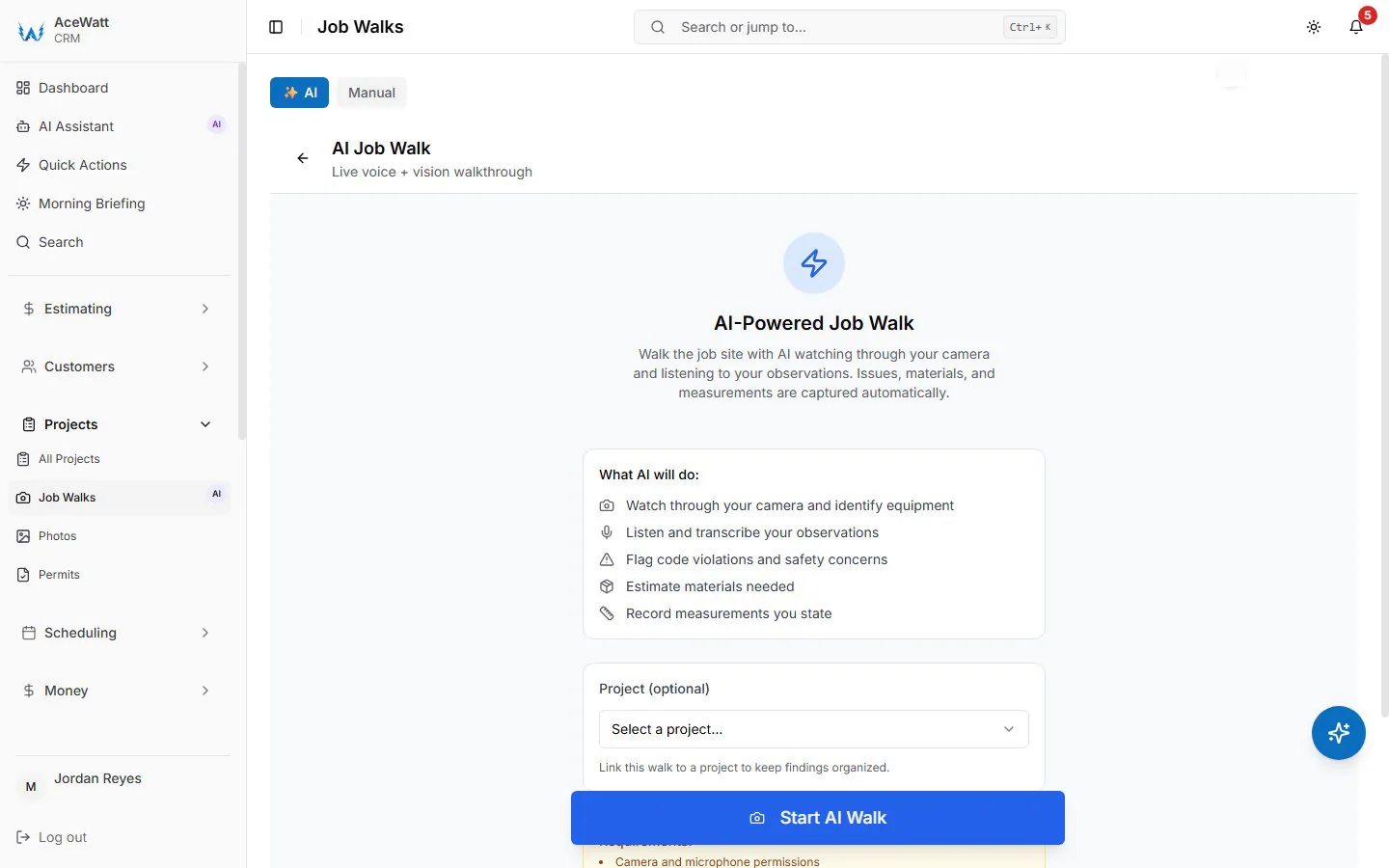
AI Voice and Job Walk Documentation changes that. The foreman opens the mobile app, hits record, and narrates: "Change order request: relocate J-box 4 feet east per homeowner request, add switched outlet at entry, upgrade main lug panel to 200A Eaton BR. Homeowner verbal approval captured. Inspector on site Thursday." The system transcribes, timestamps, geotags, and attaches the audio file to the job record. Photos of the existing panel label, the conduit path, and the homeowner's nod are auto-linked.
When the customer disputes the $2,400 panel upgrade line item in November, you pull the October 14 recording: "Yeah, go ahead and swap it to 200A, we're adding a heat pump next spring." The dispute evaporates. That is the kind of documented conversation that can justify the cost of electrical contractor change order software on a single project.
Getting Faster Approvals on Change Orders
A change order sits in the GC's inbox for six days. The electrician calls, leaves a voicemail, sends a text, and gets nothing. The crew shows up Monday and the work isn't approved. Two days of standby time at $1,200/day.
Automated Follow-Up does not chase change orders; it sends email reminders on overdue invoices. Change orders are approved internally, so the approval sits with your PM instead of a GC's inbox, and when added scope needs the customer's signature, you send it as a quote the customer e-signs from the portal link.
The electrician sees the change order's approved status on the job before the crew loads the truck. No standby. No "I thought you had approval."
Linking Approved Change Orders to Job Tracking and Invoicing
The most common profit leak in electrical contracting: approved change orders that never hit the invoice. The crew does the work. The PM forgets to add the line. The invoice goes out for the original contract amount. The contractor eats $3,700 in labor and material.

Job Tracking and Invoicing connects the dots. When a change order hits "Approved" status, the system automatically:
- Creates a billing line on the project invoice with the exact approved amount
- Links the line to the change order record for audit trail
- Updates the project's percent-complete and earned-value calculations
- Flags the PM if the change order work isn't marked complete within the scheduled window
At month-end, the PM runs the "Unbilled Change Orders" report. Zero rows. Every added circuit, every panel swap, every code-required GFCI upgrade is on the invoice. The contractor gets paid for the work they actually did, not the work they bid.
Keeping the Back Office Aligned with QuickBooks-Ready Exports
The field runs on the CRM. The office runs on QuickBooks. In 2026, there's no excuse for double entry.
Every approved change order becomes its own line on the estimate or invoice in AceWatt, and the invoice total lands on the invoice-list spreadsheet your bookkeeper exports. There is no native, bidirectional sync today; full sync is in development. If the bookkeeper adjusts an amount in QuickBooks for a retainage holdback, or the PM adds a $500 credit for a deleted receptacle, the change is made on the record, where it is visible and accountable.
Month-end close shrinks from three days to three hours. The controller isn't reconciling field tickets against invoices. The estimator isn't hunting for missing change order numbers. The owner sees real-time job cost reports with every change order baked in: labor hours, material dollars, subcontractor costs, equipment rental, all tied to the original budget and the revised contract value.
Crew Scheduling and Dispatching for Change Order Work Without the Chaos
Change order work is disruptive. A two-hour EV charger install sounds simple, until you realize the crew needs to pull 6/3 SER through finished walls, coordinate with the utility for meter upgrade, and schedule the inspector. Meanwhile, the three other jobs on the board still need their rough-in completed.
Crew Scheduling and Dispatching puts change order work on the drag-and-drop dispatch board with skill-based suggestions. J. Martinez finishes the panel swap at 143 Main at 2 PM, and Change Order #4 at 210 Oak is 1.2 miles away, so the dispatcher slots it for 2:30 to 5:00; on the Scale plan, straight-line route optimization helps order the day, with no drive-time or traffic-aware routing. If the change order requires a second electrician, the dispatcher drags "Apprentice Chen" into the slot. Chen gets a mobile notification with the job packet, photos, and change order scope.
No whiteboard erasing. No group text confusion. The crew shows up with the right gear, the right materials, and the approved scope on their phone.
What Sets a Real CRM for Electrical Contractors Apart from Generic Field Software
Generic field service software treats a change order like a work order add-on. It doesn't understand NEC 210.12(A) arc-fault requirements that trigger when you extend a circuit. It doesn't know that a panel upgrade requires a load calculation per 220.87. It doesn't map material items to your electrical distributor's pricing API.
A real CRM for electrical contractors is built on electrical workflows:
- Estimating uses NECA labor units and CSI MasterFormat divisions 26 05 00 through 26 56 00
- Change order templates include permit amendment fees, inspection scheduling, and utility coordination checklists
- Mobile forms capture panel schedules, circuit directories, and load calculations, not just "work performed"
- Reporting shows margin by change order type: code-driven vs. owner-add vs. GC-directed vs. unforeseen conditions
- Integrations talk to your supplier (CED, Graybar, Elliott), your accounting (QuickBooks, Sage 100), your estimating (Accubid, McCormick), and your design (Revit, Bluebeam)
In 2026, electrical contractors running on generic platforms are leaving 3 to 7% of revenue on the table, not from bad estimating, but from broken change order execution. The contractors who win are the ones who treat every scope change as a controlled, documented, approved, scheduled, invoiced, and reconciled transaction. That's not process for process's sake. That's how you protect the margin on every added receptacle, every panel upgrade, every EV circuit, and every code-driven surprise the inspector hands you on a Friday afternoon.