
When to create one
Once a customer has approved the work or scheduled the visit. The work order replaces the back-of-truck sticky note.
Free electrical contractor template
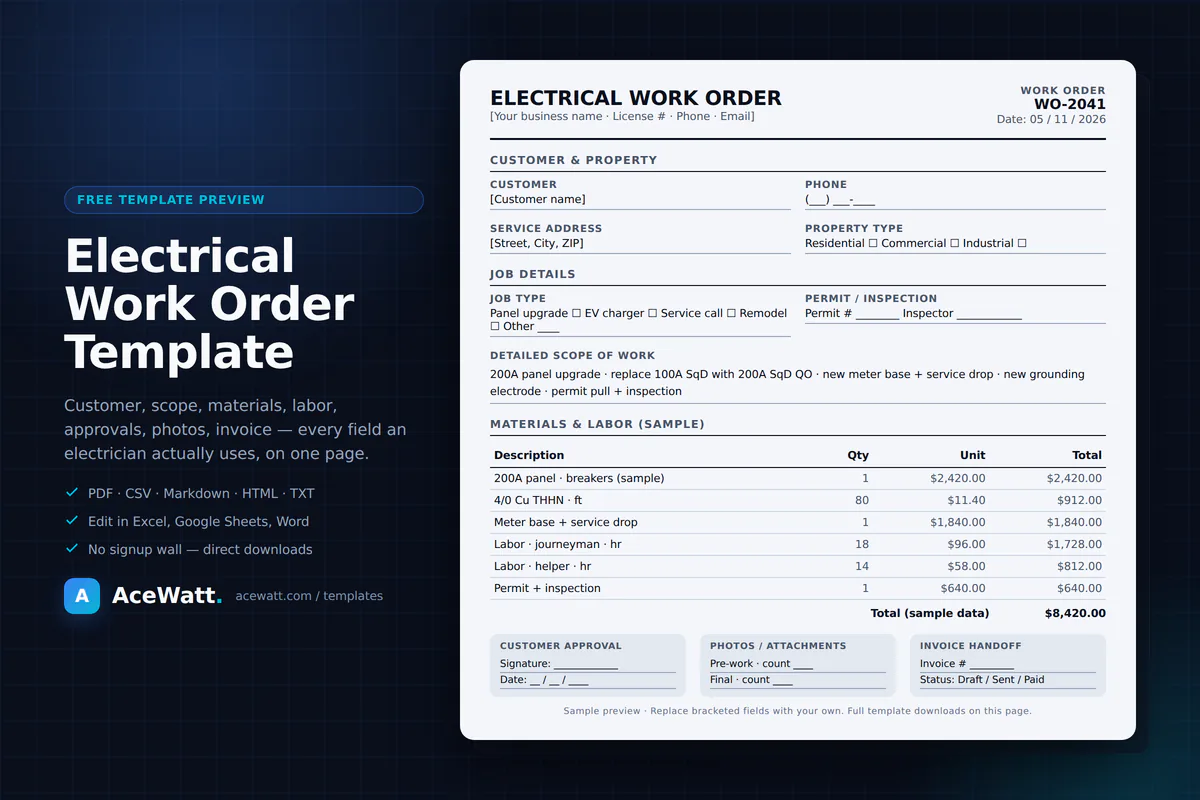
A real electrical work order template built around the fields electricians actually use — scope, materials, labor, approvals, photos, and invoice handoff. Download in PDF, CSV, Markdown, HTML, or plain text.
No signup wall. Direct downloads. Open and edit in any tool you already use.
What this template covers
Download
Every download links directly to the file. PDF for paper-and-clipboard crews, CSV for spreadsheet workflows, Markdown / HTML / TXT for digital editors.
Print on Letter paper, hand to crews, capture signatures on site. Best for paper-based field workflows.
File: electrical-work-order-template.pdf
Open in Microsoft Excel, Google Sheets, or Apple Numbers. Each row is a labeled field — duplicate the file per job or convert into a tracked sheet.
File: electrical-work-order-template.csv
Paste into Google Docs or Microsoft Word, keep the headings, and add your shop branding. Clean source for editing.
File: electrical-work-order-template.md
Open in any browser. Edit the source to match your business, then print to PDF. No software required.
File: electrical-work-order-template.html
Lightweight, copy-paste anywhere. Useful for email handoffs, quick edits, or text-only environments.
File: electrical-work-order-template.txt
What is an electrical work order?
An estimate is what the work might cost. A work order is the agreed scope, crew, materials, and labor for a specific job — created when work has been approved or is being scheduled. An invoice is what the customer is billed once the work is complete.
The work order sits between the quote and the invoice. It is the operational record electricians use on site, and the source of truth the office uses to build a clean invoice and protect margin.
Once a customer has approved the work or scheduled the visit. The work order replaces the back-of-truck sticky note.
Same template — just toggle property type and add permit / inspection details where commercial work requires them.
Paper for fast field handoff, spreadsheet for office tracking, or a CRM record when the shop scales past one tech.
What the template includes
The template covers intake, scope, materials, labor, approvals, photos, and invoice handoff. Lift fields you do not need; the source files are editable.
How to use the template
Choose PDF for paper handoffs, CSV for spreadsheets, or Markdown / HTML / TXT if you prefer a digital editor.
Open the file, replace placeholder fields with your business name, contact details, and rate sheet.
Record the customer, service address, job type, and scope of work as soon as the call comes in.
Note conditions found, permit needs, materials, and any safety considerations before pricing.
Capture a signature, email confirmation, or verbal approval and record the method on the form.
Update the form during the work so the office has accurate numbers for invoicing.
Once the work is complete, transfer the totals, customer details, and approval record into your invoice.
Examples
200A panel upgrade with permit, inspection, and a half-day labor estimate. The template captures permit number, materials list (panel, breakers, conduit, lugs), and crew hours so the office can quote the next similar job from a real record.
Level 2 EV charger install with a dedicated 240V circuit. The template captures conductor sizing notes, breaker rating, mounting hardware, and the inspection scheduling field so nothing slips between bid and final sign-off.
Same-day diagnostic call with materials TBD until the cause is found. The template separates trip charge, labor, and follow-up materials so customers see a clean breakdown when the visit becomes a bigger fix.
Common mistakes
Vague work orders cause scope creep. Use the detailed scope of work field to pin down exactly what is being done.
Photos resolve disputes. Use the attachments table to log photo IDs or file links for each job.
Without a signed or emailed approval, change orders turn into arguments. The customer approval section gives a single record location.
If materials live on a paper form and the invoice is built from memory, you lose margin. Keep both on the same record.
Paper gets damaged, left in trucks, or never reaches the office. Use the digital formats above as a backup.
When to upgrade
Templates work for solo electricians and small shops. As the business grows, the same fields belong in a CRM that connects work orders to customers, quotes, schedules, and invoices.
How AceWatt extends a work order template
Related
FAQ
An electrical work order template is a structured form an electrician uses to document a job: the customer, the scope of work, materials, labor, approvals, photos, and invoice handoff. It standardizes how every job is captured so nothing is missed in the field or in the office.
Yes. The template is free to download and use. There is no signup wall on this page — the PDF, CSV, Markdown, HTML, and plain text versions are direct downloads.
Yes. The template covers residential jobs (panel upgrades, EV charger installs, service calls, remodel rough-in) and includes a property type field for commercial or industrial work.
Download the CSV file. Excel, Google Sheets, and Apple Numbers will open the file directly. Each labeled field is a row — fill in the value column for the job, then save as XLSX or Google Sheets if you want richer formatting.
The template tracks materials, labor, taxes, totals, customer details, and approval records — the same fields you copy into an invoice. If your team retypes those fields manually, that is a strong signal it is time to use a CRM that connects work orders directly to invoicing.
When the shop has more than one tech, repeat customers, or invoices that depend on accurate work-order context, a dedicated electrical CRM beats spreadsheets. AceWatt is built for electrical contractors that need quotes, job notes, scheduling context, and invoice handoff in one workflow.
AceWatt CRM is built for electrical contractors that need work orders, quotes, schedules, invoices, and customer history in one workflow. Plans start at $49 per month.