_Last updated: June 2026._
Direct answer: An electrical contractor change order is a written, signed amendment to an existing contract or estimate that documents new scope, the cost of that scope, and any schedule impact. It protects the contractor from absorbing scope creep and the customer from surprise invoices. The best change orders are short, specific, priced before work starts, and tied to the original job record.
The most common reason electrical contractors lose money on a profitable-looking job is unpriced scope creep, a homeowner adds a circuit, a GC adds work to a tenant improvement, or the inspector flags something that wasn't on the original walk. A change order turns "we can do that" into a paper trail. AceWatt helps electrical contractors draft, send, track approval on, and tie change orders back to the original estimate and final invoice in the same CRM record.
_Not legal advice. This article is educational and operational. State and local rules for construction change orders, mechanic's liens, prompt-payment laws, and consumer disclosures vary. Have an attorney licensed in your jurisdiction review any contract or change order language you actually use._
Why change orders exist
Every electrical contractor change order exists because the estimate and the final invoice rarely match on a real electrical job. A service call can often be quoted tight. A panel upgrade, a remodel rewire, a commercial tenant improvement, or a multi-phase build almost always generates scope that wasn't in the original walk:
- The customer changes fixture counts, switch locations, or EV charger amperage.
- The GC, designer, or architect revises drawings after rough-in.
- The AHJ requires a different spec, additional bonding, or an extra inspection step.
- Field conditions surface, a hidden junction box, a corroded panel, an undersized service entrance, or a load calculation that didn't pencil out.
- Material prices move, or a specified fixture is backordered and a substitute changes the price.
Industry studies from ELECTRI International and NECA consistently identify scope changes as a top driver of margin erosion on electrical projects, alongside rework and under-documented T&M work. A change order converts mid-project discoveries into a documented, priced, and approved amendment, instead of absorbed cost or a "we'll settle up at the end" handshake that usually goes badly. For the customer, the change order makes the new scope, price, and schedule visible before any more work happens. That visibility is what keeps a change order from turning into a dispute.
What goes into a good electrical change order
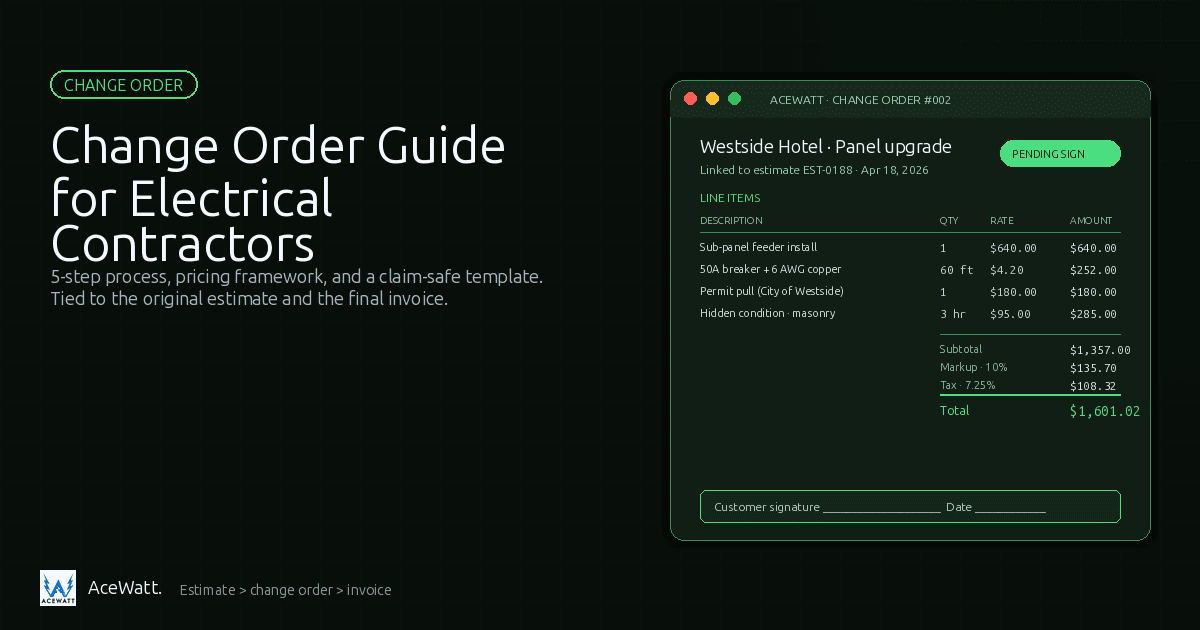
A good electrical change order is short enough to read in two minutes and detailed enough to defend in a dispute. The table below lists the sections it should include; a copy/paste excerpt appears later in this article.
| Section | What it does | Why it matters |
|---|---|---|
| Header | Names the change order number, date, project, and parties | Creates a unique document you can reference later |
| Project & customer info | Job address, customer name, original contract or estimate ID | Ties the change back to the original scope |
| Original scope reference | Pointer to the original estimate, proposal, or contract line | Shows what was already approved and what is now changing |
| Description of change | Plain-language description of the new scope, including what is added and what is excluded | Prevents the customer from claiming they thought something else was included |
| Pricing breakdown | Labor, materials, subcontractor cost, permit fees, taxes, and the markup on top | Lets the customer see how the new total was built, not just the number |
| Schedule impact | New completion date, milestone shift, or material lead time | Sets expectations for when the change actually finishes |
| Customer signature | Dated signature (or e-signature) by an authorized customer representative | Makes the change order enforceable as an amendment |
| File & photo references | Job-walk photos, inspection notes, revised plans, AHJ correspondence | Backstops the description when memory gets fuzzy months later |
Skip any of these and you create a gap. The most common gap we see in electrical contracting is a pricing breakdown that lists a single lump sum, the customer has no way to know whether that number reflects a fair markup or a wild guess, and the contractor has no way to defend it later.
Optional but recommended fields
- Reason for change (customer request, design change, code requirement, field condition). If "field condition" shows up on most of your change orders, you have an estimating or job-walk problem, not a documentation problem.
- Exclusions that did not exist in the original scope (for example, "excludes drywall patching" or "excludes painting after device install").
- Validity window (for example, "pricing valid for 14 days from issue") to protect against material price swings on long-lead items.
- Reference to the change-order clause in the original contract. See our electrical contractor contract template for the clause language to anchor against.
The 5-step change-order process
Treat the change order as a small workflow, not a moment. Most NECA-affiliated contractors follow the steps below on commercial work.
- Spot the scope change in the field. The technician, foreman, or PM recognizes the new work is not in the original scope. Best practice: do not start the new work. Note the discovery, take photos, and route the change to whoever prices it.
- Price the change before doing the work. Build the change order using the same labor units, material pricing, and overhead assumptions as the original estimate. If you use electrical contractor estimating software, pull from the same assemblies. Document assumptions: T&M ceiling, T&M vs. fixed price, permit responsibility, exclusions.
- Write the change order in plain language. Use the structure below, including the pricing breakdown, the schedule impact, and a clean signature line. Send it the same day whenever possible.
- Get customer approval in writing before work continues. E-signature through your CRM is the easiest path. Verbal approval is not enough and almost always turns into a he-said-she-said argument at billing. A signed paper copy photographed and uploaded to the job record also works.
- Tie the change order back to the original estimate and final invoice. The approved change order should update the contract value, the schedule, and the invoice total. AceWatt's CRM for electricians keeps the change order attached to the customer record, the job, and the invoice.
Two common-sense rules: never bury a change order inside a request for payment, and never combine two unrelated scope changes into one document.
Pricing framework for electrical change orders
There is no single "right" markup on a change order. There is a defensible framework that ties the new price back to the assumptions in your original estimate. Most electrical contractors build change order pricing in one of three ways.
Method 1: Add to the original estimate logic
The cleanest method. If your original estimate used a fully loaded labor rate (base wage + payroll burden + overhead allocation + target margin), a unit-based material price, and a fixed markup on subcontracted work, the change order uses the exact same inputs. The customer sees a number that looks like every other number in the original proposal, and you can defend the math line by line. This is the method electrical contractor pricing guides generally recommend. It also makes electrical job costing software work, actual labor and materials should reconcile back to the same units.
Method 2: Time and materials (T&M) with a cap
Common for diagnostic, troubleshooting, or undefined-scope work. The change order describes the work, the hourly labor rate (with burden loaded in), the material markup, and a not-to-exceed figure. The customer's signature acknowledges the cap; anything past it is a second change order. T&M with a cap is honest about uncertainty but is also the format that gets abused the most when not documented well, see our guidance on electrical contractor profit margins for the margin compression that happens when T&M is tracked loosely.
Method 3: Lump sum with a pricing breakdown underneath
Useful when the customer wants a single number but the contractor still wants to defend the math. Line items, units, and unit prices are visible in the change order itself, even though the customer only signs one total. This is the format most NECA-standard change order forms use.
Overhead, profit, and markup: using ranges, not promises
Industry guidance from ELECTRI International, NECA, and continuing-education providers like ExpertCE characterizes overhead, profit, and material markup as ranges, not fixed numbers. The actual rate depends on your cost structure, your market, your job mix, the project's risk, and the customer relationship. Rather than promise a specific percentage, the change order should show:
- The loaded labor rate (which already includes payroll burden and an overhead allocation).
- The material markup (typically a multiplier on cost, expressed as a percentage range or a flat handling fee).
- Any subcontractor markup (commonly a smaller range than materials, since the GC is doing less handling).
- The subtotal, taxes, and total.
Showing the loaded rate and markup clearly protects you from the most common dispute: "your markup is too high." If the customer can see the math, the conversation is about whether your rate is fair, not about whether you hid something.
For the broader context on how pricing flows from estimate to final invoice, see our electrical contractor pricing guide and our estimating software guide.
Change order vs estimate vs invoice
These three documents do different jobs, and the change order sits between the estimate and the invoice in the project lifecycle.
| Document | When it happens | Purpose | Becomes a contract? |
|---|---|---|---|
| Estimate | Before work, often during the job walk | Predicts scope and price; may be a ballpark | Not usually, until the customer accepts it |
| Proposal / Quote | Before work, on letterhead or in a proposal tool | Formal offer with scope, price, and terms | Becomes a contract when accepted and signed |
| Contract | Before work, once terms are agreed | The binding agreement on inclusions, exclusions, and how changes are handled | Yes |
| Change order | During work, when scope changes | Amends the original contract with new scope, price, and schedule | Yes, when signed by both parties |
| Invoice | After work is complete (or per the payment schedule) | Requests payment under the original contract plus any signed change orders | No, it is a billing instrument, not a scope document |
Two points worth highlighting:
- A change order amends an existing contract. If the original job never had a contract, the change order still creates a written scope record, but you have less protection. For a starting point on the base agreement, our electrical contractor contract template and the sibling electrical contractor service agreement post cover the language and structure.
- The change order is not the invoice. Some contractors send a change order that includes a "balance due" line, that confuses the document. The change order is a scope and price amendment; the invoice is the request for payment, which may include one or more approved change orders as line items.
Common change-order situations
The exact scope change varies, but the table below covers the majority of change orders an electrical contractor will see in 2026. Use it as a quick reference for what to price and what to document.
| Situation | Typical trigger | What to capture in the change order |
|---|---|---|
| Customer adds a circuit, device, or fixture | Homeowner or GC requests additional work after signing | Updated load calc reference, new circuit count, device count, revised homerun |
| Service upgrade or panel change discovered in field | Inspection reveals corrosion, undersized service, or code-required upgrade | AHJ notice or photo, new meter/main spec, utility coordination note |
| Design change from architect, designer, or engineer | Revised drawing issued after rough-in | Drawing revision number, dated plan page, redline or markup |
| Code-required change at inspection | Inspector requires bonding, GFCI/AFCI expansion, labeling, or extra support | Inspection report reference, AHJ contact, code citation |
| Material price or availability change | Specified fixture on backorder, commodity price spike | Quote from supplier with date, alternate substitution if applicable |
| Customer-driven scope reduction | Customer removes scope to fit budget | Clear "we are removing X, Y, Z" language with revised total, not just a credit memo |
| Add a permit or inspection fee | Scope now triggers a permit that wasn't required originally | Permit application, fee schedule reference, inspection date if known |
| T&M troubleshooting that exceeded the original allowance | Diagnostic time ran past the cap | Time log, photos, the cap from the original estimate, and the new not-to-exceed |
For projects where the change is permit-driven, our electrical permit application template helps you collect the AHJ details before you walk into the permit office.
How AceWatt CRM helps with change orders
A change order is only as good as the system that holds it. The most common failure mode is not a bad change order, it's a perfect change order that lives in someone's text thread and gets forgotten when the invoice is generated. AceWatt CRM keeps the customer record, the job record, the estimate, the change order, and the final invoice in the same workflow.
Inside AceWatt's CRM for electricians, the change-order workflow supports:
- Tied to the original job. A change order is created from the existing estimate or proposal, so the original scope, pricing, and assumptions are visible alongside the new scope.
- Photos and notes attached. Job-walk photos, inspection notes, and field photos live with the change order, not in someone's phone.
- E-signature and timestamp. Approval is captured with a date, a name, and an e-signature event you can produce if a dispute ever escalates.
- Pricing consistent with the original estimate. The same assemblies and unit prices flow into the change order, so the customer sees consistent numbers and your team doesn't have to rebuild math.
- Schedule and invoice handoff. Approved change orders update the contract value, the projected completion date, and the invoice total automatically. The final invoice lists each change order as a line item tied back to the signed document.
- Audit trail. Every revision, status change, and approval event is logged, the trail that protects you if the change order is ever challenged.
If you're currently sending change orders as PDFs over email and reconciling by hand at billing, the AceWatt pricing page shows the plans and how the change-order workflow fits into the broader estimating, scheduling, and invoicing toolset. For teams evaluating dedicated estimating tools, our guide to electrical contractor estimating software and our guide to electrical proposal software explain how the change-order piece connects to the rest of the front office.
Change order template (claim-safe excerpt, not legal advice)
The following is a structural template excerpt you can copy into your own document editor, CRM, or form builder. Replace bracketed text with your job's specifics. This is operational guidance, not legal advice.
` CHANGE ORDER [#] Date: [MM/DD/YYYY] Project: [Project name] Customer: [Customer name] Contractor: [Your company name, license #] Original contract / estimate reference: [Document ID, date]
- PROJECT & CUSTOMER INFO
Job site address: [Street, city, state, zip] Customer contact: [Name, phone, email] Original scope document: [Estimate / Proposal / Contract ID and date] Change order number: [Sequential number, e.g., CO-001, CO-002]
- ORIGINAL SCOPE REFERENCE
The original scope is described in [Document ID, section or line items]. This change order amends, but does not replace, the original contract unless explicitly stated in section 8.
- DESCRIPTION OF CHANGE
Reason for change (mark one): [ ] Customer request [ ] Design change (architect / engineer / GC revision) [ ] Code or inspection requirement (AHJ: [name]) [ ] Field condition discovered [ ] Material price or availability change [ ] Other: [describe]
What is being added:
- [Plain-language description, with quantities and locations]
What is being removed (if any):
- [Plain-language description of removed scope]
What remains excluded (carried over from original):
- [List exclusions]
- PRICING BREAKDOWN
Labor: [Description] [Hours] [Loaded rate/hr] [Line total] Materials: [Description] [Qty] [Unit cost] [Markup %] [Line total] Subcontractor: [Description] [Cost] [Markup %] [Line total] Permits / fees: [Description] [Amount] Tax: [Applicable tax, calculated on taxable subtotal]
Subtotal: $[_____] Total this change order: $[_____] Revised contract value: $[_____] (original $[_____] + this change $[_____])
- SCHEDULE IMPACT
Original completion date: [MM/DD/YYYY] Revised completion date: [MM/DD/YYYY] Additional days required: [#] Material lead time impact: [Description, e.g., "EV charger on 3-week backorder"] Inspection impact: [Description, if any]
- CUSTOMER APPROVAL
By signing below, the customer agrees that the scope, pricing, and schedule impact described in this change order amend the original contract as of the date signed.
Customer signature: ________________________ Date: __________ Customer name (print): ______________________ Contractor signature: ______________________ Date: __________ Contractor name (print): ____________________
- FILE & PHOTO REFERENCES
- [Photo 1: pre-existing condition, file name or CRM link]
- [Photo 2: revised layout, file name or CRM link]
- [Inspection notice: file name or CRM link]
- [Revised drawing: sheet, revision number, date]
- [Email or text thread reference: date and CRM link]
- [Other: ]
- NOTES
[Any additional assumptions, validity window, or carve-outs. Example: "Pricing valid for 14 days from issue date." Example: "This change order does not release the contractor from any warranty under the original contract."] `
When you paste this into your system of record, attach it to the job and link the line items back to the original estimate. That is what turns a change order from a PDF into a defensible part of the project record. For the contract language that authorizes this document, see our electrical contractor contract template and the sibling electrical contractor service agreement post.
FAQ
How is an electrical contractor change order different from a work order or a service ticket?
A work order is an internal instruction to the crew. A service ticket is a single visit logged in your CRM. An electrical contractor change order is a signed amendment to the original contract or estimate that documents new scope, new cost, and any schedule impact. They serve different purposes and should live as different documents on the same job record.
Does a change order need to be signed?
Yes. NECA and standard construction practice treat a signed change order as the amendment that updates the original contract. A verbal "yeah, go ahead" is a common source of disputes. E-signature through your CRM is the fastest path; a photographed paper signature is the second-fastest.
How long does a customer have to sign?
It depends on the change-order clause in your base contract. Many contractors write a 7- to 14-day approval window for non-emergency changes, plus a "work pauses until approved" rule. If you have no clause, default to "no signed change order, no additional work" and document the pause.
What's a fair markup on a change order?
There is no universal number. ELECTRI International, NECA, and ExpertCE characterize overhead, profit, and material markup as ranges. The most defensible answer: use the same loaded labor rate and material markup you used on the original estimate, show them on the change order, and let the math speak.
Can I send a change order after the work is done?
Technically yes, practically no. A change order signed after the fact is hard to enforce and easy to dispute. If scope changed mid-project, stop, document, send the change order, and wait for approval. If the job is already complete, write a post-job change order as a written record of what was actually done, not a permission slip.
Is a text message approval a valid change order?
A text message is evidence of an agreement, not a change order. Follow up every text approval with a written, signed change order filed to the job. A photo of the text thread is useful evidence, but the signed document is what holds up in a billing dispute or a lien situation.
How does AceWatt track change orders differently from a PDF over email?
A PDF is enforceable regardless of how it's transmitted. The problem is what happens after. PDFs in email threads get lost, don't update the original estimate, don't update the schedule, and don't flow into the invoice automatically. AceWatt's CRM keeps the change order attached to the customer and job record, updates the contract total and schedule, and lists change orders as line items on the final invoice. See the pricing page for plans, and our estimating software guide for the broader workflow.
_Not legal advice. This article is educational and operational. Change order language, lien rights, prompt-payment laws, consumer disclosures, and licensing rules vary by state and locality. Have an attorney licensed in your jurisdiction review the change order template, your base contract, and any actual change order before you use them on real work._
For related reading, If the change order is driven by a code revision, see the NEC 2026 code changes for electrical contractors summary for EV charging, load calculation, and GFCI/AFCI updates that commonly trigger mid-job change orders.
Related reading: Time & Material Billing for Small Electrical Contractors: Templates, Apps & Change-Order Workflows.
Related reading: Time & Material Billing for Electrical Contractors: Automating Change Orders from Field to Invoice.