
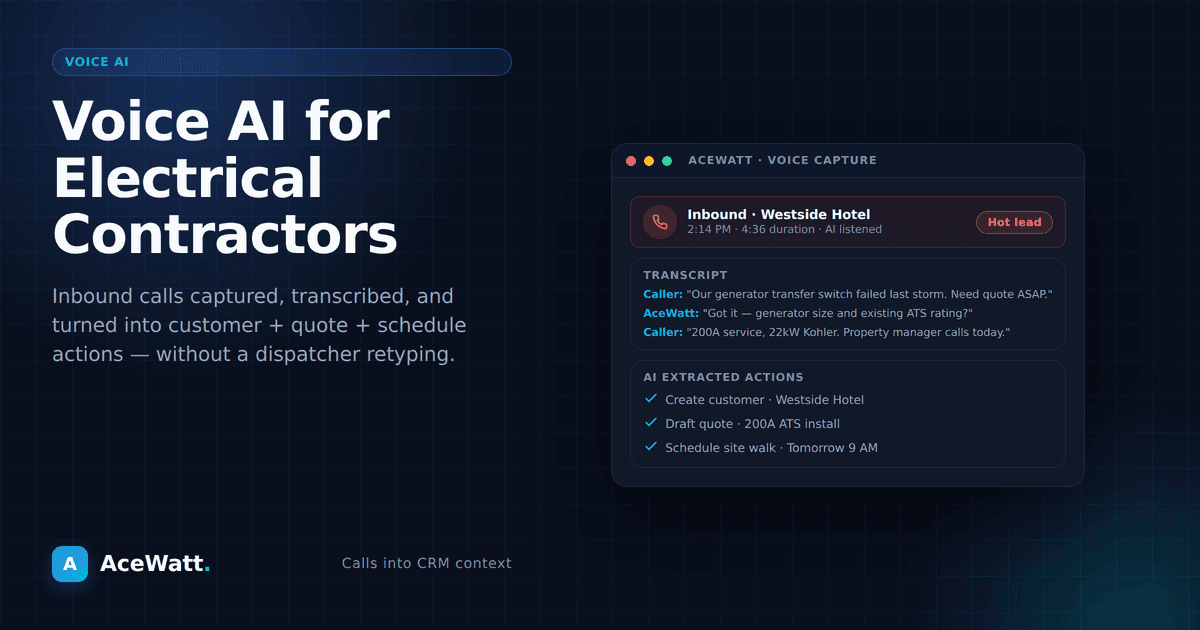
Voice AI for electrical contractors is software that can listen to spoken information, turn it into structured notes or messages, and help move office work forward with human review. In an electrical business, that usually means help with call intake, after-hours service requests, job detail capture, quote follow-up, schedule reminders, and crew handoff notes.
The important phrase is with human review.
Electrical work is not generic office work. A missed panel detail, wrong site condition, unclear scope, or careless safety assumption can create real problems. Voice AI should organize information; it should not replace a licensed electrician, estimator, service manager, or permit-aware professional judgment.
That makes voice AI most useful in the messy middle of the day: when a GC wants a rough timeline, a homeowner calls after hours, a property manager needs a quick response, or a tech needs to hand off job notes before the next stop.
For electrical contractors already looking at electrical contractor CRM workflows, voice AI is not a separate gimmick. It is a faster way to collect the information that the CRM already needs: who called, what they need, where the job is, how urgent it sounds, what photos or notes are missing, who should review it, and what happens next.
Why Voice Is a Natural Fit for Field Work
Electrical contractors do not work at a desk all day. They work in service vans, mechanical rooms, unfinished basements, commercial build-outs, parking lots, tenant spaces, and occupied homes. Their hands are often full. They may be carrying tools, wearing gloves, reading panel labels, coordinating with a GC, or walking a site while a customer explains the problem.
Typing long notes into a phone is possible, but it is not how most field teams naturally work. Voice fits the job because it lets someone capture information while the details are fresh.
A foreman can dictate rough-in progress, a service tech can capture symptoms from a homeowner call, and an office manager can record access notes from a property manager. Those notes are raw material. Voice AI can transcribe them, summarize them, attach them to a customer or job record, and create a draft next step for a human to review.
That review step is where claim-safe voice AI belongs.
Practical Field-Work Examples
1. Calls from General Contractors
A GC may call with a fast-moving request: "Can you price the electrical for a small tenant improvement? We need a walkthrough this week and a number by Friday."
A voice AI intake workflow can help capture the project name, site address, GC contact, bid deadline, walk-through window, known scope, needed documents, and internal reviewer.
A safe draft response might be: "Thanks for the details. We'll review the drawings and confirm whether we can attend the walkthrough. A licensed team member will verify scope and pricing before any proposal is sent."
That language matters. The AI can organize the request and draft the response. It should not commit to a price, approve a schedule, or interpret code requirements without review.
2. Calls from Property Managers
Property managers often need fast, clear communication. They may not know the technical cause of the issue, but they need a record of the request and a next step.
Example call: "We have three exterior lights out at the north entrance, and tenants are complaining. Can someone come tomorrow?"
Voice AI can help turn that call into a usable service request: property name, site location, access instructions, reported issue, urgency, tenant impact, photo request, and reminders about lifts, keys, parking, or after-hours access.
The human boundary is clear: the AI can summarize "reported exterior lighting outage," but a qualified person should determine whether the issue is a lamp, photocell, timer, breaker, wiring fault, water intrusion, vandalism, or something else. The contractor should verify site conditions before quoting repair scope.
3. Calls from Homeowners
Homeowner calls can be emotional and incomplete. Someone may say, "The breaker keeps popping," "I smell something hot," or "Half the house is out." A voice AI workflow should be especially careful here.
A safe intake script can collect the customer's name, address, callback number, what they noticed, when it started, whether there is smoke, burning smell, heat, sparks, water exposure, repeated breaker trips, or partial outage, and whether the concern needs immediate professional attention.
The AI should not tell the homeowner that a condition is safe. It can route the call, flag urgency, and provide pre-approved safety language such as: "If you see smoke, sparks, heat, or smell burning, stay away from the affected area and contact emergency services or a licensed electrician immediately." That language should be approved by the business before use.
4. After-Hours Service Requests
After-hours calls are one of the strongest use cases for voice AI because the alternative is often a missed voicemail, a tired owner answering every call, or incomplete notes the next morning.
A voice AI assistant can ask structured questions, capture details, and classify the request for review: emergency, urgent next-day, or routine; residential, commercial, property management, or GC-related; access requirements; known symptoms; preferred contact method; and photos if the business uses that process.
For example, a property manager calls at 9:40 p.m. about a tenant suite with partial power loss. The AI can capture the issue, mark it as after-hours, notify the on-call reviewer, and draft a response. A human decides whether to dispatch, whether premium rates apply, whether the site is safe to enter, and what information is still missing.
Voice AI should support the on-call process. It should not create an unchecked promise that someone will arrive at a specific time unless the contractor has authorized that workflow.
5. Job Details Capture During a Site Visit
A job walk often produces scattered information: spoken notes, photos, panel labels, customer comments, access issues, and reminders. Voice AI can help turn that into a job record — AceWatt's voice job walk app does this end to end, from spoken walkthrough to quote-ready scope.
A contractor might dictate:
"Residential EV charger request. Panel in garage. Customer wants charger on left wall near driveway side. Need to verify panel capacity, wire path, permit requirements, and charger model. Customer asked about scheduling before end of month. Photos added of panel, garage wall, attic access, and meter."
The AI can produce a clean draft that identifies the job type, customer request, missing information, and items requiring licensed review: panel capacity, load calculation, wiring route, permit requirements, charger specifications, and next steps before a quote.
This is the right division of labor. The AI captures what was said and organizes the job. A qualified human verifies electrical scope, code requirements, safety, site conditions, and price.
6. Quote Follow-Up
Many electrical contractors lose work because quotes go quiet. The problem is not always the quote itself; it is the follow-up process.
Voice AI can help by drafting follow-up messages based on approved templates. For example:
"Hi Jordan, this is a quick follow-up on the panel upgrade estimate we sent. If you have questions about timing, access, or next steps, we're happy to review them. Final scope and scheduling are confirmed by our team before work begins."
That message does not guarantee availability, promise a code outcome, or pressure the customer with false urgency. It simply keeps the conversation moving.
For more context on how AI can support contractor workflows beyond voice, see AI for electrical contractors and the related estimating guide at electrical estimating software.
7. Schedule Reminders
Schedule reminders are another safe, practical application. Voice AI can help draft or trigger reminders when appointments are already confirmed by the team.
Examples include customer appointment reminders, crew reminders about access and materials, and office reminders to confirm permit or inspection status.
The important boundary is that reminders should reflect approved schedule data. Voice AI should not invent appointment windows or move jobs without permission from the dispatcher, owner, or service manager.
8. Crew Handoff Notes
Crew handoff is where small details can make or break a job. A foreman may need to leave early, a service tech may find a surprise condition, or the office may need to brief tomorrow's crew.
A voice note can become a clear handoff:
"Tomorrow's crew needs to know the tenant opens at 8:30, parking is behind the building, panel room key is with security, and the ceiling grid above the reception desk is tight. We pulled photos. Need to verify fixture count before ordering."
Voice AI can summarize access, site condition, materials, attachments, and the human review owner in one handoff note.
This saves time without pretending the AI understands every site condition better than the crew.
What Voice AI Should Do: and What It Should Not Do
A good voice AI workflow for electrical contractors should be narrow, useful, and review-gated.
Voice AI can help:
- Capture inbound call details
- Transcribe field notes
- Summarize job walk information
- Draft customer replies from approved templates
- Prepare quote follow-up messages
- Create schedule reminder drafts
- Organize crew handoff notes
- Flag missing information for review
- Route urgent requests to the right person
Voice AI should not independently:
- Diagnose electrical hazards
- Confirm code compliance
- Approve final scope of work
- Set final pricing
- Promise permit approval
- Replace a licensed electrician's judgment
- Override safety procedures
- Change schedules without authorization
- Tell a customer that a condition is safe
This is the human-review boundary AceWatt keeps front and center. A licensed electrician or qualified team member verifies scope, code and compliance questions, pricing, safety, and site conditions. AI drafts, captures, summarizes, and routes information.
How to Add Voice AI Without Disrupting the Business
The safest way to introduce voice AI is to start with low-risk workflows and build from there.
Week 1: Call intake notes. Capture who called, why they called, where the job is, and what follow-up is needed.
Week 2: Field note summaries. Ask techs or estimators to dictate site-visit notes, then review the summary before it enters the job record.
Week 3: Quote follow-up drafts. Use approved templates, with a team member reviewing sends.
Week 4: Schedule and crew handoff reminders. Draft reminders from confirmed job data. Keep schedule changes with the dispatcher or owner.
This measured approach is better than trying to automate everything at once. Electrical contractors need fewer missed details, cleaner notes, faster follow-up, and better handoffs, not "fully automated electrical work."
Where AceWatt Fits
AceWatt's positioning is strongest when voice AI is presented as part of an electrical-focused workflow, not a generic chatbot. The practical promise is simple: help electrical contractors capture job information faster, keep calls and notes organized, and move work toward the next reviewed step.
That connects naturally to AceWatt's broader electrical contractor CRM, the existing guide to AI for electrical contractors, and estimating content such as electrical estimating software. Readers who want to evaluate plans can review pricing.
AceWatt can help contractors build a cleaner workflow around intake, estimates, scheduling, and follow-up, without replacing a licensed electrician, guaranteeing compliance, or running an electrical business on autopilot.
FAQ
What is voice AI for electrical contractors?
Voice AI for electrical contractors uses spoken input to capture calls, field notes, job details, reminders, and draft messages. In a safe workflow, it organizes information for review instead of making final electrical, pricing, safety, or compliance decisions.
Can voice AI answer calls from homeowners, GCs, and property managers?
Yes. It can collect basic intake details from homeowners, GCs, and property managers. The business should define scripts, escalation rules, and review steps. A qualified person should verify scope, urgency, safety concerns, schedule commitments, and pricing.
Should voice AI diagnose electrical problems?
No. It should collect symptoms, flag urgent language, and route the request to a licensed electrician or responsible team member. Diagnosis, code interpretation, and safety judgment belong with qualified professionals.
Can voice AI help with quote follow-up?
Yes. It can draft follow-up messages from approved templates, remind the team when a quote needs attention, and summarize replies. Final pricing, discounts, scope changes, and commitments need contractor review.
Is voice AI useful for small electrical shops?
It can be, especially when the owner answers calls, estimates jobs, schedules crews, and works in the field. Start with low-risk tasks: call notes, after-hours capture, field summaries, and follow-up drafts.
Does voice AI replace an office manager or dispatcher?
No. It should support office staff and dispatchers by reducing repetitive note-taking and message drafting. Humans still manage priorities, customer expectations, schedule changes, exceptions, and judgment calls.
Get Started with Review-Gated Voice AI
If your electrical business is trying to capture more job details without adding more paperwork, start with a review-gated workflow. Use voice AI for intake, notes, reminders, and draft follow-ups, then keep licensed review where it belongs.
Explore AceWatt's electrical contractor CRM, compare related AI workflows at AI for electrical contractors and the full-lifecycle AI agent for electricians, or review plans at pricing. If after-hours call intake is your bottleneck, compare the related AI answering service for electricians guide before choosing a voice workflow.
Last updated: May 2026