
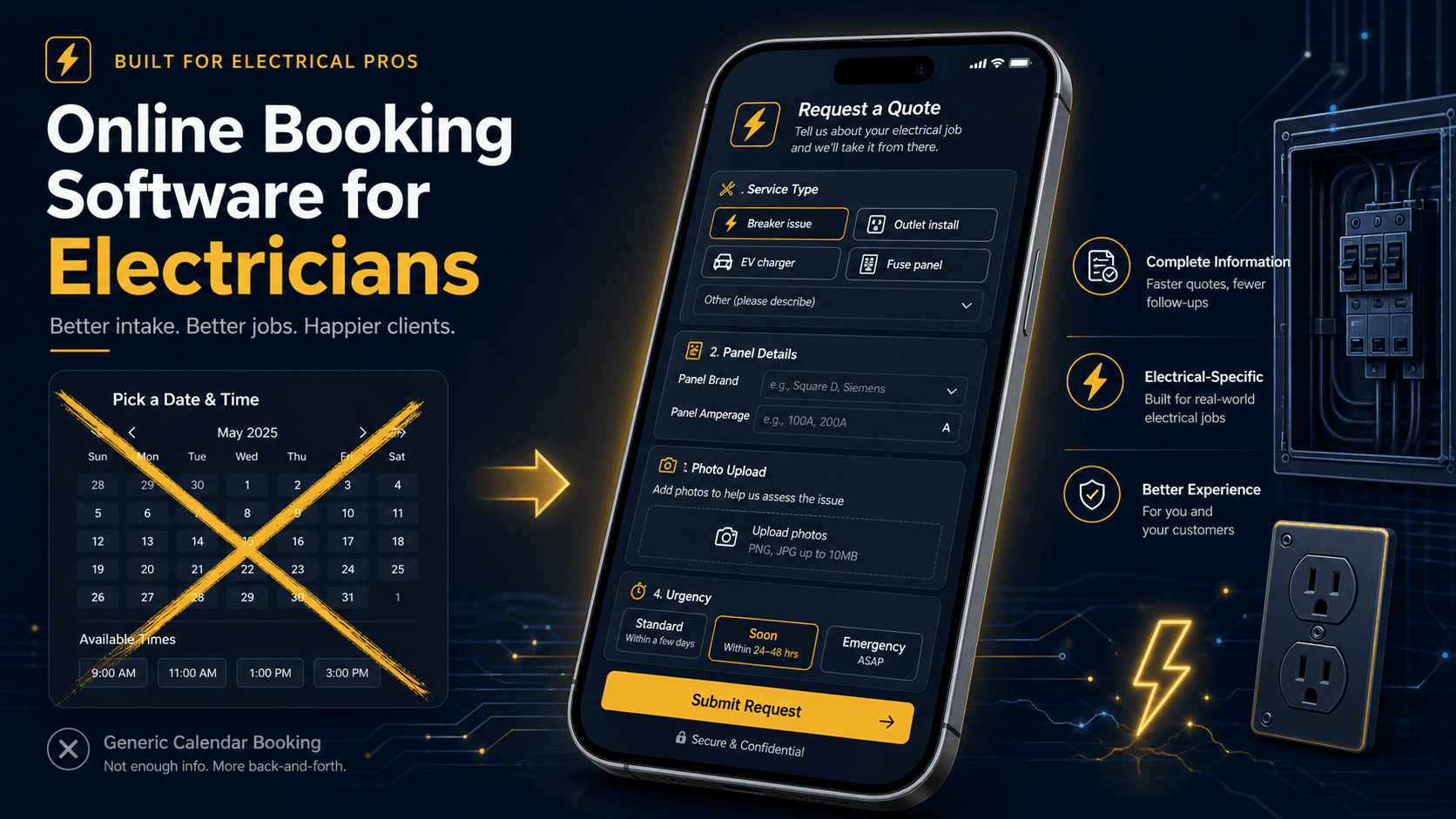
If you have searched for online booking software for electricians, you probably already know the problem: leads come in through phone, email, text, a website form, and a neighbor's referral, and half of them slip through the cracks before anyone can qualify them. The temptation is to bolt on a generic appointment-booking widget, the kind that lets a customer pick a time slot like they are reserving a table. But electrical work is not restaurant seating, and instant booking for a job you have not seen is a recipe for bad appointments, underbid work, and techs driving to sites without the right context. The right software for electricians is not a booking button. It is a structured lead-to-quote workflow that captures the right information up front, qualifies the job, and routes it into a job walk and estimate without phone tag.
What Is Online Booking Software for Electricians?
Online booking software for electricians should be structured intake, not a calendar slot. The right online booking software for electricians captures the right information up front, qualifies the job, and routes it into a job walk and estimate without phone tag. The best online booking software for electricians lets potential customers submit their electrical issue, property details, photos, and availability through a structured form, then routes that lead into your CRM for qualification, scheduling, and estimating. For most electrical work, the goal is not instant appointment booking; it is structured intake that gives you enough context to qualify the job, price it correctly, and schedule the right tech.
Generic booking widgets (the "pick a 2-hour window" calendar tools built for salons and consultants) fail for electricians because they skip the qualification step entirely. A customer books a time for "a breaker issue," the tech arrives with no panel details, and the job turns out to be a full 200-amp service upgrade that needs a permit, a helper, and a full day. Structured intake prevents that. AceWatt is built around the electrician-specific intake-to-quote pipeline.
Booking vs. Quote Request vs. Client Portal: What Electricians Actually Need
These three concepts get conflated, and choosing the wrong one wastes money. Here is the honest breakdown:
Instant booking (calendar slot picker) works for simple, repeatable services where scope and price are fixed: a haircut, a tune-up, a 30-minute inspection. For electrical work, instant booking is almost always wrong. You cannot book an appointment for "fix the outlets in the kitchen" without knowing whether it is a loose neutral, a bad breaker, or a whole-circuit rewire.
Quote request / structured intake is the model that fits most electrical work. The customer submits an issue with context: service type, urgency, property type, panel details if known, photos, access notes, availability windows. You review, qualify, and either schedule a job walk (for anything non-trivial) or send an estimate (for clearly scoped work). The customer does not pick a time slot; they provide the information you need to schedule correctly.
Client portal is the most advanced option: a logged-in experience where customers see job status, approve quotes, review message history, view invoices and payments, and access files. Portals are valuable for repeat commercial customers and multi-unit property managers but are overkill for a one-off residential service call. Some field service software for electricians markets a portal as the headline feature; for most electrical shops, structured intake is the higher-value starting point.
The honest position for electricians: start with structured quote-request intake. Add a portal when you have commercial accounts or property-manager customers who will actually use it. Do not pay for portal features you will never turn on.
When Electrical Work Should Not Be Instantly Booked
Some electrical jobs look simple and are not. Instant booking creates real risk in these situations:
- Service upgrades and panel changes. A customer describes "need a bigger panel" and books a slot. The tech arrives to find the service entrance needs a utility disconnect, the meter base is undersized, and the grounding is non-compliant. The job that looked like 4 hours is a 2-day project with a permit. Structured intake surfaces panel amperage, age, and service type before anyone drives out.
- EV charger installs. "Install an EV charger" ranges from adding a 50-amp circuit to an existing 200-amp panel to a full service upgrade with load calculation and permit. Instant booking cannot distinguish these; structured intake asks the right questions.
- Troubleshooting calls. "Outlets not working" can be a tripped GFCI (5 minutes) or a loose neutral in a junction box behind drywall (hours). Without issue description, photos, and urgency, the booking is a guess.
- Generator and solar tie-ins. These are multi-visit, permit-heavy projects. They require site survey, load calculation, utility coordination, and inspection, not a single booked appointment.
- Anything requiring a permit or inspection. Permit-required work needs planning, documentation, and AHJ coordination. Booking a tech for "tomorrow at 2" without the permit in motion wastes the slot.
The pattern: any job where scope, price, materials, or compliance depends on what you find on site should not be instantly booked. It should be intaken, qualified, and scheduled after the context is known. That is what electrician-specific intake software does.
What Your Electrical Quote Request Form Should Collect
The difference between a useful lead and a useless one is the form. A generic "name, email, message" form produces noise. An electrical intake form produces qualified, schedulable leads. These are the fields that matter:
Service type. Categorize the request (troubleshooting, panel upgrade, EV charger, lighting, generator, inspection, commercial, other). This routes the lead to the right workflow immediately.
Urgency. Is this an emergency (no power, burning smell, sparking), same-week, or flexible? Emergency calls need immediate dispatch; flexible requests can be batched. Without urgency, every lead feels equally pressing and nothing gets prioritized correctly.
Property type. Single-family, multi-unit, commercial, new construction, industrial. The tech, materials, and pricing differ dramatically by property type.
Panel details (if known). Panel amperage (100, 150, 200, 400), age, brand, and whether it has available breaker slots. This single field separates "add a circuit" from "upgrade the service."
Issue description. Free-text, but prompt for specifics: what is happening, when did it start, what have they tried, is it affecting the whole house or one circuit. The more detail here, the better the qualification.
Photos and videos. Let customers upload photos of the panel, the affected outlet, the breaker, the problem area. A photo of a panel label answers ten questions a phone call cannot.
Address and service area. Confirm the job is in your service area before spending time qualifying. Out-of-area leads should be declined politely and quickly.
Preferred contact method and availability. Some customers prefer text; some want a call. Availability windows tell you when to schedule the job walk or callback.
Access notes. Gate codes, parking, pets, attic/crawlspace access, tenant coordination. These seem minor until a tech arrives and cannot get in.
A form with these fields turns a vague "my lights flicker" into a qualified lead: "200-amp Square D panel, 2015 vintage, flickering on one circuit when the AC kicks on, photo attached, flexible timing, text preferred." That lead can be scheduled with confidence.
How Online Intake Improves Dispatch, Estimating, and Follow-Up
Online booking software for electricians does not just make the front end cleaner; it ripples through the entire operation:
Better dispatch. When the dispatcher sees service type, urgency, panel details, and location before assigning, they match the right tech, the right materials, and the right time window. No more sending a residential tech to a commercial job or scheduling a 2-hour slot for a full-day project.
Faster, more accurate estimating. The intake form feeds the job walk and estimating workflow. The tech arrives with context already captured; they are not starting from a blank clipboard. The estimate reflects what the customer actually described, not what the tech assumes.
Cleaner follow-up. Every lead that comes through structured intake is a CRM record with a status: new, qualified, job walk scheduled, estimate sent, won, lost. Your team can see which leads have gone cold, and the AI Copilot can search those records by voice. Phone-tag leads, by contrast, live in voicemail and get forgotten.
Fewer bad appointments. The single biggest ROI of structured intake is eliminating the appointment that should never have been booked: the wrong scope, the wrong tech, the wrong time, the wrong service area. Every bad appointment costs a slot, a truck roll, and customer goodwill.
Common Mistakes That Create Bad Appointments
If you are moving from ad-hoc intake to online booking software for electricians, watch for these recurring traps:
- Asking for too little. A two-field form (name + message) produces leads you have to call to qualify. A form that asks for the right context up front produces leads you can act on immediately. Err on the side of more fields, not fewer, but make every field earn its place.
- Asking for too much. A 20-field form that demands account creation before the customer can submit will kill conversion. The sweet spot is 8-12 fields, all optional or lightly required, with photo upload as the single highest-value field.
- Treating every lead as a booking. Not every quote request needs an appointment. Some can be estimated from the description and photos alone. Others need a job walk. Some are out of scope or out of area. The software should route each lead to the right next step, not force everything into a calendar slot.
- No response-time discipline. A structured lead that sits unreviewed for 6 hours is worse than a phone call answered on the second ring. Electricians who win on intake win on response speed. Set a target (under 1 hour during business hours, under 2 hours after hours) and track it.
- Ignoring the no-show risk. Appointments booked without qualification have higher no-show rates. Confirm the job, confirm the scope, and confirm the time with the customer before dispatching. A confirmation text 24 hours out cuts no-shows dramatically.
Online Booking Software Checklist for Electrical Contractors
When evaluating online booking software for electricians, look for:
- Electrician-specific intake fields (service type, panel details, urgency, photos), not generic appointment forms
- Structured quote-request workflow, not instant booking for jobs that need qualification
- CRM integration, so leads flow into your customer and job records, not into a separate inbox
- Photo and video upload from the customer's phone, attached to the lead
- Routing and assignment, so leads go to the right person or queue automatically
- Status tracking (new, qualified, scheduled, estimated, won, lost)
- Follow-up automation to flag and nudge cold leads without manual babysitting
- Mobile access for the owner/dispatcher, not just a desktop dashboard
- Service-area validation before the lead is accepted
- Confirmation and reminder texts/emails to reduce no-shows
How AceWatt Fits a Lead-to-Quote Workflow
AceWatt is built around the electrician-specific intake-to-estimate pipeline, not around a generic booking calendar. Here is how it fits:
Structured intake as the front door. Leads enter the CRM with context (service type, urgency, panel details, photos, availability) through a form designed for electrical work, not adapted from a salon template. AceWatt does not answer calls with AI; its phone menu alerts your staff to after-hours callers, and phone leads you log enter the same pipeline as form submissions (see AI answering service if you want AI call intake).
CRM context from the first touch. Every lead is a customer record, a job record, and a communication thread, not a standalone email. When the tech later does a job walk or the office sends an estimate, all the intake context is already there.
Job walk handoff. Qualified leads route to a job walk, voice and photo capture on site that documents scope, conditions, and materials. The job walk becomes the foundation of the estimate, not a separate clipboard step.
Estimating from field documentation. The job walk and intake feed automated estimating, producing tiered estimates (good/better/best or scope variants) the customer can approve. No re-entering the intake details into a separate quoting tool.
Dispatch connection. Once the estimate is approved, the job flows into dispatch with the full context attached: scope, materials, photos, access notes, customer preferences. The tech arrives prepared.
Pipeline visibility. Leads that go cold (estimate sent but not signed, job walk scheduled but no-showed, quote request submitted but never followed up) stay visible by status in the CRM, and the AI Copilot can search them by voice so your team knows who to call. The structured pipeline means no lead is invisible.
The honest scope: AceWatt does not currently market a public-facing instant-booking calendar widget or a full self-service customer portal. What it provides is the structured lead-to-quote workflow that electricians actually need: the intake, qualification, job walk, estimate, and follow-up pipeline that turns inbound interest into billed work. If a customer self-service portal is a hard requirement for your commercial accounts, confirm current capabilities with the product team before committing.
Frequently Asked Questions
Does AceWatt have online booking for electricians?
AceWatt provides structured quote-request intake and a lead-to-quote workflow rather than instant appointment booking, which is the right approach for online booking software for electricians. Electrical work usually requires qualification (panel details, scope, urgency, photos) before an appointment makes sense. Structured intake captures that context and routes the lead into job walk, estimate, and dispatch, which is more valuable than a calendar slot picker for most electrical jobs.
What's the difference between a client portal and structured intake?
A client portal is a logged-in customer experience (job status, quote approval, invoice history, messaging). Structured intake is the front-end form and routing pipeline that captures leads with the right context. Online booking software for electricians should start with structured intake; portals become valuable for commercial accounts later.
Can customers upload photos when they request a quote?
Yes. Photo upload from the customer's phone is one of the highest-value intake fields for electricians. A photo of a panel label, a problem outlet, or a breaker layout answers questions that a phone call cannot. AceWatt's intake workflow supports photo attachment tied to the lead and job record.
Should electricians offer instant booking?
For most electrical work, no. Online booking software for electricians should be structured intake, not instant booking. Instant booking skips qualification, which means techs arrive without the right context, materials, or time estimate. Structured quote-request intake, where the customer provides context and you schedule after reviewing, produces better appointments, faster estimates, and fewer wasted truck rolls.
How does structured intake connect to estimating and invoicing?
Structured intake feeds the job walk, which feeds the estimate, which feeds the work order, which feeds the invoice. In a connected CRM like AceWatt, the context captured at intake (panel details, scope, photos) carries through the entire pipeline with no re-entry at each stage. That is the core advantage over standalone booking widgets that produce a lead and then stop.
Stop Losing Leads Between the Form, Phone, Truck, and Quote
Online booking software for electricians is really intake software, the structured pipeline that turns inbound interest into qualified, scheduled, estimated work. Generic booking widgets fail because electrical work needs context before an appointment makes sense. The right online booking software for electricians captures the right information up front, routes it into your CRM, and connects it to job walk, estimating, dispatch, and follow-up so nothing slips through. See how it fits your shop with a 14-day trial.
To see how online booking connects to dispatch, invoicing, and more, browse the AceWatt features overview.