
Electrical Contractor Reporting Software: 2026 Tools & KPIs
If your Monday starts with exporting CSVs from your field-service app, invoicing tool, and payroll, then pasting them into a spreadsheet to see whether last week made money, you already know why this guide exists. Electrical contractor reporting software pulls job cost, revenue, labor hours, and accounts-receivable data out of those silos into structured dashboards and scheduled reports you can act on. This page covers what reporting software for electrical contractors does, the reports to run weekly, an honest 2026 tool comparison, and how AI is changing how shops read their numbers.
What Reporting Software for Electrical Contractors Actually Does
Reporting software for electrical contractors is the layer that sits above your individual tools and turns their raw output into answers. It aggregates job cost, revenue, labor hours, and accounts-receivable data from your field-service management (FSM) platform, your invoicing system, and your payroll, then presents it as structured dashboards and scheduled reports instead of a pile of exports you reconcile by hand.
> In one line: Electrical contractor reporting software connects the systems your crew and office already use and gives you live, structured visibility into profit, cash, and labor, ending the weekly spreadsheet ritual where somebody rebuilds the same pivot table by hand every Friday afternoon.
The reason contractors buy it is simple: the data already exists, it's just trapped. Your dispatch system knows which technician worked which job. Your invoicing system knows what's billed and outstanding. Your payroll knows what labor cost. Your job-cost layer knows what materials hit each project. Reporting software stitches that into one picture: which jobs are profitable, which invoices are aging, which technicians are productive, and whether the backlog keeps the crew busy next month. Without it, the answer to "how did we do last week?" is a project, not a glance.
It's worth being precise about scope. This page is about business intelligence and KPI dashboards, the cross-cutting view of how the company performs. That's distinct from a WIP reporting schedule (earned vs. billed on in-progress jobs) and from job costing (per-job labor, materials, overhead). Those feed this layer; they aren't the same thing. Reporting software is the place you go to see everything at once.
The Reports Every Electrical Contractor Should Run Weekly
A reporting tool is only as good as the reports you actually open. These five separate shops that run on numbers from shops that run on gut feel.
1. Job profitability report. Revenue minus fully-loaded cost (labor at the burdened rate, materials, subcontractors, permits) for every job, ranked by margin. It tells you which work is worth chasing and which is quietly subsidizing the rest, and depends entirely on clean job-coded costs (see our job costing software guide).
2. Accounts-receivable (AR) aging report. Outstanding invoices bucketed by 0 to 30, 31 to 60, 61 to 90, and 90+ days. Cash flow kills more electrical shops than bad margins do, and AR aging is the early-warning system, where you see a big commercial retainer or a stack of residential invoices cross into 60+ days before it becomes a payroll problem.
3. Technician use rate. Billable hours divided by available hours per technician. It tells you whether your highest labor cost (your electricians' time) is being sold or lost to windshield time, rework, and idle shop hours. A weekly view surfaces who's slammed, who has capacity, and whether your dispatch routing is efficient.
4. WIP and backlog report. In-progress work plus signed-but-not-started work, valued and scheduled. Backlog tells you whether the pipeline keeps the crew busy next month or you need to push sales. For earned-vs-billed math on in-progress jobs, see our WIP reporting software deep dive.
5. Revenue and margin by service type. Revenue and gross margin broken out by service line: residential service, commercial T&M, fixed-price installs, maintenance agreements, inspections. Most shops make their real margin on one or two lines and barely break even on the rest. This report shows which is which. See our electrical contractor pricing guide for how to act on it.
Run these five weekly and you'll know more about your business by Tuesday morning than most owners learn at the end of the quarter.
The 5 Best Reporting Tools for Electrical Contractors (2026)
Pricing and capabilities below reflect publicly available information as of early 2026 and change with plan tier, team size, and promotions. Confirm on each vendor's site before buying. This is an honest scan of the category: each tool below genuinely leads in the area noted, and AceWatt is positioned for what it's actually strong at, not claimed as #1.
| Tool | Best For | Standout Feature | Price Band |
|---|---|---|---|
| ServiceTitan | Large shops needing the deepest BI | Enterprise-grade reporting suite & custom report builder | Custom (mid-$100s+/mo) |
| Simpro | Mid-market project & commercial shops | Strong project-level reporting and BI | Custom (mid-$100s+/mo) |
| Knowify | Small-to-mid shops wanting job-cost + WIP | Job costing and WIP reporting in one affordable tool | ~$99/mo (varies by plan) |
| BuildOps | Commercial contractors focused on real-time WIP | Real-time WIP and backlog visibility | Custom |
| AceWatt | AI-assisted reporting on a budget | AI Assistant + morning briefing dashboard | $49 to $199/mo flat |
- ServiceTitan has the deepest reporting and BI layer in the trade, the benchmark for large residential or commercial shops running dozens of technicians that need a custom report builder and analytics-grade dashboards. The trade-off is price and complexity suited to a larger operation.
- Simpro is a strong mid-market choice for project-oriented commercial contractors who want deep project reporting alongside quoting and progress billing, again at enterprise-level pricing.
- Knowify earns its place for small-to-mid shops wanting credible job costing and WIP reporting together, without a custom contract. It's lighter on field-service depth and AI, but does the core financial reporting honestly at a fair price.
- BuildOps is built around commercial real-time WIP and backlog visibility, a fit for subcontractors running multiple concurrent commercial projects where in-flight position matters more than residential service metrics.
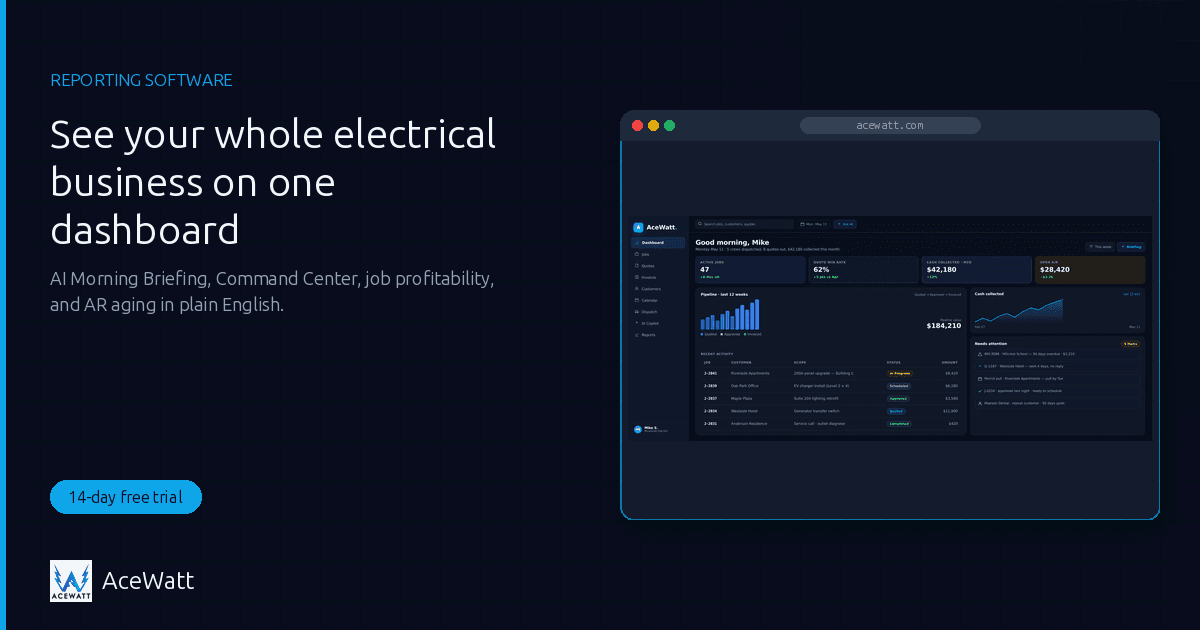
- AceWatt is the right pick if you want AI-assisted reporting on a budget: flat $49 to $199/mo, no custom contract, with an AI Assistant for quick plain-English questions and a morning briefing dashboard (active projects, overdue and outstanding invoices, expiring and pending quotes, today's hours) with an AI-written summary when you ask for one. It's built for small-to-mid electrical shops that want a live view of the business without an enterprise price tag. We won't pretend it has ServiceTitan's reporting depth; it doesn't. It competes on price, ease of setup, and AI. See plans and pricing.
Why Real-Time Matters: The Cost of Monthly Spreadsheet Reporting
Most electrical shops still report monthly, so the first time an owner sees a job slip, an invoice age, or a technician's use crater is thirty days after it happened. By then the margin is gone and the remaining move is damage control.
Real-time reporting flips that. When job cost, AR, and labor data refresh continuously, you spot drift the week it happens: a commercial job trending over estimate, invoices crossing 60 days, a technician whose billable hours dropped. You intervene while it still matters, instead of documenting it after.
Research attributed to McKinsey suggests digitizing reporting with real-time dashboards can cut administrative overhead on the order of 20% to 30% for field-service and construction businesses, an attributed industry benchmark, not AceWatt's own data or a guaranteed outcome for any shop. Your mileage depends on how manual your current process is and how clean the underlying data is. The cleaner the job-coded costs feeding your reports (the foundation in our job costing software guide), the more of that overhead disappears.
How AI Is Changing Electrical Contractor Reporting
The newest shift in electrical contractor reporting software isn't another chart type; it's how you get the answer.
From building a report to asking a question. Traditionally, a custom report meant a rigid template or, in enterprise tools, configuring a report builder or writing SQL. AI changes that. AceWatt's AI Assistant is a business Q&A chat: ask quick questions about your business in plain English, and the AI Assistant answers from a summary of your recent customers, quotes, invoices, and projects. For fuller answers, AceWatt's Report Builder takes a plain-English question and runs the matching report on live data: revenue, quote conversion, invoice aging, labor hours, job profitability or monthly P&L. If no report fits, it says so. The point isn't to remove judgment; it's to skip some of the export-and-pivot between you and a quick answer.
A morning view of what needs attention. The second change is cadence. AceWatt's morning briefing is a dashboard in the app: active projects, overdue and outstanding invoices, expiring and pending quotes, and today's hours, with an AI-written summary when you click for one. It is not sent by voice, text, or email; you open it. For owners living on weekly spreadsheet review, a daily look at that screen is a real upgrade.
Two guardrails. First, AI assists reporting. It surfaces and queries your data faster, but does not replace review by a licensed CPA or close your books. Second, any AI answer is bounded by the data underneath it; garbage in, garbage out still applies. For more, see our AI tools for electricians overview.
Buyer's Checklist: Reporting Software Must-Haves
Evaluating electrical contractor reporting software this year? This checklist separates a tool you'll still use in six months from one that becomes shelfware.
- Live integrations with QuickBooks and payroll. A reporting tool that can't read your accounting and payroll data is just another silo. Look for a QuickBooks connection that carries line-level job-cost detail, not summary totals (AceWatt's Growth plan and above give you QuickBooks-ready exports — an invoice-list spreadsheet and a QuickBooks-format payroll-hours CSV, not line-level job-cost detail — and there is no native, real-time, two-way sync today; see our QuickBooks integration guide) and a clean payroll feed. If "integration" means a raw CSV dump with no line-level detail, keep looking.
- Mobile access. If you can only open dashboards from the office desktop, you won't look at them. The owner and PM should reach them from the truck or job site.
- Scheduled, automatic reports. The reports that get run are the ones that arrive on their own. A weekly job-profitability email and a daily AR alert you didn't have to remember to generate are worth more than any single fancy chart.
- Export to common formats. CSV and PDF export isn't glamorous, but your CPA, lender, and bookkeeper will all ask for it. Make sure reports export cleanly, not as a screenshot.
- Role-based views. A technician shouldn't see the company P&L, and the office manager doesn't need every job's raw cost detail. Role-based dashboards keep the right information in front of the right person.
- AI-assisted querying (bonus). A natural-language query layer lets non-technical staff get quick answers without building reports (AceWatt's AI Assistant answers from a summary of recent records). Nice-to-have today, likely table-stakes soon.
Frequently Asked Questions
What is electrical contractor reporting software?
It's a reporting and business-intelligence layer that aggregates job cost, revenue, labor hours, and accounts-receivable data from your field-service, invoicing, and payroll systems into structured dashboards and scheduled reports. The goal is live, cross-cutting visibility into profit, cash, and productivity, so you stop rebuilding the same spreadsheet every week. It's broader than WIP reporting (earned vs. billed on in-progress jobs) or job costing (per-job costs); those feed this layer.
Does AceWatt have a reporting dashboard?
Yes. AceWatt has invoice-aging and customer-aging reports, job profitability (invoiced revenue minus logged job costs) from the Financial Hub, a morning briefing dashboard (active projects, overdue and outstanding invoices, expiring and pending quotes, today's hours) with an AI-written summary when you ask for one, and an AI Assistant for quick plain-English questions: the AI Assistant answers from a summary of your recent customers, quotes, invoices, and projects. See plans and pricing.
What KPIs should an electrical contractor track?
The core weekly set: job profitability (margin per job), AR aging (outstanding invoices by bucket), technician use (billable vs. available hours), WIP and backlog (in-flight and signed work), and revenue and margin by service type. Together these answer the four questions every owner has: am I making money, am I getting paid, is my crew productive, and is there work ahead. Benchmarks vary widely by market and trade mix, so track your own trend lines rather than chasing a generic "industry average."
How does AI reporting work?
An AI reporting layer takes your natural-language question and returns an answer from your data; some tools translate it into a full query against your records. AceWatt's AI Assistant is lighter: the AI Assistant answers from a summary of your recent customers, quotes, invoices, and projects, and the morning briefing dashboard adds an AI-written summary when you ask for one. It surfaces and summarizes faster; it does not replace review by a licensed CPA, and its accuracy depends on how clean the underlying job-coded data is.
Can I export reports to QuickBooks?
Yes. AceWatt produces QuickBooks-ready exports on Growth and Scale plans (an invoice-list spreadsheet and a QuickBooks-format payroll-hours CSV), and reports export to CSV and PDF for your CPA, bookkeeper, or lender. Those exports give your bookkeeper invoice totals, balances, and payroll hours to work from — there is no native, real-time sync today, and full sync is in development — but AceWatt doesn't perform the GAAP close itself; that stays with your accounting system and CPA. Details are in our QuickBooks integration guide.
See Your Whole Electrical Business on One Dashboard
Electrical contractor reporting software earns its keep the first Monday you skip the spreadsheet ritual and open a dashboard instead. Whether you run a residential service shop tracking use and AR or a commercial subcontractor watching job profitability and backlog, the goal is the same: see your whole business on one screen and act the week it matters.
AceWatt brings job profitability, invoice and customer aging, and quote status into live views (no WIP or over/under-billing), with an AI Assistant for quick plain-English questions and a morning briefing dashboard you open each day. Plans start at $49/month, every plan includes a 14-day free trial, and there's no custom contract. See pricing and start your trial.
Reporting software shows you the business; AI helps you read it; your CPA still closes it. To dig deeper, pair this with our guides on job costing, WIP reporting, and profit margins, or see how it all fits in our AI tools for electricians overview.