
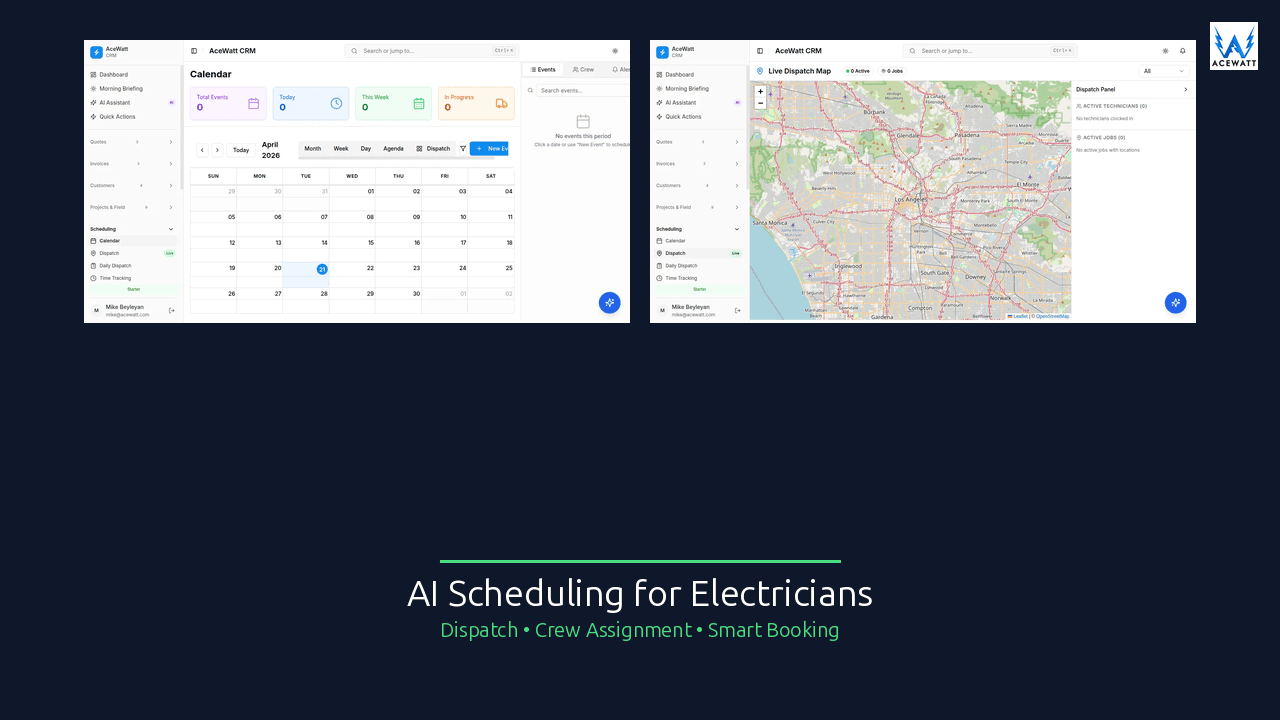
If your electrical shop schedules work from a shared calendar, a whiteboard, and a group text, the real problem is not just booking appointments. It is the handoff: the customer call, job-walk notes, estimate, crew assignment, no-show follow-up, and invoice all need to stay connected. AI scheduling software for electricians can help the office see better appointment options and keep job context attached, but the contractor still controls who goes, what gets promised, and what work is safe to perform.
What is AI scheduling software for electricians?
Direct answer for snippets
AI scheduling software for electricians is scheduling software that uses AI to organize appointment requests, surface available time slots, summarize job context, and help dispatchers assign work to the right electrician or crew. The best tools connect scheduling with customer records, estimates, invoices, reminders, and follow-up so the calendar is not isolated from the rest of the job.
AI can help reduce office drag, but it should not make electrical safety, code, scope, or pricing decisions. A licensed electrician, owner, dispatcher, or qualified reviewer should approve the assignment, customer promise, scope language, and final price.
Scheduling vs dispatch vs job management
These terms get mixed together, but they solve different problems.
| Term | What it means | Electrical example | What can go wrong if it is separate |
|---|---|---|---|
| Scheduling | Choosing the appointment time and assigned person or crew | Put a 9 AM panel inspection or 2 PM EV charger estimate on the calendar | The calendar may not include photos, estimate scope, or access notes. |
| Dispatch | Same-day coordination and field updates | Move a technician from a finished service call to an urgent outage | The dispatcher may not know skills, job context, or customer priority. |
| Job management | Tracking the full job from lead to paid invoice | Customer history, quote, schedule, notes, change orders, and invoice | The office re-enters details and loses follow-up opportunities. |
That is why many shops researching electrical contractor scheduling software eventually look for a broader electrician job management software workflow.
Where AI helps and where humans stay in control
AI is useful when the task is repetitive, text-heavy, or context-heavy. It can read an intake note, recognize that a customer asked for “panel upgrade estimate next week,” and suggest open job-walk slots. It can summarize a phone call so the tech sees “customer reports two bedrooms without power after breaker reset; no burning smell reported; homeowner available after 3 PM.”
The human boundary is just as important. AI should not decide whether an electrical condition is safe, whether a panel requires replacement, whether a repair meets code, or what final price should be sent. It can help organize the facts; a licensed electrician or qualified reviewer confirms the judgment.
Why electrician scheduling is harder than generic booking
A generic appointment calendar works when every appointment is similar. Electrical work is not like that. A 30-minute outlet replacement, a 2-hour service call, a full-day panel upgrade, and a commercial lighting retrofit all create different scheduling risks.
Emergency outages vs planned installs
A planned ceiling fan install can wait until Friday. A customer reporting partial power loss, hot equipment, or storm damage needs faster intake and escalation. Scheduling software can flag urgency and show who is available, but emergency handling must follow your company policy and qualified human review. Do not let any tool promise life-safety response that your team cannot actually deliver.
Panel upgrades and multi-tech jobs
Panel work often needs more than a simple time slot. You may need two electricians for 6-8 hours, a permit, utility coordination, inspection timing, materials, and a return visit if the inspector requires changes. A plain calendar entry that says “panel upgrade” is not enough. Good electrical contractor scheduling software should show crew assignment visibility and keep scope notes attached.
Commercial access windows
Commercial jobs often happen around tenant schedules, loading dock windows, elevator access, security check-in, or after-hours work. Missing a 7 AM access window can turn a profitable job into a wasted truck roll. AI can summarize access notes and remind the dispatcher about constraints, but the office still confirms the appointment with the property contact.
Permits, inspections, and return visits
Electrical jobs frequently depend on permit approval, inspection availability, and follow-up work. A service call may become an estimate, the estimate may become a permitted job, and the job may need a final inspection two weeks later. Scheduling needs to stay connected to the estimate and invoice so nothing sits forgotten after the first visit.
Technician skills and geography
Not every electrician should be assigned to every job. Some techs are better at troubleshooting, some at service upgrades, some at low-voltage work, and some at commercial maintenance. Geography matters too: a 20-minute gap across town can become a 55-minute drive at 4 PM. AI can help show options, but a dispatcher should confirm skills, travel reality, and customer priority.
Best AI scheduling software for electricians: comparison table
The “best scheduling software for electricians” depends on whether your pain is call intake, self-booking, dispatch coordination, or the full lead-to-invoice workflow. Public vendor positioning was checked June 1, 2026. Competitor features and pricing change often; verify directly on each vendor page before purchasing or publishing a final comparison.
| Tool | Best fit | What to verify directly on the vendor page |
|---|---|---|
| AceWatt | Electrical shops that want scheduling connected to CRM, job walks, estimates, follow-up, and invoices | AceWatt pricing starts at $49/month. AceWatt focuses on calendar workflow and crew assignment visibility, not fully autonomous dispatch; route optimization is straight-line, on the Scale plan, with no drive-time or traffic-aware routing. |
| FieldCamp | Field-service teams evaluating AI-first scheduling, dispatch, CRM, invoicing, and payments | Current plan details, electrical workflow depth, and how human approval works for dispatch decisions. |
| QuoteIQ | Home-service contractors wanting CRM, quoting, scheduling, invoicing, and self-scheduling | Which scheduling features are included by plan, current pricing, and electrical-specific fit. |
| Call Monkey AI | Shops looking for AI answering plus home-service operations tools | After-hours escalation, on-call scheduling, dispatch review, plan limits, and current pricing. |
| SuperDupr | Teams focused on AI appointment scheduling and lead booking | Integrations, customer consent handling, pricing, and whether scheduling connects to your job records. |
| Goodcall | Businesses that need an AI phone agent or virtual receptionist | Whether call capture turns into structured CRM/scheduling handoff notes for electrical work. |
| Praxedo | Larger field-service teams needing dispatcher views, mobile work orders, and formal operations | Quote-based/adapted pricing, implementation scope, integrations, and electrician workflow fit. |
AceWatt
AceWatt keeps the schedule inside the customer record. A lead can become a job walk, the job walk can feed estimate context, the accepted estimate can move into the calendar, and the completed job can hand off to invoicing and follow-up. AceWatt is a strong fit for 2-10 truck shops that want fewer office-to-field gaps. See AceWatt scheduling, AI job walk, and pricing.
FieldCamp
FieldCamp appears in AI dispatch software searches that electricians may evaluate because its public pages emphasize AI-first field service operations. Verify the live feature set, pricing, electrical workflow depth, and human approval process before relying on it for electrical dispatch.
QuoteIQ
QuoteIQ is commonly positioned as an all-in-one home-service CRM with quoting, scheduling, invoicing, and self-scheduling content. Verify directly which features are included in each plan and whether the workflow fits your electrical shop.
Call Monkey AI
Call Monkey AI is positioned around home-service operations and AI phone answering. For electricians, verify after-hours escalation, urgent-call handling, and whether dispatching is reviewed rather than automatic.
SuperDupr
SuperDupr’s public pages position the product around AI scheduling and AI voice/chat workflows for home-service companies, including electrical. Verify integrations, consent handling, pricing, and connection to your job, estimate, and invoice systems.
Goodcall
Goodcall is best understood as an AI phone agent and virtual receptionist option. Verify whether it can send structured handoff notes into your CRM or scheduling system without making safety decisions.
Praxedo
Praxedo is a field service management platform with electrician scheduling and dispatch positioning. Verify current pricing, implementation scope, integrations, and whether its workflow is practical for your shop size.
What features matter most
AI-assisted appointment suggestions
The best electrician appointment scheduling software should suggest time slots based on availability, job type, urgency, and duration assumptions. For example, a 45-minute troubleshooting call should not be treated the same as a 7-hour service upgrade. Suggestions save time, but the dispatcher should approve the slot before the customer gets a commitment.
Technician availability and skill matching
A useful schedule shows who is available, who is already assigned, and what kind of work each person can handle. Skill matching should be visible and editable. If a software vendor says AI “dispatches the best tech,” ask how it knows licensing, experience, equipment, geography, workload, and company rules.
Customer reminders
Reminders reduce missed appointments and wasted truck rolls. A simple reminder sequence might send a confirmation when booked, a reminder 24 hours before, and an “on the way” message when the office approves it. Verify SMS consent, opt-out handling, call recording rules, and message review before automating customer communication.
Estimate and invoice context
Scheduling is stronger when it knows what was quoted. If the estimate says “install 50A EV charger circuit, customer supplies charger, panel in garage,” the scheduled job should carry that context forward. When the work is complete, the invoice should be based on reviewed scope, labor, materials, and approved changes. AceWatt connects this with automated estimating and the broader field service software for electricians workflow.
CRM follow-up after no-answer or no-show
A missed call or no-show should not disappear. AI can create a follow-up task such as “left voicemail at 10:14 AM; send text and retry tomorrow morning.” This is where scheduling connects to revenue. The shop that follows up on 20 open estimates and 8 no-answer calls each week usually wins work that a calendar-only process loses.
AI scheduling workflow for a 2-10 truck electrical shop
New lead arrives
A homeowner fills out a form at 7:42 AM: “Breaker keeps tripping in kitchen. Need someone today if possible.” The lead enters the CRM with name, address, phone, service type, urgency, and source. If you are comparing broader AI tools, read AI field service software for electricians for the full lead-to-invoice picture.
AI captures job context
AI can summarize the intake into a clean note: suspected troubleshooting call, kitchen circuit, repeated breaker trips, customer available after noon, no visible smoke reported. It can also flag missing information, such as panel location or whether any appliance was recently added. It should not diagnose the hazard or tell the customer the situation is safe.
Dispatcher reviews suggested slots
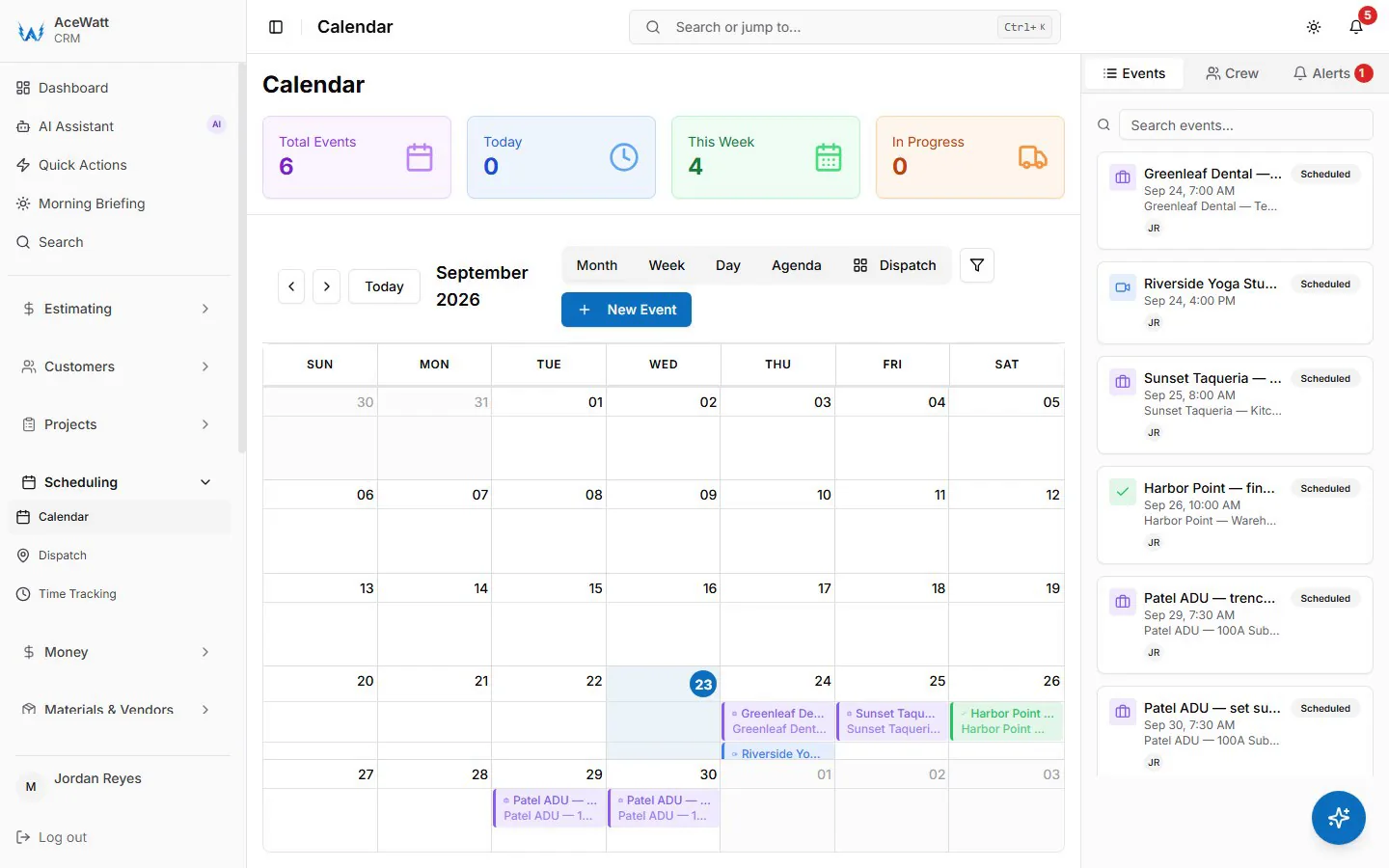
The dispatcher sees two realistic options: one tech has a 1:30-3:00 PM opening near the customer; another could arrive at 4:30 PM after a panel inspection. The dispatcher checks skill fit, travel reality, overtime risk, and urgency, then confirms the appointment. AI helped organize the choice; the human made the assignment.
Tech gets job notes
The technician sees the customer name, address, phone, issue summary, access notes, past job history, and any photos or intake details. That is a better handoff than “kitchen breaker problem, call customer.” Better notes reduce repeat calls to the office and help the tech arrive prepared.
Estimate/invoice/follow-up stays attached
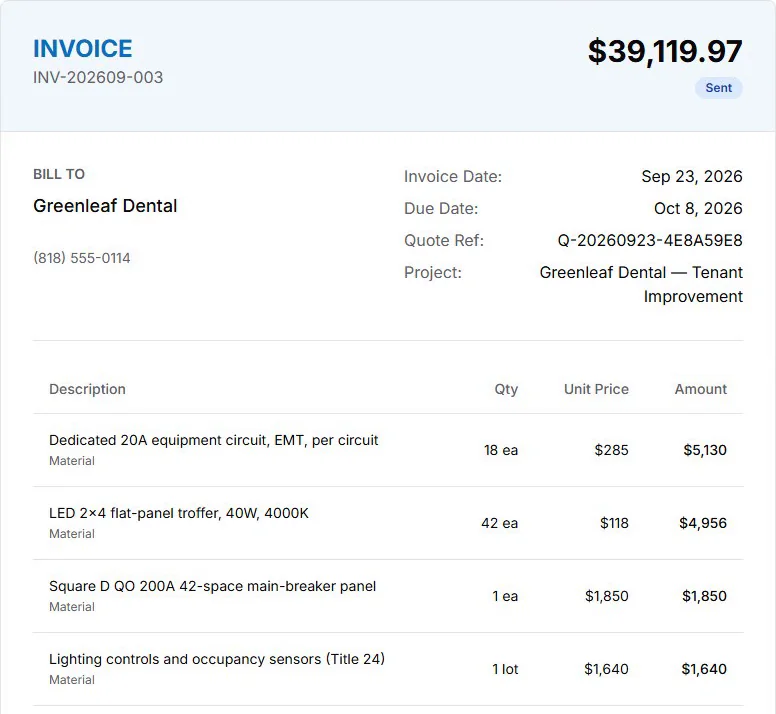
If the troubleshooting visit turns into a panel repair estimate, the estimate stays on the same record. If the customer does not approve immediately, follow-up is queued. If the work is approved and completed, invoice context stays connected. This is the difference between a scheduling tool and a growth workflow.
Red flags in scheduling software
Generic calendar widgets
If the tool only embeds a booking calendar on your website, it may be fine for simple job walks. It will not solve job context, crew assignment visibility, estimate handoff, invoices, or quote follow-up by itself.
No electrical job context
Avoid any system that treats every appointment like the same 60-minute service slot. Electrical work needs space for panel details, access notes, photos, permits, materials, inspection requirements, and safety observations reviewed by qualified people.
No CRM handoff
When a customer no-shows, asks to reschedule, or approves a quote three weeks later, the schedule needs customer history. If scheduling does not connect to CRM, your office will keep rebuilding context from texts and memory.
No human override
This is non-negotiable. AI should not auto-dispatch electricians without approval, especially for emergency calls, code-sensitive work, or jobs requiring specific licenses. Your team needs override controls, review gates, and clear escalation rules.
No after-hours escalation path
After-hours intake is useful only if it knows what happens next. Can the system collect the right information, alert the right person, and avoid unsafe promises? If not, it may create more risk than revenue.
How AceWatt supports scheduling-connected growth
AceWatt is not trying to be an autonomous dispatcher. It is an electrical contractor CRM that keeps scheduling connected to the work that creates revenue: leads, job walks, estimates, follow-up, invoices, and customer history. For a broader comparison of operational platforms, see best field service software for electricians 2026.
Lead-to-job pipeline
Every scheduled appointment should start with a clear customer record. AceWatt helps electrical shops track leads, property details, job notes, estimate status, scheduled work, and invoice status in one place. That gives owners better visibility than a calendar plus a spreadsheet.
AI job-walk context
With AI job walks, electricians can capture voice notes, photos, and scope details from the field. AI helps organize those notes into estimate-ready context. The contractor still reviews code, safety, scope, pricing, and customer-facing language before anything is sent.
Follow-up automation
Scheduling is not only about today’s calendar. It is also about the quote that needs a reminder, the no-answer lead that needs a second touch, and the completed job that should become a review request or repeat-service opportunity. AceWatt keeps that history on the customer and job record; the automated part is email reminders on overdue invoices at 1, 7, 14 and 30 days late.
Estimate and invoice handoff
When scheduling connects to estimating and invoicing, fewer jobs stall. Accepted work can move into the calendar with scope context, and completed work can move toward invoice review without copying details across apps. Compare the workflow with electrician scheduling software 2026 alternatives, then confirm the fit on AceWatt pricing.
FAQ
Can AI schedule emergency electrical calls?
AI can help capture emergency call details, show availability, and alert the office or on-call person. It should not independently decide that a situation is safe, diagnose the issue, or promise a guaranteed response your team cannot meet. Use AI for intake and escalation support, with qualified human review.
Should AI dispatch electricians without approval?
No. Electrical dispatch should include human approval. A dispatcher, owner, or qualified manager should confirm skill fit, licensing, job priority, travel reality, customer promise, and safety considerations before the appointment is finalized.
What data does AI scheduling need?
Useful AI scheduling needs customer contact information, address, job type, urgency, preferred time windows, technician availability, crew skills, job duration assumptions, customer history, estimate status, access notes, and follow-up rules. The better the inputs, the better the suggested appointment options.
How does scheduling software reduce missed jobs?
It reduces missed jobs by keeping leads, appointments, reminders, no-answer tasks, estimates, and follow-up in one workflow. Instead of relying on memory, the system can show that 12 estimates need follow-up, 3 customers have not confirmed tomorrow’s appointment, and 2 completed jobs still need invoice review.
Is AI scheduling useful for solo electricians?
Yes, if the solo electrician is losing time to calls, reminders, reschedules, and follow-up. A one-person shop may not need heavy dispatch software, but it can still benefit from AI-assisted intake notes, appointment suggestions, customer reminders, and estimate follow-up. Start simple, keep review controls in place, and add automation only after the workflow is reliable.
Vendor verification note: Competitor summaries above are based on public vendor pages and search-result checks available on June 1, 2026. Feature names, pricing, plan limits, integrations, and AI claims change often. Verify directly on each vendor page before publishing final feature or pricing claims, and keep licensed-electrician review in place for code, safety, scope, and pricing decisions.
Related Reading
- See all CRM features for electrical contractors in one platform.