
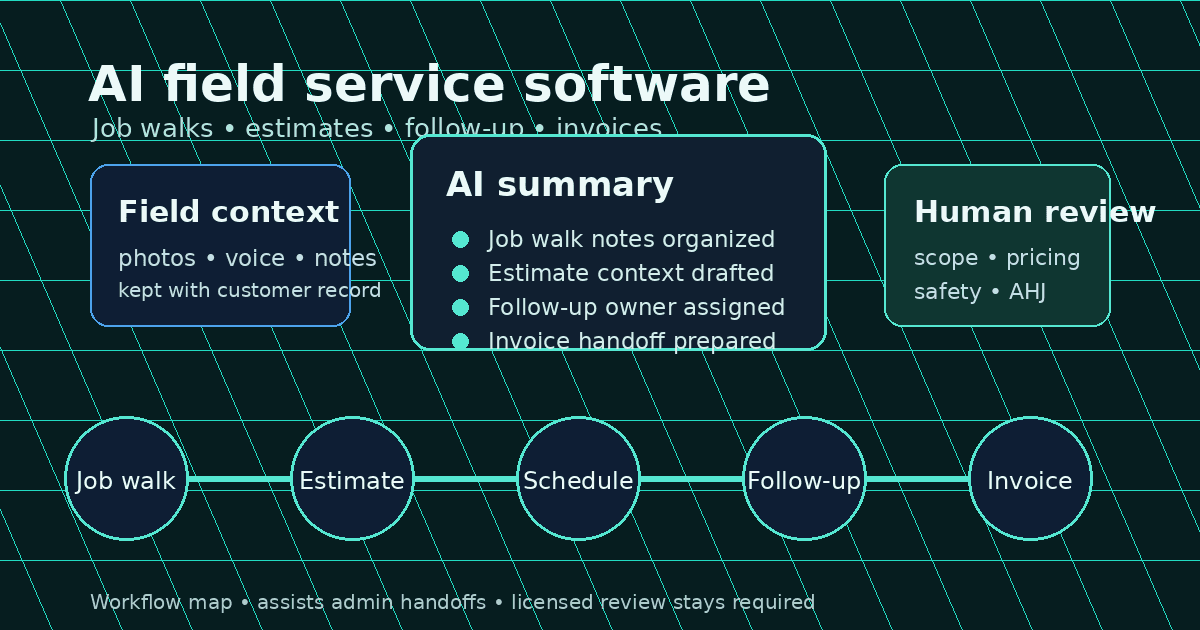
AI field service software for electricians should help your shop capture job details, build cleaner estimate drafts, keep scheduling context together, follow up on quotes, and move completed work toward invoices. It should not replace licensed electrical judgment. A good tool can reduce office time by organizing the work around real electrical jobs: service calls, panel upgrades, EV chargers, generators, commercial maintenance, and change orders.
Quick answer: AI field service software for electricians is software that uses AI to draft, summarize, remind, and organize field-service workflows for electrical contractors. It can help with job-walk notes, estimate context, scheduling, dispatch notes, customer messages, follow-up, and invoice prep while a licensed electrician or qualified reviewer still verifies scope, pricing, safety, code requirements, and site conditions.
That distinction matters. A generic AI tool that writes a nice paragraph is not enough for an electrical shop. Your problem is not “we need more text.” Your problem is that customer calls, photos, voice notes, change orders, quote follow-ups, crew availability, and invoice details often live in six different places.
When that happens, jobs slow down in the handoff:
- The technician remembers the panel condition, but the office never sees the note.
- The estimator sends a quote, but nobody follows up for eight days.
- The dispatcher has a calendar slot open, but no job context attached.
- The invoice goes out late because the completed scope is buried in a text thread.
- The owner cannot see which service types are producing clean margins.
That is where AI field service management software can help: not by making electrical decisions on autopilot, but by reducing the admin drag around those decisions.
For a specific head-to-head that includes a new AI-focused entrant, see <a href="/blog/ways-electric-vs-acewatt-which-electrical-contractor">Ways Electric vs. AceWatt</a>.
Why Electrical Contractors Are Moving Past Generic Field Service Software
Electrical contractors do not run like generic appointment businesses. A haircut, lawn visit, or simple delivery route can often be scheduled with a name, time, address, and short note. Electrical work needs more context.
A small electrical shop may need to track panel condition, job-walk photos, property-manager access notes, local permit or inspection requirements, materials that change with site conditions, approved change orders, quote follow-up, warranty history, and invoice status.
The pressure is growing. O*NET Online lists electricians as a much-faster-than-average growth occupation for 2024 to 2034, with 81,000 projected annual job openings. More demand means more opportunities, but it also means more calls, more job walks, and more chances for the office to become the bottleneck.
Deloitte’s 2026 engineering and construction outlook points to persistent labor shortages, rising material costs, and more digital tools, including AI-driven analytics, real-time project management platforms, and connected jobsite tools.
9 AI Workflows That Matter for Electrical Shops
Good AI software for electrical contractors should map to the way jobs actually move from first call to paid invoice. Evaluate these nine workflows first.
1. AI job-walk summaries
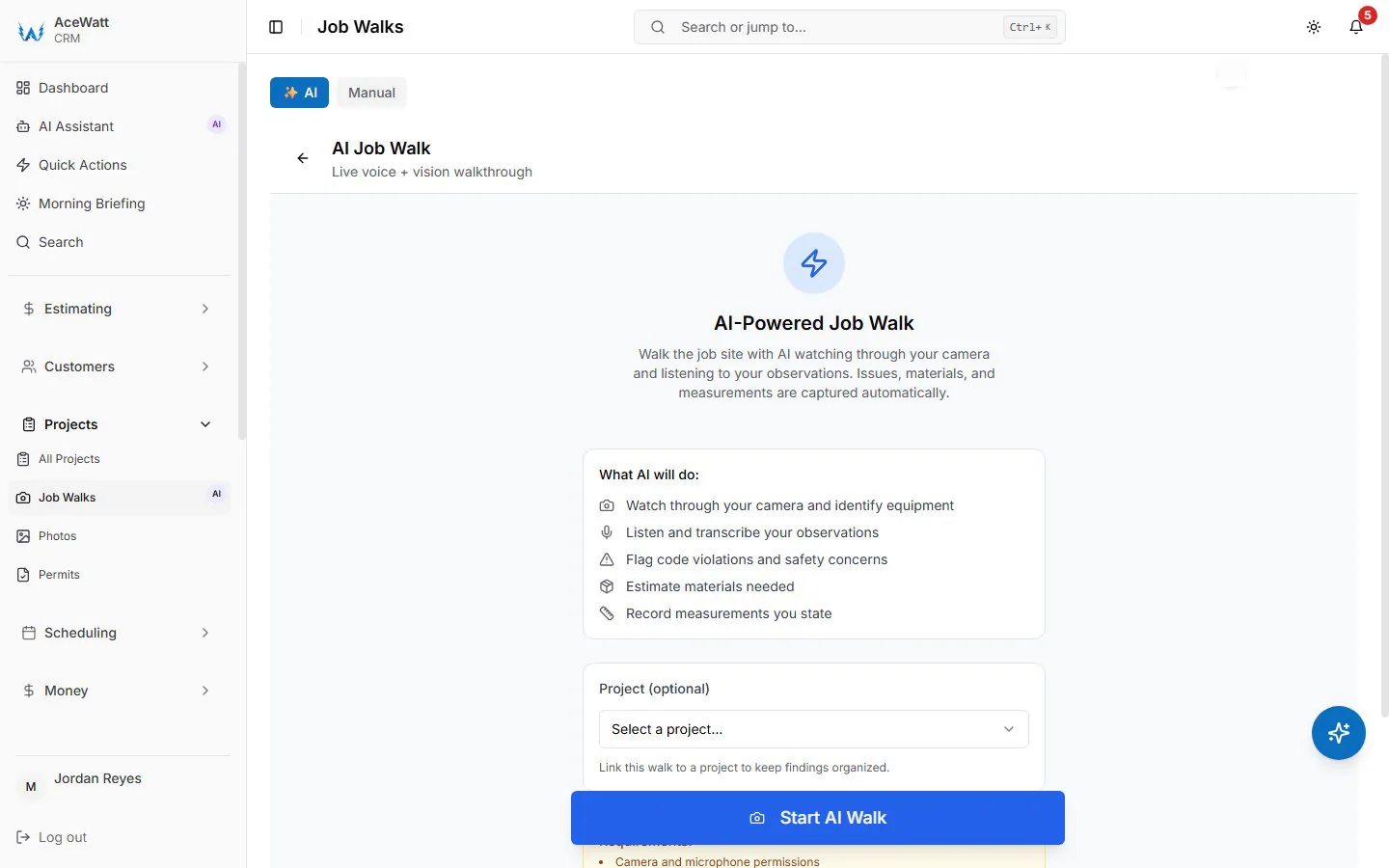
A job walk creates the context that decides whether a quote is accurate. AI can turn voice notes, typed notes, and photos into a structured summary: customer goal, panel observations, access notes, likely materials, open questions, and next steps. A qualified reviewer still verifies electrical scope, load considerations, local rules, and final recommendations.
AceWatt supports this workflow through AI job walks and voice documentation, keeping field context attached to the customer or job record.
2. Estimate draft support
AI should not decide your price. It can help organize scope language so the estimator is not starting from a blank page. For a panel upgrade, AI might draft sections for removal, installation, labeling, inspection coordination, and cleanup. The contractor still reviews labor, material assumptions, code-related requirements, safety concerns, exclusions, taxes, and final pricing. AceWatt’s automated estimating workflow keeps that review boundary clear.
3. Quote follow-up reminders
Many shops lose money after the estimate. AI-assisted follow-up can flag aging quotes and draft reminders, such as “Generator transfer switch quote sent 6 days ago. Follow up before the follow-up window closes.” Customer messages still need review for price, availability, warranty, financing, and scope language.
4. Scheduling assistance
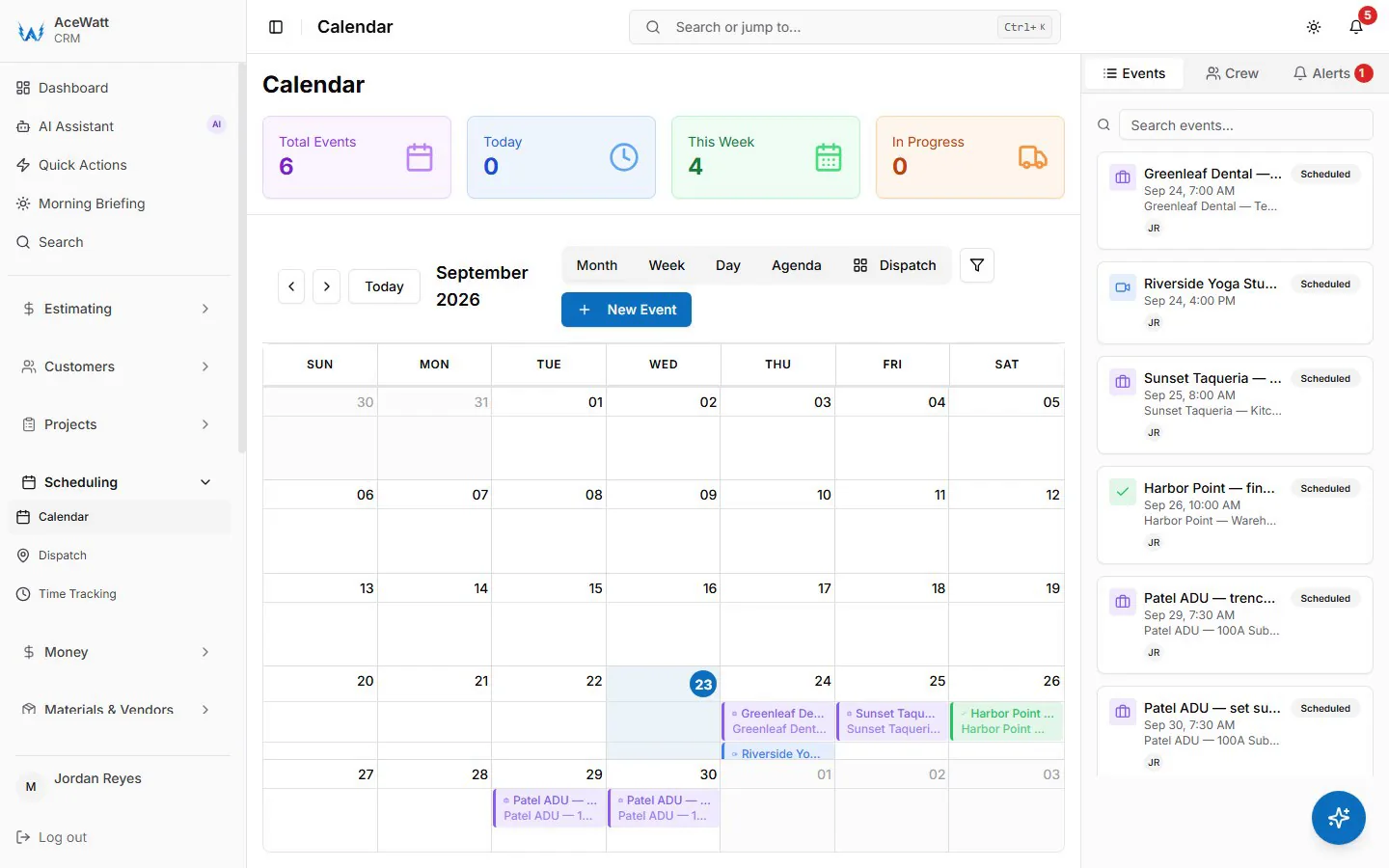
AI scheduling software for electricians can help the office see openings, job duration assumptions, and priority. It should not blindly assign electrical work. A dispatcher or owner still decides who is qualified, what safety issues exist, and whether the schedule is realistic.
5. Dispatch context
Dispatch means the technician gets address, history, job notes, photos, quoted scope, access instructions, and open questions before arriving. AI dispatch software for electricians can summarize that handoff so the tech is not reading a long thread in the driveway.
6. Call capture and intake notes
AI call capture can record who called, what they need, where the job is, how urgent it is, and what should happen next. For safety-sensitive requests, intake should gather details and route to a qualified person. It should not diagnose hazards or promise code-compliant solutions without licensed review.
7. Invoice prep
AI can summarize completed work, flag missing details, and prepare invoice context. The office still checks billable labor, materials, approved change orders, taxes, payment terms, and customer-specific requirements before sending. AceWatt’s field service software for electricians page frames this as a connected revenue handoff.
8. Customer messaging drafts
AI can draft appointment confirmations, quote reminders, status updates, and post-job messages. Contractors should review every customer-facing message for accuracy, tone, pricing, promises, warranties, schedule commitments, and safety language.
9. Job-cost and margin review
AI can organize quoted amount, labor hours, materials, change orders, invoice status, and job type. It can surface useful questions, but it is business review, not automatic accounting. Confirm reporting, exports, accounting handoff, and integrations before buying any system.
AI Field Service Software vs Electrician CRM vs Dispatch App
The categories overlap, which is why buying gets confusing. Use this table to keep the decision simple.
| Tool type | Main job | Best fit | Watch-out |
|---|---|---|---|
| Generic field service software | Schedule jobs, dispatch technicians, manage service operations | Teams with mature dispatch and field operations | May be heavy or generic for small electrical shops |
| AI field service software | Add AI summaries, reminders, routing suggestions, or workflow help to field operations | Shops with enough volume that admin handoffs are slowing work | AI claims vary widely; verify what is live |
| Electrician CRM | Track leads, customers, estimates, follow-up, jobs, and revenue handoffs | Solo and small-to-growing electrical contractors | Must connect to field notes and invoicing context |
| Dispatch app | Assign jobs and update schedules | Teams mainly struggling with calendars and crew assignments | Can miss estimating, quote follow-up, and invoice handoff |
| AceWatt | CRM-centered workflow for electrical contractors with AI-assisted job walks, estimate context, follow-up, scheduling context, and invoice visibility | Small-to-growing electrical shops that want fewer handoff gaps | Licensed review still required for scope, pricing, safety, and compliance |
For more category context, see AceWatt’s pages on AI CRM for contractors and field service software for electricians.
Must-Have Feature Checklist
Before choosing AI FSM software, ask what the tool actually does for your weekly workflow.
| Feature | Why it matters for electricians | What to verify |
|---|---|---|
| Customer and job history | Repeat work, callbacks, and commercial accounts need context | Notes, photos, quotes, invoices, and messages attach to the same record |
| Mobile field notes | Site details disappear fast after the job walk | Voice, photo, and typed notes work from the field |
| AI summaries | Office teams need clean handoffs | AI summarizes notes without hiding the original record |
| Estimate context | Faster quotes need usable scope drafts | Contractor controls final price and scope |
| Scheduling context | A calendar alone is not enough | Assignments include job notes, priority, and customer details |
| Follow-up queue | Quotes die when nobody owns the next step | Reminders and customer drafts are reviewable |
| Invoice visibility | Completed work should become cash faster | Invoice prep ties back to approved scope and job status |
| Permissions and review | Electrical work carries safety and compliance risk | Humans approve customer-facing and code-sensitive output |
| Reporting | Owners need to see what is working | Reports match the decisions you actually make |
If a vendor says AI “handles everything,” slow down. Ask for a demo of the exact workflow you need: first call, job walk, estimate, schedule, dispatch handoff, completed work, invoice, and follow-up.
Example: From Panel Upgrade Lead to Paid Invoice
Here is what a practical AI-assisted workflow can look like.
- Lead comes in: A homeowner asks about a panel upgrade. The office captures name, address, urgency, and basic project notes.
- Job walk happens: The electrician records voice notes and photos. AI drafts a summary with site context and open questions.
- Estimate is prepared: The estimator reviews the notes, builds scope, checks local requirements, confirms materials and labor, and approves final pricing.
- Quote follow-up is scheduled: The system reminds the office to follow up in two business days if the customer has not responded.
- Work is scheduled: The dispatcher assigns the job with context attached, not just a calendar block.
- Field work is documented: The crew records completed work and any approved change order details.
- Invoice context is ready: The office reviews the completed scope, checks billing details, and sends the invoice.
How to Roll Out AI Field Service Software in 30 Days
Do not rebuild the whole shop in one weekend. Roll it out in layers:
- Week 1: Clean up leads and customer records. Move active leads, job addresses, and open quotes into one place.
- Week 2: Standardize job-walk notes. Capture customer goal, existing conditions, photos, open questions, safety notes, and next action.
- Week 3: Connect estimates and follow-up. Attach estimate drafts and follow-up dates to the customer record, with a named reviewer for AI-drafted scope.
- Week 4: Add scheduling context and invoice handoff. Tie accepted work to the schedule and invoice queue so fewer jobs stall between quote, crew, and cash.
What to Avoid When Buying AI Software for an Electrical Business
Avoid tools that sound impressive but create risk or extra work.
- Generic AI wrappers: If it only writes text but does not attach to jobs, customers, estimates, and follow-up, it will not fix your workflow.
- Unsupported automation claims: Confirm what is live before assuming dispatch, call capture, invoicing, or integration features work automatically.
- No review gate: Electrical scope, pricing, compliance, safety, and customer promises need human approval.
- No mobile field workflow: If technicians cannot capture notes easily, the office still starts from missing context.
- Enterprise bloat: A 3-person shop should not need a six-month implementation to send better quotes and follow-ups.
- Integration assumptions: If you plan to use another AI tool alongside AceWatt or any CRM, confirm the data handoff or integration before purchasing.
Where AceWatt Fits
AceWatt is an AI-powered CRM workflow built around how electrical contractors quote, document, follow up, schedule, and invoice. It is not positioned as a fully autonomous electrical decision-maker. It helps organize the revenue path so small and growing shops can spend less time copying details between notes, estimates, calendars, and invoices.
AceWatt is strongest when your pain sounds like this:
- “We saw the job, but the quote took too long to build.”
- “The tech had the details, but the office never got them cleanly.”
- “We sent the estimate, then forgot to follow up.”
- “The job is done, but billing is waiting on missing notes.”
- “Our schedule is full, but nobody can see the full customer context.”
Start with the workflows that create revenue: job-walk documentation, estimate context, quote follow-up, scheduling context, and invoice visibility. Then expand as the team proves the process.
Related AceWatt resources:
- AI job walks
- Automated estimating
- Voice documentation
- AI for electrical contractors
- Voice AI for electrical contractors
- Pricing
FAQs About AI Field Service Software for Electricians
What is AI field service software?
AI field service software helps field teams organize work, draft summaries, suggest next steps, and reduce manual admin. For electricians, it should connect job walks, estimates, scheduling context, dispatch notes, follow-up, and invoices.
How can electricians use AI in daily operations?
Electricians can use AI to summarize job walks, organize voice notes, draft estimate language, remind the office about quote follow-up, prepare customer message drafts, and clean up invoice context. A licensed electrician or qualified reviewer still verifies scope, pricing, safety, compliance, and site conditions.
Can AI create electrical estimates?
AI can draft estimate context from notes, photos, and saved scope language. It should not independently price or approve electrical work. Final estimates need contractor review for labor, materials, permits, exclusions, taxes, and customer-specific details.
Does AI replace a licensed electrician?
No. AI assists with documentation, summaries, reminders, and workflow organization. It does not replace licensed judgment, AHJ requirements, code review, safety decisions, or professional responsibility on site.
What is the difference between AI CRM and field service software?
AI CRM focuses on leads, customers, estimates, follow-up, and revenue handoffs. Field service software focuses more on scheduling, dispatch, technicians, and job execution. Electrical contractors often need both workflows connected.
Sources and Research Notes
- O*NET Online, Electricians (47-2111.00): lists electricians as much faster than average for projected growth in 2024 to 2034 and shows 81,000 projected annual job openings.
- Deloitte 2026 Engineering and Construction Industry Outlook: notes labor shortages, material pressure, digital transformation, AI-driven analytics, real-time project management, and connected jobsite tools.
Try AceWatt
If your electrical shop is tired of rebuilding the same job details across notes, estimates, schedules, follow-ups, and invoices, AceWatt gives you a cleaner way to keep the work connected.
Review current AceWatt plans and trial signup or see AceWatt in action before your next week of job walks turns into another pile of scattered notes.
For a side-by-side of every AI capability in one place, see the AceWatt features hub.