

Time and Material Billing for Small Electrical Contractors: How AceWatt Fixes the QuickBooks Gap
Why Time and Material Billing Breaks Down for Small Electrical Contractors
Time and material (T&M) work should be straightforward: track hours, track materials, apply markup, send the invoice. In practice, small electrical contractors lose margin on T&M jobs every week because the billing process relies on disconnected tools, paper timesheets in the truck, receipts shoved into a folder, a whiteboard with job numbers, and a QuickBooks file that doesn't get touched until the end of the week.
The breakdown happens at the handoff points. A journeyman logs 6.5 hours on a service upgrade but forgets the 45 minutes spent picking up a replacement breaker. The apprentice's overtime hours get entered at the straight rate. A change order, adding two new receptacles mid-job, lives in a text message thread but never makes it onto the invoice. By the time the office manager rebuilds the billing record from field notes, something is always missing.
For a two- or three-person electrical shop, these losses compound. A missed $80 material charge on five jobs per week is $20,000 in uncaptured revenue over a year. Delayed invoicing, billing a Thursday job the following Wednesday because the paperwork wasn't ready, stretches days sales outstanding and puts pressure on the cash flow that covers payroll every Friday.
The core problem isn't that contractors lack discipline. It's that standard accounting software for small electrical contractors time material billing was never built to handle the way electrical work actually unfolds: scope shifts mid-job, labor rates vary by person and by hour, and material costs come from multiple suppliers at different markup tiers.
The QuickBooks Gap: Where Standard Accounting Leaves Electricians Manual and Reactive
QuickBooks is the dominant accounting platform for small trades businesses, and for good reason. It handles chart of accounts, payroll sync, tax prep, and bank reconciliation better than any general-purpose alternative at its price point. Most electrical contractors running a shop of five crews or fewer are already on QuickBooks Online or QuickBooks Desktop.
What QuickBooks does not do well is T&M invoice assembly from field-collected data.
Here is the typical workflow without specialized tooling:
- Field electrician fills out a paper or PDF timesheet with job number, hours, and a rough material list.
- Office manager types that timesheet into QuickBooks as a timesheet or manual journal entry.
- Material receipts get matched to the job, sometimes. Unmatched receipts sit in a pile.
- The office manager builds an invoice line by line: labor hours × rate, materials × markup, taxes, service call fee.
- A change order surfaces. The invoice gets edited. Job costing gets adjusted. Sometimes the edit introduces a data entry error.
- The invoice goes out days after the job was completed.
Every step is manual, duplicative, and error-prone. QuickBooks doesn't know that your journeyman bills at $95/hour while your apprentice bills at $58/hour unless you set up separate service items and manually assign them. It doesn't know that after 8 hours on Saturday, the rate shifts to time-and-a-half per your service agreement. It doesn't pull material costs from a supplier purchase order and apply your standard 20% markup automatically.
This is the gap: QuickBooks is excellent at accounting, but it is not a field-to-office billing system for electrical contractors. Treating it as one is where shops bleed time and margin.
How AceWatt Bridges QuickBooks with Automated T&M Billing Built for Electrical Work
AceWatt sits between the field and QuickBooks, built specifically for the electrical contractor who bills on a time and material basis. It is not a replacement for QuickBooks, it is a purpose-built layer that automates the parts of T&M billing that QuickBooks handles manually.
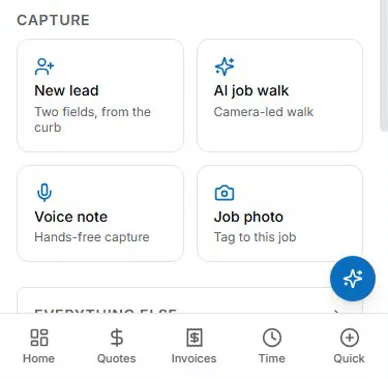
The integration works like this: clock-ins, material costs and change orders flow into AceWatt from the job site. Labor carries one hourly rate per job title, material is logged at cost, and markup is set on the quote; the accepted quote is invoiced with its line items and emailed automatically, and every invoice lands on an invoice-list spreadsheet for your bookkeeper, with payroll hours on a QuickBooks-format CSV. That handoff is an export, not a native two-way sync; full sync is in development. Your chart of accounts, customer list, and item structure stay intact in QuickBooks.
For contractors already managing job costing in QuickBooks, that structure stays yours to keep. Labor and material costs sit on the correct job in AceWatt, so your bookkeeper posts from a finished invoice rather than rebuilding it. The markup is set on the quote, where it stays visible and auditable, not buried in a manually calculated number that nobody can trace three months later.
This is what makes AceWatt different from a generic field service app with a QuickBooks connector: it understands electrical billing. It knows that a service call has a minimum. It knows that an apprentice and a journeyman on the same job bill at different rates. It knows that the conduit and fittings picked up from the supply house mid-job need to be logged at cost against the job, not absorbed into overhead, with markup set on the quote.
Handling Change Orders Without Breaking Job Costing or Invoicing Accuracy
Change orders are where T&M billing fails most often on electrical projects. A homeowner asks for an additional can light while the ceiling is open. A commercial GC adds three circuits to a tenant buildout. The electrician does the work, notes it verbally, and the billing falls into one of three failure modes:
- The change order never gets billed. The material and labor hit job costing as an expense, but the invoice goes out without the additional line items. Margin erodes silently.
- The change order gets billed but not costed. The invoice includes the added work, but the job cost doesn't reflect the additional labor and material because the change was entered only on the invoice side. Job profitability reporting becomes inaccurate.
- The change order gets billed at the wrong rate. The additional work goes out at a flat rate someone estimated in the field, which doesn't match the actual labor hours or material cost. The shop either overcharges the customer (and gets a dispute) or undercharges (and eats the difference).
AceWatt captures change orders inside the billing workflow. When a field electrician adds work to a job in progress, that entry flows through the same system as the original scope, labor hours at the hourly rate for that job title, materials at logged cost, posted to the same job for costing purposes. The change order isn't a side note or a separate invoice; it's a continuation of the T&M record, and it appears on the final invoice with the same accuracy and structure as the base work.
For contractors billing commercial work with change order approval requirements, the system produces a documented record of what changed, when it was entered, and what it cost, which matters when the GC asks for backup on invoice line items at the end of the month.

Real-World Workflow: From Field Timesheet to QuickBooks-Ready Invoice
A concrete example of how this works in practice:
A two-person crew, one journeyman at $95/hour, one apprentice at $58/hour, is dispatched to a residential service panel upgrade quoted as T&M with a $250 service call minimum.
Monday, 8:00 AM. The journeyman clocks into the job on the AceWatt mobile entry. The $250 service call minimum is already on the accepted quote.
Monday, 10:30 AM. The breaker panel delivered last week is logged to the job at cost: $412. The quote already carried it at $494.40 with the shop's 20% markup.
Monday, 12:15 PM. The homeowner asks to add a surge protector and relocate two existing circuits. The journeyman enters the change in the field: 1.5 additional labor hours, $89 in materials from the truck stock. The change order is captured in real time, tied to the job, and approved internally.
Monday, 4:30 PM. Crew clocks out. Total labor: 8.5 hours journeyman, 8.0 hours apprentice. AceWatt applies the hourly rate for each job title. Material costs are logged from the delivery and the field-entered truck stock.
Monday, 5:00 PM. The office manager reviews the job in AceWatt, confirms the entries, and approves the invoice. It lands on the invoice-list export with the correct customer, total, and balance, ready for the bookkeeper. The office manager does not rebuild the invoice.
Tuesday morning. The invoice goes to the homeowner. Margin on the job is visible immediately in AceWatt.
Total office time spent on invoice assembly: under five minutes. Without AceWatt, the same job typically consumes 30 to 45 minutes of manual entry and still carries a risk of missed charges.
What Small Electrical Shops Can Stop Doing Manually Once AceWatt Is Live
Once AceWatt is live and your bookkeeper is bringing its exports into QuickBooks, small electrical contractors can eliminate several manual tasks that consume office hours and introduce billing errors:
- Retyping field timesheets into QuickBooks. Field hours arrive on the QuickBooks-format payroll-hours CSV. The office reviews and approves rather than transcribes.
- Looking up labor rates by hand. Each job title (journeyman, apprentice) carries one hourly rate, configured once; overtime and after-hours premiums are not applied automatically.
- Applying material markup on a calculator. Markup is set on the quote and carries into the invoice created from it, so there is no guessing whether the last invoice used 15% or 20%.
- Rebuilding invoices after change orders. Changes are captured in the field and flow into the final invoice without re-entering the base scope.
- Reconciling unmatched material costs at month-end. Material costs logged against a job in the field are already in the system at cost.
- Chasing missing backup for commercial billing. Every line item on the invoice has a documented source, timesheet entry, PO, or field material log, which simplifies draw requests and GC billing reconciliation.
The net effect is faster invoicing, fewer billing disputes, more accurate job costing, and tighter cash flow. For a small electrical shop where the owner is also the project manager and sometimes the lead electrician, getting invoices out the day the job closes instead of a week later is the difference between making payroll comfortably and juggling supplier terms.
Implementation Notes for Contractors Already Running QuickBooks Online or Desktop
AceWatt's exports are a spreadsheet and a QuickBooks-format CSV, so implementation does not require migrating accounting platforms. The setup process typically follows this sequence:
1. QuickBooks mapping. Your bookkeeper decides how each invoice on the exported list posts to your QuickBooks company file. Your existing customer list, service items, and chart of accounts stay the system of record. There is no native, real-time, bidirectional sync today.
2. Labor rate configuration. The shop's billing rates are entered for each employee or role, journeyman, apprentice, master electrician, service technician. Each job title carries one hourly rate; there are no overtime or double-time multipliers, so any premium is added as its own line on the quote.
3. Material markup. Markup is set on the quote rather than by automatic rules, and material costs are logged at cost. Whether the shop marks up all materials at a flat 20% or uses different markups for wire, fixtures and consumables, the markup lives on the quote.
4. Job costing structure. Job costing runs by job in AceWatt, so there is no need to rebuild the job costing framework already in place in QuickBooks.
5. Field onboarding. Field electricians are set up with mobile access for timesheet and material entry. The interface is designed for quick entry on a phone, job number, hours, material description and cost, not a full desktop-style form.
Most small electrical shops are live within one to two weeks of starting implementation, depending on how clean the existing QuickBooks item and customer lists are. Shops with well-maintained service items and consistent job naming conventions move faster; shops that have accumulated years of duplicate or inconsistent items spend some time cleaning up the list before the first export.
For contractors evaluating whether AceWatt fits their operation, the clearest signal is the current time lag between job completion and invoice delivery. If T&M invoices routinely go out three or more days after the crew leaves the site, or if the office manager spends more than a few hours per week manually assembling billing from field paperwork, the return on implementation is typically immediate. Faster invoicing, markup set once on the quote, and less re-typing pay for the system within the first month for most small electrical shops.
Related reading: Time & Material Billing for Small Electrical Contractors: Templates, Apps & Change-Order Workflows.
Related reading: Mobile Time & Material Capture for Electricians: Eliminating Paper Tickets & Revenue Leakage.