
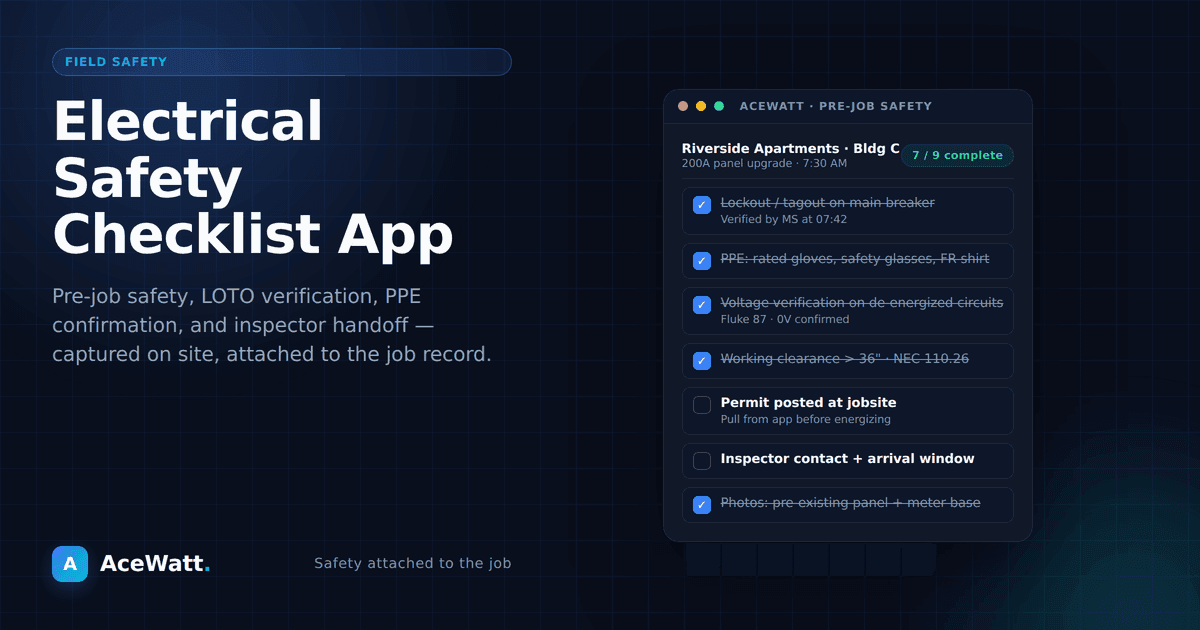
An electrical safety checklist app replaces paper inspection forms with a digital system that documents job site conditions, verifies compliance, and protects your business with timestamped, photo-backed records. For electrical contractors navigating NFPA 70E, OSHA, and local AHJ requirements, a digital safety checklist app turns a liability into verifiable proof: every item checked, every photo geotagged, every record searchable from your phone.
You just finished a rough-in on a commercial build. The general contractor wants documentation that everything meets code. The inspector is coming Thursday. Your apprentice swears he checked every box, but you weren't on site for the full shift.
So you dig through the truck for the clipboard with the safety checklist on it. It's not there. Maybe it's in the shop. Maybe it got thrown away. Either way, you have no documentation, and that means no proof of compliance, no sign-off from the GC, and a potential delay that could cost you the next phase of the project.
Paper checklists have been the standard on electrical job sites for decades. But they're unreliable, easy to lose, impossible to search, and completely disconnected from the rest of your business operations. A digital electrical safety checklist app changes all of that, and it might be one of the most impactful upgrades you make to your workflow this year.
If you handle this on a phone in the field, see our guide to the best mobile app for electrical safety inspections first — it covers the workflow end to end.
Why Paper Checklists Fail Electricians
Paper safety checklists feel simple. Print a form, grab a pen, walk the site, check the boxes. Done. But that simplicity is deceptive. Paper creates problems that don't show up until something goes wrong.
They Get Lost
Job sites are messy. Papers get wet, torn, covered in dust, or left in a truck that gets cleaned out on Friday. When you need that documentation for an inspector, a client, a general contractor, or your own records, there's a good chance you can't find it.
They're Incomplete
Handwritten checklists depend on someone actually filling them out completely. In practice, electricians rush through them, skip items, or fill them out from memory after the fact instead of in real time. An incomplete checklist is worthless as a compliance document.
They Don't Connect to Anything
A completed paper checklist sits in a file folder. It's not connected to the customer's record, the job file, or the invoice. When you need to pull up documentation for a specific job six months later, you're digging through physical files or hoping you scanned it at some point.
They Can't Be Shared in Real Time
If your project manager or the general contractor wants to see the completed safety checklist, you have to physically hand it to them, scan it, or take a photo and text it. There's no real-time visibility. No one knows the status of an inspection until the paper changes hands.
They Don't Protect You Legally
In a dispute with a client, an inspector, an insurance company, or OSHA, your documentation is only as good as its reliability. A crumpled, partially completed, undated piece of paper doesn't hold up the way a timestamped, geotagged digital record does.
What a Digital Electrical Safety Checklist App Does
A purpose-built job site documentation app replaces your paper checklists with a digital system that's faster, more reliable, and infinitely more useful.
Real-Time, On-Site Documentation
Open the electrical safety checklist app on your phone or tablet while you walk the job site. Check items, add photos, record voice notes, and mark completion status, all in real time. No more "I'll fill it out later."
Every entry is timestamped and, on most devices, geotagged. That means you have verifiable proof of when and where the documentation was completed.
Photo and Video Evidence
Attach photos directly to checklist items. Photograph panel labels, grounding connections, GFCI test results, conduit runs, or any other detail that needs visual documentation. The photos become part of the permanent job record, not random images lost in a camera roll.
Voice-to-Text Notes
On a busy job site, typing notes is impractical. A quality safety checklist app includes voice-to-text capabilities, so you can narrate observations while your hands are free to work. AceWatt's voice documentation tools are designed for exactly this scenario: electrical contractors who need to document conditions without slowing down.
Customizable Checklist Templates
Every electrical job is different. A residential service call has different safety requirements than a commercial new construction project. A good electrical safety checklist app lets you create and save templates for different job types:
- Arc flash safety checklist for commercial panel work
- Lockout/tagout verification for industrial settings
- Residential rough-in inspection for new construction
- Service upgrade documentation for panel replacements
- Final walkthrough checklist before calling for inspection
Build your templates once, reuse them on every job, and know that nothing gets missed.
Instant Sharing and Collaboration
When you complete a safety checklist, it's immediately available to anyone who needs it. Share it with the general contractor, your project manager, the property owner, or the inspector, all from the app. No scanning. No emailing attachments. No delays.
Permanent, Searchable Records
Every checklist you complete is stored digitally and attached to the customer and job record. Need to find the arc flash documentation from that industrial job last March? Search by customer, job type, or date and pull it up in seconds. That's impossible with paper files.
Key Features to Look for in an Electrical Safety Checklist App
Not all job site documentation apps are created equal. Here's what matters most for electrical contractors:
| Feature | Why It Matters for Electrical Contractors | Impact on Compliance |
|---|---|---|
| Offline functionality | Job sites often lack reliable Wi-Fi or cell service; the app must work without a connection and sync later | Prevents gaps in documentation on remote or basement jobs |
| Mobile-first design | You document on a job site, not at a desk; large touch targets and one-handed operation are essential | More complete checklists because electricians actually use the app |
| CRM integration | A standalone checklist app is still a disconnected tool; the real power comes when safety docs link to jobs, customers, and invoices | One source of truth with no duplicate data entry and no lost records |
| Photo geotagging and timestamps | Compliance and legal protection require metadata proving when and where documentation was created | Holds up in OSHA audits, insurance claims, and contract disputes |
| Voice input for electrical terminology | Electricians work with their hands; dictating notes is faster and more accurate than typing on site | Richer, more complete documentation without slowing the crew |
| Custom form builder | Every shop has specific workflows; drag-and-drop forms let you match your process without a developer | Templates that fit arc flash, LOTO, rough-in, and final walkthrough |
Offline Functionality
Job sites don't always have reliable Wi-Fi or cell service. Your electrical safety checklist app needs to work offline and sync when you're back in range. If it requires an internet connection to function, it will fail you when you need it most.
Mobile-First Design
You're documenting on a job site, not at a desk. The app should be designed for one-handed phone use, with large touch targets and a clean interface that doesn't require tiny scrolling or precision tapping.
Integration With Your CRM
A standalone checklist app is better than paper, but it's still a disconnected tool. The real power comes when your safety documentation integrates with your electrician job management software. Checklists automatically attach to jobs. Customers can see completed documentation in their portal. Invoices reference completed safety items. Everything connects.
Photo Geotagging and Timestamps
For compliance and legal protection, your documentation should include metadata showing when and where it was created. This is particularly important for OSHA documentation, insurance claims, and contract disputes.
Voice Input Capabilities
Electricians work with their hands. Being able to dictate notes, checklist items, and observations by voice, and have the app transcribe them accurately, is a major productivity advantage. Look for an app that understands electrical terminology, not just generic speech-to-text.
Custom Form Builder
Your business has specific workflows and documentation requirements. The app should let you build custom forms and checklists without needing a developer. Drag-and-drop form builders make it easy to create exactly what you need.
The Compliance Advantage
For electrical contractors, safety documentation isn't optional; it's a legal and professional requirement. NFPA 70E (Standard for Electrical Safety in the Workplace), OSHA electrical standards (29 CFR 1910 Subpart S and 1926 Subpart K), and local building codes enforced by your AHJ all require documented safety procedures. A digital electrical safety checklist app doesn't just make compliance easier; it makes it verifiable.
OSHA Documentation
If OSHA visits your job site, they want to see documentation of safety training, hazard assessments, lockout/tagout procedures, and PPE compliance. A digital app gives you instant access to complete, organized records.
Insurance and Liability
In the event of an incident, your insurance company and legal team need thorough documentation. Digital records with timestamps and photos are far more valuable than handwritten notes when establishing what happened and when.
Client and GC Requirements
More general contractors and commercial clients require subcontractors to submit digital safety documentation as a condition of payment. Having an app that generates professional, shareable reports keeps you in compliance and keeps payments flowing.
Code Compliance
Local electrical inspectors increasingly expect, and in some jurisdictions require, digital documentation. Being able to pull up a complete, photo-documented safety checklist on your phone during an inspection demonstrates professionalism and thoroughness.
How an Electrical Safety Checklist App Saves Time and Money
The compliance benefits are clear. But a digital electrical safety checklist app also delivers direct time and cost savings:
Eliminate duplicate data entry. Paper checklists require someone to transcribe the information into your job management system later. Digital checklists feed directly into your records.
Reduce errors and rework. Incomplete or inaccurate paper documentation leads to re-inspections, correction notices, and callbacks. Digital checklists with required fields and photo evidence catch problems on the first pass.
Speed up approval and payment. When the GC or client can review your documentation instantly, instead of waiting for you to scan and email a paper form, approvals happen faster, and you get paid sooner.
Lower insurance costs. Some insurers offer reduced premiums for contractors with documented safety management systems. A digital app makes it easy to demonstrate that you take safety seriously.
Protect against disputes. Timestamped, photo-documented records protect you in disputes over scope, quality, or compliance. The data doesn't lie.
Getting Started with Digital Safety Documentation
Transitioning from paper to digital is straightforward:
- Audit your current checklists. What paper forms are you using today? Which ones are most critical for compliance, client requirements, or your own quality control?
- Create digital templates. Recreate your most-used checklists in the electrical safety checklist app. Customize them for different job types and service categories.
- Train your team. Walk your electricians and apprentices through the app. Most modern apps are intuitive enough that training takes minutes, not hours.
- Start on your next job. Don't try to backfill old records. Start fresh with your next job and build the habit of digital documentation from day one.
- Review and refine. After a few weeks, review your templates. Are there items you're always skipping? Items you need to add? Refine your checklists based on real-world usage.
Why AceWatt's Documentation Tools Are Built for Electricians
AceWatt isn't a generic field service app with a checklist feature bolted on. It's a CRM and job management platform built specifically for electrical contractors, and the voice documentation tools reflect that.
With AceWatt, you can:
- Create custom safety checklists for any job type
- Document job site conditions with photos and voice notes
- Attach all documentation directly to the customer and job record
- Share completed checklists with clients, GCs, and inspectors instantly
- Access everything from your phone, tablet, or computer
- Queue clock in/out, new leads, field notes, expenses and project notes offline, sending them when signal returns
It's part of a complete platform that also handles estimating, scheduling, invoicing, and customer management. One app for your entire business.
AceWatt plan and trial terms change over time, so confirm current details on the pricing page.
Stop Losing Documentation. Start Protecting Your Business.
Every paper checklist that gets lost, every inspection form that's incomplete, every job walk that goes undocumented is a gap in your professional record and a risk to your business. A digital electrical safety checklist app closes those gaps permanently.
Ready to go digital? Try AceWatt free for 14 days and see how much easier, and more reliable, your job site documentation can be.
Looking for a complete business management solution? Explore how AceWatt's electrician job management software handles scheduling, estimating, invoicing, and documentation, all in one place.
If faster quote turnaround is a priority, review automated estimating for electricians.
Frequently Asked Questions
What is an electrical safety checklist app?
An electrical safety checklist app is a mobile application that lets electricians and contractors document job site safety inspections, code compliance checks, and job walk conditions digitally, replacing paper forms with timestamped, photo-backed, searchable records attached to each job.
How does a digital safety checklist app help with OSHA compliance?
OSHA requires documented safety training, hazard assessments, lockout/tagout procedures, and PPE compliance. A digital electrical safety checklist app gives you instant access to complete, organized, timestamped records during an audit, far more reliable than handwritten paper forms that can be lost or incomplete.
Can I use an electrical safety checklist app offline?
Yes. A quality electrical safety checklist app works offline on job sites without Wi-Fi or cell service and syncs your completed checklists, photos, and notes to the cloud when you're back in range. Offline functionality is a must-have for basements, remote sites, and metal-framed buildings where connectivity is unreliable.
What should an electrical safety checklist include?
A standard electrical safety checklist should cover lockout/tagout verification, PPE inspection (gloves, face shields, arc-rated clothing), grounding confirmation, GFCI testing, panel and circuit labeling, conduit and raceway inspection, and final walkthrough sign-off. The best apps let you build custom templates for arc flash work, residential rough-in, commercial new construction, and service upgrades.
How much does an electrical safety checklist app cost?
Most trade-specific electrical safety checklist apps and CRM platforms with documentation features range from free trials to roughly $50-$199 per month depending on features and team size. AceWatt's pricing changes over time, so confirm current plans and trial terms on the pricing page.
Does AceWatt include an electrical safety checklist app?
Yes. AceWatt's voice documentation tools include customizable safety checklists, photo and voice notes, offline queuing of field and project notes, and full integration with customer and job records, so every checklist is automatically attached to the right job, invoice, and customer portal without duplicate data entry.