
You just finished walking a potential job. The homeowner showed you everything, the outdated panel, the flickering lights, the addition they want wired. You took a few photos, maybe jotted some notes on a scrap of paper. Then you drove to the next estimate.
Three days later, when you sit down to write the estimate, you can't remember the details. Was the panel 100 amps or 150? Did they want six recessed lights or eight? Where exactly was the crawl space access?
This scenario plays out in electrical contracting businesses every single day. And it costs real money, in inaccurate estimates, return visits to re-walk the job, and jobs lost to competitors who responded faster.
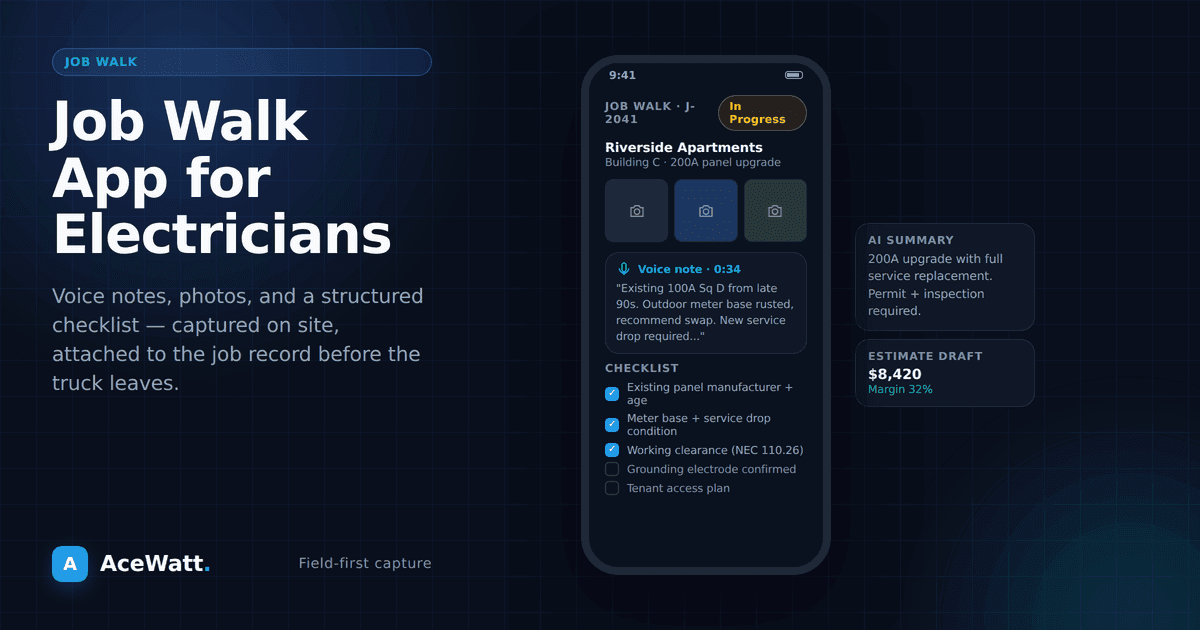
A job walk app solves this problem by giving you a structured, mobile tool to capture every detail of every job walk, photos, voice notes, measurements, observations, organized and ready to use when you need it. AceWatt's voice job walk app is built exactly for this: talk through the site walk and let AI turn the notes into quote-ready scope.
What Is a Job Walk App?
A job walk app is mobile software designed for contractors to document job site conditions during walk-throughs. Instead of relying on memory, scattered photos in your phone's camera roll, and handwritten notes that end up in the washing machine, a job walk app captures everything in one organized place tied to the specific job.
For electricians, this means:
- Photos with annotations, Snap photos of the panel, existing wiring, access points, and label them directly in the app
- Voice notes, Record your observations hands-free while you walk the site
- Measurements, Log distances, room dimensions, and wire runs
- Checklists, Work through a standard set of items to check on every job walk
- AI processing, Some apps, including AceWatt, use AI to convert your raw notes into structured data you can use for estimates
The result is a complete, organized record of every job walk that lives in your system, not in your head.
Why Electricians Need Job Walk Documentation
More Accurate Estimates
The single biggest factor in estimate accuracy is the quality of your job walk documentation. When you have detailed photos, measurements, and notes from the walk-through, your estimates reflect reality instead of guesswork.
This means fewer surprises on the job, fewer change orders that upset clients, and more consistent profit margins.
Faster Turnaround
How long does it take you to go from job walk to sent estimate? If the answer is more than 24 hours, you're losing jobs.
Contractors who can send professional estimates the same day, or even before they leave the job site, win more work. A job walk app makes this possible by capturing all the information you need during the walk so you can build the estimate immediately.
Protection Against Disputes
Documented job site conditions protect you when disputes arise. If a client claims existing damage was caused by your work, photos from the job walk tell the real story. If a GC questions your change order, your documented observations support the additional cost.
Consistency Across Your Team
If you have multiple electricians doing job walks, you need consistency. One guy might photograph the panel and the main feed while another focuses on the outlets and fixtures. A job walk app with built-in checklists ensures everyone captures the same information on every walk.
How a Job Walk App Works in Practice
Here's what the workflow looks like with a dedicated job walk app:
1. Create the Job
Before you arrive at the site, create a new job in the app with the client's name, address, and any basic information you already have.
2. Walk the Site with the App Open
As you walk through the property:
- Take photos of the panel, existing wiring, access areas, attic and crawlspace conditions, and any problem areas
- Record voice notes describing what you see, "200-amp panel, full, no room for additional breakers, will need a subpanel for the addition"
- Log measurements, Room dimensions, wire run distances, conduit lengths
- Mark up photos, Circle the panel slot that's overloaded, arrow the corroded wire, highlight the access point
3. AI Processes Your Documentation
With AI-powered tools like AceWatt's job walk feature, your raw documentation gets processed automatically:
- Voice notes are transcribed and organized into structured observations
- Photos are categorized (panel, wiring, fixtures, access)
- Key details are extracted, panel amperage, existing circuit count, wire types
- A job summary is generated from your inputs
4. Build Your Estimate from the Documentation
Instead of starting the estimate from a blank page, you start with a complete picture of the job. Your documentation feeds directly into the estimating tool, auto-populating materials and labor based on the scope you documented.
What used to take an hour of trying to remember and recreate the job walk now takes minutes of reviewing organized information.
What to Look for in a Job Walk App
Not all job walk apps are created equal. Here's what matters for electricians:
Mobile-First Design
You're using this app while standing in a client's basement, not sitting at a desk. It needs to work smoothly on your phone with one hand while you hold a flashlight with the other. If the app is clunky on mobile, you won't use it.
Photo Capture with Annotations
The ability to take photos directly in the app (not from your phone's camera and then upload) saves time. Annotation tools, circles, arrows, text overlays, let you mark up photos to highlight issues without switching to another app.
Voice Recording and Transcription
Voice notes are faster than typing, especially when you're wearing work gloves or holding a flashlight. The app should record, transcribe, and organize your voice notes automatically.
AI transcription that understands electrical terminology, panel, amperage, conduit, Romex, MC cable, is a significant advantage over generic voice-to-text tools.
Checklist Templates
Pre-built checklists for common job types, residential service calls, panel upgrades, EV charger installations, commercial buildouts, ensure you don't miss anything on the walk-through. You should also be able to create your own custom checklists.
Integration with Estimating
The whole point of documenting the job walk is to use that information. If your job walk app doesn't connect to your estimating tool, you're still doing duplicate work. Look for a platform that links job walk data directly to the estimate builder.
Offline Capability
Job sites don't always have cell service. Your job walk app needs to work offline and sync when you're back in range. Nothing is worse than completing a thorough job walk only to lose the data because you were in a dead zone.
Common Job Walk Mistakes (And How the App Fixes Them)
Rushing the Walk
When you're busy, there's a temptation to breeze through the walk-through. A checklist-driven app forces you to slow down and check each item. Two extra minutes on the walk saves two hours of headaches later.
Not Photographing Existing Conditions
"Before" photos are essential. They document what the site looked like before you started work, protecting you from damage claims. The app prompts you to capture them every time.
Forgetting to Check Access
You estimated a job assuming easy attic access. Day one, you discover the attic has a 16-inch clearance and blown-in insulation. Now the job takes twice as long. A proper job walk checklist includes access assessment for every work area.
Not Noting Code Issues
During the walk, you spot code violations in the existing work. If you don't document them, you might get blamed for them during inspection. The app gives you a place to record these observations with photos.
Job Walk Apps vs. Generic Note-Taking Apps
Some electricians use the Notes app on their phone or voice memos. This works better than nothing, but it has real limitations:
- No organization, Notes and photos aren't connected to specific jobs
- No structure, There's no checklist ensuring you cover everything
- No processing, Your notes stay as raw text with no AI analysis
- No integration, Notes don't feed into your estimating or invoicing tools
- No sharing, Team members can't access your documentation
A dedicated job walk app solves all of these problems and turns your walk-through from a casual observation into a business process.
How AceWatt's Job Walk App Works
AceWatt was built specifically for electrical contractors, and the job walk feature is designed around how electricians actually work:
- Open the app and create or select the job
- Walk the site taking photos and recording voice notes as you go
- AI processes your documentation, transcribing voice notes, organizing photos, extracting key details
- Review the summary and add any details you missed
- Generate the estimate directly from your job walk documentation
With a consistent process, many teams can move from walkthrough notes to estimate draft much faster than manual methods.
Learn more about how AceWatt's job walk app for electricians can transform your estimating workflow. If your walkthrough process also needs safety capture, review the electrical safety checklist app; for the full handoff from lead to invoice, see electrician job management software.
Frequently Asked Questions
What is a job walk app?
A job walk app is a mobile tool that lets electrical contractors document a site visit using photos, voice notes, and checklists instead of paper and memory. The best job walk apps turn that documentation into structured scope so you can build an accurate estimate without re-entering details.
Why do electricians need a job walk app?
Electricians need a job walk app because the details captured during the walk — existing conditions, access constraints, code issues, photos — are what make an estimate accurate. Relying on memory or scattered notes leads to missed line items, underpriced change orders, and disputes. A job walk app captures everything in one place.
Can a job walk app use voice documentation?
Yes. A job walk app like AceWatt lets you speak your observations while walking the site, then transcribes and structures them. Voice documentation is faster than typing on a phone and keeps your hands free to photograph and inspect.
Does the job walk app connect to estimating?
A job walk app should connect directly to estimating. The whole point of capturing scope on the walk is to use it. AceWatt turns documented job-walk scope into a draft estimate, so you move from site visit to quote without re-typing materials and labor.
What should I look for in a job walk app?
Look for mobile-first design, photo capture with annotations, voice recording and transcription, checklist templates, offline capability, and integration with estimating. If the app cannot work without cell signal or doesn't connect to your estimate, it won't survive real field use.
Stop Losing Details. Stop Losing Jobs.
Every job walk you do without proper documentation is a gamble. You're gambling that you'll remember the details, that you won't need to go back, and that nothing will change between the walk and the work.
A job walk app takes the gamble out of the equation. You capture everything. You process it quickly. You use it to build accurate estimates that win jobs and protect your margins.
Try AceWatt's job walk app free for 14 days at acewatt.com and see how much faster and more accurate your estimating becomes when you have the right documentation tools.
If faster quote turnaround is a priority, review automated estimating for electricians.