
Every electrical contractor has been there: you finish a walk-through, the homeowner asks "so, how much?" and you scribble a number on a piece of scrap paper. Maybe you text it to them later. Maybe you forget entirely and they go with the next electrician who actually sent something professional.
An electrician estimate template gives you a consistent, professional framework for quoting every job, from a simple outlet install to a full commercial buildout. It protects your margins, sets clear expectations with clients, and makes your business look like the operation it actually is.
In this guide, you'll get a free electrical estimate template you can start using today, plus a step-by-step walkthrough of how to write estimates that win jobs without leaving money on the table.
What Should Be on an Electrician Estimate?
A professional electrical estimate needs seven core sections:
- Your business information, Company name, license number, address, phone, email
- Client information, Name, address, phone, email
- Estimate details, Date, estimate number, expiration date
- Scope of work, Detailed description of every task and material
- Itemized costs, Materials, labor, permits, and any other charges broken out line by line
- Terms and conditions, Payment schedule, warranty info, validity period
- Signature lines, For both you and the client
That's it. No fancy design required. Just clear, organized information that a homeowner or GC can review and approve.
Free Electrician Estimate Template
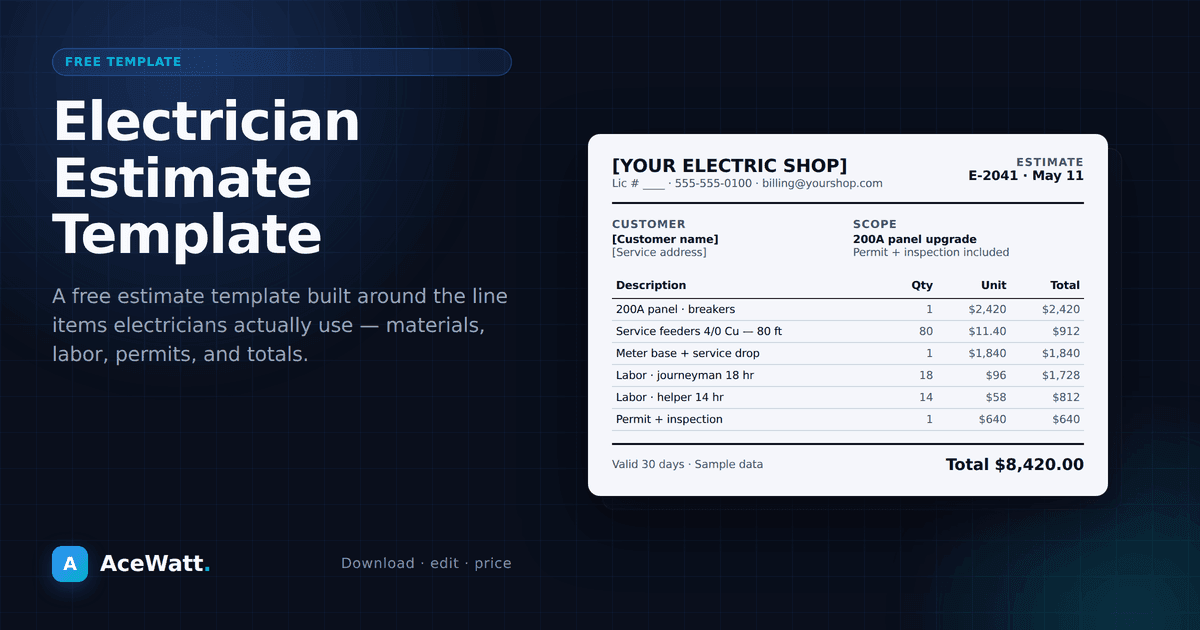
Here's a ready-to-use estimate template you can copy into Word, Google Docs, or any document editor:
ACE ELECTRICAL SERVICES
License #EC-2026-XXXXX
123 Main Street, Anytown, ST 00000
(555) 000-0000 | ace@electrical.com

═══════════════════════════════════════════
                 ESTIMATE
═══════════════════════════════════════════

Estimate #: EST-2026-001
Date: [MM/DD/YYYY]
Valid Through: [MM/DD/YYYY + 30 days]

PREPARED FOR:
[Client Name]
[Client Address]
[Client Phone] | [Client Email]

PROJECT ADDRESS:
[If different from client address]

───────────────────────────────────────────
SCOPE OF WORK
───────────────────────────────────────────

[Detailed description of work to be performed.
Be specific: "Install (6) 4-inch LED recessed
lights in kitchen ceiling on existing circuit"
is better than "Kitchen lighting."]

───────────────────────────────────────────
COST BREAKDOWN
───────────────────────────────────────────

ITEM                     QTY    RATE     TOTAL
─────────────────────────────────────────────
MATERIALS:
  [Item description]       [X]  [$0.00]  [$0.00]
  [Item description]       [X]  [$0.00]  [$0.00]
  Materials Subtotal:                     [$0.00]

LABOR:
  [Task description]       [X]  [$0.00]  [$0.00]
  [Task description]       [X]  [$0.00]  [$0.00]
  Labor Subtotal:                         [$0.00]

OTHER COSTS:
  Permit fees                              [$0.00]
  Inspection fees                          [$0.00]
  Other: [description]                    [$0.00]

───────────────────────────────────────────
                         ESTIMATE TOTAL:  [$0.00]
───────────────────────────────────────────

TERMS & CONDITIONS:
- This estimate is valid for 30 days.
- Payment due upon completion unless
  otherwise agreed.
- Additional work requested beyond scope
  will be billed at $[rate]/hour.
- Warranty: [X] years on workmanship.
  Manufacturer warranty on materials per
  product specifications.

ACCEPTANCE:
By signing below, the client authorizes
the work described above at the stated price.

Client Signature: __________________ Date: _______

Contractor Signature: ______________ Date: _______
You can also download our formatted electrical work order template from AceWatt, which includes estimate and work order functionality in one document.
How to Write a Professional Electrical Estimate
Having a template is half the battle. The other half is knowing what to put in it. Here's how to write estimates that protect your business and win jobs.
Step 1: Do a Thorough Job Walk
Before you write a single number, walk the job site. Document everything:
- Existing conditions, What's already there? What needs to come out?
- Access challenges, Attic work? Crawlspace? Finished walls to fish through?
- Panel capacity, Is there room for new breakers? What's the amperage?
- Code requirements, What does the local jurisdiction require for this type of work?
If you skip the walk-through, you're guessing. And guessing is how you lose money on jobs.
Many electricians now use a job walk app to capture photos, voice notes, and measurements on-site so nothing gets missed when it's time to write the estimate.
Step 2: Itemize Your Materials
Don't just write "materials: $800." Break it out. This does two things:
- It builds trust. Clients can see exactly what they're paying for.
- It protects you. If material prices change before the job starts, you have documentation to justify a change order.
Include wire, conduit, boxes, breakers, fixtures, and any specialty items. Add a materials markup, 15-25% is standard in the electrical trade to cover procurement time, delivery, and waste.
Step 3: Calculate Your Labor Accurately
This is where most electricians get into trouble. Underestimating labor is the fastest way to turn a profitable job into a losing one.
Base your labor estimate on:
- Hours per task, How long does each item actually take an experienced electrician?
- Number of electricians, One guy or a two-man crew?
- Your hourly rate, This should include wages, taxes, insurance, and overhead. Most electrical contractors need to bill $75-$150/hour per electrician to cover costs and make a profit.
Be honest with yourself. If a panel swap usually takes you 6 hours but you quote 4, you just ate 2 hours of unpaid labor.
Step 4: Include Permits and Inspections
Never skip permits to save the client money. It's your license on the line. Include permit costs as a separate line item so the client understands this is a legal requirement, not an optional add-on.
Step 5: Set Clear Terms
Your terms and conditions section is your safety net. At minimum, include:
- Estimate validity, How long is the price good for? (30 days is standard)
- Payment terms, When is payment due? Do you require a deposit?
- Change order policy, What happens when the client adds work?
- Warranty, What do you guarantee, and for how long?
Common Mistakes to Avoid on Electrical Estimates
Being Too Vague
"Upgrade electrical" tells the client nothing. "Replace existing 100A panel with 200A panel, install new main breaker, add (4) 20A circuits for kitchen renovation" tells them exactly what they're getting. Specific estimates prevent disputes.
Forgetting Overhead
Your estimate needs to cover more than just materials and labor. You have truck payments, insurance, office costs, software, phone bills, and a dozen other expenses. If your pricing only covers job costs, you're working for free after the bills are paid.
Not Following Up
Sending an estimate and waiting is not a strategy. Follow up within 48 hours. Ask if they have questions. Address concerns. Most jobs are won by the contractor who follows up, not necessarily the one with the lowest price.
How Software Makes Estimating Faster
Templates work. But templates plus software work even better. Here's why more electrical contractors are moving from paper templates to estimating software:
Speed. Instead of retyping client info and recalculating totals every time, software auto-populates fields and does the math for you. What takes 30 minutes on paper takes 5 minutes on screen.
Consistency. Software stores your material prices, labor rates, and commonly used items. No more guessing whether Romex is $85 or $110 per 250-foot roll this week.
Professional output. Digital estimates arrive as clean PDFs or interactive links. They include your logo, branding, and a client portal where they can approve with one click.
Tracking. You can see when a client opens your estimate, which items they're reviewing, and when they sign. No more wondering if they got it.
AceWatt's AI-powered estimating tools take this further by generating estimates from job walk notes, voice memos, or photos, turning what used to be an hour of desk work into a few minutes of review.
Mobile Estimating: Write Estimates on the Job Site
The best time to write an estimate is while you're still on the job site. Everything is fresh in your mind. You can show the client the estimate before you leave and get a signature on the spot.
Mobile estimating apps let you:
- Pull up client information instantly
- Select from pre-built material libraries
- Apply your standard labor rates automatically
- Generate a PDF and email it before you drive away
- Get a digital signature on your phone or tablet
This isn't a nice-to-have anymore. Contractors who respond with professional estimates within hours, not days, win more jobs. Mobile tools make that possible.
Estimate vs. Quote: What's the Difference?
This comes up a lot, and it matters for how you present pricing to clients.
An estimate is an educated guess at what a job will cost based on what you can see and know at the time. It can change if conditions are different than expected. Most residential electricians use estimates.
A quote (or bid) is a fixed price. You're committing to do the work for exactly that amount, regardless of what surprises come up. Commercial work typically requires formal quotes.
Your template should make clear which one you're providing. If it's an estimate, say so. If it's a firm quote, label it that way and make sure your numbers are airtight.
When to Use a Template vs. Estimating Software
A simple template is perfectly fine if you're just starting out or only do a few estimates per month. But as your business grows, the limitations become obvious:
- 1-5 estimates/month: A Word or Google Docs template works fine
- 5-15 estimates/month: You need a spreadsheet with formulas at minimum
- 15+ estimates/month: Estimating software may be worth evaluating because time savings and fewer manual errors can become more valuable than maintaining templates by hand
At 15 estimates per month, you're spending 7-10 hours just on estimates if you're doing them manually. That's a full workday you could spend on billable work instead.
Ready to Stop Building Estimates from Scratch?
You've got the template. You've got the process. Now you need a system that makes estimating fast, accurate, and professional every single time.
AceWatt CRM includes built-in estimating tools designed specifically for electrical contractors. No more rebuilding spreadsheets. No more guessing at labor hours. No more wondering whether the client approved: quotes can be e-signed from the customer portal link.
Start your 14-day free trial and see how fast you can go from job walk to signed estimate at acewatt.com.
Want more templates and resources for your electrical business? Check out our electrical work order template, the how to start an electrical contracting business guide, and our complete guide to electrical contractor software.
Browse every download in one place: the free electrical contractor templates hub.