

Why Generic CRMs Force Electricians to Work Around the Software Instead of With It
You didn't start your electrical business to become a CRM administrator. You started it to run pipe, pull wire, pass inspections, and get paid. Yet if you're running on Salesforce, HubSpot, Zoho, or any other horizontal CRM, that's exactly what you've become: a part-time software configurator trying to force a sales pipeline tool to behave like an electrical project management system.
The mismatch shows up everywhere. A "deal stage" field doesn't map to rough-in, trim-out, and final inspection. A "contact" record doesn't hold a journeyman's license number, an apprentice's hour log, or a permit expiration date. You end up building custom objects, writing validation rules, and stitching together Zapier flows just to track the basics, permit numbers, NEC code references, crew certifications, per-job labor hours. Those are billable hours you're spending on software gymnastics instead of on the job site.
Generic CRMs are built for sales cycles: lead, opportunity, quote, close. Electrical contracting runs on project lifecycles: estimate, job walk, material order, rough-in, inspection, trim-out, final inspection, punch list, invoice, warranty. The data model is fundamentally different. When you try to retrofit a sales tool for project execution, you create shadow processes, spreadsheets for scheduling, whiteboards for dispatch, text threads for job walk notes, because the CRM can't handle the reality of the work.
The Real Cost of Bolt-On Tools: Estimating, Scheduling, and Job Walk Workarounds
Most shops don't realize the full cost until they add it up. A generic CRM subscription might run $50, $150 per user per month. But then you need estimating software ($200, $500/month), a scheduling app ($100, $300/month), a job walk documentation tool, a follow-up automation, and a QuickBooks sync connector. Each integration is a failure point: data gets duplicated, timestamps drift, and someone has to reconcile it all at month-end.
Consider the job walk. You're on site with a GC or property manager, walking a 15,000-square-foot tenant improvement. You're dictating scope: "Four 20-amp circuits for receptacles, two dedicated 30-amp for mini-splits, EMT run to code, AFCI/GFCI per 2023 NEC 210.8 and 210.12." In a generic CRM, you either type notes into a free-text field on your phone, record a voice memo you'll never transcribe, or promise to "write it up back at the office." That night, you're rebuilding the estimate from memory or scratchy audio. The next day, the GC emails a question about the mini-split disconnects, and you're digging through texts to find the answer.
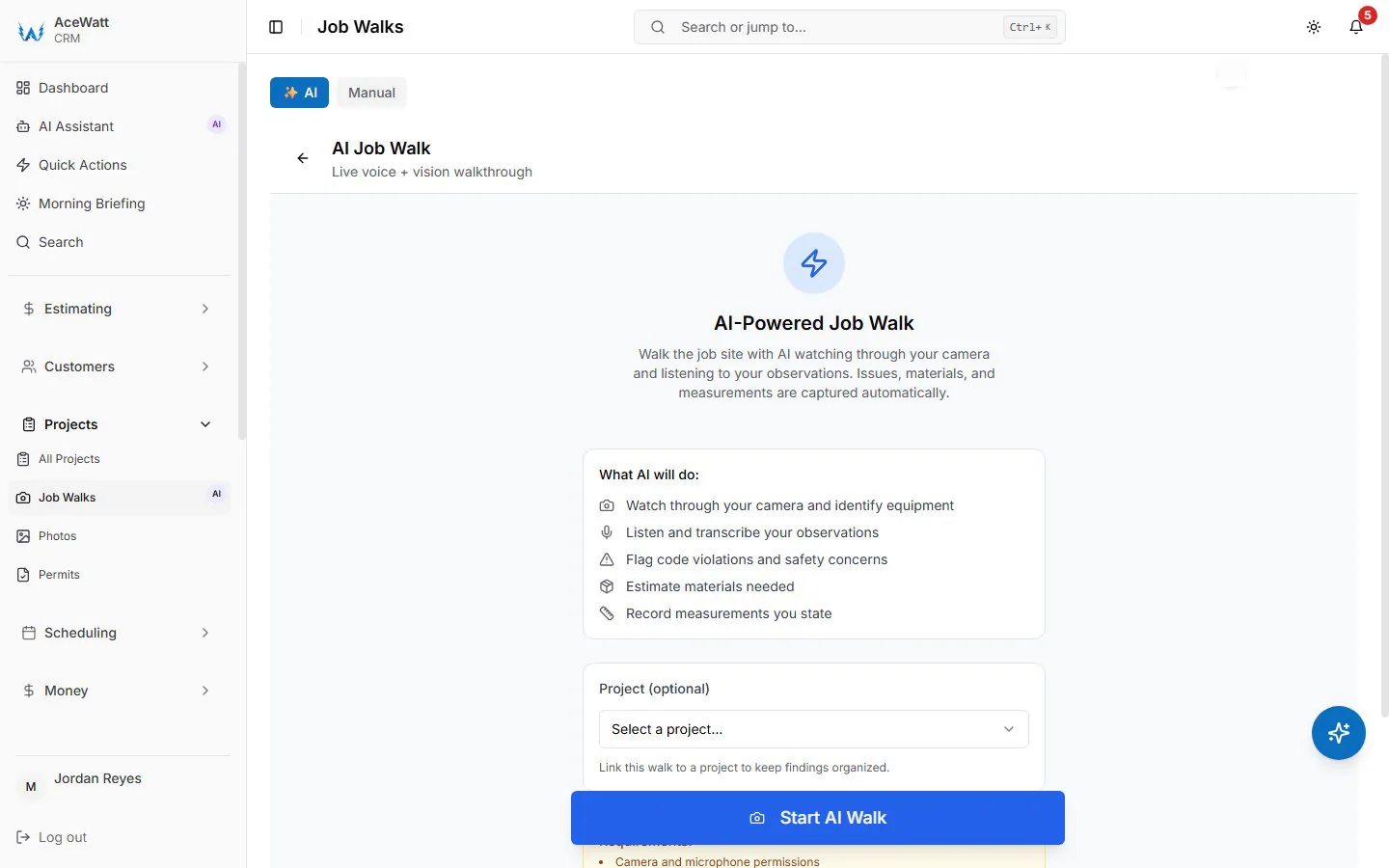
AI Voice and Job Walk Documentation changes that workflow entirely. You speak the scope into the app while walking. The system transcribes, parses electrical terminology, and structures it into line items: conduit type, wire size, box counts, device specs, labor units. You review, adjust, and hit send. The proposal goes out same-day. That's not a bolt-on, it's a native capability built on an electrical data model.
Built for the Trades: What an Electrical-Specific CRM Looks Like in Practice
An electrical-specific CRM doesn't ask you to define "custom fields for permit tracking." It ships with a Permits module that knows the difference between an electrical permit, a low-voltage permit, and a solar permit. It knows which jurisdictions require plan check, which allow over-the-counter issuance, and which demand a licensed contractor's signature on the application. The data model includes license classifications (C-10 in California, 01-E in Texas, EC in Florida), journeyman-to-apprentice ratios enforced by state apprenticeship boards, and NFPA 70E training expiration dates.
Job Tracking mirrors the actual phases: Pre-Construction, Rough-In, Inspection, Trim-Out, Final Inspection, Closeout. Each phase carries its own required documents, redlined drawings, inspection tickets, photos of labeled panels, as-builts. Crew Scheduling and Dispatching doesn't just show "who's free Tuesday." It gives skill-based suggestions on a drag-and-drop board and a live map of who is nearby while their app is open; license, arc-flash training and apprentice-ratio checks on a commercial rough-in stay with the dispatcher.
This isn't configuration. It's domain modeling. The difference is onboarding time: a generic CRM implementation for a 10-person electrical shop typically takes 8, 12 weeks with a consultant. A purpose-built electrical CRM gets a crew productive in days because the terminology, workflows, and constraints already match how the business runs.
AI Estimating and Voice-Documented Job Walks: Capabilities Generic CRMs Lack
Estimating is where the time bleed is worst. A solo electrician spending four hours on a Sunday building a $12,000 service upgrade estimate in Excel, looking up material prices, applying labor units from a 2019 NECA manual, guessing at conduit fill, is losing money before the job starts. AI Estimating built for electrical contractors works from your pricebook and assembly templates: your material costs, your labor units, and your vendor pricing agreements. It applies current NEC tables (2023 Chapter 9, Annex C for conduit fill; Article 310 for ampacity) and your shop's labor rates.
When you finish a job walk, the voice transcript becomes the estimate skeleton. The AI identifies "200-amp main breaker panel" and pulls the correct Square D QO catalog number, your contracted price from Elliott Electric, and the 4.5 labor units set in your assembly template. It flags "AFCI required per 210.12" and adds the combination AFCI breakers automatically. You adjust quantities, add the permit fee for that jurisdiction, and the proposal generates with your terms, license number, and insurance certs attached.
No generic CRM does this. They offer "quote templates", static PDFs you fill in manually. They don't know a 4/0 AL SER cable from a 6 AWG THHN. They don't know that a 200-amp service in Denver requires a meter-main combo with a 22kAIC rating, while the same service in rural Kansas might allow a separate meter socket and main disconnect. That knowledge lives in electrical-specific software because it was built by people who've pulled that wire.
Crew Scheduling, Dispatching, and Job Tracking Across Rough-In, Trim, and Final
Scheduling for electrical work isn't calendar blocking. It's constraint solving. You have three active jobs: a residential rough-in needing two journeymen and one apprentice (1:1 ratio), a commercial trim-out requiring a tech with fire-alarm certification, and a service call for a tripped 400-amp breaker that needs a master electrician. Your generic calendar shows "John, 8am, 5pm." It doesn't know John's C-10 license expired last month, or that the apprentice on the rough-in needs a journeyman on site per California Labor Code 3099.
Crew Scheduling and Dispatching built for electrical contractors gives skill-based suggestions on a drag-and-drop board, so the fire-alarm job lands with the tech who has that skill; license, ratio and certification checks like the ones above stay with the dispatcher. Route optimization on the Scale plan orders stops by straight-line distance, not drive time. You see which trucks have the required material staged, because Job Tracking links the material list from the estimate to the purchase orders and receiving logs.
When the inspector red-tags the rough-in for "missing nail plates per 300.4(A)(1)," the field tech photos it, marks the correction in the mobile app, and the office sees it instantly. The re-inspection gets scheduled. The GC gets notified. The crew knows exactly what to fix before they drive back. That's a closed loop. Generic CRMs treat this as a "task" with a due date, no trade context, no code reference, no photo attachment tied to a specific circuit.
Follow-Up, Invoicing, and QuickBooks-Ready Exports That Keep Electrical Shops Cash-Flow Positive
Cash flow kills more electrical shops than bad work. You bid ten jobs, win three, and the GC on the biggest one pays in 60 days because your invoice sat in their AP queue missing a lien waiver. Automated Follow-Up handles the collections side: overdue invoices get email reminders at 1, 7, 14 and 30 days late. Bid follow-up still runs on your judgment of the difference between a residential homeowner who needs a reminder the day after the estimate, a property manager who decides at the monthly board meeting, and a GC who awards bids every Tuesday at 10 AM.
Time your own follow-ups to those rhythms, attach the right documents (license, insurance, bond letter, W-9), and call when a bid hits 14 days without response; the CRM keeps each bid's status on the customer record so you can see which GCs are worth the chase.
Invoicing and Payment Tracking closes the loop. Milestone (percentage-of-completion) billing follows the contract: 30% mobilization, 40% rough-in complete, 20% trim-out, 10% final. Lien waivers, certified payroll reports and retainage are handled outside the invoice. Payment Tracking shows you which invoices are past 30, 60, 90 days.
QuickBooks-ready exports are a simple handoff: your invoice list as a spreadsheet and your payroll hours as a QuickBooks-format CSV for your bookkeeper. There is no native, real-time, bidirectional sync today; full sync is in development. Change orders land on the invoice, so there is no "did I bill that change order?"

How to Evaluate Whether a CRM Is Truly Built for Electrical Contractors
Don't trust the marketing page. Test the data model. Ask these questions during a demo:
- Show me the permit tracking. Does it have jurisdiction-specific workflows, or just a date field?
- Show me the license and certification tracking. Does it enforce journeyman-to-apprentice ratios per state? Does it alert on expiration?
- Walk me through a job walk to proposal. Can I speak the scope and get a line-itemed estimate with current material pricing and NEC-compliant labor units?
- Show me scheduling with constraints. Can I see license requirements, travel time, and ratio violations in the dispatch board?
- Show me the phase-based job tracking. Are rough-in, trim-out, and final inspection distinct phases with required documents?
- Show me the QuickBooks sync. Is it bidirectional for estimates, invoices, payments, and vendor bills? Does it handle retainage and progress billing?
- Show me automated follow-up for a lost bid to a GC. Does it know the GC's award cycle and attach the right docs?
If the answer to any is "you can configure that with custom fields," it's not built for electrical. It's a generic CRM you'll be customizing forever.
Final Verdict: When Specialization Outperforms Customization
You can make a generic CRM work. You can also make a pickup truck pull a 20,000-pound trailer, if you upgrade the transmission, brakes, suspension, and cooling. But you'll spend more time fixing the truck than hauling the load.
Electrical contracting software exists because the work has structure: NEC codes, license hierarchies, inspection sequences, material specs, labor units, progress billing, lien rights. That structure doesn't live in Salesforce. It lives in software built by people who know the difference between a home run and a multi-wire branch circuit, who've sat through a plan check correction list, who've waited on a hot permit while the inspector finishes lunch.
The right tool doesn't just save admin hours. It wins bids because proposals go out same-day with accurate pricing. It passes inspections because the field has the right docs on the phone. It gets paid faster because invoices are complete before they leave your desk. It keeps your best techs because they're not texting the office for clarification on every job.
Specialization isn't a luxury. It's the difference between running the business and running the software.
- See the voice job walk live → book a live demo